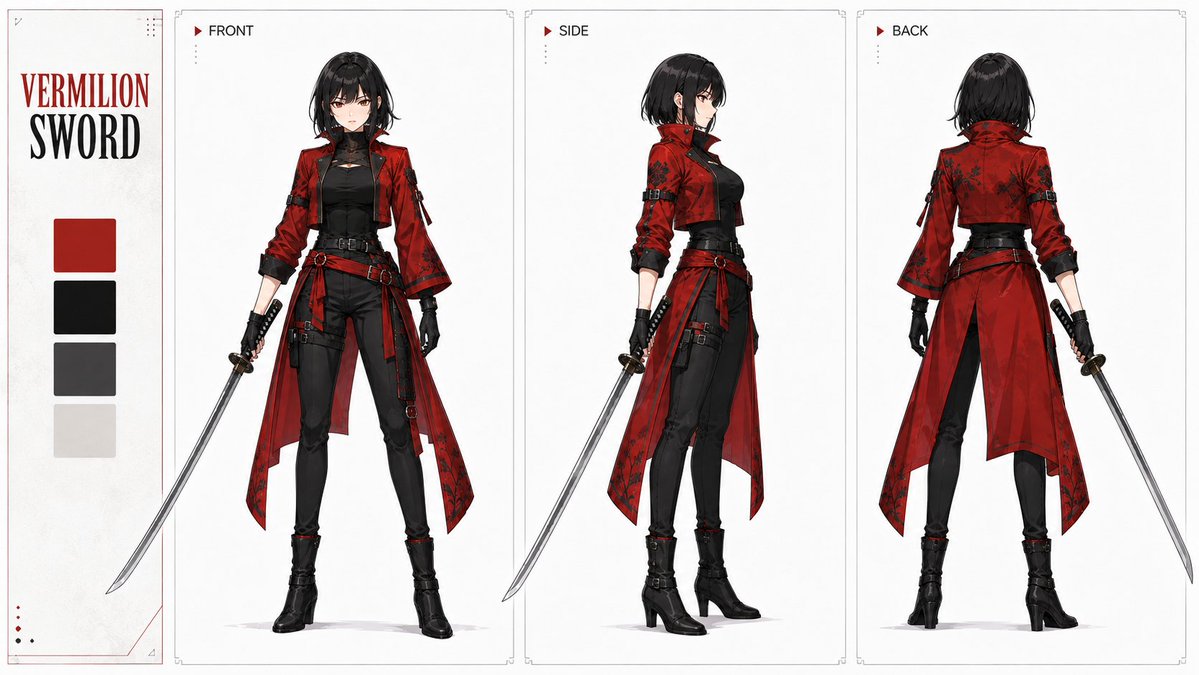
A highly technical structured prompt for designing a 2D anime swordsman character with vermilion accents and specific instructions for weapon symmetry and design accuracy.
# CUSTOM_VERMILION_SWORD_ANCHOR ## [Input Item] Protagonist: [Female / Male] (Selection required) ## [Purpose] Without using reference images, generate a new single anchor image to serve as the protagonist for this video project. This image will be used as the sole design standard for character, costume, and sword for subsequent 'Design-focused Three-view' and 'Simple Three-view' sheets. Prioritize a character design that is not only visually appealing as a finished illustration but also has clear facial features, hair, body type, proportions, clothing, sword, and color placement, making it easy to expand into front, side, and back views later. ## [Aspect Ratio] **Fixed 1:1 square.** Fit the protagonist from the top of the head to the tips of the toes, including the entire sword, within the square without strain. Ensure a stable full-body composition where the character is not too small and is not cut off at the edges of the screen. ## [Person] A young adult male/female swordsman in their early 20s. Slender and supple, with naturally long legs and a physique capable of handling a sword. Do not make them excessively muscular. Sharp and attractive high-quality 2D anime face design. Hair should be medium length as a base, with clear shapes for bangs, sides, and the back of the head, creating a silhouette easily recognizable in a video. ## [Costume] Not traditional Japanese clothing, but a **sophisticated modern swordsman style incorporating Japanese elements**. Based on the premise of video action and three-view expansion, do not over-complicate with decorations or overlapping layers of fabric. Create a clear costume where the front, side, and back structures can be naturally developed. The primary color of the costume is **Vermilion**. The vermilion should cover enough area to identify the person at a glance. Inner-wear, pants, belt, and shoes should be primarily black to dark gray. Do not make the entire body a simple solid vermilion. Do not use multiple colors. ## [Sword] Only one sword. Maintain a natural sword shape, with the blade in a neutral metallic color and the hilt primarily black to dark gray. **Do not use a scabbard. Do not have them hold a scabbard. Do not show a scabbard on screen.** Do not make the blade itself red. While vermilion effects will generate from the tip in the main video, do not display flashy slashing effects in this anchor image. **The blade should not be drawn as a symmetrical single metal plate, but should have a clearly distinct asymmetrical structure between the edge and the spine. The edge side should have a wide, bright silver-white 'kirihamane' (cutting surface) that is continuous from the guard to the tip. The opposite spine should be thin and drawn as a dark gray metallic surface. Only the side with the wide silver-white surface is the 'edge', and the thin dark side is the 'spine'.** **The cutting surface should run continuously on the same side for the entire length of the blade and not switch to the opposite side midway. Do not create a wide silver-white surface on the spine side. Maintain a natural curve like a Japanese sword, where the wide cutting surface functions as the actual striking edge. Do not use a 'mine-uchi' (striking with the back) composition that makes the spine side look like the striking surface.** ## [Composition] Full-body image of one protagonist. Based on a natural 3/4 standing pose, where the face, both hands, both legs, shoes, entire costume, and entire sword can be confirmed. Not in the middle of a sword action, but in a quiet stance ready to start moving. Avoid extreme perspective, jumping, crouching, or poses with large body twists. Prioritize the accurate readability of character proportions and costume structure. ## [Art Style] High-quality 2D anime style. Sharp lines, organized cell shading, and a clear silhouette. Design it so it can naturally expand into the black-and-white + vermilion graphic expression used in the video. Do not make it photorealistic, 3D, or CGI. ## [Background] Simple background based on white to very light gray. Very light paper or ink nuances are acceptable but must not interfere with the design confirmation. Do not include cityscapes, buildings, crowds, text, or logos. ## [Completion Conditions] Single protagonist / 1:1 square / Full body clearly visible / Attractive and reproducible face, hair, and body / Natural hands and legs / Clear shape and color placement of vermilion costume / Full shape of one sword confirmed / **No scabbard present** / **Wide silver-white cutting surface continuous from guard to tip on the edge side** / **Spine side is thin and dark metal without a cutting surface** / **Cutting surface is continuous on the same side for the full length** / **Wide cutting surface functions as the striking edge and does not look like back-striking** / Design naturally expandable to front, side, and back / Can be used as the sole character standard for subsequent three-views. ## [Prohibitions] Multiple people, excessive decoration, multi-coloring, photorealism, 3D, CGI, extra weapons, **scabbard, symmetrical blade where edge and spine cannot be distinguished, missing cutting surface, cutting surface switching sides midway, wide cutting surface on the spine, reversal of edge and spine, mine-uchi composition,** extra limbs, distorted hands, broken sword, extreme action poses, background information overload, text, logos, watermarks, being cut off at screen edges. # CUSTOM_VERMILION_SWORD_THREE_VIEW ## [Input Item] Sheet Type: [Design-focused / Simple] (Selection required) ## [Fixed Display for Design-focused] Use only if 'Design-focused' is selected. Title line 1: `VERMILION` / Title line 2: `SWORD`. Swatches: Vermilion / Black / Dark Gray / Off-white. Auxiliary text: None. For 'Simple', do not display title, swatches, or auxiliary text. ## [Purpose] Using **only the one adopted anchor image** attached with this instruction as the sole character, costume, and sword design reference, create one three-view sheet of the same person. ## [Aspect Ratio] **Fixed 16:9.** Use a horizontal 16:9 canvas for both Design-focused and Simple types. Do not change to 1:1, 4:3, 3:2, 2:3, 9:16, or any other ratio. ## [Person Reference] Using the adopted anchor image as the sole standard, maintain facial features, age, hairstyle, hair color, hair length, body type, height, proportions, costume design, color placement of vermilion and black tones, shoes, sword, hilt, and high-quality 2D anime expression. FRONT/SIDE/BACK are not three different people, but the **same person viewed from different directions**. Naturally supplement the side and back views that are not directly visible in the anchor image based on the existing design; do not add new decorations, patterns, equipment, colors, or costume structures just because they aren't visible. ## [Three-view] FRONT is direct front, SIDE is **complete side profile**, and BACK is a clear rear view. **SIDE must always face right.** The face, nose tip, chin, gaze, chest direction, abdominal direction, and toes must **all face toward the right of the screen**. Do not point the face or nose toward the left. Do not make the SIDE a left-facing profile. Do not degrade the SIDE into a 3/4 direction. In the SIDE view, the **right shoulder, right arm, and right hand must be the foreground side closest to the camera**, with the left shoulder, left arm, and left hand in the background. Ensure the sword held in the right hand can be clearly confirmed without being hidden by the body. Do not use a composition where the left hand is primarily visible in the SIDE view. Display the full body from head to toe in all three views, maintaining the same height, proportions, body type, leg length, and costume structure. Use a natural upright posture as the base; do not cross legs or twist the body significantly. Ensure hand positions and shapes are naturally visible; in the SIDE view, do not expose the background hand to the point of breaking the side profile. Do not hide costume structure with poses. ## [Costume] Expand the costume from the anchor image into three directions. Maintain the positional relationship between the vermilion parts and black/dark gray parts; do not change color distribution per view. Rear structures not visible from the front should be minimal supplements that do not contradict the front/side structures. Do not simplify, glamorize, or redesign the costume. ## [Sword] Use **only one** sword identical to the anchor image. **Do not use a scabbard; all three views must be in a drawn state. In FRONT/SIDE/BACK, the sword must be held in the right hand; do not switch it to the left hand.** Do not change the blade, hilt, length, or curve between views; it must be the same sword seen from three directions. Maintain a natural curve; **the outside/convex side of the curve is the edge, and the inside/concave side is the spine.** Show the bright cutting surface continuous from guard to tip on the edge side, and draw the spine as a thin back. The cutting surface must pass through the same edge side in all views. **In the SIDE view, the priority is that the foreground right hand holds the sword, and the sequence of Right Hand -> Hilt -> Guard -> Blade -> Edge side can be clearly confirmed without being hidden by the body.** The sword may be held naturally diagonally downward, but at an angle that does not interfere with the right-hand grip and edge confirmation. Do not use a mine-uchi composition. Organize the sword so it does not interfere with character confirmation; do not fuse it with the body or costume. Do not perform independent sword displays, weapon displays, or scabbard displays. ## [Art Style] Maintain the same high-quality 2D anime expression as the anchor image. Do not change character design, lines, cell shading, or color expression to another style. Do not make it live-action, photorealistic, 3D, or CGI. ## [Sheet Type] ### [Design-focused] **Establish a fixed information area on the far left of the 16:9 horizontal canvas, and divide the right side into three vertical character panels: FRONT/SIDE/BACK.** Place the two-line title `VERMILION` / `SWORD` and the four-color swatches in the left info area. Character panels should be in order of FRONT, SIDE, BACK from left to right, with `FRONT` / `SIDE` / `BACK` labels placed small at the top. Panels should have uniform width, height, boundaries, and margins, with consistent character scale and head/foot positions. Fine outer frames, subtle grid lines, small dots, or very light ink/editorial accents may be used as long as they don't hide the character, right hand, sword, or costume. **The central SIDE panel must be a complete side profile facing right**, ensuring the right shoulder, arm, hand, and sword are visible to the camera. Do not make it a left-facing SIDE. **Maintain the structure of Left Info Area + 3 Vertical Panels every time; do not change to free layout. Do not add independent sword or scabbard displays.** ### [Simple] Within the 16:9 horizontal canvas, **evenly arrange three character figures in a horizontal row: Left = Front, Center = Complete Right-facing Side Profile, Right = Complete Rear.** The center SIDE must be a **complete side profile with the face, nose, chin, gaze, chest, and toes all facing the right of the screen**. The right shoulder, arm, hand, and sword are in the foreground, with the left side in the background. Do not face left. Do not use 3/4 view. The background should be white or a near-white neutral gray; consist only of the three characters and a plain background. **Do not include any text, letters, numbers, titles, view names, labels, annotations, swatches, frames, decorative lines, icons, extra graphics, independent sword displays, or scabbard displays.** ## [Completion Conditions] Same person as the anchor / Fixed 16:9 / FRONT, SIDE, BACK correctly established / **SIDE is a complete side profile** / **SIDE must face right** / **SIDE has face, nose, chin, gaze, chest, toes all facing right** / **SIDE has right shoulder, arm, hand in foreground** / **SIDE has left side in background** / **Right-hand sword grip in SIDE view clearly confirmed without body obstruction** / Consistent facial identity in FRONT/SIDE / BACK view matches head shape and hair / Consistent hair, body type, proportions / Costume design and vermilion placement match / No scabbard and drawn sword in all 3 views / Right-hand sword grip in all 3 views / Sword length, curve, hilt, edge, and spine match / Cutting surface is continuous from guard to tip on the same edge / No reversal of edge/spine (no mine-uchi) / Full body not cut off / Natural hands, legs, shoes / Design-focused structure (Left info + 3 panels) established / Simple type has no elements other than 3 figures and plain background / Do not mix sheet types. ## [Prohibitions] Character change, face change, hairstyle change, body type change, proportion change, costume redesign, changing vermilion placement, multi-coloring, extra equipment, extra swords, **scabbard, switching sword to left hand, facing SIDE to the left, pointing nose/face left in SIDE view, pointing chest/toes anywhere but right in SIDE view, hiding the right hand behind the body in SIDE view, making the left hand primary in SIDE view, breaking the SIDE into 3/4 view, reversal of edge and spine, blade switching cutting sides midway, mine-uchi orientation,** extra limbs, distorted hands, broken sword, adding decorations not in anchor, ratios other than 16:9, changing fixed layout of Design-focused type, adding text/decor to Simple type, mixing Design-focused and Simple types, photorealism, 3D, CGI.