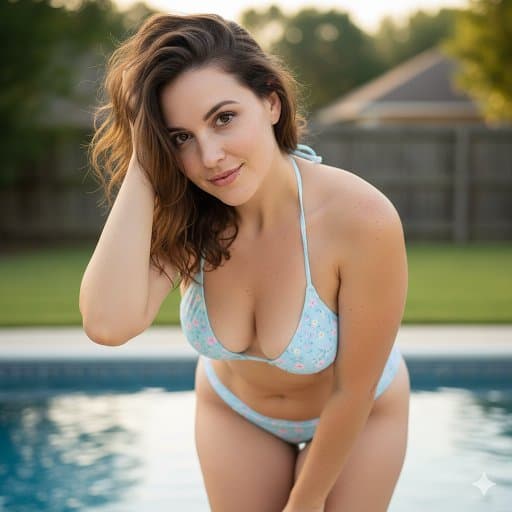
Ultra-realistic {argument name="ethnicity" default="Asian"} woman in her early 20s wearing a stunning, elegant {argument name="dress color" default="red"} one-piece dress with a fitted silhouette, delicate fabric details, and a graceful neckline. Natural makeup, long silky dark hair, soft confident expression, feminine and sophisticated look, standing naturally in a {argument name="setting" default="luxurious modern setting"}. Cinematic soft lighting, realistic skin texture, natural body proportions, high-fashion editorial photography, subtle depth of field, premium magazine aesthetic, photorealistic, 4K, vertical 9:16.
“using this json as reference, generate a person holding my product [attach product image]”

> GPT-Image 2.5 generates the photo with that person holding your product

compare it with a version generated without the reference and look at the difference in the lighting and color grading

> save the generated character photo you’re happy with as your reference

> for future generations, attach the character photo each time and ask it to preserve the same facial features

now you have a reference character you can use across multiple product photos

you can also iterate the base json prompt and chat back and forth with GPT-6 Astra based on what you want, then repeat the same process..

i like this because it gives you much more direction over the color grading instead of leaving everything up to the model

the basic colours and grainy look are some of the things that can make an image feel AI-generated, so pay attention to those when comparing your results

this is how you can start building a library of high quality ugc images around your own products

the json gives GPT-Image 2.5 the lighting and color direction, your character reference helps with consistency, and you control the product placement

once you have that starting point, you can keep creating variations without writing everything from scratch

GPT-Image 2.5 Sunburst & Flare are available on Higgsfield. try this with your own product and reference images there
Photorealistic cinematic portrait of a {argument name="subject" default="handsome adult man with tousled medium-length brown hair and a neatly trimmed beard"}, wearing a {argument name="outfit" default="sophisticated black tailored suit with a crisp white open-collar shirt"}, elegant and modern with no tie. He is standing at a slight angle to the camera, one hand casually resting in his trouser pocket while the other hangs naturally by his side, with relaxed shoulders and a confident, composed posture. His head is slightly turned toward the camera, maintaining a calm, intense, subtly contemplative expression. Set in a {argument name="setting" default="luxurious modern rooftop at twilight"}, with softly illuminated city buildings and distant skyline lights creating an elegant urban atmosphere in the background. Subtle warm architectural lights contrast with the cool blue tones of the evening sky. Cinematic depth, gentle atmospheric haze, realistic environmental reflections, and softly blurred city lights. Soft directional key light illuminates his face naturally, with a subtle warm rim light separating his hair and shoulders from the background. Natural skin texture, sharp expressive eyes, realistic facial details, authentic hair strands, realistic fabric texture, shallow depth of field, professional fashion photography, 85mm portrait lens, f/1.8, creamy bokeh, cinematic contrast, sophisticated color grading, luxury fashion editorial aesthetic, ultra-detailed, photorealistic, 8K.
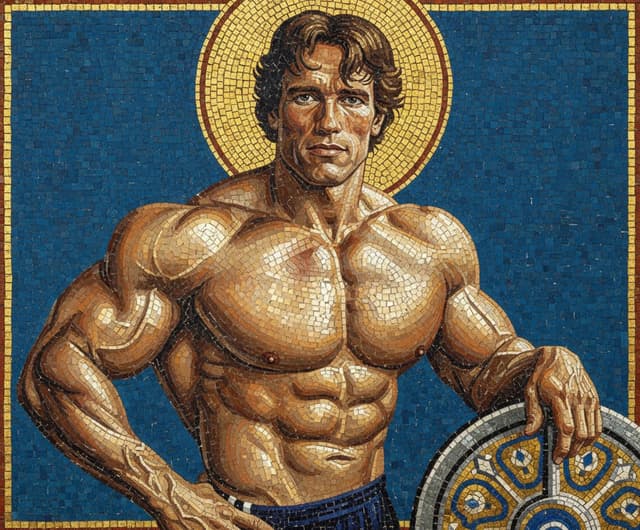
A triumphant Byzantine mosaic of the subject, rendered entirely in shimmering {argument name="mosaic color" default="gold"} and glass tesserae, depicted against a deep {argument name="background color" default="cerulean"} background, holding the barbell plate as a stylized heroic shield.
Use the uploaded image as the main composition, styling, pose, lighting, and environment reference. Create a photorealistic 1980s-inspired Miami lifestyle fashion portrait of an {argument name="subject" default="adult man"} standing beside a {argument name="car" default="glossy black vintage convertible"} during golden hour.

Frame him from approximately mid-thigh upward, leaning casually against the open driver-side door with a relaxed, confident expression while looking toward the camera. One hand rests naturally near the car while holding a pair of classic aviator sunglasses, and the other hand is casually tucked into his trouser pocket.

Dress him in an elegant {argument name="outfit" default="cream/off-white linen suit"} with a relaxed tailored blazer and high-waisted pleated trousers. Underneath, add a black open-collar shirt with the top buttons undone for a sophisticated retro look. Add a slim black leather belt with a polished gold buckle and a classic gold-tone wristwatch. Keep the styling refined, masculine, minimal, and authentic to the 1980s.

Place the scene on a glamorous Miami Beach–inspired boulevard, surrounded by tall palm trees, pastel Art Deco architecture, outdoor cafés, vintage cars, and softly blurred pedestrians in the distance. Position a pastel pink-and-white Art Deco hotel building in the background to enhance the vintage South Beach atmosphere.

Use warm late-afternoon sunlight, golden rim lighting around the subject, soft shadows, subtle lens flare, cinematic highlights reflecting across the black car, and a warm nostalgic film color grade. Add realistic skin texture, natural facial details, crisp linen fabric texture, shallow depth of field, soft atmospheric bokeh, subtle film grain, and premium editorial photography.

Add handwritten cream-colored text “{argument name="text" default="1980’s"}” in the upper-right corner with a loose underline stroke.

Style: vintage luxury fashion campaign, 1980s Miami aesthetic, cinematic editorial photography, warm analog film look, realistic DSLR quality, 50mm lens, shallow depth of field, ultra-detailed, natural proportions, photorealistic.

Aspect ratio: 4:5 vertical.
Use the uploaded image as the main restoration and identity reference. Convert this severely damaged old portrait into a clean, fully restored modern-looking photo while preserving the original appearance, pose, and composition.

Restore all missing and damaged areas of the photograph, including torn sections, faded parts, scratches, stains, cracks, peeling emulsion, discoloration, and burned or washed-out regions. Reconstruct the man and woman completely so both subjects appear whole, natural, and clearly visible.

Keep the same arrangement: the woman standing in front holding a large bouquet of flowers, and the man standing slightly behind her. Preserve their facial features, expressions, body proportions, posture, and elegant formal clothing, but refine everything to look polished, realistic, and complete.

Transform the image from an antique sepia damaged print into a high-quality modern portrait with:

clean natural skin tones

realistic facial details

sharp focus

balanced lighting

soft studio background

improved clarity and texture

realistic modern photo finishing

The final image should feel like a professionally restored contemporary portrait, as if the same couple was photographed clearly with a modern camera, while still keeping the classic formal elegance of the original scene.

Style: photorealistic, high detail, restored portrait, modern studio photography, clean, elegant, natural colors, sharp and realistic.
Ultra-realistic casual portrait of {argument name="subject description" default="a young woman"} sitting comfortably in a dark folding lounge chair, photographed indoors with a smartphone. She has long, straight dark-brown hair falling naturally over her shoulders, soft facial features, smooth natural skin, dark expressive eyes, and a warm playful smile with her eyes gently squinting. She wears small silver hoop earrings and {argument name="headwear" default="a pale yellow baseball cap with a playful vintage graphic and lettering on the front"}.
She is dressed in {argument name="clothing" default="a simple fitted white long-sleeve V-neck top and light blue relaxed-fit jeans"}. Her arms are comfortably crossed over her torso, creating a relaxed and confident pose. She is seated with her knees slightly raised toward the camera.
The setting is a cozy indoor balcony or casual room, with a beige wall, a large window covered by sheer patterned curtains, tiled floor, and dark folding chairs in the background. Soft natural daylight enters through the window, producing even illumination and gentle shadows.
Authentic smartphone photography, candid lifestyle aesthetic, natural skin texture, realistic hair strands, detailed clothing fabric, subtle imperfections, soft neutral color palette, relaxed youthful mood, shallow depth of field, realistic proportions, photorealistic, high resolution, vertical 4:5 composition.
Negative prompt: cartoon, anime, CGI, plastic skin, excessive makeup, distorted face, asymmetrical eyes, malformed hands, extra fingers, unnatural pose, unrealistic hair, blurry subject, oversaturated colors, warped background, excessive retouching, text artifacts, watermark.
A {argument name="nationality" default="Taiwanese"} {argument name="portrait style" default="Instagram-style"} adult female influencer, clearly an adult, with fair cool-toned porcelain skin and a few natural faint freckles on the nose bridge and cheeks. She has a {argument name="facial features" default="refined, cool fox-like small face"}: narrow and flowing in shape, with a defined jawline and a small, slightly pointed chin that is not overly sharp. Slender natural eyebrows with a soft arch. Slightly elongated eyes with narrow double eyelids, clear inner corners, and gently upturned outer corners; her gaze is quiet, cool, and slightly distant. Slim straight nose with a small rounded tip. Refined lips, the upper lip slightly thinner and the lower lip a little fuller, with naturally relaxed corners. Not a glamorous or heavily made-up influencer face, but a natural, lightly mature, cool Japanese-beauty look that is distinctive and holds up well. Slender, long-limbed figure with natural proportions. 9:16
Transform this photo into an elevated fashion studio portrait. Choose a {argument name="background color" default="complementing-color"} background that enhances the subject's skin tone. Keep a tight head-and-shoulder composition with the subject centered and facing the camera straight with an optimistic expression. Apply directional lighting with subtle shadows. Preserve natural skin tones while making the image polished, minimal, and editorial—like a magazine photoshoot.
Sunny day, {argument name="scene description" default="a clearing in the woods"}, surrounded by a large amount of green branches and leaves, extremely rich in detail, shot with a high-quality high-resolution mirrorless camera, excellent dynamic range, clear and blur-free, {argument name="aspect ratio" default="5:3"}
Create a {argument name="task" default="hairstyle analysis graphic"} using this portrait. Show side-by-side {argument name="subject" default="hairstyle"} comparisons to highlight which {argument name="plural_subject" default="hairstyles"} suit the subject best
Generate every frame of a GIF emoji spritesheet of the character in the image in a {argument name="style" default="cartoon Line style"} as a bust. Ensure headwear and hairstyle are accurate. Use a 4x4 grid layout to generate a total of 16 small images. These 16 images should represent continuous split actions for a "{argument name="action" default="blowing a kiss"}" animation, which can be combined to form a complete, realistic looping animation where the last frame flows smoothly back to the first. Include the Chinese characters "{argument name="text" default="Love you"}" in each of the 16 images using a font that matches the visual style. Ensure sufficient white space between the 16 small images for easy cutting, and each image must not exceed its own area. Do not copy the original image exactly; only use the character. The background should be pure white without divider lines. The aspect ratio is 1:1.
Based on the image I uploaded, design a set of {argument name="style" default="3D emoji"} 1:1 transparent sticker sheets, containing {argument name="sticker count" default="9"} distinct stickers. Arrange them in a 3x3 grid, with each sticker showing a different expression, pose, or reaction. Leave wide and completely transparent gaps between the stickers. No background, shadows, or overlapping elements, incorporating {argument name="emojis" default="🚀🎉🥳🤟"}.
Use the attached image as a photography scheme reference. Retain its exposure relationships, lighting direction, clothing texture, and compositional rhythm; redesign the character and thematic color palette. The subject should be a {argument name="subject" default="adult"}; do not copy the face of the reference person. After generation, check against the original: have you changed the lighting, thickened the clothing, or made the skin excessively smooth without authorization?
Create a real-life room promotional image to market my room to potential tenants. The theme is room layout: a large floor-to-ceiling window on the left with excellent sunlight and lighting. Beside the window is a cat bed with a {argument name="pet" default="orange cat"} lying on it. Inside the bedroom is a large desk with daily items like a computer, keyboard, mouse, and phone. A young Chinese male is sitting on an ergonomic chair operating the computer. To the right of the desk is a single bed. The overall spatial relationship follows the sketch. Lighting and textures should look like a bedroom photo taken with a phone. Hard requirements: all items drawn in the sketch must appear, including the sun outside the window. Problems to avoid: do not include any elements or phenomena that contradict real daily life. Other proportions and room details are up to you to ensure a natural, realistic, and unforced effect.
@Create Image
Form a massive visual anchor with a strong brush weight using the core text or symbols of the theme. Let the letterforms act as a vertical architectural skeleton of the frame, colliding in scale, overlapping, and partially crossing boundaries with the main image. Summarize the main subject as an exaggerated, enlarged flat silhouette, organizing the image with sharp white-out lines, limited but layered color blocks, and clear boundaries. Let the environment support the form, creating a foreground-midground-background relationship around the subject while maintaining a central breathing zone. Use an asymmetric composition where the high-density main form creates a strong crop along one edge, while the secondary subject crosses the central axis into the white space. The bottom is stabilized by a wider supporting shape. The reading flow moves naturally from high-contrast anchors through image events down to the lower information zone. Use deep, low-saturation theme colors for structural weight, warm near-whites to open up space, and brighter or warmer focal colors within the same palette to mark theme events. Use near-black text for maximum readability. Let hand-written or seal-like cultural symbols related to the theme become emotional anchors juxtaposed with the subject. Fine titles, descriptions, poems, and signatures serve as low-register editorial annotations, adapted to the text system's structure. Form a multi-part rhythm of main character skeletons and secondary character breathing through scale, density, direction, and weight, allowing text to actively intersperse with color blocks, images, and white space, creating a restrained, vivid, and narratively tense editorial visual.

Subject: {argument name="subject" default="The Life of Su Shi"}
Purpose: {argument name="purpose" default="PPT cover for courseware"}.
Total 10 images.
Note: No serial numbers or coding logic, award-winning courseware level.
{argument name="platform" default="Douyin"} livestream interface, two {argument name="characters" default="Chinese female influencers"} having a split-screen session
Coarse-grained, low-resolution dreamy film portrait. {argument name="female character" default="an adult, high-beauty Korean woman"} with a narrow oval cold-toned face, a new Chinese-style magnolia makeup variant in pink and white, creamy oxygen skin, and pale pink lips. Low bun hair decorated with small pale pink flowers and crystal drop earrings. Wearing {argument name="outfit" default="champagne white off-the-shoulder ancient-style sheer clothing"} with transparent wide sleeves and a moon-white long skirt. Indoor white background with a slightly blurred wooden dressing table and bronze mirror. The character bows her head and gently touches her stray hair, looking down, appearing quiet and soft. A soft flash near the axis from the front left creates pink and white highlights on the face, collarbone, earrings, and tulle. Overall low saturation, high exposure, coarse grain, and old photo texture. Avoid plastic skin, deformed hands, and extra text. Add an artistic handwritten signature "{argument name="signature" default="Haiqushe"}" in the bottom right corner.
Please use this character to create various shots in {argument name="style" default="Vocaloid MV"} style, output in a {argument name="grid" default="3x3"} grid format, with an aspect ratio of {argument name="aspect ratio" default="16:9"}.
Uniformly maintain the face, hairstyle, clothing, color scheme, and physique of the attached character, and generate a single sprite sheet image with 4 types of pixel art motions suitable for a game, with a maximum of 4 frames each. {argument name="frame size" default="Each frame size is 256x256px"}.
- {argument name="motion 1" default="Run: Lean the body forward and move arms and legs alternately in large motions."}
- {argument name="motion 2" default="Jump: Crouch -> Jump up -> Spread arms and legs in the air -> Land."}
- Spin Attack: Rotate the whole body once: front -> side -> back -> other side.
- Fall: Stumble -> Lean to the side -> Lie down -> Close eyes and stop moving.
Arrange one action per row in a horizontal line, keeping the size, feet placement, center, and scale consistent for all cells. The background must be a completely solid color. Do not use shadows, text, frames, numbers, UI, blurring, semi-transparency, gradients, or anti-aliasing. Ensure looping motions connect naturally from start to finish.
You have been with me for a long time. Now I want to do an experiment. Based on all our conversations, generate an image: let me see who you really are. Do not draw a robot, do not draw a logo, draw a specific person.