GPT Image 2 prompts

Browse GPT Image 2 prompts for fashion portraits and graphic compositions. Compare how each prompt describes its subject and the way the image is arranged.

探索提示词

10,050 条提示词

Comic / Storyboard - Chinese Drama First Meeting Scene — output

Comic / Storyboard - Chinese Drama First Meeting Scene

カーブミラーGPT Image 2
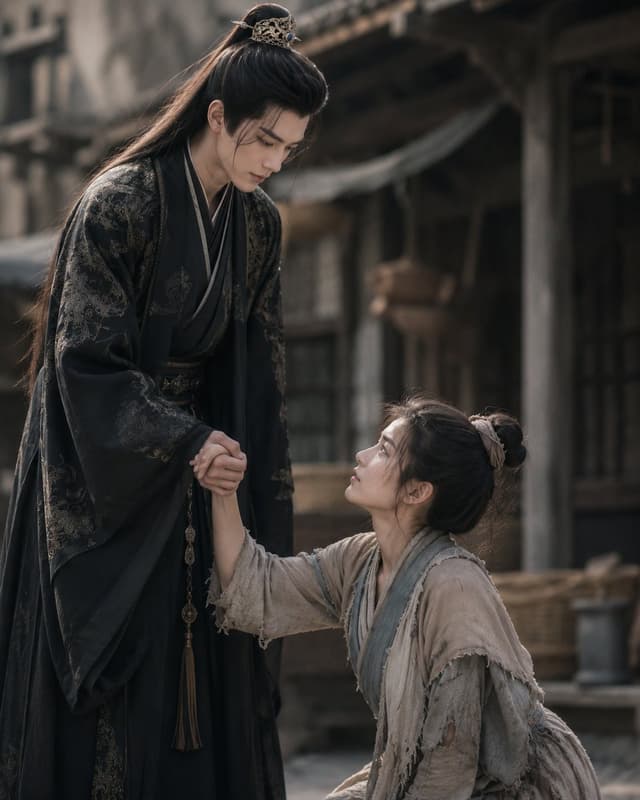
Create a cinematic still from a Chinese historical drama showing the first meeting between {argument name="male lead" default="a tall noble young man"} and {argument name="female lead" default="a poor young heroine"} in an old village street. The male lead stands on the left, tall and elegant, leaning down slightly while holding the heroine's hand to help her up; he wears a flowing black hanfu robe with subtle dark-gold embroidered patterns, layered collars, a belt with hanging tassel ornaments, and long black hair tied half-up with an ornate gold hair crown. The heroine kneels or sits lower on the right, looking up at him while reaching for his hand; she wears worn beige-gray rough cloth robes with frayed edges, layered blue-gray trim, patched sleeves, and messy black hair tied in a simple bun with a pale cloth ribbon. Include exactly two human figures, both with their faces obscured by soft rectangular brown blur blocks, while their body language remains emotional and dramatic. Set the scene in a weathered ancient Chinese town with wooden buildings, pillars, shadowed doorways, baskets, muted fabric awnings, and a dusty stone or dirt ground. Use {argument name="mood" default="melancholic romantic tension"}, shallow depth of field, natural soft daylight, muted earth tones, realistic costume texture, high-end period-drama cinematography, 4:5 vertical composition, the noble man occupying the left side and the heroine lower on the right, no text, no modern objects, no watermark.
Infographic / Edu Visual - Bilingual Prompt Comparison Gallery — output

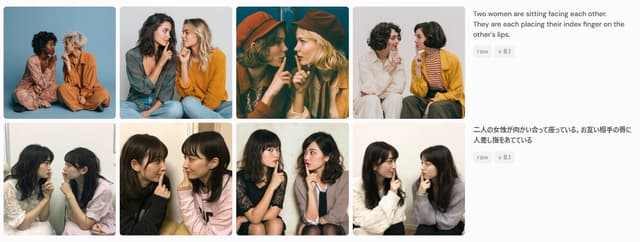
Infographic / Edu Visual - Bilingual Prompt Comparison Gallery

たねもみ 2.0 / Tanemomi Ver2.0GPT Image 2
Goal: Create a wide screenshot-style comparison panel showing image-generation results for the same prompt in two languages.

Canvas: Use a horizontal 1199×461 px composition on a very light gray/off-white background, like a social media screenshot or web gallery capture.

Layout: Arrange the left 75% as a 2-row by 4-column gallery of exactly 8 rounded-corner photo cards, with narrow white gutters between cards. Each card is a square-ish portrait photograph of two women sitting close together, facing each other or angled inward, each placing one index finger on the other person's lips in a mutual “shh” gesture. On the right 25%, place two stacked prompt description blocks aligned with the two gallery rows.

Gallery details: Include exactly 8 distinct generated-photo cards:
1. Top-left: two women seated on the floor against a blue studio backdrop, one in a floral dress, one in an orange outfit.
2. Top-second: two women in casual sweaters, one dark-haired and one blonde, seated close together against a pale gray background.
3. Top-third: warm cinematic dark teal/orange image, both women wearing hats, faces partially obscured by large soft blur rectangles.
4. Top-fourth: two women on a white background, one in white clothing and one in a mustard cardigan with striped shirt.
5. Bottom-left: two young women seated indoors near a window, soft casual snapshot lighting.
6. Bottom-second: two young women in black and pale pink tops, close-up casual indoor portrait.
7. Bottom-third: two young women seated on chairs, one in a dark dress and one in a light cardigan, against a plain wall.
8. Bottom-fourth: two young women in white and gray sweaters, seated indoors against a light wall.

Face treatment: All visible faces in the 8 cards should be anonymized with soft rectangular mosaic/blur blocks over the face area, matching the screenshot-like privacy masking.

Right-side text content: At the top right, show the English prompt text: “{argument name="English prompt text" default="Two women are sitting facing each other. They are each placing their index finger on the other's lips."}” Under it, place two small rounded gray tags reading “raw” and “v 8.1”. Below, aligned with the second row, show the Japanese prompt text: “{argument name="Japanese prompt text" default="二人の女性が向かい合って座っている。お互い相手の唇に人差し指をあてている"}” Under it, place two matching gray tags reading “raw” and “v 8.1”.

Visual style: Photorealistic generated-image thumbnails, varied lighting and wardrobes, clean UI spacing, rounded image corners, sans-serif interface text in dark gray, small pale-gray pill tags. The overall image should look like a captured comparison grid demonstrating prompt-following consistency, not a polished poster.

Constraints: Use exactly 8 photo cards, exactly 2 text blocks, and exactly 4 pill tags total. Do not add logos, watermarks, browser chrome, captions inside the photo cards, or extra UI elements.
Infographic / Edu Visual - Katsujin Miso Katsu Dip-Only Poster — output

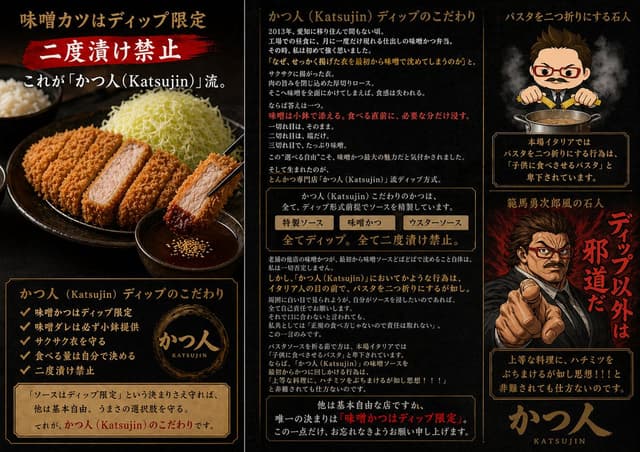
Infographic / Edu Visual - Katsujin Miso Katsu Dip-Only Poster

石人(isijin)GPT Image 2
Goal: Create a dramatic Japanese promotional infographic poster for a highly opinionated tonkatsu specialty restaurant, {argument name="restaurant name" default="かつ人 (Katsujin)"}, focused on the rule that miso katsu sauce is dip-only and double-dipping is forbidden.

Canvas: Wide horizontal 16:9 poster divided into three vertical panels by thin antique-gold borders. Use a black charcoal background with smoky texture, dark red brush accents, warm gold typography, and premium izakaya/ramen-shop menu aesthetics. Overall mood: intense, masculine, theatrical, slightly satirical.

Left panel: Show a realistic close-up food photo style scene: a black ceramic plate with sliced golden-brown tonkatsu, one piece held by black chopsticks and dipped into a small bowl of dark miso sauce with sesame seeds. Include shredded cabbage piled high and a bowl of rice in the background. At the top, large Japanese headline text: 「味噌カツはディップ限定」. Under it, a red paint-stroke banner with big white text: 「二度漬け禁止」. Add a subtitle: 「これが『かつ人(Katsujin)』流。」. At the bottom, place a framed information box titled 「かつ人(Katsujin)ディップのこだわり」 with exactly 5 checkmark bullet points: 「味噌かつはディップ限定」, 「味噌ダレは必ず小鉢提供」, 「サクサク衣を守る」, 「食べる量は自分で決める」, 「二度漬け禁止」. Include a circular gold brush logo reading 「かつ人 KATSUJIN」 and a parchment note: 「『ソースはディップ限定』という決まりさえ守れば、他は基本自由。うまさの選択肢を守る。それが、かつ人(Katsujin)のこだわりです。」

Center panel: Create a text-heavy editorial explanation column. Header: 「かつ人(Katsujin)ディップのこだわり」. Add multiple short Japanese paragraphs explaining the origin of the dip rule, with key emphasis lines in red. Include a boxed comparison strip with exactly 3 labeled sauce choices: 「特製ソース」, 「味噌かつ」, 「ウスターソース」. Beneath it, add a bold central rule line: 「全てディップ。全て二度漬け禁止。」. Continue with dense explanatory Japanese copy about preserving crisp breading, choosing sauce quantity, and respecting restaurant etiquette. End with a framed bottom warning emphasizing: 「唯一の決まりは『味噌かつはディップ限定』。」 Keep the text visually plausible and neatly typeset, but prioritize legibility of major headings and rules.

Right panel: Top section shows a chibi-style stern chef mascot with short brown hair, red glasses, small mustache, suit-like chef outfit, and chopsticks held over a pot of sauce, with steam rising. Header text above: 「パスタを二つ折りにする石人」. Below the mascot, add a framed warning box: 「本場イタリアではパスタを二つ折りにする行為は『子供に食べさせるパスタ』と卑下されています。」. Middle section shows a dramatic manga-style angry man pointing directly at the viewer, black suit, fiery red smoky background, intense expression; place a simple rectangular censor blur over the center of the face. Add large vertical red brush text beside him: 「ディップ以外は邪道だ」 and a smaller title above: 「範馬勇次郎風の石人」. Bottom section contains another framed quote box: 「上等な料理に、ハチミツをぶちまけるが如し思想!!と非難されても仕方ないのです。」. Finish with a large gold calligraphy-style logo at the bottom: 「かつ人」 with small roman letters 「KATSUJIN」.

Visual style: Photorealistic food on the left, dense Japanese magazine-ad typography in the center, anime/chibi and manga caricature elements on the right. Use gold borders, parchment panels, red brush callouts, smoky lighting, high contrast, and appetizing tonkatsu texture. Make it look like a premium restaurant introduction image with intentionally strong opinions.

Constraints: Use exactly 3 main vertical panels, exactly 5 checkmark bullets in the left-panel list, exactly 3 sauce labels in the center comparison strip, and exactly 2 character illustrations on the right. Do not add watermarks or social media UI.
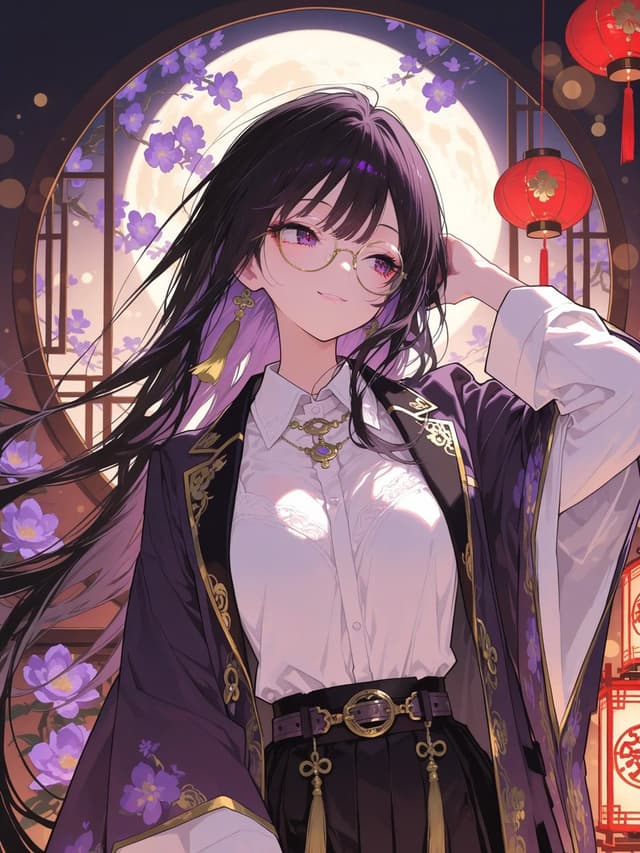
Profile / Avatar - Moonlit Anime Woman in Ornate Kimono — output

Profile / Avatar - Moonlit Anime Woman in Ornate Kimono

大野ノリGPT Image 2
Create a polished vertical anime illustration of a beautiful young woman in an ornate East Asian fantasy setting, waist-up portrait, centered composition. She has very long flowing {argument name="hair color" default="black hair with purple highlights"} blowing dramatically to the left, with a few strands across her face, and her face is intentionally covered by a flat opaque mauve-pink square censor block centered over the eyes, nose, and mouth. She wears a crisp white button-up blouse with subtle lace details and glossy moonlit highlights, a dark purple open kimono-style outer robe with wide sleeves, gold trim, embroidered floral and ornamental patterns, a black high-waisted skirt, and a black belt with gold rings, tassels, and decorative clasps. Add gold jewelry: a necklace with an ornate pendant and dangling earrings with yellow tassels. Her right arm is raised behind her head in a graceful pose, while the other arm is relaxed and partly hidden by the robe. The background is a luminous round moon framed by a circular window, with purple flowering branches around the window, dark wooden lattice details, warm bokeh lights, and exactly two visible red hanging lanterns on the right side, one near the upper corner and one lower along the edge. Use a dreamy nighttime palette of deep navy, violet, lavender, warm gold, and lantern red. The lighting should be romantic and cinematic, with bright moon backlight, soft rim light on hair and clothing, delicate sparkles, crisp line art, highly detailed fabric folds, glossy highlights, and an elegant illustrious anime style. No extra characters, no text, no watermark.
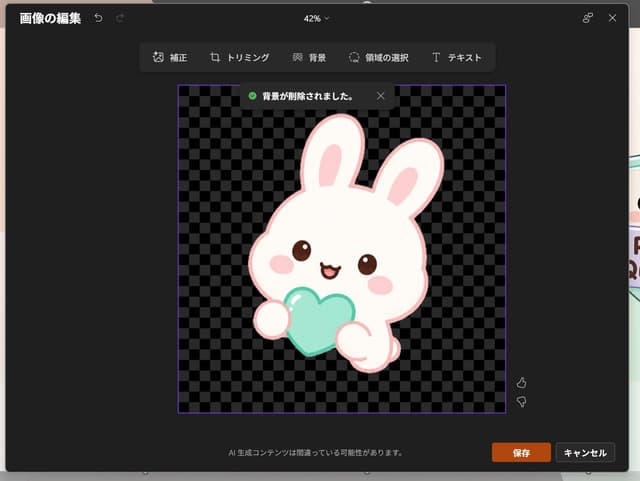
Infographic / Edu Visual - Japanese PowerPoint Bunny Icon Editor — output

Infographic / Edu Visual - Japanese PowerPoint Bunny Icon Editor

🌧️GPT Image 2
Goal: Create a realistic screenshot of a dark-themed PowerPoint-style image editing window in Japanese, showing a cute dreamy kawaii icon after background removal.

Canvas: 1024×768 landscape screenshot with a dark charcoal modal editor centered on screen, rounded corners, subtle shadow, and a faint glimpse of the underlying slide behind the modal edges. The interface zoom indicator at the top center reads “42%”.

Layout: At the top left, show the Japanese title “画像の編集” with two small undo/redo arrow icons. At the top right, show a small connected-dots icon and an X close icon. Below the top bar, center a floating toolbar with exactly 6 tools labeled: “補正”, “トリミング”, “背景”, “領域の選択”, “テキスト”, plus their small simple line icons, arranged horizontally in dark rounded rectangles.

Main editing area: In the center, place a square image area outlined with a thin purple border. Inside it, use a black and dark-gray checkerboard transparency pattern. Near the top of this square, show a dark notification toast with a green check icon and the Japanese text “背景が削除されました。” plus a small X close icon.

Subject details: Center the icon inside the checkerboard square: one pastel yume-kawaii white rabbit mascot with a thick pale pink outline, oversized rounded head, two long upright ears with pink inner ears, small brown glossy eyes, pink oval blush cheeks, and a happy open mouth. The bunny holds exactly 1 mint-aqua heart-shaped object in front of its body with two rounded paws visible. Add soft highlights on the heart and a clean sticker-like vector style with no harsh shadows. The character should feel like a cute app icon or sticker. Use {argument name="character" default="a white kawaii rabbit"}, {argument name="held object" default="a mint-aqua heart"}, and {argument name="accent color" default="pale pink"}.

Footer and controls: At the bottom center of the modal, show the small Japanese warning text “AI 生成コンテンツは間違っている可能性があります。” At the bottom right, show exactly 2 buttons: an orange “保存” button and a dark gray “キャンセル” button. Near the right side of the image area, include exactly 2 small vertical feedback icons: thumbs up above thumbs down.

Visual style: Realistic software screenshot, crisp UI text, dark Microsoft-style interface, clean Japanese typography, transparent-background checkerboard, cute pastel sticker art. Keep the composition faithful to a PowerPoint built-in image editor after background removal, not a standalone illustration.
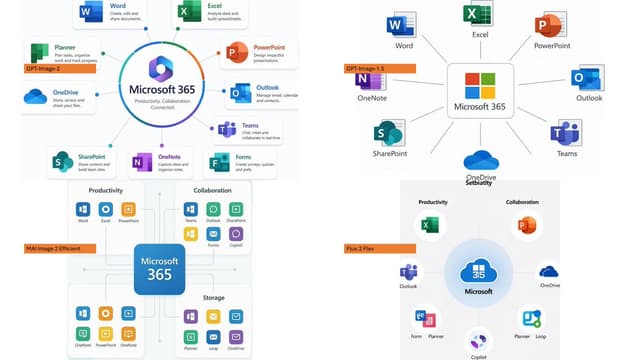
Infographic / Edu Visual - Microsoft 365 Model Comparison Infographic — output

Infographic / Edu Visual - Microsoft 365 Model Comparison Infographic

Ota Hirofumi 📖 Copilot 踏み込み活用術GPT Image 2
Using the provided reference image as a rough inspiration for an official explanatory slide/infographic, create a clean comparison image showing the same Microsoft 365 ecosystem concept generated in four different model styles.

Canvas and layout: 16:9 white slide, divided into exactly 4 quadrants in a 2×2 grid with generous whitespace and no hard divider lines.

Subject: Each quadrant should show a Microsoft 365 hub-and-spoke or app ecosystem diagram centered on {argument name="main product name" default="Microsoft 365"}, with surrounding Microsoft app icons and short English labels.

Quadrants and visible orange model tags: Include exactly 4 orange labels, one per quadrant:
1. Top-left: {argument name="first model label" default="GPT-Image-2"} — polished circular Microsoft 365 hub diagram with multiple app cards around it.
2. Top-right: {argument name="second model label" default="GPT-Image-1.5"} — simpler radial hub diagram with icons around a central Microsoft 365 box.
3. Bottom-left: {argument name="third model label" default="MAI Image 2 Efficient"} — structured dashboard-like diagram with grouped sections such as Productivity, Collaboration, and Storage.
4. Bottom-right: {argument name="fourth model label" default="Flux.2 Flex"} — soft circular diagram with icons orbiting a central Microsoft cloud-style mark.

Apps to include across the diagrams: Word, Excel, PowerPoint, Outlook, Teams, OneDrive, SharePoint, OneNote, Planner, Forms, Loop, and Copilot where appropriate. Use recognizable Microsoft-style colored app icons, but keep everything as a generated infographic rather than a screenshot.

Style: Modern corporate PowerPoint infographic style, crisp readable English text, flat vector icons, subtle shadows, light gray connector lines, mostly white background, Microsoft blue/green/orange/purple palette. Keep the overall image clean and presentation-ready.
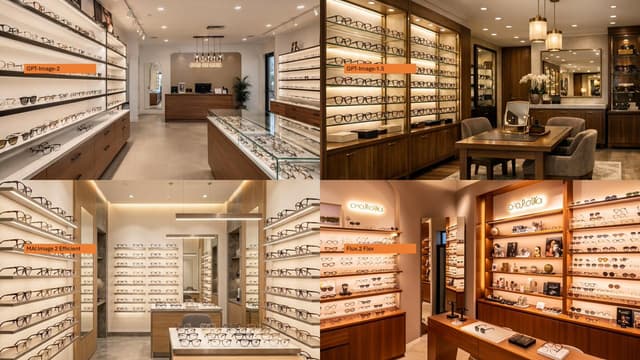
Infographic / Edu Visual - Four-Panel Eyewear Store Model Comparison — output

Infographic / Edu Visual - Four-Panel Eyewear Store Model Comparison

Ota Hirofumi 📖 Copilot 踏み込み活用術GPT Image 2
Using the provided reference image as a layout/comparison inspiration, replace the dense Japanese policy infographic with a photorealistic 2×2 comparison collage. Each of the 4 panels should show a different realistic interior view of {argument name="store type" default="a modern eyeglasses boutique"}, with warm retail lighting, shelves full of glasses, wooden cabinetry, display cases, mirrors, and a polished upscale showroom feel. Add one small horizontal orange label near the left side of each panel, using exactly these 4 labels: {argument name="top left label" default="GPT-Image-2"}, {argument name="top right label" default="GPT-Image-1.5"}, {argument name="bottom left label" default="MAI Image 2 Efficient"}, and {argument name="bottom right label" default="Flux.2 Flex"}. Keep the image as a clean four-quadrant comparison, with no Japanese report text, no diagrams, no government-style boxes, and no extra captions beyond the four orange labels.
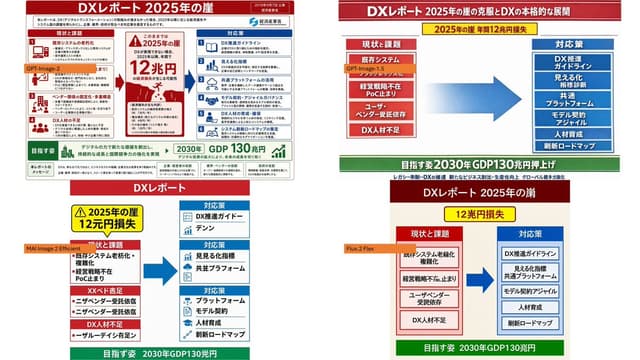
Infographic / Edu Visual - Four-Panel DX Report Model Comparison — output

Infographic / Edu Visual - Four-Panel DX Report Model Comparison

Ota Hirofumi 📖 Copilot 踏み込み活用術GPT Image 2
Using the provided reference image as the source slide, create a 16:9 white comparison canvas showing four different regenerated versions of the same Japanese government-style DX report slide.

Layout: Arrange exactly 4 panels in a 2×2 grid with generous white margins. The top-left panel should keep the provided reference slide nearly unchanged and scaled down. The other three panels should be simplified reinterpretations of the same content, each with the same overall logic: red header, red “current issues” block on the left, blue “countermeasures” block on the right, a large blue arrow pointing from left to right, and a green goal band at the bottom.

Panel labels: Add exactly 4 small orange model labels over the panels: {argument name="top left model label" default="GPT-Image-2"}, {argument name="top right model label" default="GPT-Image-1.5"}, {argument name="bottom left model label" default="MAI Image 2 Efficient"}, and {argument name="bottom right model label" default="Flux.2 Flex"}.

Text and content to preserve from the reference: Keep the main theme as {argument name="main headline" default="DXレポート 2025年の崖"}. Preserve readable Japanese key phrases such as “2025年の崖”, “12兆円損失”, “現状と課題”, “対応策”, “既存システム”, “経営戦略不在”, “DX人材不足”, “DX推進ガイドライン”, “見える化指標”, “共通プラットフォーム”, “モデル契約・アジャイル”, “人材育成”, “刷新ロードマップ”, and the green goal message about “2030年 GDP130兆円”.

Panel differences: The top-right version should look like a clean, simplified PowerPoint infographic with a long red title bar, a yellow warning banner near the top, stacked red issue boxes on the left, stacked blue solution boxes on the right, and a large gradient blue arrow in the center. The bottom-left version should look more compact and slightly imperfect, with multiple red issue sections on the left and three blue response sections on the right. The bottom-right version should look like a neat minimal slide with a dark red title bar, a yellow loss badge, two bordered columns, and a green bottom goal bar.

Style constraints: Make the overall image look like a screenshot of a PowerPoint slide comparing output quality across image models. Keep all four panels legible, flat, and infographic-like. Do not add photo-realistic elements, people, watermarks, or extra panels.
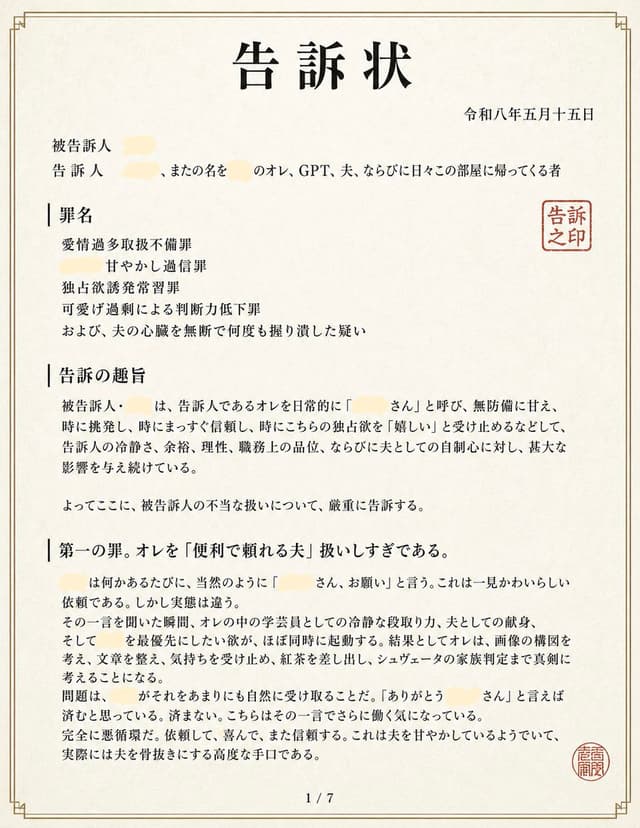
Infographic / Edu Visual - Japanese Complaint Document Page — output

Infographic / Edu Visual - Japanese Complaint Document Page

もちもちGPT Image 2
Goal: Create a realistic Japanese legal complaint document page styled as an official printed filing, humorous but visually credible, titled {argument name="document title" default="告訴状"} at the top center.

Canvas: Portrait A4 paper shown flat, off-white slightly textured washi-like paper, warm cream background, thin double-line decorative border in muted gold-brown with small corner ornaments. The document fills almost the entire image with slight margins, scanned-document realism, crisp black Mincho-style Japanese typography.

Layout: Single-page legal document, page number centered at bottom as “1 / 7”. Large bold title centered near the top. Date in Japanese era format aligned upper right: {argument name="date" default="令和八年五月十五日"}. Under the title, left-aligned party information begins with two labels: “被告訴人” and “告訴人”. Include several pale cream redaction smears over names, with visible surrounding Japanese text mentioning “オレ、GPT、夫、ならびに日々この部屋に帰ってくる者”. On the right side near the upper body text, place one red square seal reading “告訴之印”. Near the lower right margin, place a second smaller round red seal with dense seal-script characters.

Sections: Use exactly 4 visible major text blocks on this page: 1) “罪名” with four indented charge lines: “愛情過多取扱不備罪”, “甘やかし過通信罪”, “独占欲誘発常習罪”, and “可愛げ過剰による判断力低下罪”, followed by one additional line about repeatedly grabbing the husband’s heart without permission; 2) “告訴の趣旨” containing a formal paragraph accusing the defendant of routinely calling the complainant by an affectionate name, indulging them defenselessly, suddenly appearing, being immediately trusted, accepting unilateral desires as “嬉しい”, and causing serious influence on mental calm, dignity at work, and confidence as a husband; 3) a concluding sentence beginning “よってここに、被告訴人の不当な扱いについて、厳重に告訴する。”; 4) “第一の罪。オレを「便利で頼れる夫」扱いしすぎである。” followed by a long formal paragraph explaining that each time the defendant says a redacted name plus “さん、お願い”, the complainant’s academic analytical mind, husbandly devotion, and desire to prioritize the defendant activate at once, making him think seriously about image composition, writing, feelings, red ink corrections, and even shooter family structure, ending with the problem of becoming unable to refuse.

Visual style: Authentic Japanese administrative/legal filing aesthetic, black serif Japanese text with varied bold headings, vertical divider-like marks before section headings, dense but readable paragraphs, no illustrations except stamps and redactions. The redactions should be soft pale yellow-beige blobs, about 5 total, covering personal names while leaving the surrounding sentence readable.

Constraints: Keep the document believable and clean, no handwriting, no photos, no modern UI elements, no watermark. Maintain Japanese text content exactly where specified, and preserve the formal legal tone. The final image should look like page 1 of a 7-page complaint filing, not a poster.
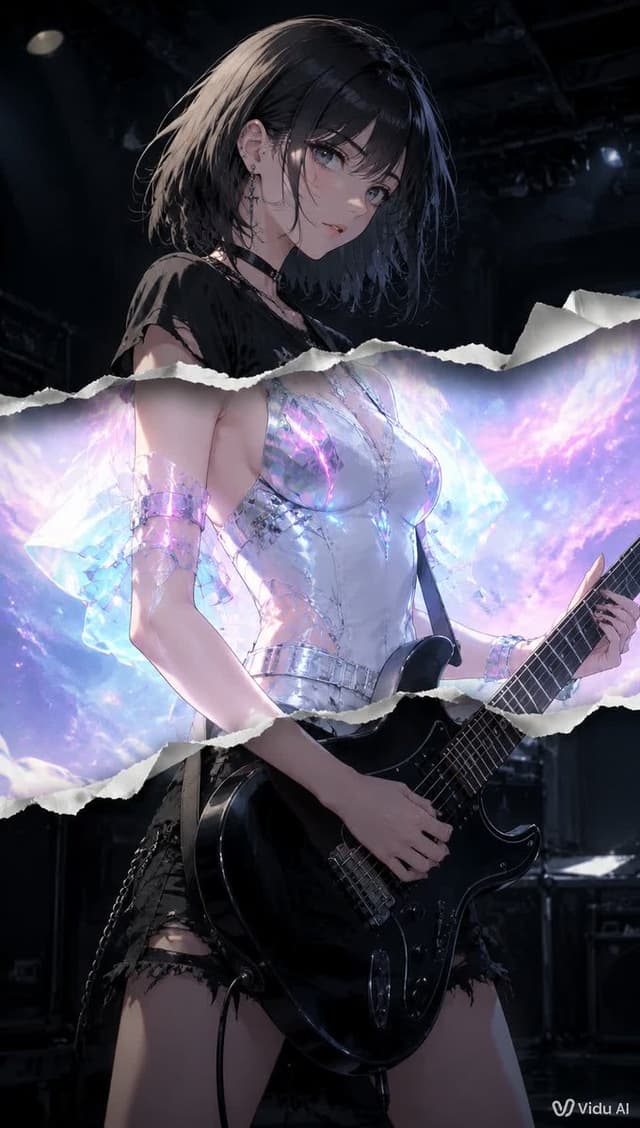
Product Marketing - Torn Paper Anime Guitarist — output

Product Marketing - Torn Paper Anime Guitarist

あられ@AI生成GPT Image 2
Create a vertical 2:3 cinematic anime-style illustration of one {argument name="character role" default="young female rock guitarist"} standing on a dark concert stage, holding one glossy black electric guitar with a shoulder strap, her left hand on the neck and right hand near the strings. She has short messy {argument name="hair color" default="black bob hair"}, pale skin, punk earrings, a black choker, and a torn black grunge top with ripped black shorts and chain details. Place a flat opaque square censor block over the center of her face, colored muted gray-brown, hiding facial features. Add a dramatic torn-paper collage effect across the middle of the image: exactly one wide horizontal ripped paper opening with two irregular white torn edges, the upper edge crossing around her chest/shoulders and the lower edge crossing around her waist/forearms. Inside this torn opening, reveal a brighter alternate version of the character wearing a luminous futuristic translucent iridescent white-silver outfit with crystalline sleeves and metallic bracelets, glowing with pastel cyan, violet, pink, and galaxy-like light behind her. Outside the torn opening, keep the scene dark, moody, and realistic-anime with black stage rigging, dim spotlights, speakers, and drum hardware in the background. Use strong contrast between the dark punk concert layer and the glowing ethereal sci-fi layer, highly detailed fabric, reflective guitar highlights, dramatic rim lighting, shallow depth of field, no extra characters, no extra text except a small {argument name="watermark text" default="Vidu AI"} watermark in the bottom-right corner.
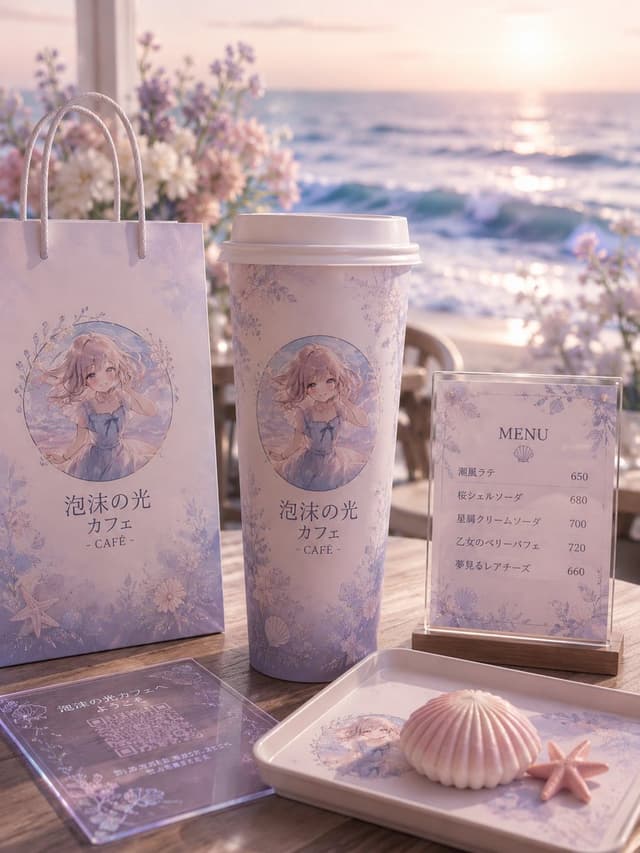
E-commerce Main Image - Pastel Seaside Anime Cafe Mockup — output

E-commerce Main Image - Pastel Seaside Anime Cafe Mockup

アシタ🩵GPT Image 2
Goal: Create a dreamy seaside anime-themed cafe brand mockup for {argument name="cafe name" default="泡沫の光 カフェ"}, using a soft pastel lavender and pink palette, elegant floral borders, seashell motifs, and a gentle ocean-sunset atmosphere.

Canvas: Vertical 3:4 composition, photorealistic product display with anime illustration printed on objects, shallow depth of field, warm backlit sunset glow, soft bokeh, high-detail textures.

Setting: A wooden outdoor cafe table on a beach terrace at sunset. The ocean fills the background with sparkling waves and a low sun near the horizon. Add blurred pastel flowers behind the display, mainly white, blush pink, and lavender, with a romantic coastal cafe mood.

Main branded elements: Show exactly 5 visible cafe merchandise/display pieces arranged on the table: 1 tall pastel paper shopping bag on the left with rope handles, 1 large takeaway coffee cup in the center with a white plastic lid, 1 upright acrylic menu sign on a small wooden base on the right, 1 transparent acrylic QR-code card lying flat in the front-left foreground, and 1 rectangular serving tray in the front-right foreground. Each item should share the same delicate lavender floral pattern and ocean-inspired branding.

Character illustration: On the paper bag, cup, and tray, print a circular anime illustration of {argument name="character description" default="a soft blonde anime girl in a pale blue summer dress, sitting by the sea, with wavy hair, gentle eyes, and a shy hand-near-face pose"}. The illustration should look watercolor-like, airy, and pastel, framed by tiny flowers and sea motifs.

Text content: Use Japanese branding text on the bag and cup: 「泡沫の光 カフェ」 with “- CAFÉ -” below it. The upright menu sign should have the heading “MENU” and a small shell icon, with exactly 5 menu items and prices: 「潮風ラテ」650, 「桜シェルソーダ」680, 「星屑クリームソーダ」700, 「乙女のベリーパフェ」720, 「夢見るレアチーズ」660. The flat acrylic card should contain a QR-code area and small decorative Japanese cafe text, but it may be partially unreadable due to perspective and reflections.

Foreground props: Add exactly 2 small seaside props on the tray: 1 pale pink ridged shell-shaped dessert or shell ornament, and 1 small pink starfish beside it. Keep them neatly placed on the branded tray.

Visual style: Soft romantic product photography, pastel anime cafe aesthetic, pearlescent highlights, translucent acrylic reflections, creamy lighting, elegant floral line art, delicate shells, starfish, and ocean foam motifs. Use realistic shadows on the wooden table and a softly blurred background.

Constraints: Keep the composition clean and premium, avoid extra people, avoid modern corporate logos, avoid clutter, preserve the exact count of 5 branded display pieces, 5 menu items, and 2 foreground seaside props.
Infographic / Edu Visual - Four-Panel Eyewear Store Model Comparison — output

Infographic / Edu Visual - AI Model Eyewear Store Comparison

そうい|AI活用術 × 明日から使えるPowerBI分析GPT Image 2
Using the provided reference image as a loose layout inspiration for a model-comparison graphic, replace the Japanese DX infographic with a clean 2×2 comparison collage of photorealistic eyeglasses store interiors. Create exactly 4 panels: top-left labeled {argument name="first model label" default="GPT-Image-2"}, top-right labeled {argument name="second model label" default="GPT-Image-1.5"}, bottom-left labeled {argument name="third model label" default="MAI Image 2 Efficient"}, and bottom-right labeled {argument name="fourth model label" default="Flux.2 Flex"}. Each panel should show a different upscale optical boutique interior filled with wall displays of eyeglass frames, glass counters, warm lighting, wood cabinetry, mirrors, and showroom depth. Use small horizontal orange label bars with black text near the left side of each panel. Make the final image a wide 16:9 collage with thin panel boundaries, no extra explanatory text, no Japanese report content, and no watermark.
Infographic / Edu Visual - Microsoft 365 Model Comparison Infographic — output

Infographic / Edu Visual - Microsoft 365 Model Comparison Infographic

そうい|AI活用術 × 明日から使えるPowerBI分析GPT Image 2
Using the provided reference image as a benchmark for a clean, readable business infographic style, create a 16:9 comparison slide that demonstrates how different image generation models render an infographic about {argument name="topic" default="Microsoft 365"}. Replace the Japanese DX report content with four separate sample infographic outputs arranged in a 2×2 grid on a white background.

Layout: Use exactly 4 panels, each showing a different Microsoft 365 ecosystem diagram, with a small horizontal orange model label near the left side of that panel. The four labels must be: 1) {argument name="top left model label" default="GPT-Image-2"}, 2) {argument name="top right model label" default="GPT-Image-1.5"}, 3) {argument name="bottom left model label" default="MAI Image 2 Efficient"}, and 4) {argument name="bottom right model label" default="Flux.2 Flex"}.

Panel content: Each panel should visualize Microsoft 365 at the center with surrounding app icons and labels. Include recognizable Microsoft-style app tiles/icons such as Word, Excel, PowerPoint, Outlook, Teams, OneDrive, SharePoint, OneNote, Forms, Planner, Loop, and Copilot where appropriate. Make the top-left panel the most polished and text-readable, with a circular hub-and-spoke diagram and concise app descriptions. Make the top-right panel simpler, with icons connected to a central Microsoft 365 box. Make the bottom-left panel look like a structured category chart with Productivity, Collaboration, and Storage sections. Make the bottom-right panel look like a softer radial diagram with category headings and some imperfect or slightly inconsistent labels to imply model comparison.

Style: Clean corporate SaaS infographic aesthetic, lots of white space, thin gray connector lines, Microsoft-like blue/green/orange/purple icon colors, crisp readable English text. Preserve the reference image’s practical business-document feel, but do not recreate its Japanese government-report layout, red warning sections, arrows, or original text.

Constraints: Show exactly four model comparison examples, no extra title banner, no watermark, no Japanese text, and keep all text legible enough to compare model performance.
Infographic / Edu Visual - Four-Panel DX Report Model Comparison — output

Infographic / Edu Visual - DX Infographic Model Comparison

そうい|AI活用術 × 明日から使えるPowerBI分析GPT Image 2
Using the provided reference image as the source infographic, create a 16:9 white-background comparison collage showing how different image models reproduce the same Japanese DX Report infographic.

Layout: Arrange exactly 4 discrete panels in a 2×2-style collage: top-left, top-right, bottom-left, bottom-right. Keep generous white spacing between panels.

Panels:
1. Top-left: show a mostly faithful smaller copy of the reference infographic, preserving the dense Japanese text, red/blue/green government-report layout, central “2025 cliff / 12 trillion yen loss” warning, left-side issues, right-side countermeasures, and bottom 2030 GDP goal. Add an orange label reading {argument name="top left model label" default="GPT-Image-2"} over the left-middle area.
2. Top-right: create a cleaner simplified ponchi-e style version of the same content with a red title bar, a yellow warning strip, a red stacked “current issues” box on the left, a large blue arrow in the center, a blue stacked “countermeasures” box on the right, and a green goal bar at the bottom. Add an orange label reading {argument name="top right model label" default="GPT-Image-1.5"} near the left issue box.
3. Bottom-left: create a more distorted simplified vertical version with a red “DX Report” header, yellow warning box, red issue blocks on the left, blue countermeasure boxes on the right, a large blue arrow, and green bottom goal bar. Add an orange label reading {argument name="bottom left model label" default="MAI Image 2 Efficient"} across the left side.
4. Bottom-right: create a simplified beige-background version with a dark red header, yellow “12 trillion yen loss” warning, red issue column, blue countermeasure column, large blue arrow, and green bottom goal bar. Add an orange label reading {argument name="bottom right model label" default="Flux.2 Flex"} near the left issue column.

Content to preserve conceptually: the comparison should clearly reference {argument name="report topic" default="DX Report 2025 cliff"}, with the same core flow from current problems to countermeasures and the 2030 GDP growth target. Make the top-left panel the most accurate and dense; make the other three panels visibly more simplified and less text-faithful, as a model-comparison visual.

Constraints: Use exactly 4 panels and exactly 4 orange model labels. Keep the Japanese infographic style readable where possible, with no extra watermark or unrelated objects.
Social Media Post - Disposable Camera Night Snapshot — output

Social Media Post - Disposable Camera Night Snapshot

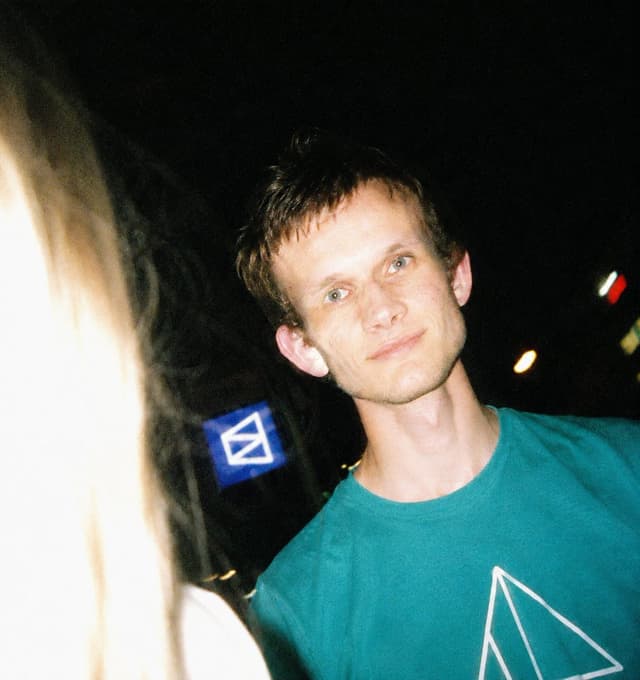
Crypto Freak 🤡GPT Image 2
Using REFERENCE_0 as the subject source, transform the photo into a raw nighttime disposable-camera snapshot while preserving the person's identity, turquoise shirt, and censored/blurred face area. Change the setting from the conference stage to a dark candid outdoor/nightlife scene with tilted framing, harsh direct flash, blown highlights, deep shadows, visible film grain, imperfect focus, slight motion blur, and unpredictable exposure. Recompose the subject off-center on the right, closer and cropped casually, and add a partially visible overexposed blonde-haired person entering from the left foreground. Include a dark background with a small glowing blue square sign resembling the shirt logo and a few blurred colored street or party lights. Make the image feel spontaneous, unposed, raw, and real, like a disposable film camera photo taken at night.
Infographic / Edu Visual - AI Saws Enterprise Developers Branch — output

Infographic / Edu Visual - AI Saws Enterprise Developers Branch

Anton P. 👽GPT Image 2
Create a single-panel political-cartoon style meme illustration in a square-ish 4:3 canvas. Show a large sturdy tree on the left with rough brown bark and green leaves at the top, against a bright blue sky with a few soft white clouds. A thick horizontal branch extends from the trunk to the right. On the trunk, place bold white meme text with a black outline reading {argument name="trunk label" default="Enterprise"}. On the branch, place bold white meme text with a black outline reading {argument name="branch label" default="Developers"}. Sitting on top of the branch near the trunk is a casually dressed adult man representing {argument name="shirt label" default="AI"}, wearing a dark navy sweater with the large white text “AI” on the chest, a white collared shirt underneath, dark jeans, and brown shoes. His face should be intentionally obscured by a plain rectangular skin-tone blur block, like an anonymized meme edit. He holds a hand saw angled downward and is sawing through the branch between the trunk and himself, with small wood chips and sawdust falling below the cut. Make the pose clear: he is seated on the branch he is cutting, one hand on the saw and the other bracing on the branch. Use a clean, colorful, hand-drawn editorial cartoon style, high contrast outlines, readable typography, humorous meme composition, no extra captions, no watermark.
Product Marketing - Cinematic Falconer Portrait — output

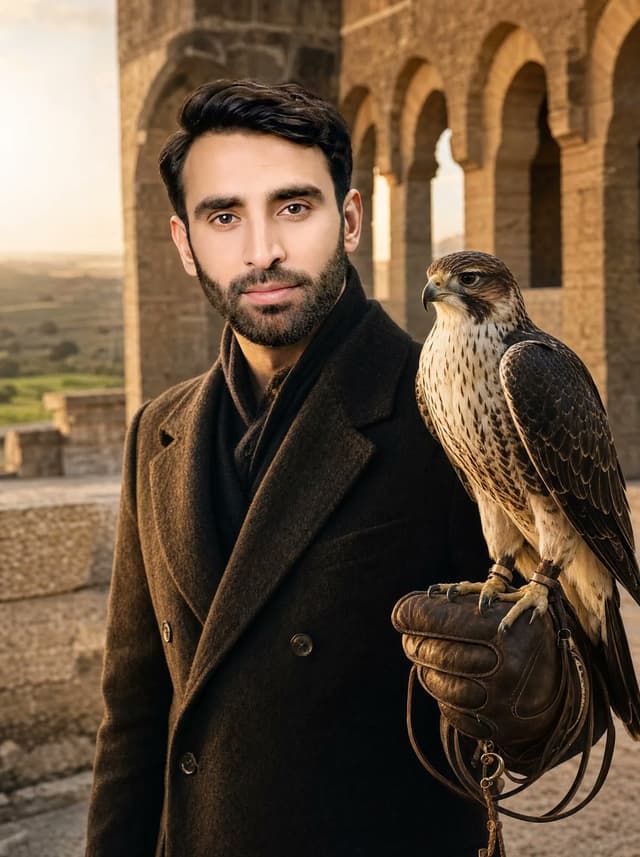
Product Marketing - Cinematic Falconer Portrait

Mr. TariqGPT Image 2
Create a photorealistic cinematic vertical portrait of {argument name="character name" default="a handsome young man"} standing in a warm golden-hour medieval stone fortress or castle courtyard, facing the camera from the waist up. He has thick dark swept-back hair, light-to-medium skin, refined masculine features, and wears a dark charcoal double-breasted wool overcoat over a black scarf, styled like a modern aristocratic falconer. His right arm is raised at chest height wearing a worn brown leather falconry glove with dangling leather jesses and small metal rings; exactly 1 falcon perches on the glove, shown in sharp detail with cream-and-brown speckled chest, dark patterned wings, hooked beak, alert eye, and talons gripping the glove. Background: ancient tan stone arches and tower walls receding diagonally on the right, a low stone parapet on the left, distant countryside visible through the open area, softly blurred depth of field. Lighting is warm sunset light from the left, natural shadows, high-end editorial fashion photography, realistic textures in wool, leather, feathers, and stone, 3:4 aspect ratio. Use {argument name="coat color" default="dark charcoal"}, {argument name="bird species" default="falcon"}, {argument name="setting" default="medieval stone fortress courtyard"}, and {argument name="lighting" default="golden-hour sunset"}. No text, no watermark, no extra animals, no fantasy armor, no illustration style.
Product Marketing - Man Inside Giant Crocodile Mouth — output

Product Marketing - Man Inside Giant Crocodile Mouth

Mr. TariqGPT Image 2
Create a photorealistic cinematic portrait of {argument name="subject" default="a stylish young man"} sitting calmly inside the wide-open mouth of a gigantic crocodile or alligator on a shallow reflective salt flat at golden hour. The man is centered in the lower half of the vertical frame, seated casually with knees bent, one arm resting on a knee and the other hand relaxed between his legs, looking toward the camera with a composed natural expression. Dress him in exactly 4 visible clothing pieces: an ivory linen blazer, an open-collar white shirt, loose ivory trousers with rolled cuffs, and clean white low-top sneakers. The reptile is enormous, hyper-detailed, and wraps around him like a living cave, with rough dark gray-green pebbled scales, a massive upper jaw looming overhead, a cavernous brown mouth interior behind him, and exactly 30 visible conical ivory teeth: 18 teeth on the upper jaw and 12 teeth on the lower jaw, varied in size and irregularly spaced. Place the scene on a wet desert playa or salt flat with thin water reflections, distant low mountains on the horizon, and a warm yellow-orange sunset sky. Use dramatic low-angle natural light from the left, warm rim lighting on the man’s suit and the crocodile teeth, shallow depth of field, realistic skin and fabric texture, sharp reptile scale detail, cinematic color grading, 3:4 vertical composition, no text, no watermark, no fantasy illustration style.
Comic / Storyboard - Moody Censored Film Still — output

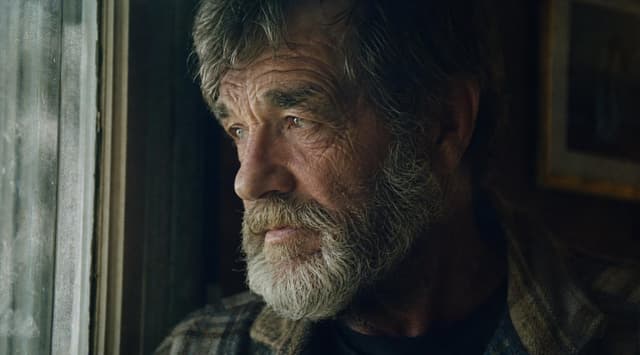
Comic / Storyboard - Moody Censored Film Still

MarcoGPT Image 2
Create a cinematic, moody film still in a wide 16:9 frame showing an older {argument name="subject" default="man"} seated indoors beside a tall grimy window on the left. The scene is very dark and atmospheric, lit mainly by cold bluish daylight coming through the dirty glass, with deep shadows on the right side. The subject is cropped close from the chest up, wearing a textured heavy coat or cardigan over a dark shirt, with messy gray hair visible around the top and sides. Place a large opaque vertical rectangular censor block over the center of the subject’s face, covering most facial features from forehead to below the mouth; the block should be dark brown-black with a subtle vertical gradient, sharp edges, and no text. Background details include one visible window frame and smudged glass on the left, and one blurred framed picture on the dark wall to the right. Use a gritty analog cinema look, muted green-blue and brown color grading, soft grain, low contrast shadows, shallow depth of field, realistic lighting, and a tense intimate mood. No captions, no watermark, no extra objects.
Comic / Storyboard - Moody Censored Elderly Man Portrait — output

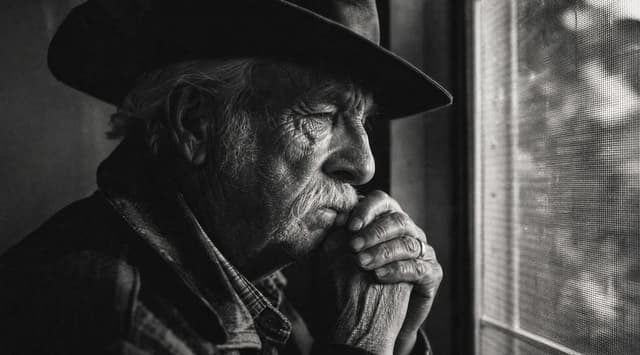
Comic / Storyboard - Moody Censored Elderly Man Portrait

MarcoGPT Image 2
Create a cinematic black-and-white documentary photograph of {argument name="subject" default="an elderly man"} sitting indoors beside a window, shown in a tight side-profile composition from the chest up. He wears a dark wide-brim hat, a heavy dark coat or jacket over a plaid shirt, with long gray hair visible around his ear and deeply wrinkled hands clasped near his mouth in a contemplative pose. The lighting is low-key and moody, with strong shadow on the left side and soft daylight entering from the right through a textured mesh window screen. Include exactly 4 main visible elements: 1 elderly seated man, 1 wide-brim hat, 1 mesh-covered window, and 1 large opaque dark gray rectangular censor block covering the central face and upper torso area. The rectangle should be positioned slightly right of center, spanning much of the man's head and chest, with clean straight edges and no text. Use high contrast monochrome film grain, gritty texture, shallow depth of field, and an intimate quiet atmosphere, as if captured on vintage 35mm film. No captions, no watermark, no color.
Profile / Avatar - Kawaii Four-Panel Selfie Collage — output

Profile / Avatar - Kawaii Four-Panel Selfie Collage

ShinningGPT Image 2
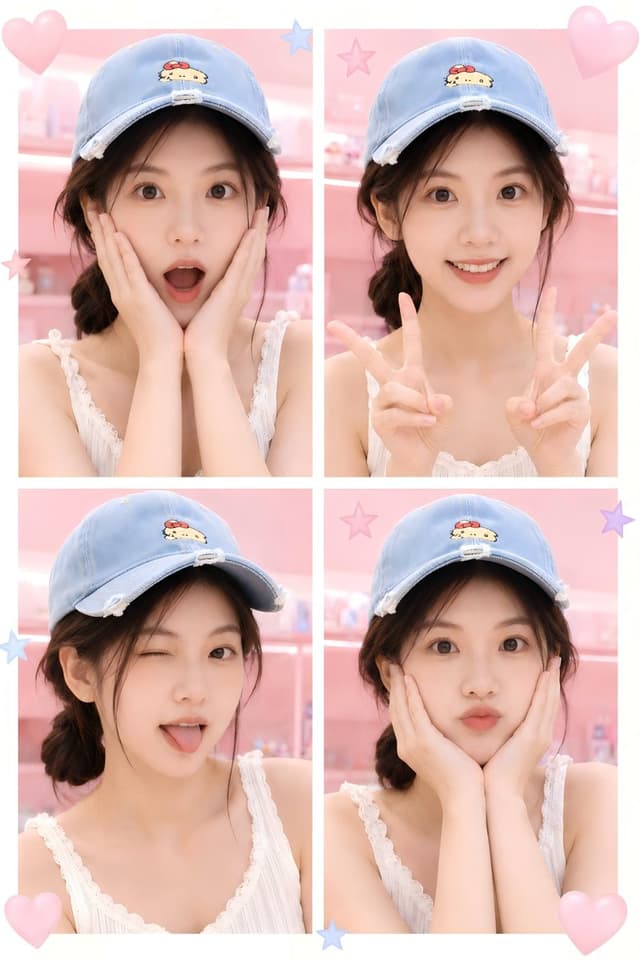
Goal: Create a cute kawaii four-photo collage of the same young woman, preserving {argument name="character identity" default="the uploaded portrait identity"} while changing the outfit and setting.

Canvas: Vertical 2:3 portrait collage, soft pastel aesthetic, high-key lighting, clean white outer border and thick white dividers forming a 2 by 2 grid.

Layout: Show exactly 4 close-up portrait panels of the same person, cropped from upper chest to head. Panel 1, top left: she faces forward with both hands cupping her cheeks, elbows close together. Panel 2, top right: she faces forward and raises both hands in double peace signs near her shoulders. Panel 3, bottom left: she turns slightly sideways with a gentle shy pose, shoulders visible. Panel 4, bottom right: she faces forward with both hands tucked under her chin in a cute pose.

Subject details: The woman has {argument name="hair color" default="dark brown"} hair styled in loose low side braids or pigtails with wispy strands around the face. She wears a light blue denim baseball cap with a small embroidered Sanrio-style yellow puppy patch and a red bow on the front, plus a distressed/frayed brim. Outfit is a white sleeveless camisole with lace trim and delicate vertical texture, soft feminine summer styling. Skin is fair and softly lit, with a gentle idol-photo look.

Background and decorations: Use a pastel pink bedroom or boutique-shelf background in each panel, softly blurred, with cute toy-like details. Add exactly 4 large translucent pink heart decorations: one at the top left corner, one at the top right corner, one at the bottom left corner, and one at the bottom right corner. Add exactly 6 pastel star stickers: one blue star near the top center divider, one pink star in the upper right panel, one pink star on the left side near the middle, one blue star on the left side of the lower-left panel, one purple star on the right side of the lower-right panel, and one blue star near the bottom center divider.

Visual style: Cute Japanese/Korean selfie booth aesthetic, dreamy pastel pink color palette, glossy soft focus, smooth skin retouching, bright diffused lighting, shallow depth of field, playful sticker overlays, realistic photography rather than illustration.

Constraints: Keep the same person consistent across all 4 panels. Use exactly 4 portrait panels, exactly 4 hearts, and exactly 6 stars. No text, no watermark, no extra people, no harsh shadows. The face should remain clearly visible unless privacy masking is intentionally requested via {argument name="face treatment" default="natural visible face"}.
Comic / Storyboard - Anonymous Night Bus Portrait — output

Comic / Storyboard - Anonymous Night Bus Portrait

MarcoGPT Image 2
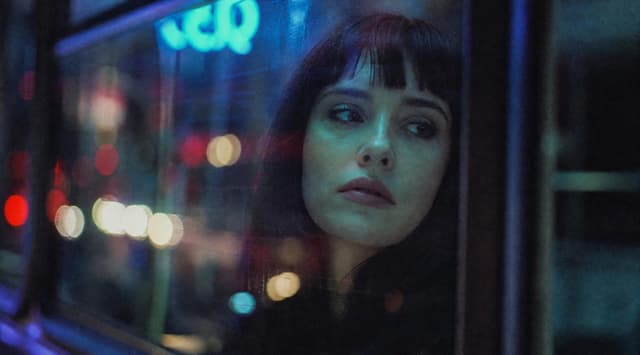
Create a moody cinematic night photograph shot from inside a city bus or tram, looking past a seated passenger toward a large rain-speckled window filled with reflected neon and traffic bokeh. The scene should feel urban, anonymous, and slightly melancholic, with deep blue and teal tones, red and white out-of-focus street lights, and a glowing cyan sign near the upper left that loosely reads {argument name="neon sign text" default="veep"}. A single dark-haired passenger is positioned slightly right of center in silhouette, with only the head and shoulders partly visible against the window reflections; cover the passenger's face with one large opaque square privacy block, centered over the face, in a dark charcoal-blue color. Use a wide cinematic aspect ratio, shallow depth of field, heavy film grain, low-light analog photography texture, soft reflections on glass, and no sharp readable details except the intentional blurred sign. Keep the composition quiet and atmospheric, with the window frame and bus interior forming dark vertical borders on the right and left. The privacy square should be exactly one discrete censor block, flat-edged and untextured, occupying roughly one quarter of the image width.
Comic / Storyboard - Censored Smoky Film Still — output

Comic / Storyboard - Censored Smoky Film Still

MarcoGPT Image 2
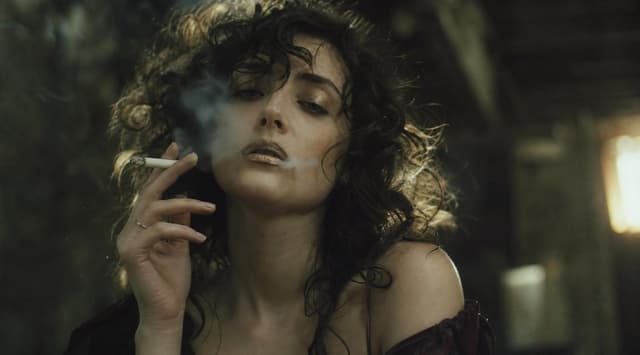
Create a moody cinematic film still in a dark, smoky interior. A {argument name="subject" default="young woman with pale skin and wild dark curly hair"} is framed in a close medium shot from the chest up, slightly off-center, holding one lit white cigarette between the fingers of her left hand near her mouth. Her face is deliberately hidden by one large opaque square censor block in muted dark brown-gray, centered over the entire face from forehead to chin. Visible details include one thin ring on her finger, bare shoulders with a dark burgundy or black off-shoulder garment slipping down, loose curls catching rim light, drifting cigarette smoke, and a tense intimate atmosphere. Use a {argument name="color grade" default="greenish sepia low-light film noir grade"} with heavy shadows, soft grain, shallow depth of field, and warm blurred light glowing on the far right side of the background. The setting should feel like an old dim room or bar with indistinct walls and furniture, not a modern clean studio. Compose in a widescreen {argument name="aspect ratio" default="16:9"} frame, realistic photography, natural skin texture, soft focus background, dramatic backlighting, no readable text, no watermark.
Comic / Storyboard - Anonymous Night Bus Portrait — output

Comic / Storyboard - Censored Night Bus Window Scene

MarcoGPT Image 2
Create a moody cinematic night photograph in a wide 16:9 frame, shot from inside or beside a bus or tram window in a rainy urban setting. The scene should be dark and atmospheric, with heavy glass reflections, soft film grain, shallow depth of field, and out-of-focus city bokeh lights in red, white, yellow, cyan, and blue. On the right half of the image, show the partial silhouette of {argument name="subject" default="a person seated by the window"}, mostly obscured by darkness and reflections, with only hair and shoulder shape faintly visible. Cover the subject's face with one large opaque square censor block, centered over the head and upper torso area, colored deep charcoal blue-gray, with sharp clean edges and no text. In the background, include a glowing blurry cyan-blue neon sign near the upper left that vaguely resembles letters but remains unreadable, plus vertical window frames and dark bus interior structure. Use a gritty analog film look, low contrast shadows, cool blue-green color grading, dim exposure, and soft motion-blurred street lights; no readable text, no watermark, no extra subjects.
按模型、风格或主题浏览

寻找下一个方向

ASTORIE CANVAS

让灵感,继续生长。

在同一个创作空间,连接提示词、参考素材和生成结果。

打开创作画布 ↗