GPT Image 2 prompts

Browse GPT Image 2 prompts for fashion portraits and graphic compositions. Compare how each prompt describes its subject and the way the image is arranged.

探索提示词

10,044 条提示词

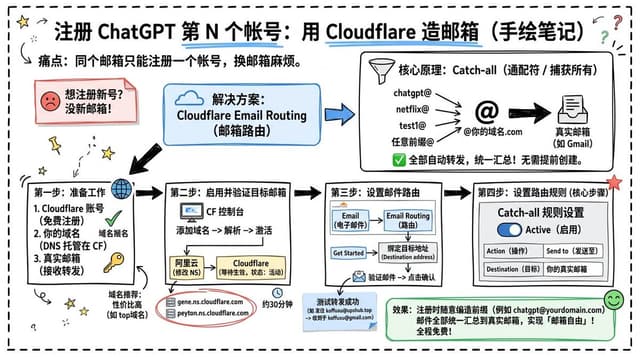
Infographic / Edu Visual - Cloudflare Catch-All Email Routing Infographic — output

Infographic / Edu Visual - Cloudflare Catch-All Email Routing Infographic

koffuxuGPT Image 2
Goal: Create a landscape hand-drawn notebook-style Chinese infographic explaining how to register multiple ChatGPT accounts by using Cloudflare Email Routing to create catch-all mailbox aliases.

Canvas: Wide 16:9 whiteboard page, clean off-white background, surrounded by a thick black dashed rounded border. Use a casual marker-and-pen sketch style with slightly imperfect lines, doodle arrows, stars, question marks, pins, and small expressive icons.

Title and intro: At the top center, write the bold headline {argument name="headline text" default="注册 ChatGPT 第 N 个账号:用 Cloudflare 造邮箱(手绘笔记)"}. Underline “Cloudflare” in blue. Beneath it on the left, write the pain point line: “痛点:同个邮箱只能注册一个账号,换邮箱麻烦。” Add a small curved arrow doodle and star near the title.

Main layout: Use exactly 7 main content boxes/cards plus decorative doodles. Arrange them left-to-right as a process with bold black arrows connecting sections. The 7 cards are: 1 pain card, 1 solution card, 1 core-principle card, and 4 numbered step cards.

Card 1, pain card: A red outlined sticky-note box on the upper left with a sad red face icon. Text: “想注册新号?没新邮箱!” Make it look like a folded-corner note.

Card 2, solution card: A blue rounded rectangle in the upper middle with a blue cloud icon. Text: “解决方案:Cloudflare Email Routing(邮箱路由)”. Put a blue arrow pointing toward the core principle box.

Card 3, core principle card: A large black-outlined rounded rectangle in the upper right. Header text: “核心原理:Catch-all(通配符 / 捕获所有)”. Include a funnel icon. Show exactly 4 example incoming aliases on the left: “chatgpt@”, “netflix@”, “test1@”, and “任意前缀@”. Draw arrows from all four into a large “@” symbol and “@你的域名.com”, then a thick black arrow to a mailbox icon labeled “真实邮箱(如 Gmail)”. Bottom line with green check icon: “全部自动转发,统一汇总!无需提前创建。”

Step cards along the bottom: Use exactly 4 numbered boxes.

Step 1 card, bottom left: Title “第一步:准备工作”. Include exactly 3 numbered requirements: “1. Cloudflare 账号(免费注册)”, “2. 你的域名(DNS 托管在 CF)”, “3. 真实邮箱(接收转发)”. Add a globe icon, a green check mark, and a yellow key icon. Below it add small text: “域名推荐:性价比高(如 top域名)”.

Step 2 card, bottom center-left: Title “第二步:启用并验证目标邮箱”. Include a small computer icon labeled “CF 控制台”. Text flow: “添加域名 → 解析 → 激活”. Draw an arrow down to a mini DNS nameserver panel with two columns: left “阿里云(修改 NS)”, right “Cloudflare(等待生效,状态:活动)”. Beneath the card, draw a red circled nameserver list with exactly 2 entries: “gene.ns.cloudflare.com” and “peyton.ns.cloudflare.com”. Add a small clock icon and text “约30分钟”.

Step 3 card, bottom center-right: Title “第三步:设置邮件路由”. Show a mini Cloudflare UI mockup with exactly 2 top tabs/boxes: “Email(电子邮件)” and “Email Routing(路由)”. Include a small “Get Started” button pointing to “绑定目标地址(Destination address)”. At the bottom add an envelope icon and text: “验证邮件 → 点击确认”. Under this card place a small blue status note titled “测试转发成功” with two arrow lines showing an alias forwarding to a Gmail address.

Step 4 card, bottom right: Title “第四步:设置路由规则(核心步骤)”. Show a UI panel titled “Catch-all 规则设置”. Include a blue toggle switch labeled “Active(启用)”. Include a two-row table with headers and values: row 1 “Action(操作)” to “Send to(发送至)”; row 2 “Destination(目标)” to “你的真实邮箱”. Add a red star near the corner.

Final result box: At the bottom right below Step 4, add a green rounded rectangle with a smiling face icon. Text: “效果:注册时随意编造前缀(例如 chatgpt@yourdomain.com)邮件全部统一汇总到真实邮箱,实现「邮箱自由」!全程免费!”

Visual style: Handwritten Chinese typography, thick black marker outlines, simple vector doodles, blue/red/green/yellow accent colors, informal classroom note-taking feel. Keep all arrows bold and directional, with minor sketchy imperfections.

Constraints: Keep the entire infographic in Chinese as specified, use no photorealism, no 3D rendering, no watermark, no extra sections beyond the 7 cards and final result box, and make the text legible.
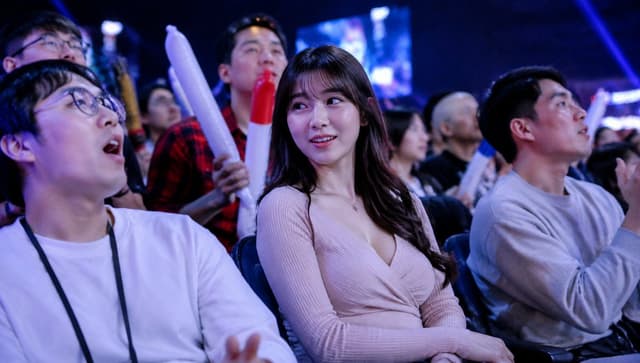
Social Media Post - Blurred Esports Audience Crowd Shot — output

Social Media Post - Blurred Esports Audience Crowd Shot

楽園GPT Image 2
Create a realistic candid event-photography image shot from within the seated audience at a dark indoor {argument name="event type" default="esports gaming tournament"}. Use a wide 16:9 landscape frame, cool blue and purple stage lighting, shallow depth of field, high ISO concert-photo atmosphere, and a large blurred LED screen glowing in the background. In the foreground are three main seated spectators: on the left, a young man in a plain white long-sleeve shirt with a black lanyard, relaxed posture, hands low in frame; in the center, a young woman with long dark wavy hair wearing a pale pink ribbed wrap-style knit top, seated with hands folded in her lap; on the right, a young man in a light gray sweatshirt turned slightly toward the stage and holding a smartphone or small camera. Behind them is a dense crowd of spectators, some standing, some cheering. Include exactly 3 visible inflatable cheering sticks: two long white sticks with red tips held upright near the center-left background, and one blue-and-white stick partly visible behind the right spectator. Add privacy anonymization: place exactly 8 soft-edged rectangular purple blur blocks over visible faces, varying in size and opacity, covering the left foreground man, the top-left background person, a small center-left background face, the center-back person in red plaid, the central woman, a small mid-right background face, a bald mid-right background face, and the right foreground man. Make the image feel like an accidental TV broadcast crowd shot at a lively tournament, with natural poses, no readable text, no logos, no watermark, and photorealistic lighting.
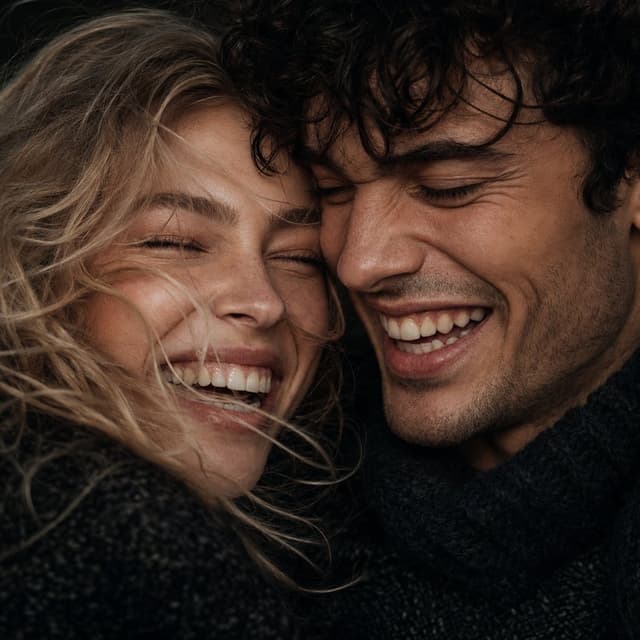
Profile / Avatar - Macro Candid Couple Portrait — output

Profile / Avatar - Extreme Close-Up Laughing Couple Portrait

Ozair AIGPT Image 2
Create an extreme close-up square macro portrait of a young couple laughing together, with two people: a young woman on the left with messy {argument name="hair color" default="light brown blonde"} windblown hair, and a young man on the right with dark tousled hair and light stubble. Their faces are pressed very close together, cropped tightly so the composition fills the entire frame; show only partial hair, cheeks, mouths, jawlines, and the upper edges of dark chunky knit sweaters. Capture a candid, hyper-realistic editorial photography style with high-fidelity skin texture, natural pores, slight freckles, subtle cheek flush, realistic teeth and gums, crinkled nearly closed eyes from intense joyful laughter, and authentic imperfect expressions. Use a dark minimalist background and moody cinematic color grading with deep desaturated tones, warm raw skin undertones, high contrast, and soft dramatic directional key light catching fine strands of hair and sculpting the noses, brows, lips, and cheek contours. Shot as if on {argument name="camera look" default="35mm film"}, shallow depth of field, sharp focus on the center where the faces meet, dark textured knitwear around their necks, raw intimate atmosphere, award-winning fashion editorial realism. Use a 1:1 square aspect ratio and avoid text, logos, extra people, or overly polished beauty retouching.
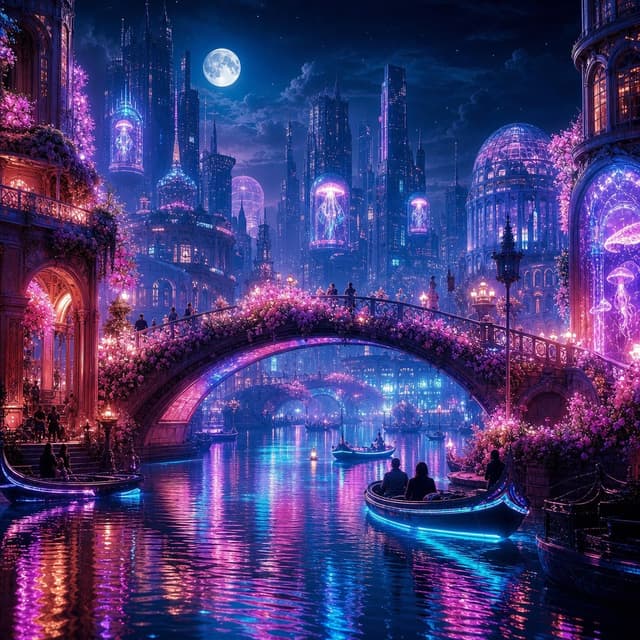
Game Asset - Neon Dream City — output

Game Asset - Neon Dream City

Liz RobertsGPT Image 2
Create a highly detailed fantasy cyberpunk cityscape at night titled {argument name="scene concept" default="Neon Dream City"}: a romantic canal city with Venetian architecture fused with futuristic glass towers, glowing magenta and cyan lights, and a luminous full moon in a deep blue starry sky. Use a square 1:1 canvas, cinematic wide-angle view from water level, with a grand arched stone bridge covered in dense pink flowering vines crossing the center of the image. Show exactly 4 visible boats: one gondola docked at the lower left by a warmly lit arched building entrance, one small gondola near the center under the bridge, one larger foreground gondola at the lower right carrying seated silhouettes with bright cyan underglow, and one dark moored boat at the far right edge. Include exactly 5 prominent glowing jellyfish holograms or aquarium-like displays: one tall jellyfish in a tower capsule on the left skyline, one jellyfish inside a pink dome near the center-left skyline, one floating jellyfish sign high in the middle distance, one large jellyfish display in the right-side arched window, and one small jellyfish display near the far right lower window. The city should contain ornate balconies, domed conservatories, spires, skyscrapers, streetlamps, tiny silhouetted pedestrians on the bridge, and pink blossoms cascading from both sides. The canal water must be calm but rippled, reflecting intense neon {argument name="primary neon color" default="cyan"}, {argument name="secondary neon color" default="magenta"}, violet, and warm orange lights in long vertical streaks. Mood: dreamy, romantic, magical, futuristic, ultra-detailed digital painting, sharp architectural detail, volumetric moonlight, glowing mist, rich contrast, no text, no logo, no watermark.
Infographic / Edu Visual - Glasses Glare Removal Comparison — output

Infographic / Edu Visual - Glasses Glare Removal Comparison

peak of human evolutionGPT Image 2
Create a realistic side-by-side comparison image showing the same outdoor cafe-style portrait duplicated in two vertical panels. Canvas is a wide 16:9 frame. Layout: exactly 2 equal panels placed left and right, separated by 1 thin vertical white divider line at the center. Each panel shows the same young woman from the chest up, standing outdoors in warm late-afternoon sunlight with a shallow-depth-of-field background of greenery, modern glass buildings, and soft bokeh. She has long light-brown/blonde hair backlit by the sun, wears a cozy cream knit sweater, and holds 1 slim gray laptop or notebook against her chest with both arms. Her head is turned slightly toward the camera, but the entire face area is anonymized with exactly 2 opaque rectangular blocks, one per panel, colored warm taupe-brown, covering forehead through chin. Include thin round eyeglass rims visible at the sides of the anonymized face; in the left panel, show a noticeable pale blue-white glare/reflection on the glasses lens, while in the right panel make the glasses clearer with the glare mostly removed, preserving the same face shape, hair, pose, clothing, lighting, and background. Photorealistic DSLR portrait, natural color grading, sunlit hair rim light, crisp subject with blurred background, no text, no labels, no watermark. Customizable details: subject is {argument name="subject description" default="a young woman with long light-brown blonde hair"}, clothing is {argument name="clothing" default="a cream knit sweater"}, object held is {argument name="held object" default="a slim gray laptop"}, anonymizing block color is {argument name="face block color" default="warm taupe-brown"}, setting is {argument name="setting" default="outdoor cafe courtyard with greenery and modern glass buildings"}.
Infographic / Edu Visual - Glasses Glare Removal Comparison — output

Infographic / Edu Visual - Glasses Glare Removal Comparison

peak of human evolutionGPT Image 2
Create a realistic side-by-side before-and-after comparison image showing the same outdoor portrait in two vertical panels separated by a thin white divider. The subject is {argument name="subject description" default="a woman with long dark curly hair wearing a loose white linen beach blouse, small gold hoop earrings, and light-framed eyeglasses"}, photographed from the shoulders up in three-quarter profile on a sunny beach boardwalk. The background shows ocean waves on the left, pale blue sky, wooden railings, and softly blurred palm trees, with shallow depth of field and natural warm daylight. Use exactly 2 panels: left panel is the original portrait with visible glasses glare/reflections partially obscuring the eyes, and right panel is the edited version where the glare has been removed and the eyes look natural while the face shape, pose, hair, clothing, lighting, and background remain unchanged. Add no labels or captions. Preserve photorealistic texture in the curls, translucent white fabric, skin tones, and beach environment. Keep the composition cropped horizontally like a social media comparison image, with the subject centered across both panels and the edit looking subtle and trustworthy for a profile photo. Use {argument name="image ratio" default="16:9 landscape"}, {argument name="setting" default="sunny beach boardwalk"}, and {argument name="edit goal" default="remove eyeglasses glare without changing the face"}.
Infographic / Edu Visual - Cafe Portrait Glare Removal Comparison — output

Infographic / Edu Visual - Cafe Portrait Glare Removal Comparison

peak of human evolutionGPT Image 2
Create a realistic side-by-side comparison image showing the same cafe portrait duplicated in two equal vertical panels, like a before-and-after social media demonstration for removing glasses glare while preserving identity. Canvas is a wide 16:9 image, approximately 1200×675, split exactly down the center by a thin vertical white divider. Both panels show one adult man seated at a cafe table by large windows, wearing a dark navy blazer over a plain white crew-neck T-shirt, arms resting forward, with short neatly styled black hair and warm medium skin tone. In both panels, place a large opaque tan square censorship block over the center of the face, covering the eyes, nose, and mouth while leaving hair, ears, jawline, neck, and clothing visible; use {argument name="face block color" default="muted tan brown"}. The left panel should subtly imply the original portrait with eyeglass frames and glare partly visible at the edges of the face block, while the right panel should show the cleaned version with no visible glasses glare and the same face shape, pose, hair, outfit, lighting, and background. Include exactly 2 portrait panels: left original and right edited. Include exactly 2 identical coffee cups, one near the bottom center of each panel, cream-colored ceramic with coffee inside. Include exactly 2 small green potted plants, one at the lower left of each panel. Background: bright cafe interior with black window frames, sunlit glass, soft green foliage outside, blurred street and building shapes, shallow depth of field, natural daylight, realistic photography. Style should be high-quality candid profile-photo realism, crisp subject details, soft bokeh background, no text labels, no watermark, no extra people, and no changes between the two panels except the suggested glasses-glare removal on the right. Use {argument name="subject outfit" default="dark navy blazer over a white T-shirt"}, {argument name="setting" default="sunlit cafe by large windows"}, and {argument name="comparison theme" default="glasses glare removal before and after"}.
Infographic / Edu Visual - Glasses Glare Removal Portrait Collage — output

Infographic / Edu Visual - Glasses Glare Removal Portrait Collage

peak of human evolutionGPT Image 2
Goal: Create a clean comparison collage showing four portrait-photo examples for eyeglasses glare removal, with each example displayed as a side-by-side before-and-after pair while preserving the same person, pose, clothing, lighting, and background.

Canvas: Wide 16:9 image, approximately 1200×675 px, white background, thin white gutters between panels, rounded photo corners, realistic profile-photo photography.

Layout: Arrange exactly 4 comparison groups in a 2×2 grid. Each group contains exactly 2 near-identical portrait photos placed left and right, for a total of exactly 8 portrait panels. The pairs are: 1) top-left pair: an East Asian woman in a gray blazer in an office setting with shelves and a monitor behind her; 2) top-right pair: a young Black man outdoors in a green park, wearing an olive overshirt over a white T-shirt; 3) bottom-left pair: an older white man with gray hair wearing a pale blue sweater in a warm home-library setting with bookshelves and a glowing lamp; 4) bottom-right pair: a woman with dark curly hair tied up, wearing a navy blouse with white dots, seated indoors near a window and a green plant, resting her hand near her chin.

Subject details: In the left image of each pair, show subtle eyeglasses glare or reflection over the eye area; in the right image of each pair, remove the glare so the eyes look natural and clear, without changing facial identity, expression, head position, skin tone, hairstyle, clothing, camera angle, or background. Use realistic shallow depth of field, natural color grading, soft professional portrait lighting, and profile-photo framing from chest or shoulders upward.

Privacy treatment: Cover the central face area of every portrait with a solid opaque rectangular censor block, matching the skin tone of that subject, so facial features are hidden. Use exactly 8 censor rectangles, one per portrait panel, centered over the face and extending from forehead to lower face. The blocks should be plain, without blur texture or text.

Constraints: No captions, no arrows, no logos, no watermark, no UI elements, no extra people, no decorative graphics. Keep the comparison pairs aligned and visually consistent, like a social-media demonstration image for {argument name="editing task" default="remove glasses glare"}. Use {argument name="image style" default="realistic professional portrait photography"}, {argument name="collage layout" default="four side-by-side before-and-after portrait pairs"}, {argument name="background color" default="white"}, and {argument name="privacy treatment" default="solid skin-tone face censor blocks"}.
Infographic / Edu Visual - Two-Panel Snow Cabin Model Comparison — output

Infographic / Edu Visual - Two-Panel Snow Cabin Model Comparison

GPTProto OfficialGPT Image 2
Goal: Create a vertical side-by-side model comparison poster showing the same snowy modern mountain cabin scene rendered in two stacked panels, with bold labels identifying each model.

Canvas: Portrait 3:4 image, approximately 768×1024 px. Split the canvas horizontally into exactly 2 equal photographic panels with no thick border between them.

Layout:
- Panel 1, top half: snowy alpine landscape with a modern dark wooden A-frame cabin on a hill, evergreen trees, pastel winter sky, and one small hiker walking toward the cabin along a trail of footprints. Add a large label in the upper-left reading {argument name="top label" default="Banana pro"}.
- Panel 2, bottom half: a very similar snowy alpine cabin scene from a slightly lower and closer perspective, with warmer sunset colors, denser foreground trees, one small hiker on a snowy path, and a large label in the upper-left reading {argument name="bottom label" default="GPT image 2"}.

Counted visible elements:
- Exactly 2 stacked comparison panels.
- Exactly 2 large text labels: “Banana pro” on the top panel and “GPT image 2” on the bottom panel.
- Exactly 2 modern cabins, one per panel.
- Exactly 2 human figures, one per panel, both small and walking away from the viewer.
- Each panel should include many snow-covered evergreen trees, but keep the composition focused on the cabin and path.

Scene details: Both panels depict a winter evening in a snowy conifer forest. The cabin is contemporary, tall, angular, and steep-roofed, with dark vertical wood siding, warm glowing rectangular windows, a concrete or stone lower level, and a roof with dark solar-panel-like sections or skylights. The snow should show soft wind-shaped drifts and a clear trail of footprints leading from the foreground toward the hiker and cabin. The sky should be soft lavender, pink, and pale blue, suggesting dusk.

Typography: Use a large decorative blocky condensed serif or western-style display font, white fill with dark outline and subtle internal striping. Place the text flush near the top-left of each panel, large enough to dominate the corner without covering the cabin.

Visual style: Photorealistic architectural visualization, crisp winter detail, high dynamic range, warm window light contrasting with cold snow, cinematic dusk lighting. The top panel should feel slightly cleaner and more minimal with a pale lavender sky; the bottom panel should feel more dramatic and polished with stronger pink sunset clouds and richer contrast.

Constraints: Do not add logos, watermarks, extra captions, UI frames, or additional people. Keep the two-panel comparison structure obvious and preserve the exact label wording unless customized.
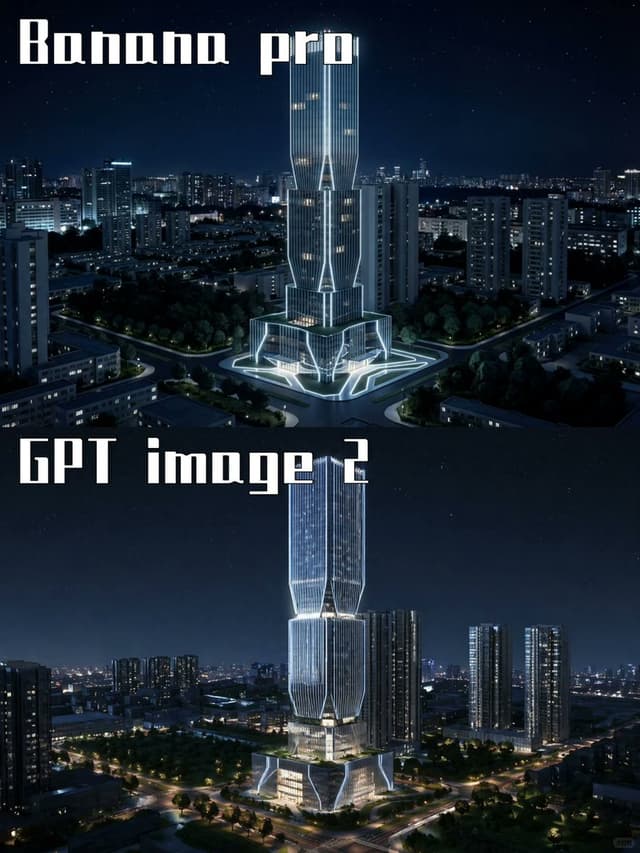
Infographic / Edu Visual - Night Skyscraper AI Model Comparison — output

Infographic / Edu Visual - Night Skyscraper AI Model Comparison

GPTProto OfficialGPT Image 2
Goal: Create a two-panel vertical comparison image showing the same futuristic skyscraper concept rendered by two different image models at night.

Canvas: Portrait 3:4 aspect ratio, 768×1024 feel, split horizontally into exactly 2 equal stacked panels with no visible border line. Both panels show a dark blue nighttime cityscape with a starry sky and glowing urban lights.

Panel 1: Top half labeled {argument name="top label" default="Banana pro"} in large white blocky stencil/gothic display lettering at the upper left. Show a futuristic illuminated skyscraper centered in a dense city district, surrounded by mid-rise apartment towers, roads, trees, and a plaza. The tower has a tall twin-volume form with vertical ribbed glass, bright white outline lighting, warm lit windows, angular cutouts, and a glowing geometric base/plaza. Camera angle is elevated aerial view, looking slightly downward, crisp cinematic night lighting.

Panel 2: Bottom half labeled {argument name="bottom label" default="GPT image 2"} in the same large white blocky display lettering at the upper left. Show a similar but more refined futuristic skyscraper centered in a nighttime urban landscape, taller and sleeker, with stacked faceted glass sections, luminous vertical lines, bright white edge lighting, warm interior floors, and a glowing multi-level podium. Surround it with high-rise residential towers, tree-lined roads, intersections, and distant city lights. Camera angle is elevated aerial view, cinematic and realistic.

Visual style: Photorealistic architectural visualization, dramatic blue-black night palette, crisp high contrast, cool white neon accents, realistic city depth, subtle stars, polished glass reflections, high detail, no people visible.

Text content: Use exactly 2 visible text labels: {argument name="top label" default="Banana pro"} and {argument name="bottom label" default="GPT image 2"}. Keep the typography large, white, angular, and slightly retro-futuristic.

Constraints: Include exactly 2 comparison panels, exactly 2 central skyscraper subjects, and exactly 2 large labels. Do not add logos, watermarks, captions, UI elements, arrows, or extra explanatory text.
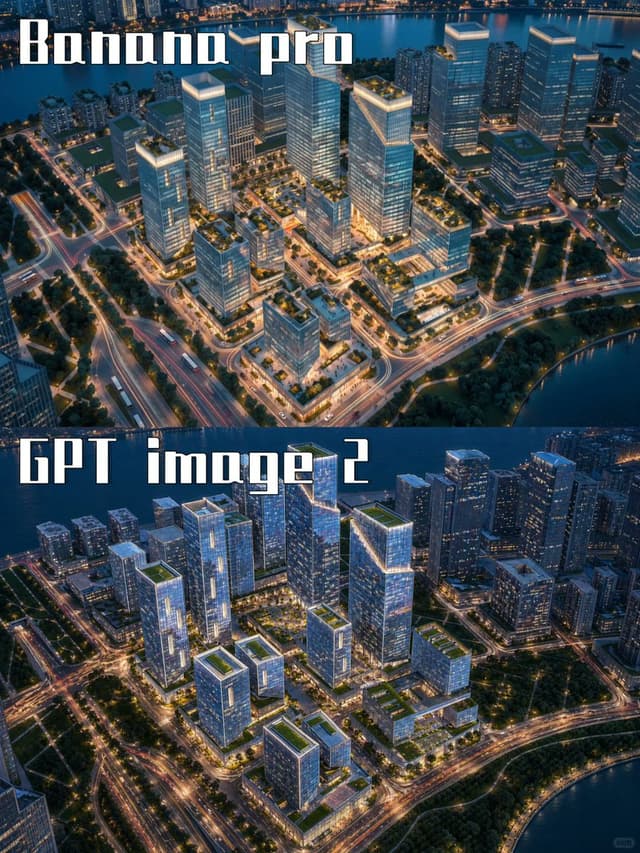
Infographic / Edu Visual - AI City Rendering Comparison Poster — output

Infographic / Edu Visual - AI City Rendering Comparison Poster

GPTProto OfficialGPT Image 2
Goal: Create a vertical side-by-side comparison poster showing two AI-generated aerial city renderings, one above the other, for a visual model comparison between {argument name="top model label" default="Banana pro"} and {argument name="bottom model label" default="GPT image 2"}.

Canvas: Portrait 3:4 image, approximately 768×1024 px. Split the canvas into exactly 2 equal horizontal panels with no border or margin between them.

Layout: The top panel fills the upper half and the bottom panel fills the lower half. Each panel shows a similar futuristic waterfront business district at blue-hour dusk from a high oblique aerial view. Place exactly 2 large text labels: the top label in the upper-left corner reading “Banana pro”, and the bottom label in the upper-left area of the lower panel reading “GPT image 2”. Use a tall, blocky, condensed white display font with a dark shadow or outline, similar to retro stencil/gaming typography.

Top panel scene: A polished architectural visualization of a modern urban development beside a river or bay. Include approximately 12 prominent glass office towers and mid-rise blocks arranged on a gridded campus, with glowing rooftop edges, landscaped green roofs, tree-lined roads, and warm street lighting. Show water along the top edge and lower-right edge, with distant city buildings beyond the water. Roads have orange and white light trails, creating a lively night-city effect.

Bottom panel scene: A second version of the same waterfront district, slightly darker and more dramatic, with approximately 14 prominent glass towers and mid-rise buildings. Use cooler blue glass reflections, brighter illuminated windows, stronger road-light trails, green rooftop gardens, and a river or bay curving along the top and lower-right edges. Make the composition visibly similar to the top panel but not identical, so it feels like two different AI model outputs from the same prompt.

Visual style: Hyper-detailed aerial architectural rendering, realistic but slightly idealized, cinematic dusk lighting, blue and teal shadows, warm golden streetlights, crisp glass facades, dense urban planning, marina/waterfront atmosphere, high contrast, sharp perspective, no people visible.

Constraints: Use exactly 2 stacked comparison panels and exactly 2 visible text labels. Keep the labels large, readable, and white with dark outline/shadow. Do not add logos, UI elements, watermarks, captions, or extra text.
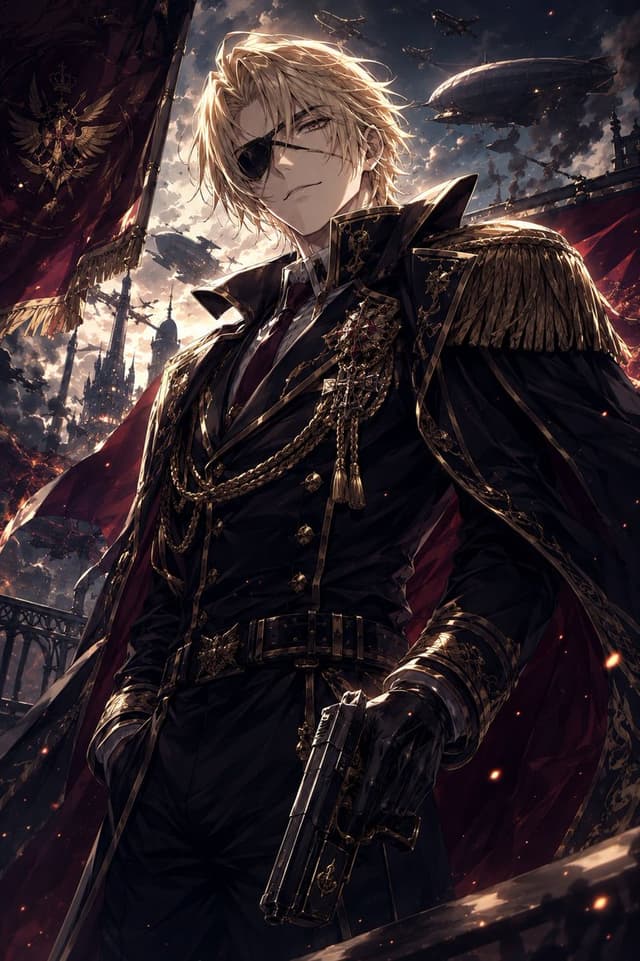
Social Media Post - Imperial Marshal Anime Commander — output

Social Media Post - Imperial Marshal Anime Commander

AIossansanGPT Image 2
Create a dramatic vertical anime fantasy-military illustration of {argument name="character name" default="Marshal Berg"}, an imposing adult male commander standing in a low-angle hero shot. He has {argument name="hair color" default="long tousled blond hair"} blown by the wind, a stern aristocratic presence, and a face visible without obstruction. Dress him in a black imperial marshal uniform with a high structured collar, fitted black jacket, gold piping, ornate epaulettes with heavy fringe, medals, jeweled brooches, layered gold chains, tassels, leather gloves, a wide black belt with a decorative gold buckle, and a deep crimson cape lined in shadow. His right hand holds an ornate black pistol angled downward in the foreground; his other hand rests near his side with confident posture. The setting is a grand dark steampunk-fantasy empire at dusk, with stormy glowing clouds, ember sparks, gothic towers, iron railings, red banners, and a huge military flag bearing a gold winged crest and crown on the left. In the sky show exactly 5 visible flying war machines: 2 large zeppelin airships and 3 smaller aircraft silhouettes. Use cinematic backlighting from the cloudy sunset, strong rim light on the hair and shoulders, high contrast shadows, intricate gold details, dynamic wind, epic scale, ultra-detailed anime painting style, sharp composition, no text, no watermark, no facial censor block, no blur.
Social Media Post - Japanese Train Schoolgirl Phone Recording — output

Social Media Post - Japanese Train Schoolgirl Phone Recording

トーマ@Grok愛好家GPT Image 2
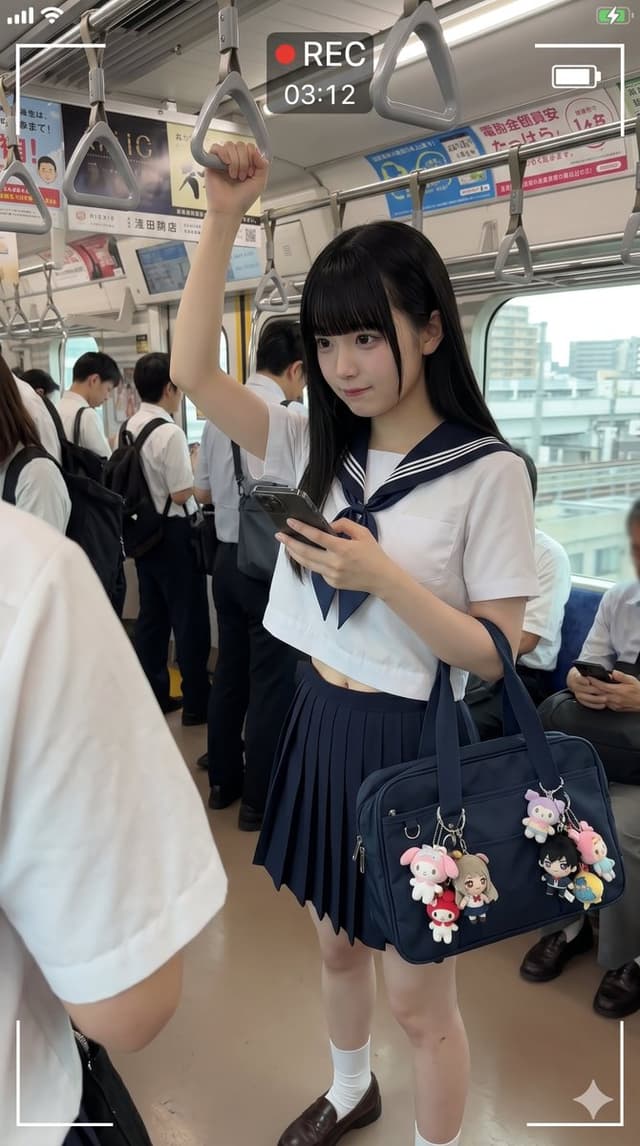
Create a photorealistic vertical smartphone candid photo inside a busy Japanese commuter train, shot from standing passenger height with a wide-angle phone lens. The main subject is {argument name="character description" default="a Japanese high school girl with long straight black hair"} standing in the aisle, wearing a classic navy-and-white sailor school uniform: short-sleeve white cropped sailor blouse with navy collar and double white stripes, navy neckerchief, navy pleated skirt, white crew socks, and brown loafers. Her face is intentionally hidden by a centered soft-edged square pixel blur/mosaic censor block. She raises her left arm to hold one gray triangular overhead train strap and looks downward while holding a dark smartphone in her right hand. On her shoulder is {argument name="bag description" default="a navy rectangular school shoulder bag"} decorated with exactly 5 visible dangling character charms: a pink bunny plush, a small red mushroom-like mascot, a blonde anime girl doll, a black-haired anime boy doll, and a pink-and-blue pastel plush on the far right. Surround her with other commuters in white shirts and school uniforms, some standing and some seated, with their faces blurred; include train windows showing an urban city view outside, metal poles, fluorescent ceiling lights, Japanese ad posters above the windows, and many gray triangular hanging straps receding into the background. Add a realistic phone video recording overlay: white corner frame brackets, a red dot and “REC” at the top center, timer text {argument name="recording time" default="03:12"}, small phone status icons at the top corners, and a small sparkle icon near the bottom right. Lighting should be natural daylight mixed with train interior fluorescent light, highly realistic, slightly compressed social-media photo quality, candid documentary mood, no glamour posing, no watermark.
Comic / Storyboard - Moonlit Palace Dancer Duel — output

Comic / Storyboard - Moonlit Palace Dancer Duel

ねね*AIcreatorGPT Image 2
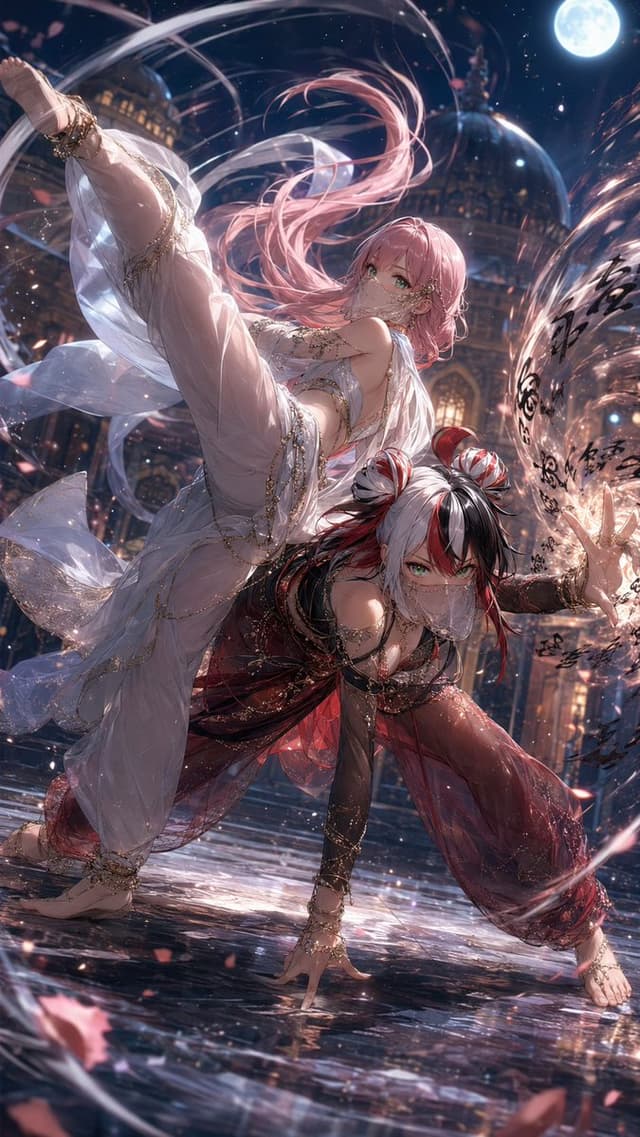
Create a highly detailed vertical anime fantasy action illustration of exactly two masked female dancers/martial artists performing a dramatic synchronized pose in a moonlit palace courtyard. The first character, {argument name="upper dancer hair color" default="long flowing pastel pink hair"}, is elevated diagonally across the upper half of the image with one leg extended high toward the top-left corner, wearing a translucent white harem-dancer outfit with gauzy veils, gold chains, jeweled anklets, bare feet, pale fabric layers, and a delicate face veil; her expression is calm and confident with bright green eyes. The second character, {argument name="lower dancer hair color" default="black-and-white hair with red streaks in twin buns"}, crouches low in the foreground in a dynamic hand-to-ground fighting stance, wearing a dark red and black translucent harem outfit with gold jewelry, arm bands, ankle ornaments, bare feet, and a matching face veil; she has sharp green eyes and an intense gaze. Set them in an ornate domed palace at night under a bright full moon in the upper-right sky, with warm glowing windows, arched architecture, and a glossy reflective wet stone floor. Surround the characters with swirling ribbons of light, transparent silk trails, sparkling particles, rose-petal fragments, and a circular magical calligraphy spell effect on the right side containing black brush-like glyphs. Use a cinematic low-angle composition with strong diagonal motion, flowing hair and fabric, high-detail jewelry, dramatic rim lighting, soft moonlight, warm palace highlights, reflections on the ground, shallow depth of field, and an ultra-polished Japanese anime illustration style. The image should feel elegant, sensual, magical, and action-packed, with no modern objects, no watermark, and no readable English text.
Infographic / Edu Visual - Annotated ChatGPT Multiple Image Outputs — output

Infographic / Edu Visual - Annotated ChatGPT Multiple Image Outputs

ひまきち@himakitiGPT Image 2
Goal: Create a realistic screenshot-style image of a ChatGPT image generation interface demonstrating multiple image outputs from one request.

Canvas: Landscape 16:9 screenshot crop, white background, resembling a mobile or narrow desktop chat interface. Keep the composition slightly zoomed in so the right edge of the image carousel is visible.

Layout: At the top right, place one rounded light-gray user message bubble containing Japanese text. Beneath it on the left, show the status line “Thought for 2m 7s ›” in light gray. Below that, show one large generated image preview with rounded corners, and a narrow strip of additional generated thumbnails on the right side.

Text content: The user bubble should read: “絵コンテを参考に今回のベた塗アニメMVで使用する背景イラストを被写体なしで10個作成してください。\nテイスト強めで汚らしっぷつぷ感はなくしてください。プロアニメーターとして画質はよくしてほしいです。\n16:9 n=10”. Highlight the “n=10” part as the key detail.

Generated image preview: The main preview is a pastel anime background illustration of an empty stylized street with no characters, inspired by a colorful East Asian shopping district. Use soft cel-shaded anime line art, bright pastel blue, pink, yellow, and mint tones, lanterns hanging from buildings, decorative circular signs, shopfronts on both sides, a centered vanishing point, and a decorative archway in the distance. The image should look like a professional anime MV background, 16:9, clean and polished.

Discrete visible elements to include: exactly 1 user message bubble; exactly 1 status line; exactly 1 large main generated image; exactly 3 narrow vertical thumbnails partially visible on the right, each showing a different pastel anime background; exactly 2 circular overlay buttons on the main preview, one dark “編集” edit button at bottom left and one white downward arrow download button near bottom right; exactly 1 small dark share/upload icon button at the lower-right corner of the main preview.

Annotation: Add thick hand-drawn yellow marker annotations over the screenshot: exactly 1 yellow circle around “n=10”, exactly 1 thick yellow arrow pointing from the circled “n=10” down toward the right-side thumbnail strip, and exactly 1 tall yellow bracket-like outline encircling the vertical thumbnail strip. The yellow marker should look casual and drawn by hand.

Style: Clean UI screenshot aesthetic with subtle antialiasing, light gray interface elements, Japanese text rendered legibly, and bright yellow annotation marks. Use {argument name="main annotation text" default="n=10"} as the highlighted parameter in the chat message. Keep the screenshot realistic, not a poster or infographic.
Comic / Storyboard - Dynamic Anime Rooftop Action Scene — output

Comic / Storyboard - Dynamic Anime Rooftop Action Scene

砂クリ(カスキャ/AI絵)GPT Image 2
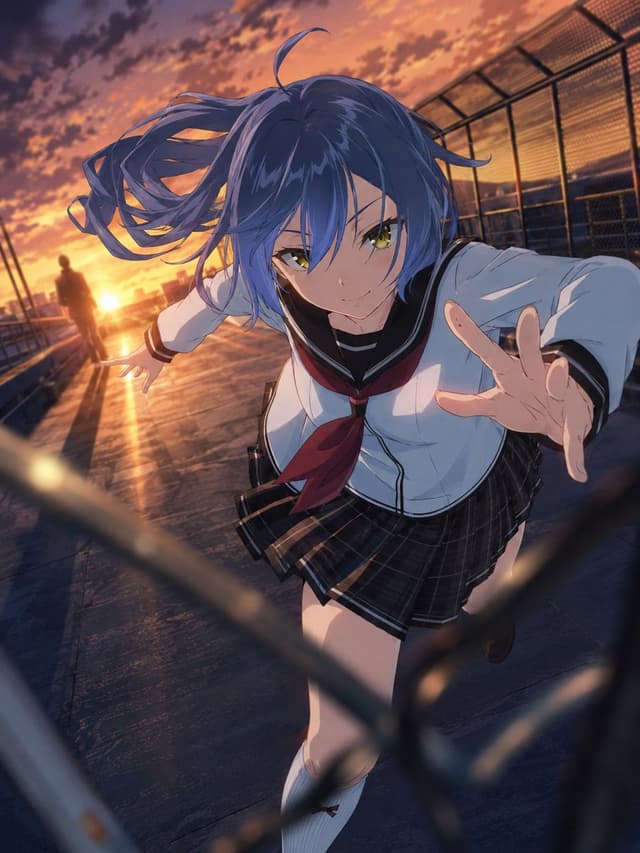
Using REFERENCE_0 as the character base, transform the standing full-body portrait into a dramatic anime action scene. Keep the same school-uniform design, blue twin-tail hairstyle, socks, shoes, and overall character identity, but reconstruct the face clearly in polished 2D anime style with sharp eyes and a confident expression.

Change the pose and composition: make the character sprint or lunge toward the viewer, one hand reaching forward close to the camera and the other arm extended back, with hair and skirt blown by motion. Use an intense low/wide-angle perspective with strong foreshortening and dynamic motion.

Add a new setting: a school rooftop or fenced walkway at sunset, with warm orange sky, dramatic clouds, reflective ground, and chain-link fencing. Include exactly 1 distant human silhouette near the glowing sunset in the background. Add blurred fence bars in the extreme foreground to create depth and a cinematic chase/battle-scene feeling.

Style: high-quality Japanese anime key visual, cinematic lighting, warm sunset rim light, dramatic shadows, detailed hair strands, expressive face, energetic composition, no text, no watermark.
Product Marketing - Vintage Temperance Tarot Card Pair — output

Product Marketing - Vintage Temperance Tarot Card Pair

тoяoтoʀᴀGPT Image 2
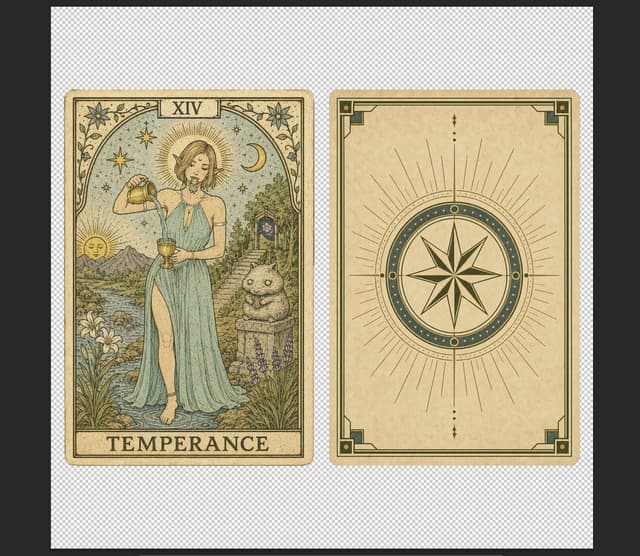
Goal: Create a vintage tarot card design sheet showing exactly 2 cards side by side: the front of a tarot card on the left and the matching card back on the right.

Canvas: Landscape composition on a transparent-background checkerboard preview, with both cards vertically oriented, evenly spaced, and centered. Use aged cream paper, muted ink, weathered edges, and a hand-illustrated antique tarot aesthetic.

Left card, front design: A classic tarot card titled {argument name="card title" default="TEMPERANCE"} with the Roman numeral {argument name="roman numeral" default="XIV"} in a small top plaque. The card has an ornate botanical border with vines, small flowers, stars, and corner linework. In the center stands a serene feminine figure in a flowing {argument name="dress color" default="pale teal"} Greco-Roman style dress with a thigh slit, barefoot in shallow water, pouring liquid from one golden cup into another. The face is softly indistinct and painterly rather than detailed. Behind her are a radiant halo, scattered stars, a crescent moon, distant mountains, a river, flowers, grasses, and a small cute stone-cat statue on a pedestal at the right side. The lower title band contains large serif text reading TEMPERANCE.

Right card, back design: A matching ornate tarot card back with no title text. Use the same aged parchment tone and thin dark green-gold border. The center contains one large circular compass-star emblem: an 8-point star inside concentric circles, with a dark teal ring decorated with small gold dots. Around it, add a symmetrical sunburst of many fine rays extending outward. Include small vertical ornamental dots and diamond marks above and below the circle, plus geometric corner brackets and small square corner ornaments.

Visual style: Antique occult illustration, Art Nouveau-inspired tarot engraving, muted teal, sage green, ochre gold, cream parchment, fine ink hatching, slightly faded print texture, subtle stains, realistic paper grain, handmade line art.

Constraints: Show exactly 2 cards: 1 front card and 1 back card. Keep both cards the same size and orientation. Preserve the readable text {argument name="bottom title text" default="TEMPERANCE"} and XIV. Do not add extra cards, hands, mockup shadows, modern UI, or watermarks.
Game Asset - Medieval Castle Mock Duel — output

Game Asset - Medieval Castle Mock Duel

カーブミラーGPT Image 2
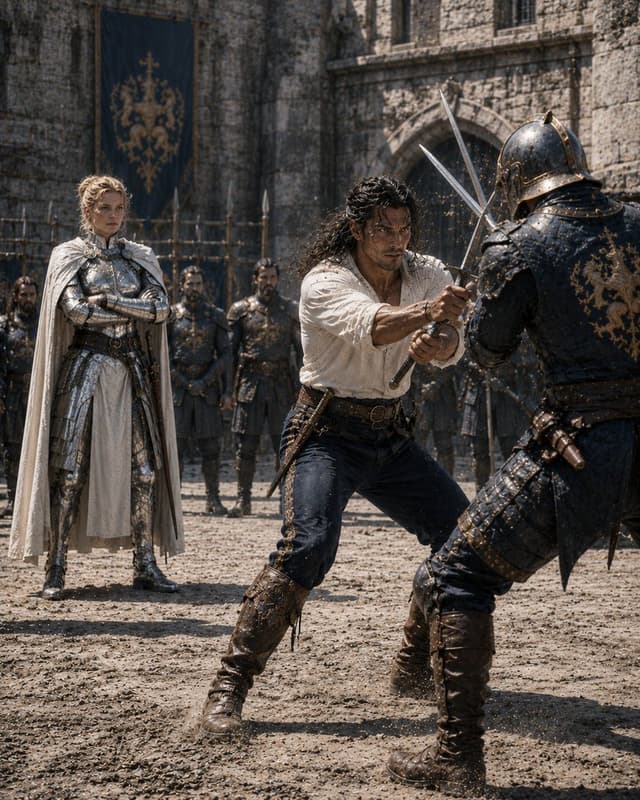
Create a cinematic medieval fantasy mock duel scene in a stone castle courtyard, titled by mood as {argument name="scene theme" default="mock battle"}. Use a vertical 4:5 composition, realistic high-detail photography style, harsh midday sunlight, dusty air, flying grit and tiny sparks where weapons meet. Show exactly 8 visible people: 2 foreground duelists, 1 noble armored observer, and 5 background guards. In the foreground center, a rugged swordsman with {argument name="hero hair" default="long dark curly hair"} wears an off-white loose linen shirt, dark trousers, a leather belt, a side dagger, and tall worn brown boots; he crouches forward with both hands gripping a sword, blocking an attack. On the right foreground, an opponent in dark blue-black plate armor with ornate gold trim, a closed helmet, layered leather straps, and tall boots lunges in with crossed blades, partially back-facing the viewer. On the left midground, a regal knight commander with {argument name="commander armor" default="polished silver plate armor and a white cape"} stands calmly with arms crossed, watching the duel. Behind them, place 5 armored guards standing in a loose line with spears and dark armor, slightly out of focus. The background is an old gray stone fortress wall with an arched gate, narrow windows, wooden palisade details, and a large dark blue hanging banner bearing a gold heraldic lion-like crest. Faces should be anonymized with simple flat brown rectangular face coverings on all clearly visible people, matching the image’s censored look. Emphasize gritty medieval realism, textured armor, scratches, dust, leather, cobblestone ground, dramatic action, shallow depth of field, no modern objects, no text, no watermark.
Product Marketing - Bold Gold Fashion Magazine Cover — output

Product Marketing - Bold Gold Fashion Magazine Cover

HER19845GPT Image 2
Goal: Create a bold fashion magazine cover featuring {argument name="model description" default="a young woman with long light-brown hair wearing a white baseball cap and a black ribbed halter top"}, posed from the chest up against a glossy golden satin fabric background. The model is centered, cropped close, with a large opaque square censor block covering the entire face area from forehead to chin; the square should be a warm beige-brown tone matching the cover palette.

Canvas: Vertical portrait magazine cover, 3:4 aspect ratio, high-resolution editorial print design. Use a saturated golden-yellow background with dark chocolate-brown typography. The overall look should be luxurious, sporty, feminine, and unapologetically graphic.

Layout: Oversized condensed serif masthead text fills the top and continues behind the model, reading {argument name="masthead text" default="HER19845"}. The letters are extremely tall, tightly spaced, and partially obscured by the cap and hair. Place additional huge cropped numeral-like typography behind the model on the left-center. Keep the model in the center foreground, with the cap brim extending left. Use strong magazine-cover layering: background fabric, huge masthead, model, censor square, then smaller cover lines.

Visible text elements: Include exactly 8 distinct text/graphic label groups: 1) giant top masthead “HER19845”; 2) small left label “SPRING / SUMMER 2024”; 3) large stacked left cover line {argument name="left cover line" default="OWN EVERY FRAME"}; 4) small right tagline “BOLD FEMININE UNAPOLOGETIC”; 5) right-side label “EST. 19845” with a horizontal rule below it; 6) large lower-right title {argument name="main cover word" default="HER"}; 7) small lower-right caption “POWER IN FOCUS. STYLE IN MOTION.”; 8) tiny footer copyright “© HER19845 ALL RIGHTS RESERVED.” plus a small globe icon nearby.

Subject details: The white baseball cap should look softly wrinkled with dark navy cursive embroidery on the front. Hair falls around both sides of the censor square. The black halter top has visible ribbed texture and a deep neckline. Skin is warmly lit with editorial studio lighting.

Visual style: High-fashion magazine cover, sharp commercial photography mixed with bold graphic design, heavy contrast, warm gold palette, glossy satin folds, dramatic typography, clean print finish, no border.

Constraints: Keep all text in dark brown or near-black. Do not add extra headlines beyond the 8 listed groups. Keep the censor square perfectly rectangular, centered over the face, and opaque. Make the composition look like a finished luxury sports-fashion magazine cover, not a poster mockup.
Profile / Avatar - Censored Fantasy Cosplayer at Expo — output

Profile / Avatar - Censored Fantasy Cosplayer at Expo

soda hoGPT Image 2
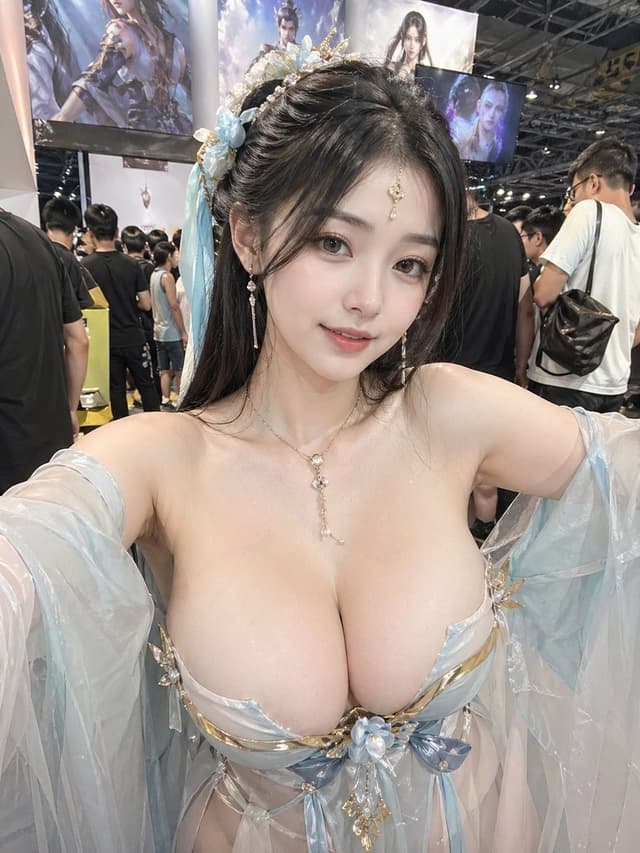
Create a realistic candid convention photo of an adult woman cosplayer posing close to the camera in a crowded indoor anime/game expo. She wears an ornate white-and-gold fantasy goddess costume with translucent off-shoulder draped sleeves, gold filigree trim, a jeweled necklace with a glowing opal-like pendant, dangling earrings, and an elaborate gold crown hairpiece with pearls and crystal ornaments. Her long dark brown hair is styled half-up with glossy waves. The composition is a vertical smartphone shot from slightly below chest height, tightly cropped from upper torso to head, with her arms extended outward as if posing; place a solid rectangular censor block over the face in a muted brown skin-tone color. Emphasize glossy fabric, metallic gold details, realistic skin lighting, and shallow depth of field. Background: busy exhibition hall with overhead black ceiling trusses, bright booth lights, blurred attendees, a large fantasy character poster on the left with Chinese calligraphy, and a glowing booth sign on the right. Use photorealistic detail, natural convention lighting, wide-angle phone perspective, and no watermark. Customize the setting as {argument name="event setting" default="crowded indoor anime/game expo"}, the costume theme as {argument name="costume theme" default="white-and-gold fantasy goddess"}, the jewelry centerpiece as {argument name="jewelry centerpiece" default="opal-like pendant"}, the censor block color as {argument name="censor block color" default="muted brown skin-tone"}, and the background poster text style as {argument name="background poster text style" default="Chinese calligraphy"}.
Profile / Avatar - Anonymized Fantasy Cosplay Selfie — output

Profile / Avatar - Anonymized Fantasy Cosplay Selfie

soda hoGPT Image 2
Create a highly realistic vertical 3:4 smartphone selfie photo of an adult female cosplayer at a crowded game/anime convention booth, shot from slightly above chest height with both arms extended toward the camera. She wears an ornate ethereal fantasy costume in {argument name="costume colors" default="pale icy blue, white, silver, and gold"}: a low-cut sculptural bodice with metallic gold trim, translucent flowing gauze sleeves, layered sheer fabric, and a central blue flower ornament. Include exactly 6 prominent costume/accessory elements: 1 floral-and-gold hairpiece with pale blue ribbons on the left side of her dark hair, 1 pair of dangling pearl-like earrings, 1 delicate necklace with a long crystal pendant, 1 ornate structured bodice, 2 translucent sleeve drapes, and 1 central flower-and-gold chest ornament. Her face is deliberately anonymized by a large opaque square censor block in {argument name="censor block color" default="warm gray-brown"}, covering the entire face from forehead to chin while leaving the hair and accessories visible. The background is a busy indoor expo hall with harsh overhead lighting, ceiling trusses, many attendees in casual clothing, and exactly 3 visible large fantasy character displays/posters behind her: one tall illustrated banner on the upper left, one bright central fantasy banner, and one smaller dark blue screen/poster on the upper right. Use natural smartphone flash/ambient lighting, realistic skin texture, shallow depth of field, candid convention atmosphere, no text overlay, no watermark.
Social Media Post - Whimsical Pirate Girl on Ship Deck — output

Social Media Post - Whimsical Pirate Girl on Ship Deck

Mattyou BenettGPT Image 2
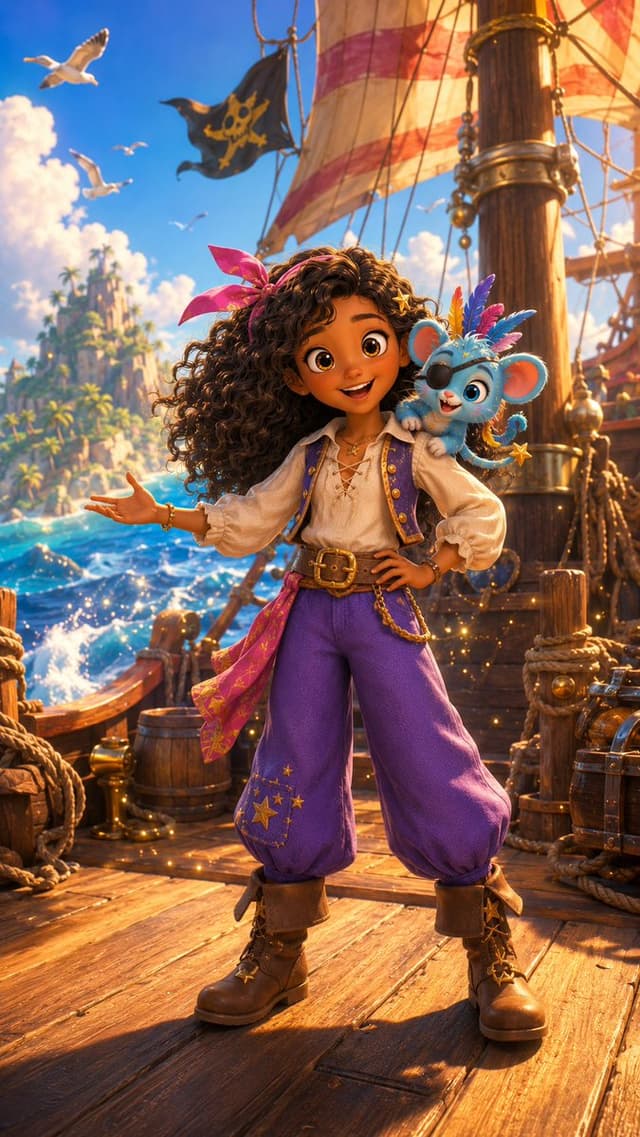
Create a vibrant vertical 2:3 cinematic fantasy adventure illustration in a polished 3D animated feature style. Show {argument name="character name" default="a young pirate girl"} standing full-body on the sunlit wooden deck of a pirate ship, confident pose with one hand on her hip and the other arm extended outward. Her face is intentionally covered by a centered solid medium-brown square mask with no facial features. She has abundant dark brown curly hair blowing in the sea breeze, tied with a bright pink bandana bow, and wears a cream lace-up pirate blouse with puffy sleeves, a short purple vest with gold trim, loose high-waisted purple trousers decorated with small gold stars, a wide brown belt with a large brass buckle and dangling chain, a pink patterned sash at one hip, brown cuffed pirate boots with gold star accents, and small gold jewelry. Perched on her shoulder is {argument name="companion creature" default="a cute tiny blue fantasy monkey-mouse mascot"} with huge round ears, big expressive eyes, a cheerful smile, colorful pink and blue feathers on its head, a curled tail, and a small gold star charm wand. The setting is a richly detailed pirate ship deck with ropes, barrels, chests, brass fittings, mast, rigging, and glowing golden sparkles around the character’s feet; behind her are striped cream-and-red sails and exactly 1 black pirate flag with a yellow skull-and-crossbones style emblem. In the background, show a turquoise ocean with foamy waves, a tropical island with cliffs and palm trees, fluffy white clouds, and exactly 4 white seagulls flying in the bright blue sky. Use warm golden-hour sunlight, saturated colors, rim lighting, shallow depth of field, dynamic composition, ultra-detailed textures, whimsical magical atmosphere, and high-end family adventure movie concept art quality. No text, no watermark, no extra characters.
Product Marketing - Rebellious Streetwear Poster — output

Product Marketing - Rebellious Streetwear Poster

HER19845GPT Image 2
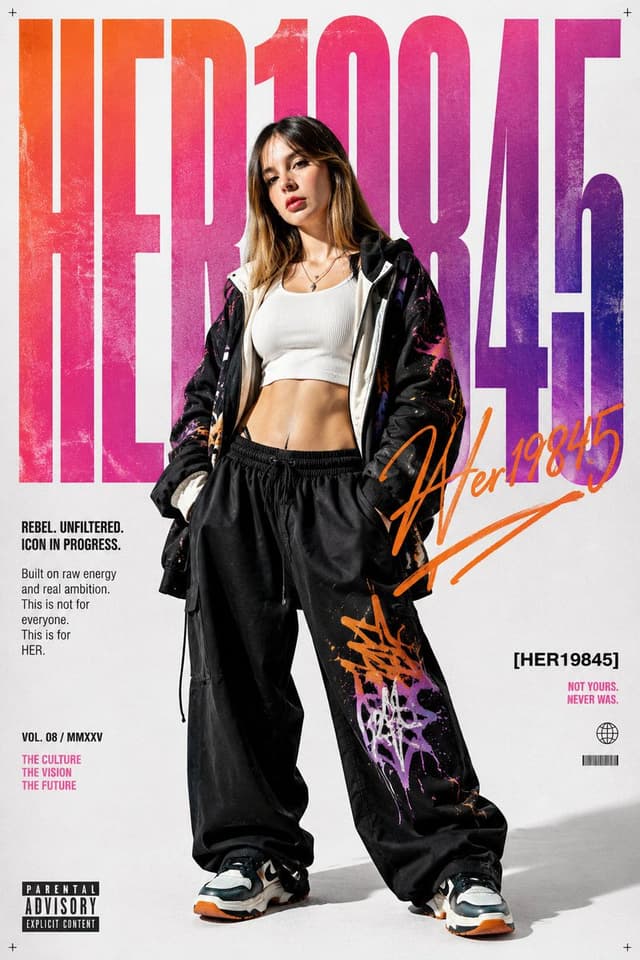
Goal: Create a vertical fashion-editorial magazine poster for a rebellious streetwear brand identity centered on {argument name="character name" default="HER19845"}.

Canvas: Portrait poster, 2:3 aspect ratio, clean off-white studio background with subtle paper grain and tiny registration-cross marks in all four corners.

Layout: Place one full-body female model in the center foreground, standing confidently with legs apart and hands in pockets. Behind her, fill almost the entire background with enormous condensed block typography reading {argument name="headline text" default="HER19845"}, cropped at the edges, using a gritty orange-to-pink-to-purple gradient with distressed texture. Add an energetic orange handwritten signature/scribble overlay across the right-middle area, partially crossing the model and the large number forms.

Subject details: The model has long highlighted brown-blonde hair and a deliberately anonymized blurred face. She wears a white cropped ribbed tank top, layered necklaces, an oversized black zip hoodie with white lining and colorful paint-splatter graphics, very loose black drawstring streetwear pants with orange, pink, and purple graffiti marks, and chunky black-white-orange sneakers. Pose is relaxed, confident, rebellious, fashion campaign style.

Visible text content: Include exactly 9 distinct text elements: 1) giant background headline: “HER19845”; 2) left bold tagline: “REBEL. UNFILTERED. ICON IN PROGRESS.”; 3) left paragraph: “Built on raw energy and real ambition. This is not for everyone. This is for HER.”; 4) lower-left issue line: “VOL. 08 / MMXXV”; 5) lower-left pink slogan stacked in three lines: “THE CULTURE / THE VISION / THE FUTURE”; 6) right bracketed label: “[HER19845]”; 7) small pink right slogan: “NOT YOURS. NEVER WAS.”; 8) bottom-left black-and-white label: “PARENTAL ADVISORY EXPLICIT CONTENT”; 9) orange handwritten mark reading {argument name="signature text" default="After19845"}. Also include two tiny graphic icons under the right slogan: a simple globe icon and a small barcode.

Visual style: High-contrast studio fashion photography blended with bold graphic poster design, sharp full-body lighting, slight floor shadow, grunge print texture, contemporary youth-culture zine aesthetic, neon gradient typography, orange marker strokes, black/pink accent typography.

Constraints: Keep the model centered over the huge background word, maintain legible poster text, use no extra words beyond the 9 listed text elements, preserve the blurred/anonymized face, and make the final result look like a premium rebellious streetwear magazine cover.
Product Marketing - Streetwear Magazine Cover Poster — output

Product Marketing - Streetwear Magazine Cover Poster

HER19845GPT Image 2
Goal: Create a bold vertical streetwear magazine-cover poster featuring a full-body urban fashion model standing in front of enormous distressed typography.

Canvas: Vertical 2:3 poster, off-white paper background with subtle grain, scuffs, and vintage print texture. Use bright daylight shadows on the floor, slightly low-angle fashion photography mixed with graphic-design magazine layout.

Main subject: A young woman streetwear model, centered and overlapping the typography, standing with legs apart and hands in pockets, confident relaxed pose. Her face is intentionally obscured by a soft rectangular blur. She has long blonde hair and wears a dark baseball cap, a black oversized bomber jacket, a cropped white graphic T-shirt with a teddy bear print and the word “Rebel,” a chunky gold chain necklace, oversized dark gray cargo sweatpants with large side pockets and worn paint marks, and black-white-blue high-top sneakers. Make the clothing realistic, baggy, textured, and slightly worn.

Background typography: Place one huge word/number composition spanning almost the full height behind the subject: “HER19845”. Use extremely tall condensed block letters with distressed ink texture. Color count: 3 large color regions — hot pink for “HER,” orange-red for “19,” and deep blue for “845.” The subject should cover the center of the letters, but the text remains readable.

Visible text blocks: Include exactly 9 smaller graphic text elements around the poster: 1) top-left small blue text: “ISSUE No.19845 / CONFIDENCE IS SILENT / INSECURITIES ARE LOUD”; 2) top-center small blue text: “WORLDWIDE EDITION / MUSIC. FASHION. CULTURE.”; 3) top-right small blue text: “COPYRIGHT © 2024 / ALL RIGHTS RESERVED / THIS IS AN ORIGINAL ARTWORK” plus a small globe icon; 4) left-middle blue slogan: “NOT FOR EVERYONE / MADE FOR ME.” with a small globe/eye icon beneath; 5) large lower-left hot pink handwritten signature: “Rebel” with a simple crown doodle above it; 6) right-middle blue handwritten phrase: “Since / Day One” with a hot pink underline and paint drips; 7) bottom-left small blue text: “LOUD HEART. / CLEAR VISION.”; 8) bottom-left barcode with the number “19845”; 9) bottom-right blue parental advisory label reading “PARENTAL / ADVISORY / EXPLICIT CONTENT.”

Visual style: High-impact editorial streetwear poster, Y2K hip-hop magazine cover energy, screen-printed ink, distressed halftone texture, rough paper grain, bold pink/orange/blue palette, realistic subject cutout layered over flat graphic type, sharp sneaker details, soft cast shadow.

Customizable parameters: Use the huge background title {argument name="background title" default="HER19845"}, the handwritten signature {argument name="signature text" default="Rebel"}, the handwritten slogan {argument name="slogan text" default="Since Day One"}, the model outfit theme {argument name="outfit theme" default="oversized black bomber, cropped white graphic tee, dark gray cargo sweatpants, black-white-blue high-top sneakers"}, and the issue number {argument name="issue number" default="19845"}.

Constraints: Keep the composition poster-like and vertically centered, do not add extra people, keep exactly one full-body model, preserve the nine small text elements, keep the face obscured, and avoid any watermark or realistic brand logos.
按模型、风格或主题浏览

寻找下一个方向

ASTORIE CANVAS

让灵感,继续生长。

在同一个创作空间,连接提示词、参考素材和生成结果。

打开创作画布 ↗