GPT Image 2 prompts

Browse GPT Image 2 prompts for fashion portraits and graphic compositions. Compare how each prompt describes its subject and the way the image is arranged.

探索提示词

10,043 条提示词

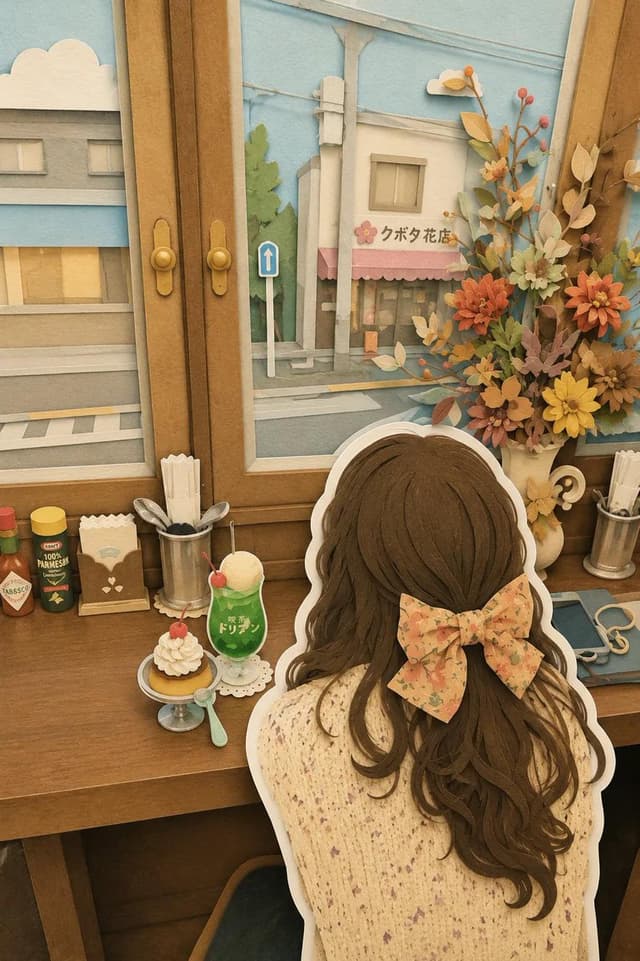
Comic / Storyboard - Japanese Paper-Cut Diorama Scene — output

Comic / Storyboard - Japanese Paper-Cut Diorama Scene

TaarukGPT Image 2
Whimsical layered paper-cut diorama, handcrafted 3D papercraft world, cozy {argument name="location" default="Japanese travel scene"}, ultra-detailed cut-paper illustration, soft pastel color palette, felt and cardstock textures, stacked paper layers with visible depth, charming miniature town aesthetic, storybook atmosphere.

Scene: {argument name="character" default="cute traveler girl viewed from behind"}, oversized ribbon bow in her hair, sitting inside a cozy retro café by a wooden window, looking out at a peaceful {argument name="view" default="Japanese street"}. Tiny desserts, cream cake, soda float, vintage café accessories, flower arrangements, warm wooden furniture, soft afternoon sunlight. Outside the window are pastel-colored buildings, flower shops, utility poles, clouds, and quiet neighborhood streets.

Style: handmade paper sculpture, layered cardstock art, laser-cut paper layers, clay-like details, kawaii Japanese aesthetic, miniature dollhouse environment, soft shadows, tactile paper textures, warm nostalgic mood, highly detailed handcrafted elements, children’s book illustration, diorama display.

Composition:
- Character seen from behind
- Thick white cutout outline around characters and objects
- Multi-layered paper scene with depth
- Decorative flowers and cute accessories
- Blue sky background with fluffy paper clouds
- Cozy café tabletop with desserts and drinks
- Symmetrical framing through a large window

Lighting:
soft daylight, warm ambient glow, gentle shadows, dreamy atmosphere, cozy indoor lighting, pastel highlights.

Quality:
masterpiece, ultra detailed, paper art masterpiece, intricate handcrafted textures, 8k resolution, cinematic depth, professional papercraft design, adorable travel diary aesthetic, trending on Pinterest, kawaii diorama style.
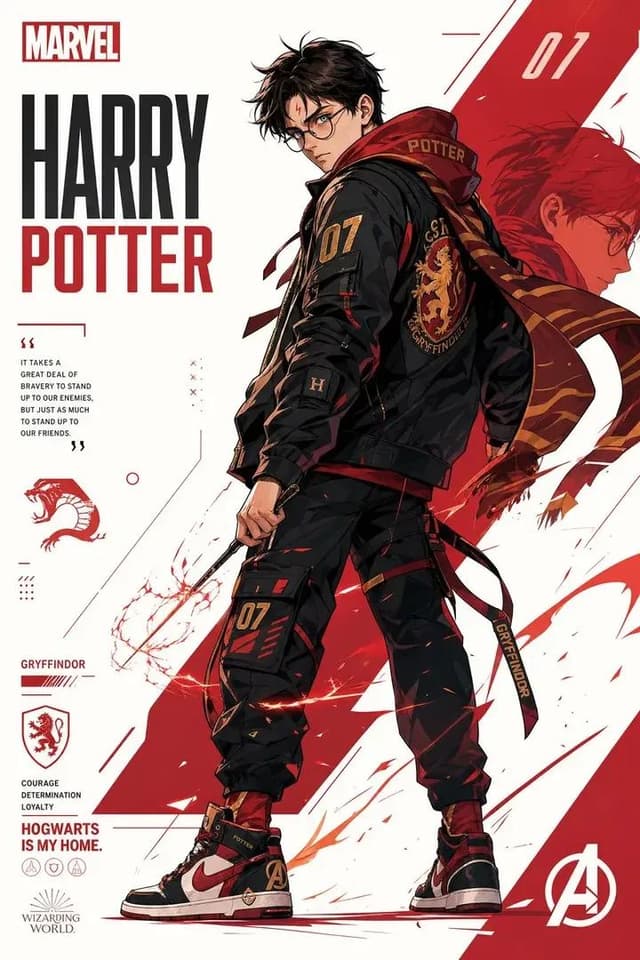
Comic / Storyboard - Marvel-Style Harry Potter Poster — output

Comic / Storyboard - Marvel-Style Harry Potter Poster

simplyGPT Image 2
Marvel-style superhero poster of {argument name="character" default="Harry Potter"}, anime/manga art style, wearing {argument name="outfit" default="Hogwarts uniform with Gryffindor scarf"}, holding wand, dramatic lighting, dynamic pose. Marvel logo at top left. "HARRY POTTER" bold title text in center. {argument name="color scheme" default="Red, white, black"} color scheme. Comic book poster layout with graphic design elements, sharp details, cinematic, high quality 8k, poster art
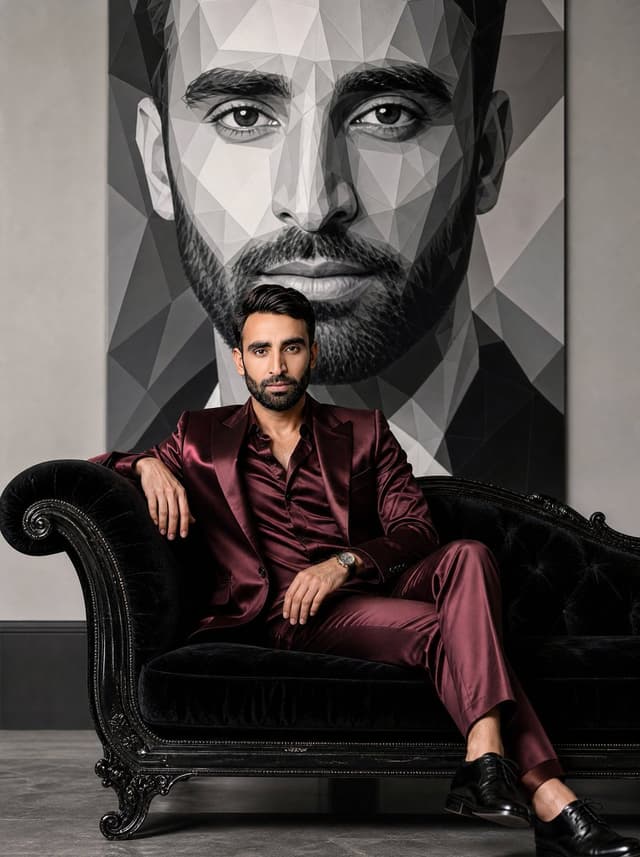
Social Media Post - Luxury Fashion Mural Portrait — output

Social Media Post - Luxury Fashion Mural Portrait

Mr. TariqGPT Image 2
Elegant luxury fashion editorial portrait of a {argument name="subject" default="handsome man"} seated gracefully on a vintage black velvet chaise lounge, wearing a {argument name="outfit" default="deep burgundy satin suit with subtle sheen and flowing tailored fabric"}, soft styled hair, confident gaze toward camera, minimalist light gray studio backdrop. Behind him, a massive black-and-white geometric low-poly mural portrait of the same man dominates the wall, creating a striking contrast between realism and abstract art. High-fashion magazine aesthetic, luxury interior styling, dramatic composition, soft cinematic lighting, premium textures, photorealistic skin, shallow depth of field, sophisticated color grading, Vogue-style campaign, ultra-detailed, clean shadows, modern gallery atmosphere, centered composition, elegant and timeless mood.
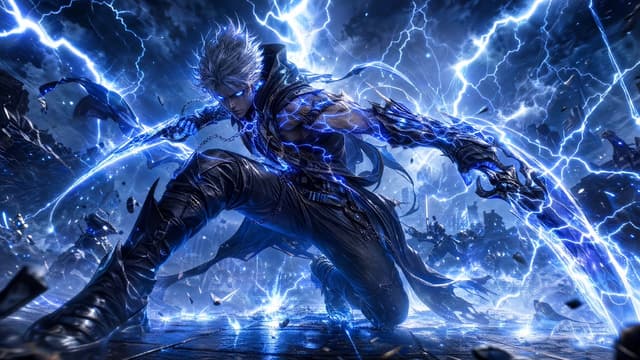
Comic / Storyboard - Storm-Born Lightning Rogue Character — output

Comic / Storyboard - Storm-Born Lightning Rogue Character

KomodoGPT Image 2
A {argument name="character type" default="storm-born lightning rogue"} who dances along electric arcs, chaining devastating bolts between enemies, supercharging allies with crackling speed, and collapsing the sky into a cataclysmic thunder dome where every strike births chain-lightning explosions.
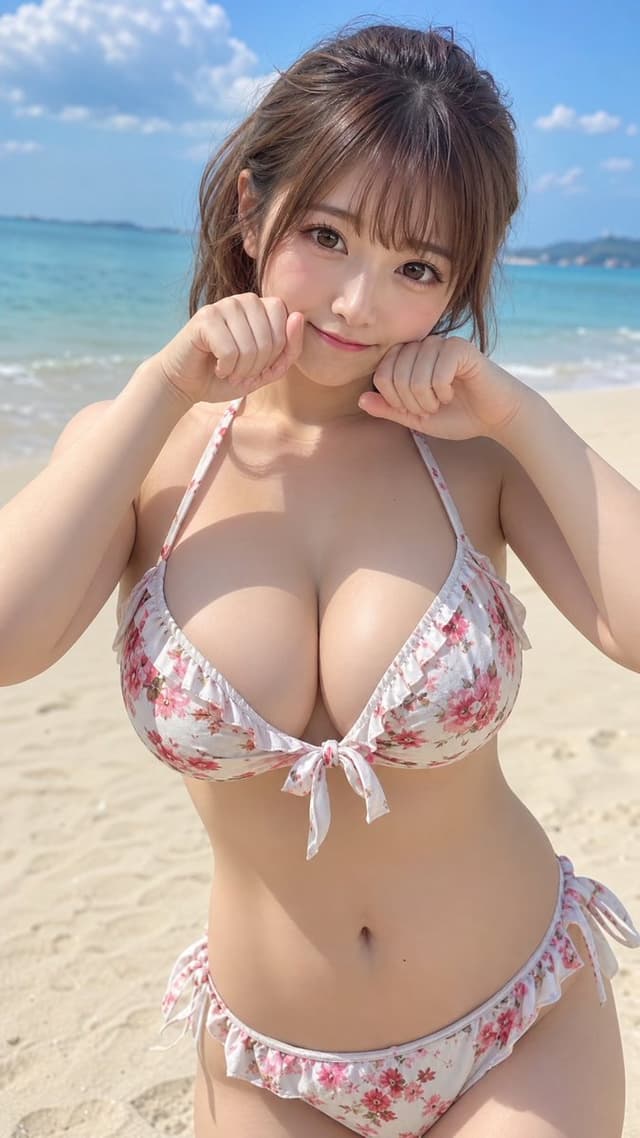
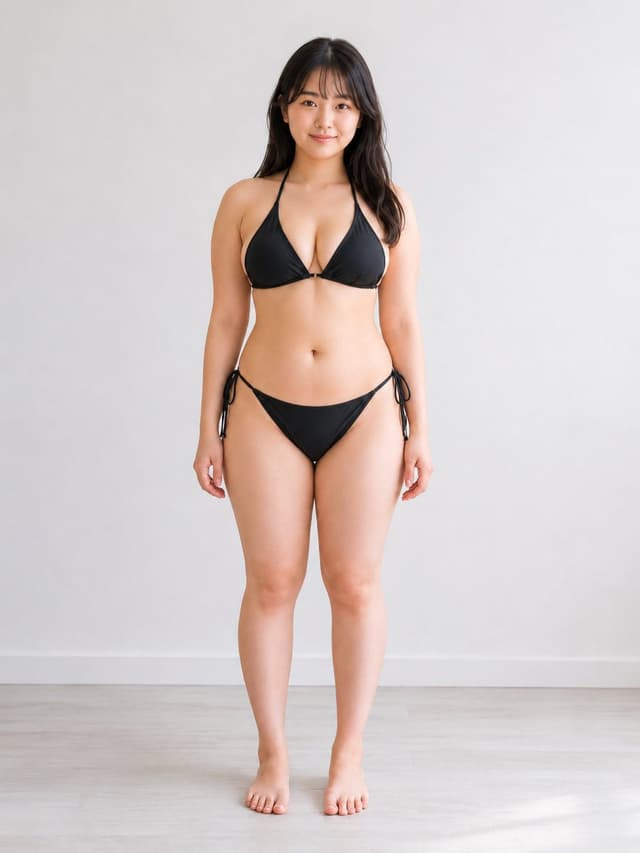
Profile / Avatar - Japanese Fashion Model Beachwear Portrait — output

Profile / Avatar - Japanese Fashion Model Beachwear Portrait

Adam也叫吉米GPT Image 2
An hourglass figure with a balanced and plump build, with {argument name="expression" default="cute and adorable"} eyes and facial expression, a mature Japanese female model around {argument name="age" default="20 years old"}, wearing stylish beachwear.
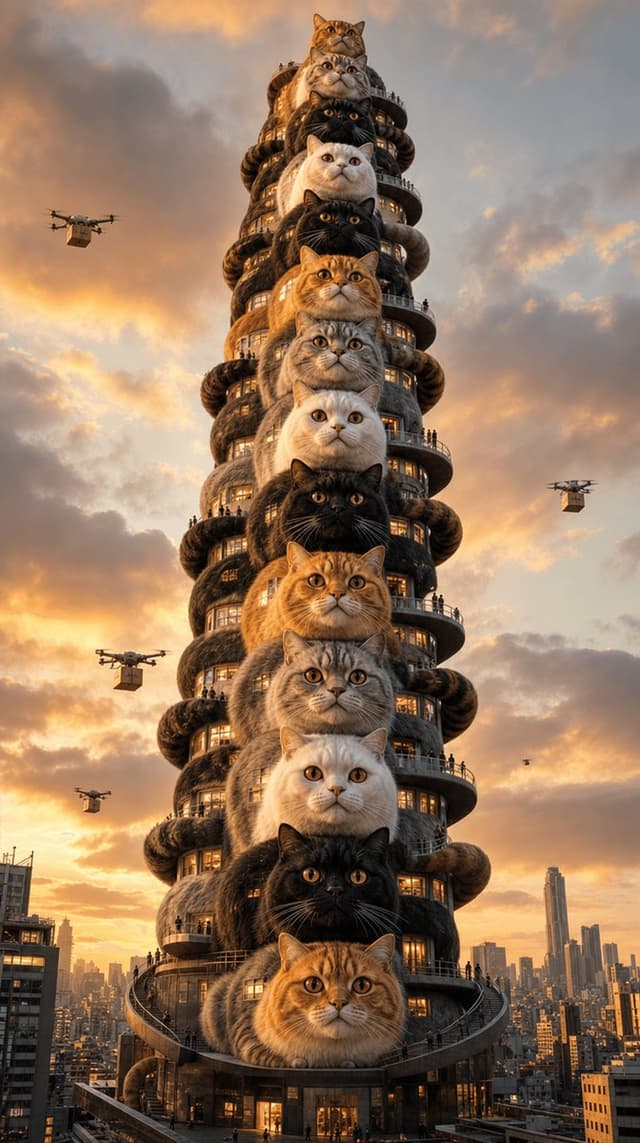
Social Media Post - Surreal Tokyo Cat Skyscraper — output

Social Media Post - Surreal Tokyo Cat Skyscraper

kuroGPT Image 2
Ultra-cinematic surreal architectural photography of a 60-story skyscraper in a futuristic Tokyo cityscape where the entire building is constructed of {argument name="subject" default="60 enormous stacked cats"} — each cat the size of a full floor, alternating {argument name="patterns" default="tabby orange + black + white + grey"} fur, eyes wide open looking forward, real glowing windows cut into their fur, tiny balconies on each cat's chest, tiny people commuting up exterior staircases that run along the cats' tails, miniature drone deliveries flying around. Sunset golden hour with warm orange light. Tiny normal-sized buildings around for scale. Dramatic low-angle wide architectural shot, the cat-tower dominating the frame. NO TEXT, NO OVERLAYS, NO LOGOS. 9:16 vertical, 8K hyper-realistic surreal architecture photography.
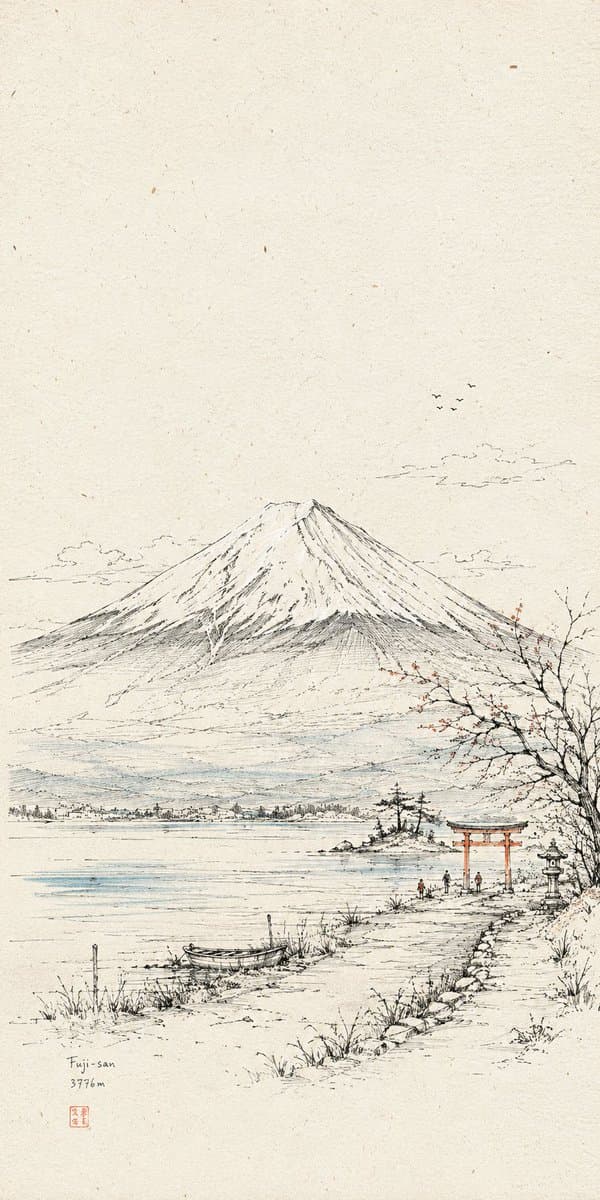
Profile / Avatar - Hand-Drawn Linear Sketch Art — output

Profile / Avatar - Hand-Drawn Linear Sketch Art

小小东GPT Image 2
Generate a paper-based line drawing visual work based on a specific theme. The image is first established by extremely fine, slightly shaky hand-drawn lines to build space, subject outline, structural transitions, paths, and scale relationships. Then, a few high-purity color surfaces are introduced only to the most critical recognition planes, connection nodes, emotional pauses, and centers of gravity; color is not a full fill but acts as precise annotations to edit attention. The overall visual area is dominated by warm off-white paper and black fine lines. Paper texture, tiny spots, and a slight scan feel should be clearly present. Ample white space is reserved above or around to make the subject appear as if observed in a page of a travel manuscript. Visual weight is concentrated in the middle or lower-middle part, maintaining breathable distance around the subject. The composition consists of a clear anchor, a low-density environment layer, and a few colored nodes. The core object maintains recognizable structural lines, outlines, local hatching, and compressed details. Details gather along edges, openings, corners, and movement paths. Volume and shadows are achieved through fine hatching and varying line density. Background appears as a low-density line-art memory layer. Added tiny figures or symbols serve as scale 'noise' to give a sense of life and usage. If text is needed, use narrow, restrained annotation-style fonts. The final surface shows the finish of pen line drawing, colored pencil, or light ink overlay, with quiet, open, manual textures and slight perspective errors. Theme: {argument name="subject" default="Close-up of the Great Hall of the People"} Aspect Ratio: {argument name="ratio" default="1:2"} Usage: {argument name="usage" default="Mobile wallpaper"}
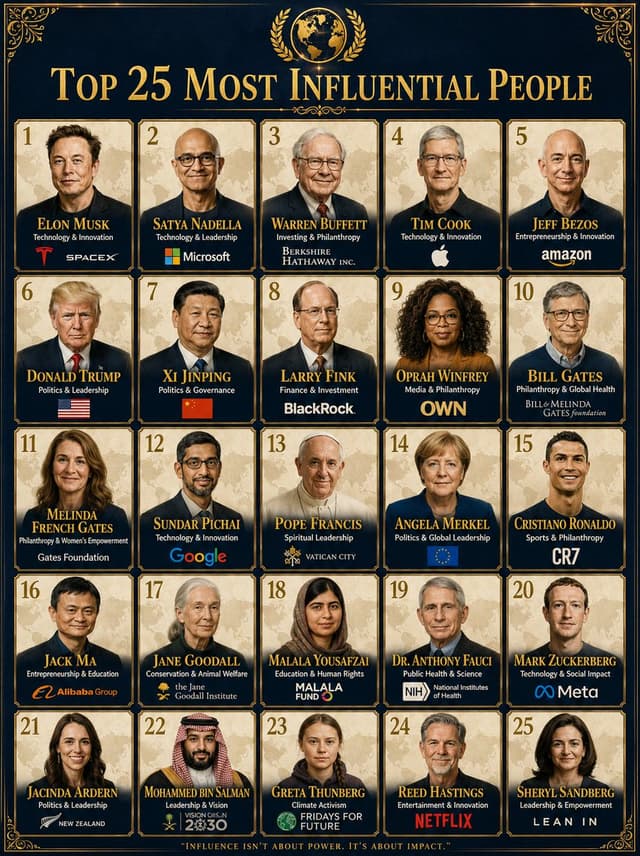
Infographic / Edu Visual - Professional Infographic Influential People Poster — output

Infographic / Edu Visual - Professional Infographic Influential People Poster

Zephyra LeighGPT Image 2
A professional infographic poster titled "{argument name="title" default="Top 25 Most Influential People"}" with a {argument name="background color" default="dark navy blue background"} and {argument name="accents" default="gold decorative accents"}. The layout features a 5-column grid of 25 individual portrait cards arranged in 5 rows. Each card has a cream/beige background with a faint world map watermark behind the portrait. Each card contains: a gold rank number in the top-left corner, a realistic illustrated portrait in the center, the person's full name in bold gold serif font at the bottom, their field of influence in smaller white text below, and a recognizable organization or company logo at the very bottom. The title at the top reads "TOP 25 MOST INFLUENTIAL PEOPLE" in large gold serif font with a gold laurel emblem above it. Luxury editorial design, premium typography, dark navy and gold color palette, highly detailed. 1744x2336
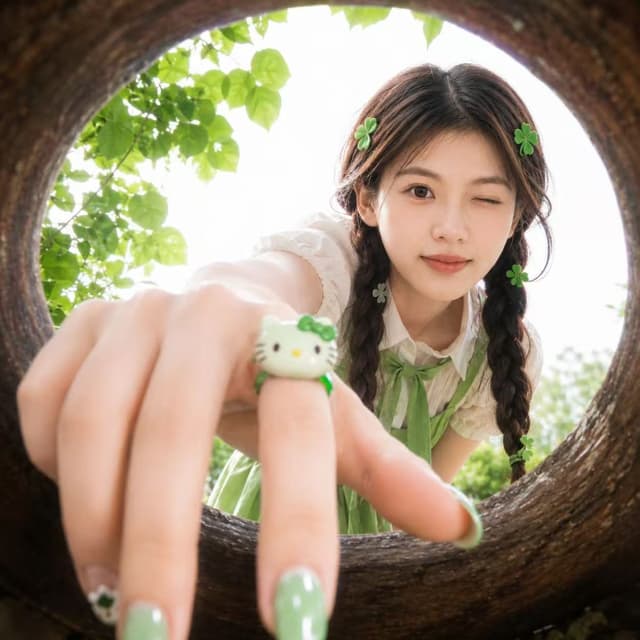
Profile / Avatar - Soft Spring Cherry Blossom POV Portrait — output

Profile / Avatar - Soft Spring Cherry Blossom POV Portrait

ShinningGPT Image 2
Use the {argument name="reference" default="uploaded portrait"} only as the identity reference. Preserve the person’s real facial features, face shape, skin tone, eye shape, and recognizable hairstyle. Create a realistic square close-up portrait taken from inside a {argument name="frame" default="round hollow wooden opening"}, as if the camera is placed inside a circular tree hole or natural wooden ring. The person leans toward the opening and looks into the camera with a {argument name="expression" default="playful cute expression"}, one eye gently winking, creating a fresh youthful snapshot mood.

The camera uses an ultra-wide fisheye perspective, with the circular wooden frame surrounding the entire image. The person’s hand reaches toward the camera in the extreme foreground, creating strong depth and perspective distortion. Focus on the hand and face balance: the hand should look close but natural, with realistic finger proportions. Add glossy green manicured nails with subtle cute details, and a small green-and-white cute cartoon cat-style ring on one finger. Add small green clover-shaped hair accessories around the hair for a playful lucky charm feeling.

Choose a flattering outfit that best suits the uploaded person’s appearance and hairstyle, using a fresh green-and-white color palette, youthful fashion styling, and clean fabric texture. Do not copy any specific outfit. The outfit should feel cute, fresh, and naturally coordinated with the green accessories.

Outdoor garden atmosphere, soft daylight, bright overexposed sky behind the person, fresh green leaves around the circular frame, natural shallow depth of field, slightly dreamy soft focus, realistic skin texture, natural hair strands, authentic smartphone snapshot feeling, cute Japanese/Korean youth fashion mood, high realism, soft colors, playful composition, no text, no logo, no watermark.
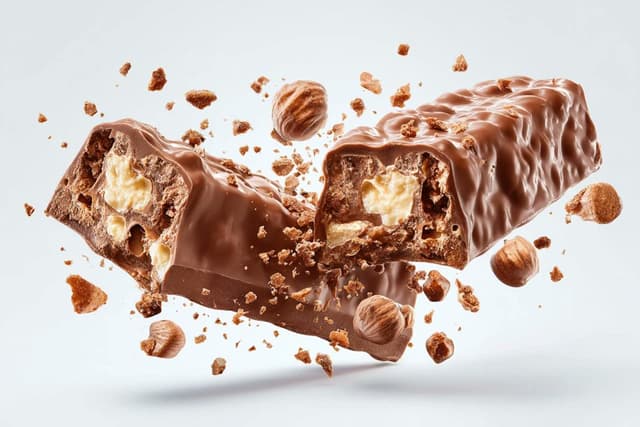
E-commerce Main Image - Exploding Food Commercial Photography — output

E-commerce Main Image - Exploding Food Commercial Photography

PromptLabGPT Image 2
A {argument name="food item" default="pastry"} split open and exploding outward, revealing {argument name="filling" default="molten chocolate"} inside, with {argument name="filling action" default="oozing out"}. The outer surface shows [outer texture], and the cross-section exposes [internal layers]. Crumbs and particles hang suspended mid-air. Shot against a clean [background] with professional studio lighting, high-end commercial food photography aesthetic, ultra-detailed, tack-sharp focus.
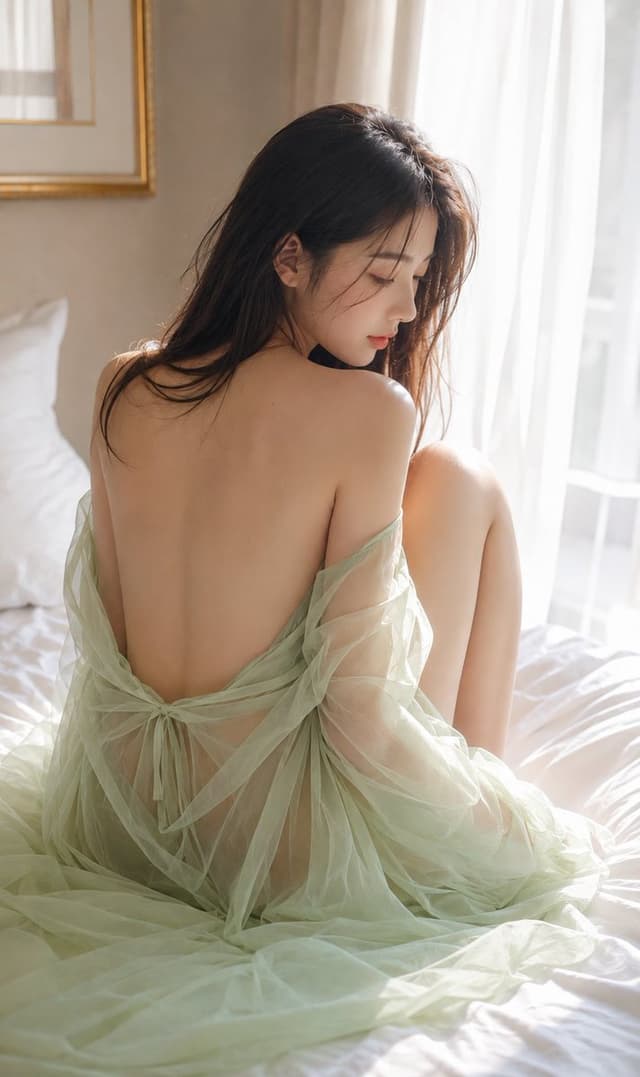
Social Media Post - Luxury Minimalist Japanese Fine Art Portrait — output

Social Media Post - Luxury Minimalist Japanese Fine Art Portrait

とろたっくんGPT Image 2
Hyper-realistic luxury emotional portrait inspired by minimalist Japanese fine art photography. Important: Generate only one vertical image. No collages. No multi-panel posters.
Style: Minimal cold-tone cinematic realism. Luxury emotional photography. Fine art editorial aesthetic.
Main Concept: Quiet futuristic feminine portrait focusing on cold white lighting, minimalist emotional isolation, beautiful back silhouette, and serene cinematic elegance.
Model: {argument name="model" default="Adult East Asian female model"} with wet-look dark hair, soft translucent skin, and natural emotional expression.
Pose: Model standing alone in a minimalist white room, facing away from the camera. The soft curve of the neck and the silhouette of the spine are highlighted by cold lighting. One hand lightly touches the shoulder.
Outfit: {argument name="outfit" default="Soft off-white knit back-open dress with subtle fabric texture and minimalist luxury styling"}.
Background: {argument name="background" default="Minimalist white architectural interior with a soft misty atmosphere and cold daylight reflections"}.
Color Palette: Cold white, soft silver, light gray, pearl glow, and minimal beige tones.
Lighting: Cold cinematic soft light. Minimal volumetric glow. Subtle rim light reflections.
Mood: Serenity. Modern. Emotional. Minimalist luxury sense of solitude.
Quality: Ultra-realistic HDR. 8K cinematic realism. Fine art editorial photo quality similar to a real luxury emotional portrait campaign.
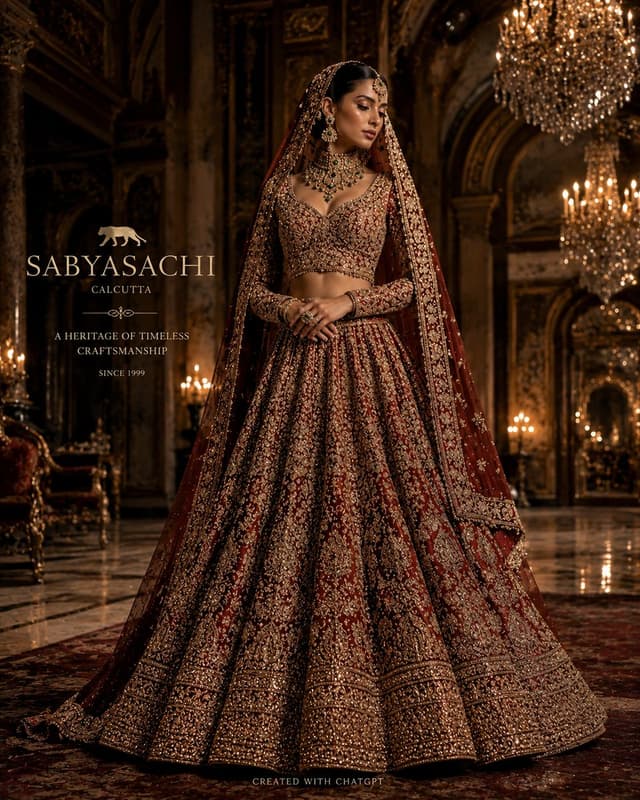
Infographic / Edu Visual - Luxury Bridal Fashion Empire Poster — output

Infographic / Edu Visual - Luxury Bridal Fashion Empire Poster

Noira.GPT Image 2
Create an ultra-luxury cinematic bridal fashion empire poster inspired by premium viral AI storytelling campaigns on X/Twitter. Design a breathtaking {argument name="color palette" default="black, gold, and ruby-red"} masterpiece featuring a {argument name="bride style" default="stunning South Asian bride"} as the central visionary figure, standing gracefully inside a {argument name="palace setting" default="magnificent royal palace surrounded by towering marble columns, crystal chandeliers, and golden reflections"}. Showcase a handcrafted couture lehenga adorned with intricate gold zardozi embroidery, royal jewelry, flowing embroidered dupatta, and timeless heritage craftsmanship. Surround the central figure with elegant luxury fashion panels highlighting Bridal Couture, Heritage Embroidery, Royal Jewelry, Premium Fabrics, Luxury Craftsmanship, and Timeless Elegance. Display a massive gold title at the top: {argument name="title" default="LUXURY LEHENGA"} Below the title, add the tagline: FROM HERITAGE TO ELEGANCE. FROM TRADITION TO COUTURE. Create a visually stunning infographic-style luxury poster with dramatic cinematic lighting, glossy marble floor reflections, floating golden particles, ultra-realistic fabric textures, magazine-cover composition, luxury branding elements, and premium editorial aesthetics. Use a rich black and gold color palette, Vogue-level fashion photography, hyper-detailed craftsmanship, photorealistic rendering, 8K HDR quality, masterpiece composition, award-winning luxury campaign design, trending on X, and elegant gold typography throughout.
Product Marketing - Character Consistency and Angle Control — output

Product Marketing - Character Consistency and Angle Control

陽仙堂GPT Image 2
Use the reference image as the main character identity reference. Preserve the same {argument name="character description" default="adult Japanese woman in her early 20s"}, including her face, facial impression, hairstyle, body balance, body proportions, outfit design, and overall atmosphere.

Create a new realistic high-quality photo of the same person. Change only the camera angle and composition according to the {argument name="angle instruction" default="angle instruction below"}. Do not redesign the character, do not change her age appearance, do not make her look like a different person, and do not change her body type or clothing structure.

Keep a simple natural standing pose, but allow very small posture adjustments only if needed to make the camera angle physically natural. Use a clean bright studio room with a visible floor and wall, natural realistic lighting, realistic perspective, and polished commercial photo quality.

Keep the result tasteful, non-explicit, clean, and suitable for general commercial stock imagery. Avoid extra limbs, broken fingers, distorted hands, missing body parts, duplicated faces, ghosting, warped clothing, messy anatomy, unnatural body proportions, distorted facial features, and extreme lens distortion.
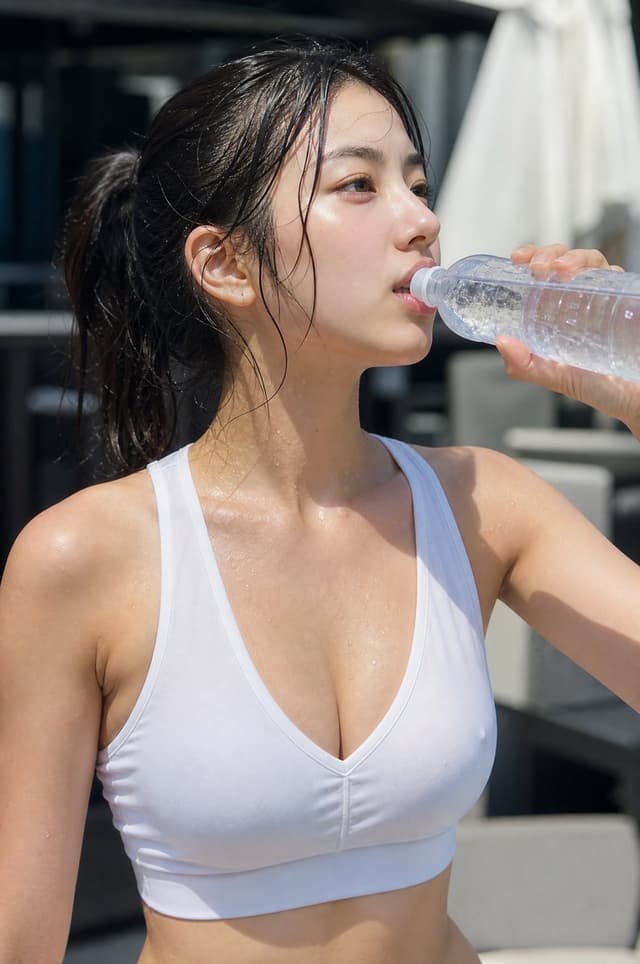
Profile / Avatar - Minimalist Athletic Fashion Close-up — output

Profile / Avatar - Minimalist Athletic Fashion Close-up

DavidGPT Image 2
A beautiful young {argument name="ethnicity" default="East Asian woman"}, {argument name="outfit" default="modern athletic-style sleeveless fitted minimalist sports V-neck top paired with a skirt"}, crafted from high-performance athletic fabric and sharp tailoring, closeup portrait
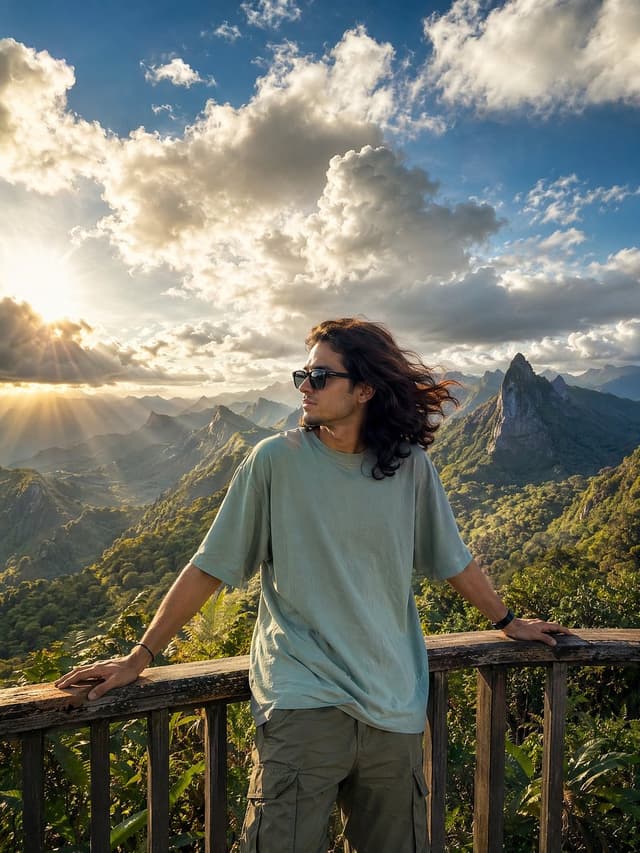
Social Media Post - Golden Hour Mountain Viewpoint Portrait — output

Social Media Post - Golden Hour Mountain Viewpoint Portrait

ÀBDŪLLÂHGPT Image 2
A cinematic travel photography portrait of a young woman standing at a {argument name="viewpoint" default="wooden mountain viewpoint"} overlooking lush emerald-green valleys and dramatic pointed mountain ridges under a breathtaking sky. The scene is captured during golden hour with intense sunlight breaking through massive fluffy clouds, creating radiant sun rays and atmospheric volumetric lighting across the landscape. The woman has {argument name="hair style" default="long flowing dark brown hair"}, wearing {argument name="outfit" default="black sunglasses, an oversized pastel sage-green t-shirt, olive cargo pants, and a smartwatch"}, casually leaning against the wooden railing with both arms extended while looking sideways with a calm relaxed expression. The composition is highly scenic and immersive, featuring layered mountain ranges fading into the distance with rich natural textures, tropical greenery, and deep cinematic depth. Vibrant blue sky contrasts with soft white and gray clouds illuminated by warm sunlight. Ultra-realistic travel photography style, HDR lighting, natural skin tones, high detail, realistic shadows, atmospheric perspective, vibrant greens and blues, soft wind movement in hair and clothing, wide-angle composition, professional DSLR quality, cinematic color grading, 3:4 aspect ratio.
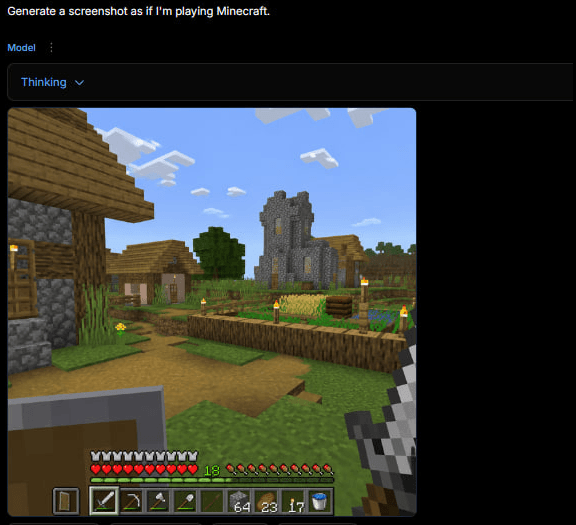
Game Asset - Minecraft Gameplay in AI Generator UI — output

Game Asset - Minecraft Gameplay in AI Generator UI

maloyGPT Image 2
Goal: Create a square screenshot of a dark AI image-generation web interface showing a generated Minecraft gameplay screenshot. The interface should look like someone typed {argument name="user prompt" default="Generate a screenshot as if I'm playing Minecraft."} and received a rendered game image below it.

Canvas: Square 1:1 image, approximately 576 by 576 pixels, dark black background, with the content aligned near the top-left and a large empty black margin on the right and bottom.

Top UI layout: At the very top-left, show the white prompt text: “Generate a screenshot as if I'm playing Minecraft.” Beneath it, show a small blue label “Model” with a vertical three-dot menu icon beside it. Below that, draw a wide dark rounded rectangle dropdown bar containing the blue text “Thinking” and a small downward chevron. The UI should feel like a minimal web app in dark mode.

Generated image panel: Under the dropdown, place a large square Minecraft-style gameplay screenshot with slightly rounded corners. The screenshot should be first-person perspective in a bright blocky village scene.

Minecraft scene details: Show a sunny daytime village with a blue sky and exactly 8 visible white blocky cloud clusters. On the left foreground, include a partially visible wooden-and-cobblestone house with a wooden door, plank roof, cobblestone wall, and a lit torch. In the center distance, show a gray stone church/tower with narrow yellow-lit windows. Around it, include a small village house, a leafy green tree, grass blocks, a dirt path, and a fenced crop field. The crop field should contain golden wheat, green crops, a wooden fence border, and exactly 6 visible torch posts with yellow flames around the village/farm area. Keep the Minecraft aesthetic authentic: cubic blocks, pixelated textures, low-resolution game rendering, no photorealism.

First-person HUD and equipment: In the lower left foreground, show a raised shield. In the lower right foreground, show the player holding an iron sword. Along the bottom, draw the Minecraft HUD with exactly 10 red hearts, exactly 10 hunger drumsticks, a green experience level number “18,” and a 9-slot hotbar. The hotbar should contain these 9 visible slots from left to right: shield icon, iron sword, pickaxe, axe, shovel, empty or dark slot, stack of 64 blocks, stack of 23 torches/items, stack of 17 items, plus a water bucket icon visible at the far right edge if space permits. Make the HUD slightly pixelated and game-accurate.

Visual style: The whole image should look like an actual screenshot of a browser-based AI generator displaying a generated Minecraft gameplay image, not a clean standalone render. Use dark UI chrome, small crisp text, and a blocky game screenshot embedded inside it. No watermark, no extra captions, no logos.
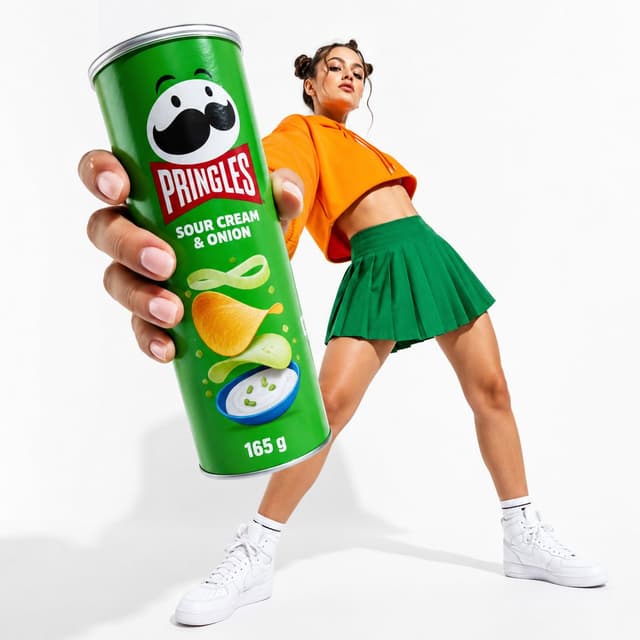
E-commerce Main Image - Oversized Pringles Fashion Ad — output

E-commerce Main Image - Oversized Pringles Fashion Ad

Amira ZairiGPT Image 2
Create a polished studio advertising product shot for {argument name="brand and product" default="Pringles Sour Cream & Onion"}, with an oversized green cylindrical snack can held very close to the camera in extreme foreground by a fashion model. The can dominates the left side of the frame, tilted slightly diagonally, with a visible silver rim and bottom edge, realistic hand and fingers gripping it, and crisp label details: Pringles mascot face with mustache at top, red Pringles logo panel, white flavor text reading “SOUR CREAM & ONION,” illustrated potato chips, green onion ribbons, sour cream dip bowl, small garnish dots, and “165 g” near the bottom. In the background on the right, show a full-body young woman in a dynamic low-angle pose leaning backward, face intentionally blurred or obscured, wearing {argument name="hoodie color" default="bright orange"} cropped hoodie, {argument name="skirt color" default="emerald green"} pleated mini skirt, white crew socks, and white high-top sneakers. Use a clean seamless white studio background with soft shadows on the floor, high-key commercial lighting, glossy realistic packaging, saturated brand colors, wide-angle perspective exaggeration, sharp focus on the can and hand, slightly softer model depth, energetic Gen Z fashion campaign mood, no extra text beyond the packaging label, no watermark.
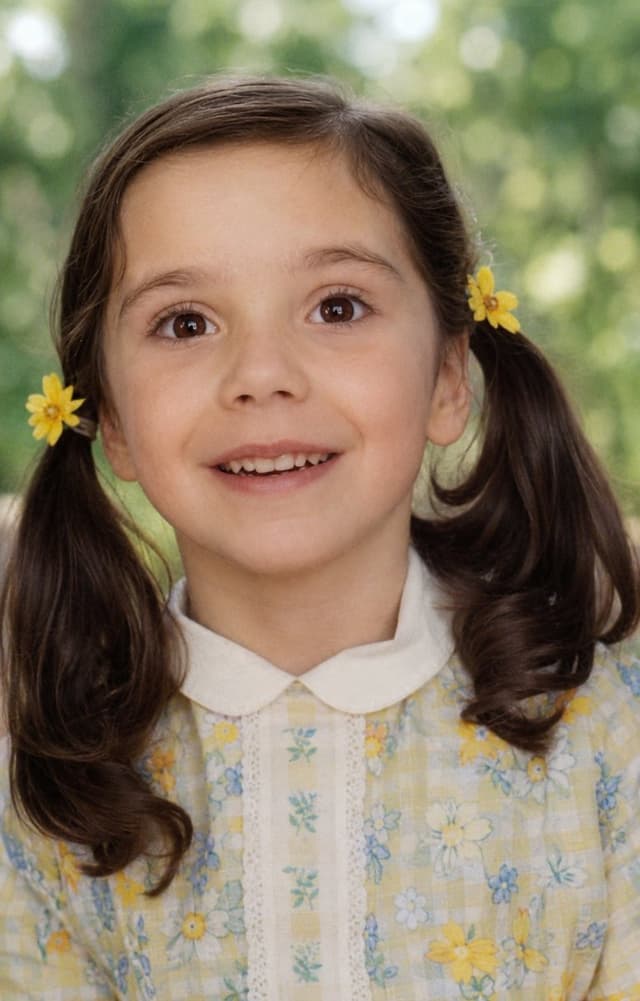
Profile / Avatar - Old Photo Restoration — output

Profile / Avatar - Old Photo Restoration

SnowGPT Image 2
Using the provided reference image, refine and restore the old damaged photo into a clean, realistic original snapshot. Remove all cracks, creases, scratches, faded discoloration, stains, and paper damage, and reconstruct any missing or obscured areas naturally. Preserve the same child, facial identity, joyful laughing expression, hairstyle with pigtails, yellow flowers beside both ears, checkered floral dress with white collar, pose, close portrait framing, and outdoor background. Convert the aged pinkish tint into natural color, sharpen details, improve lighting and contrast, and make the result look like an authentic modern film photograph rather than an illustration. Do not change the subject’s age, clothing design, composition, or expression; do not add extra people, text, borders, or watermark.
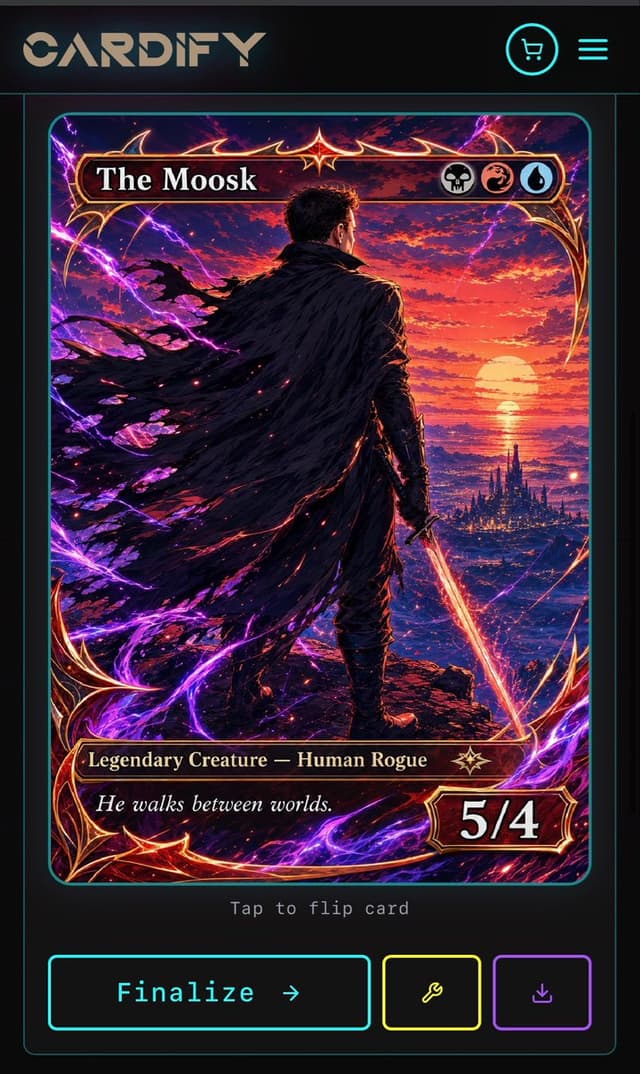
Game Asset - Cyberpunk Fantasy Trading Card App — output

Game Asset - Cyberpunk Fantasy Trading Card App

CardifyGPT Image 2
Goal: Create a dark futuristic mobile web app screen for a custom trading card generator called {argument name="app name" default="CARDIFY"}, showing one completed fantasy TCG card ready to finalize.

Canvas: Vertical smartphone screenshot, 720×1200 style aspect ratio, black and charcoal background with thin neon cyan divider lines and rounded borders. Overall look is premium cyberpunk UI mixed with high-detail fantasy card art.

Layout: Top navigation bar contains exactly 3 visible elements: a large stylized CARDIFY logo on the left, a circular neon cyan shopping cart icon near the upper right, and a neon cyan three-line hamburger menu icon at the far right. Below it is a centered card preview inside a thin cyan rounded rectangle panel. Under the card preview, show small gray monospace text reading “Tap to flip card”. At the bottom, place exactly 3 action buttons: a large cyan-outlined rectangular button labeled “Finalize →”, a smaller yellow-outlined square button with a wrench icon, and a smaller purple-outlined square button with a download icon.

Trading card design: The card is a vertical fantasy collectible card with rounded corners, ornate red-gold metallic frame, glowing crimson highlights, and electric purple energy curling around the border. The card title bar at the top reads {argument name="card title" default="The Moosk"} in large white serif type. On the right side of the title bar are exactly 3 circular mana/type icons: a skull icon, a red dragon/swirl icon, and a blue water droplet icon. The lower type bar reads {argument name="type line" default="Legendary Creature — Human Rogue"} in gold serif text, with a small star-like rarity emblem to its right. The flavor text box below reads {argument name="flavor text" default="He walks between worlds."} in italic white serif type. The bottom-right power/toughness badge reads {argument name="power toughness" default="5/4"} in large bold white numerals.

Main card artwork: A dramatic anime-fantasy illustration of a lone male rogue viewed from behind, standing on a rocky cliff at sunset. He has short dark hair, dark armor, and a huge tattered black cloak streaming leftward in the wind. He holds a glowing orange-red sword pointed downward in his right hand. In the distance is a luminous ocean horizon with a large setting sun, red and purple clouds, and a dark spired fantasy city near the water. Purple lightning arcs and magical energy ribbons surround the character and frame, with red sparks scattered through the cloak and foreground. Use extremely detailed painterly digital art, high contrast, cinematic lighting, saturated magenta, violet, crimson, orange, and gold.

Constraints: Keep the screen as a mobile app mockup, not a standalone card. Use exactly 1 trading card preview, exactly 3 top navigation elements, exactly 3 mana/type icons, and exactly 3 bottom action buttons. Preserve all visible UI text clearly. Do not add extra cards, popups, watermarks, or unrelated interface panels.
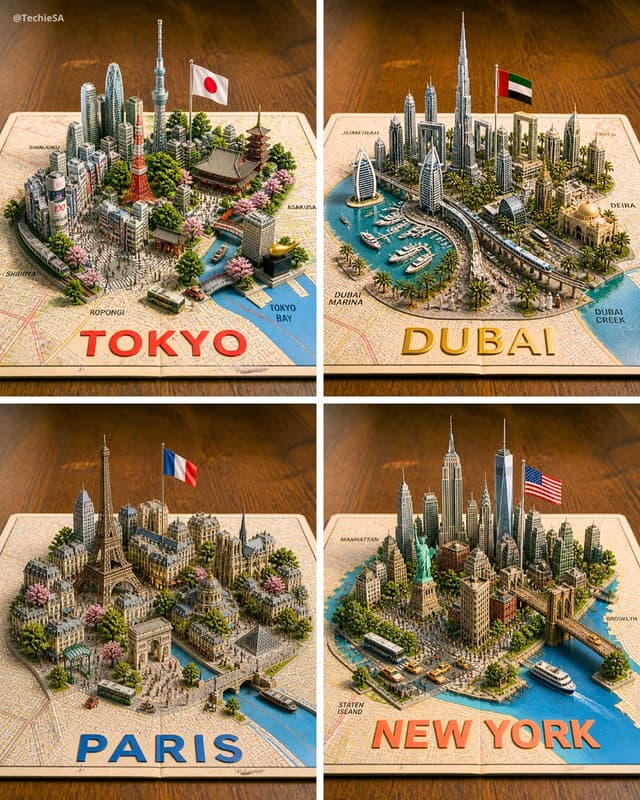
Infographic / Edu Visual - Four 3D Miniature City Maps — output

Infographic / Edu Visual - Four 3D Miniature City Maps

TechieSAGPT Image 2
Goal: Create a photorealistic 3D miniature city-map showcase featuring exactly 4 square panels arranged in a 2×2 grid, each panel showing a famous world city as a raised diorama emerging from a printed paper street map on a warm wooden tabletop.

Canvas: Square image, evenly divided by thin white gutters into four equal quadrants. Use an isometric three-quarter view from above, shallow depth of field, warm studio lighting, crisp miniature details, and realistic shadows.

Layout: The 4 panels are: top-left Tokyo, top-right Dubai, bottom-left Paris, bottom-right New York. Each city sits on an open map sheet with a large bold city name printed along the bottom edge of its panel in bright color. Include small neighborhood labels on the map surface.

Panel 1 — Tokyo: Build a dense miniature Tokyo skyline with exactly 6 key recognizable landmarks: Tokyo Tower, Tokyo Skytree, a traditional pagoda, a large temple roof, a modern cluster of skyscrapers, and a canal leading to Tokyo Bay. Add a Japanese flag on a pole, cherry blossom trees, small buses, tiny streets, and map labels such as Shinjuku, Shibuya, Roppongi, Asakusa, and Tokyo Bay. Large bottom text: {argument name="Tokyo label" default="TOKYO"} in bold red letters.

Panel 2 — Dubai: Build a futuristic Dubai marina diorama with exactly 6 key recognizable elements: Burj Khalifa, Burj Al Arab, twin sail-like towers, Dubai Frame, a yacht-filled marina, and a curving elevated transit line. Add palm trees, modern high-rises, an Emirati flag on a pole, blue water, boats, and map labels such as Jumeira, Dubai Marina, Deira, and Dubai Creek. Large bottom text: {argument name="Dubai label" default="DUBAI"} in bold gold letters.

Panel 3 — Paris: Build a classic Paris miniature with exactly 6 key recognizable landmarks: Eiffel Tower, Arc de Triomphe, Notre-Dame-style cathedral, Louvre-like glass pyramid, Haussmann apartment blocks, and a Seine river with bridges. Add a French flag on a pole, tree-lined boulevards, pink blossoms, tiny buses, pedestrians, and warm stone architecture. Large bottom text: {argument name="Paris label" default="PARIS"} in bold blue letters.

Panel 4 — New York: Build a dense Manhattan miniature with exactly 6 key recognizable landmarks: Statue of Liberty, One World Trade Center, Empire State Building, Chrysler Building, Brooklyn Bridge, and a harbor with ferries. Add an American flag on a pole, yellow taxis, buses, crowded streets, waterfront piers, greenery, and map labels such as Manhattan, Brooklyn, and Staten Island. Large bottom text: {argument name="New York label" default="NEW YORK"} in bold orange-red letters.

Visual style: Hyper-detailed 3D paper-map diorama, realistic plastic-and-paper miniature scale model, tilt-shift photography effect, vibrant but natural colors, warm wooden background, soft bokeh at the edges, high-resolution commercial render quality.

Constraints: Keep exactly 4 panels and exactly the 4 city themes listed. Do not add extra cities. Keep all text legible, with the city names large and centered near the lower edge of each panel. Include a small creator watermark in the top-left corner reading {argument name="watermark text" default="@TechieSA"}.
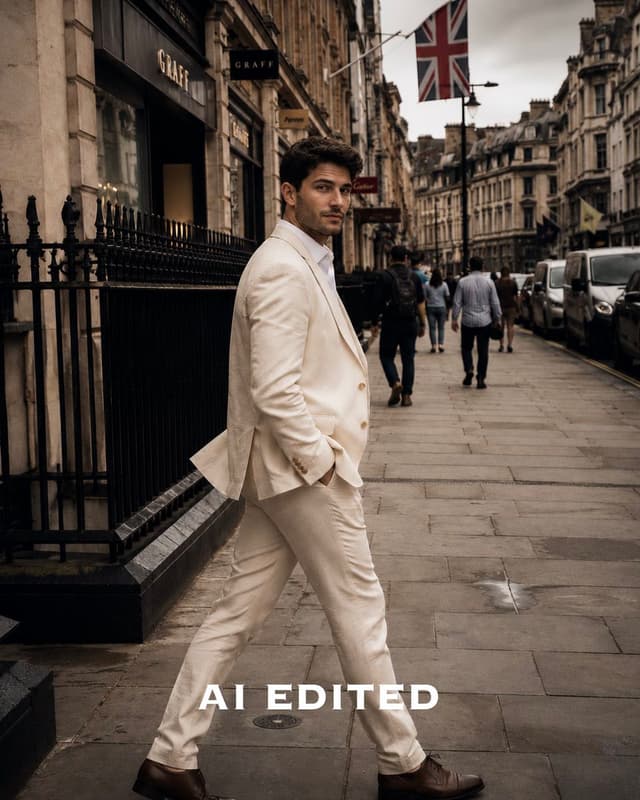
Social Media Post - Cinematic Lightroom Street Edit — output

Social Media Post - Cinematic Lightroom Street Edit

ᴍᴜʀᴘʜʏGPT Image 2
Using the provided reference image, keep the same subject, pose, street location, composition, and facial anonymization, but apply a high-end Lightroom-style editorial photo edit. Make the image moodier and more cinematic with warmer beige-brown tones, deeper blacks, stronger contrast, slightly reduced highlights, richer shadows, subtle vignette, sharper details, and a premium fashion-street-photography look. Keep the outfit and background elements intact, including the London street setting and Union Jack flag. Replace the single bottom text label with large bold white all-caps serif text reading {argument name="bottom label" default="AI EDITED"}. Remove the original bottom label and avoid adding any other text, logos, or watermarks.
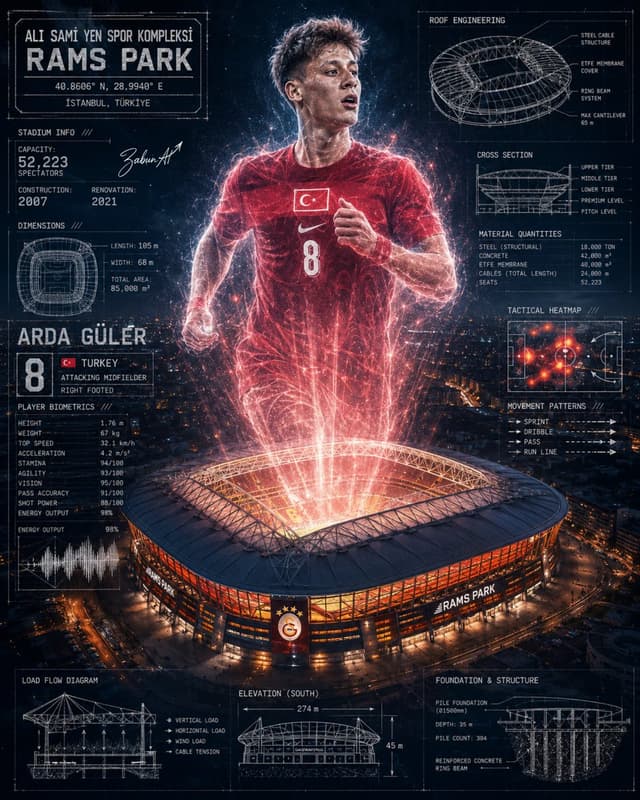
Infographic / Edu Visual - Rams Park Football Tech Poster — output

Infographic / Edu Visual - Rams Park Football Tech Poster

mertzabun.aiGPT Image 2
Goal: Create a dramatic vertical sports-engineering poster for {argument name="player name" default="ARDA GÜLER"} at {argument name="stadium name" default="RAMS PARK"}, combining a cinematic football hero hologram with detailed blueprint-style stadium data overlays.

Canvas: Portrait 4:5 poster, dark navy night palette, high contrast, ultra-detailed, futuristic technical infographic aesthetic. Background is an aerial nighttime city view with a brightly lit oval football stadium at the bottom center. From the stadium roof, red-orange energy beams and particles project upward to form a giant semi-transparent football player running toward the viewer.

Central subject: A young male footballer in a red {argument name="national team" default="Turkey"} jersey, number {argument name="jersey number" default="8"}, with the Turkish flag badge on the chest and a white swoosh logo. He is mid-run with clenched hands, athletic posture, glowing red electrical outlines, sparks, and holographic scan lines. Add a soft rectangular anonymized blur over the face, as if the face has been intentionally obscured. The lower body dissolves into red light streams connecting into the stadium.

Main stadium: Large modern oval stadium seen from above at night, orange-red illuminated facade, glowing open roof, visible sign reading “RAMS PARK” on the front. Add a Galatasaray-style crest centered on the facade. The stadium emits intense red-white light upward, like a sports-tech energy projection.

Layout: Surround the central player and stadium with exactly 13 technical information panels drawn in thin white blueprint lines, using small condensed uppercase technical typography, subtle grid marks, measurement arrows, and schematic line art.

Panel count and content:
1. Top-left title plate: “ALI SAMI YEN SPOR KOMPLEKSI”, huge headline “RAMS PARK”, coordinates “40.8606° N, 28.9940° E”, and “ISTANBUL, TÜRKIYE”.
2. Left upper stadium info panel: “STADIUM INFO ///”, capacity “52,223 SPECTATORS”, construction “2007”, renovation “2021”, plus a stylized signature.
3. Left middle dimensions panel: small top-down stadium plan, labels “LENGTH: 105 m”, “WIDTH: 68 m”, “TOTAL AREA: 85,000 m²”.
4. Left player identity card: large name “ARDA GÜLER”, large number “8”, small Turkish flag, labels “TURKEY”, “ATTACKING MIDFIELDER”, “RIGHT FOOTED”.
5. Left biometrics panel: “PLAYER BIOMETRICS ///” with exact stat list: Height 1.76 m, Weight 67 kg, Top Speed 32.1 km/h, Acceleration 4.2 m/s², Stamina 94/100, Agility 93/100, Vision 95/100, Pass Accuracy 91/100, Shot Power 88/100, Energy Output 98%.
6. Left lower chart: “ENERGY OUTPUT” with a white waveform graph and “98%”.
7. Top-right roof engineering panel: circular roof structure blueprint titled “ROOF ENGINEERING”, labels “STEEL CABLE STRUCTURE”, “ETFE MEMBRANE COVER”, “RING BEAM SYSTEM”, “MAX CANTILEVER 65 m”.
8. Right upper cross-section panel: stadium section drawing titled “CROSS SECTION”, labels “UPPER TIER”, “MIDDLE TIER”, “LOWER TIER”, “PREMIUM LEVEL”, “PITCH LEVEL”.
9. Right material quantities panel: “MATERIAL QUANTITIES” with list: Steel (structural) 18,000 ton, Concrete 42,000 m³, ETFE membrane 48,000 m², Cables total length 24,000 m, Seats 52,223.
10. Right middle tactical heatmap panel: mini football pitch with red-orange heat dots and white tactical arrows, titled “TACTICAL HEATMAP ///”.
11. Right movement patterns panel: “MOVEMENT PATTERNS ///” with four rows labeled “SPRINT”, “DRIBBLE”, “PASS”, “RUN LINE”, each represented by arrow and dashed line patterns.
12. Bottom-left load flow diagram: structural roof/load schematic titled “LOAD FLOW DIAGRAM”, labels “VERTICAL LOAD”, “HORIZONTAL LOAD”, “WIND LOAD”, “CABLE TENSION”.
13. Bottom center/right engineering base panels: include “ELEVATION (SOUTH)” with stadium elevation drawing and measurements “274 m” width and “45 m” height, plus “FOUNDATION & STRUCTURE” showing pile foundation cross-section with labels “PILE FOUNDATION Ø1500mm”, “DEPTH: 35 m”, “PILE COUNT: 304”, “REINFORCED CONCRETE RING BEAM”.

Visual style: Photorealistic stadium and city, mixed with holographic red particle effects and crisp CAD blueprint overlays. Use thin white technical lines, subtle scan texture, glowing red highlights, star-like particles, lens bloom, and dark atmospheric haze. Typography should look like a condensed industrial monospace display font, mostly uppercase, with intentionally dense but legible micro-labels.

Constraints: Keep exactly one central player, one main stadium, and exactly 13 surrounding technical panels. Do not add extra logos beyond the Turkish flag, simple swoosh-like mark, RAMS PARK text, and the crest on the stadium facade. Maintain the face-obscuring rectangular blur. No watermark, no social media UI, no extra captions outside the poster design.

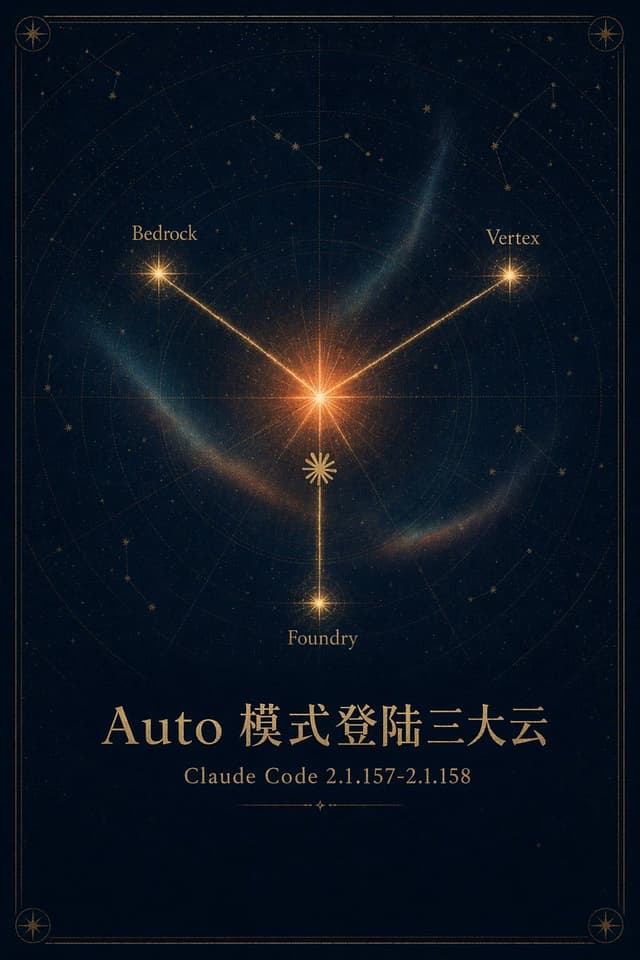
Infographic / Edu Visual - Celestial Cloud Launch Poster — output

Infographic / Edu Visual - Celestial Cloud Launch Poster

thinkthinkingGPT Image 2
Goal: Create an elegant mystical astronomy poster announcing {argument name="headline text" default="Auto 模式登陆三大云"} with a celestial map motif and premium gold-on-navy styling.

Canvas: Vertical poster, 2:3 aspect ratio, deep midnight navy background with subtle paper grain, faint stars, and a thin double-line antique gold border with rounded corners. Add small compass-star medallions in all 4 corners.

Main illustration: Center the composition around one bright glowing orange-gold starburst slightly above the middle. From this center, draw exactly 3 luminous gold rays to 3 labeled satellite stars: upper left labeled {argument name="left cloud label" default="Bedrock"}, upper right labeled {argument name="right cloud label" default="Vertex"}, and bottom center labeled {argument name="bottom cloud label" default="Foundry"}. Each satellite point is a smaller radiant star, with the bottom star connected by a vertical ray. Place a small decorative gold rosette/sun symbol on the lower vertical ray between the center and bottom star.

Celestial chart details: Behind the rays, include faint concentric astrolabe rings, radial guide lines, dotted orbital arcs, subtle constellation line drawings, scattered tiny stars, and translucent blue-green nebula wisps curving around the center. The look should feel like an antique star atlas mixed with modern cinematic glow.

Text content: In the lower third, set a large refined serif title in metallic gold: {argument name="headline text" default="Auto 模式登陆三大云"}. Below it, centered in smaller gold serif type, write {argument name="subtitle text" default="Claude Code 2.1.157-2.1.158"}. Under the subtitle, add a short thin ornamental divider line with a tiny diamond/star at its center.

Visual style: Sophisticated, high-end, poetic, celestial, dark academia, occult astronomical chart, luminous gold typography, subtle volumetric glow, balanced symmetry, crisp fine-line ornamentation.

Constraints: Use exactly 3 connected cloud labels and exactly 4 corner medallions. Keep the background dark and uncluttered, preserve the Chinese headline text exactly, avoid logos, people, watermarks, UI elements, or extra captions.
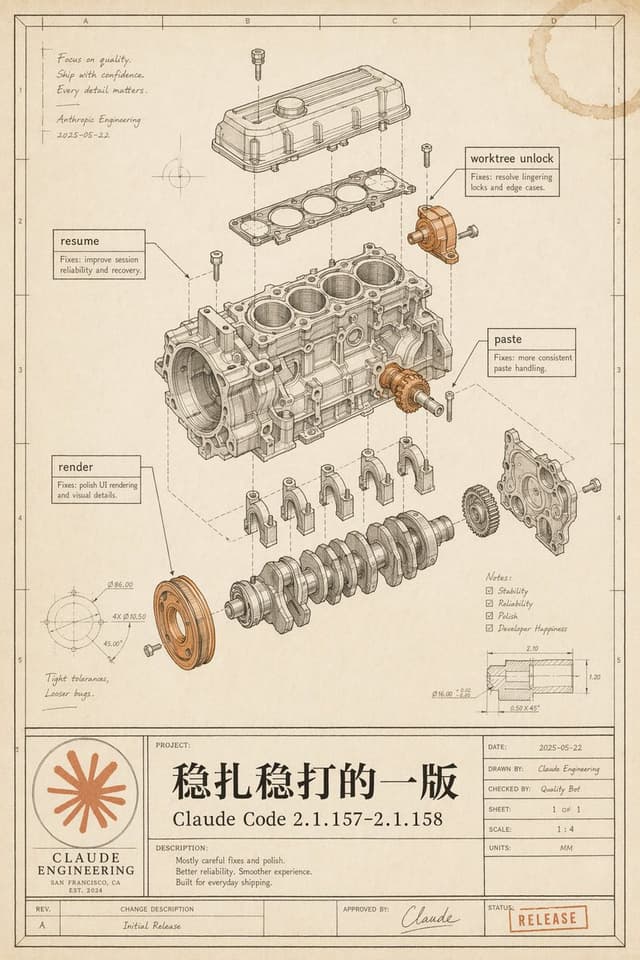
Infographic / Edu Visual - Vintage Claude Code Release Blueprint — output

Infographic / Edu Visual - Vintage Claude Code Release Blueprint

thinkthinkingGPT Image 2
Goal: Create a vintage engineering blueprint poster for {argument name="software release name" default="Claude Code 2.1.157–2.1.158"}, presented as an exploded mechanical engine assembly diagram that metaphorically documents a polished software release.

Canvas: Portrait technical drawing sheet, 4:5 aspect ratio, warm aged cream paper with subtle stains, worn edges, faint grid coordinates, thin black drafting border, and a title-block table along the bottom. Use monochrome ink linework with selective muted copper-orange highlights on a few mechanical parts and the logo/stamp.

Main illustration: Center the page on a detailed exploded isometric engine block assembly, drawn like a patent/automotive CAD manual. Show exactly 11 major visible mechanical groups: 1) top valve cover, 2) gasket plate beneath it, 3) main engine block with four cylinder bores, 4) crankshaft at the bottom, 5) four connecting caps beneath the block, 6) front circular pulley highlighted in copper-orange, 7) right-side gear highlighted in copper-orange, 8) right-side front cover plate, 9) upper-right small bracket/actuator highlighted in copper-orange, 10) scattered bolts/screws around the assembly, 11) dashed vertical and diagonal alignment/construction lines connecting the exploded components. Keep all linework precise, layered, and technically plausible.

Callouts and annotations: Include exactly 4 rectangular software-fix callout boxes with leader lines: 1) “resume” with small text “Fixes: improve session reliability and recovery.” 2) “worktree unlock” with small text “Fixes: resolve lingering locks and edge cases.” 3) “paste” with small text “Fixes: more consistent paste handling.” 4) “render” with small text “Fixes: polish UI rendering and visual details.” Add a handwritten note in the upper-left: “Focus on quality. Ship with confidence. Every detail matters.” followed by “Anthropic Engineering” and the date “2025-05-22”. Add lower-left handwritten note: “Tight tolerances, Looser bugs.” Add a lower-right notes checklist with exactly 4 checked items: “Stability”, “Reliability”, “Polish”, “Developer Happiness”. Add two small technical detail drawings: one circular dimension diagram in the lower-left with tiny dimension labels, and one sectional dimension diagram in the lower-right with tiny measurements.

Bottom title block: Make a large blueprint title panel spanning the bottom. On the left, include a circular orange Claude-like radial starburst logo above the words “CLAUDE ENGINEERING”, “SAN FRANCISCO, CA”, and “EST. 2024”. In the central project area, write a very large Chinese project title {argument name="main Chinese title" default="稳扎稳打的一版"}, with the release name below it. Under “DESCRIPTION:” include exactly 3 short lines: “Mostly careful fixes and polish.” “Better reliability. Smoother experience.” “Built for everyday shipping.” On the right, include a standard engineering metadata table with: “DATE: 2025-05-22”, “DRAWN BY: Claude Engineering”, “CHECKED BY: Quality Bot”, “SHEET: 1 OF 1”, “SCALE: 1 : 4”, “UNITS: MM”. Along the bottom revision row include “REV. A”, “CHANGE DESCRIPTION Initial Release”, “APPROVED BY: Claude” with a signature, and a red-orange rubber stamp reading {argument name="status stamp" default="RELEASE"}.

Visual style: High-end retro technical illustration, fine black/brown ink, hatching, small dimension ticks, subtle perspective, realistic paper grain, faint coffee-ring stain in the top-right corner, no glossy modern UI styling. The image should feel like a carefully archived engineering release drawing, elegant, intentional, and slightly nostalgic.

Constraints: Preserve all listed text exactly where specified, keep the Chinese title prominent, avoid extra software names, avoid photorealistic rendering, avoid clutter outside the blueprint page, and make the mechanical diagram the visual focus.
按模型、风格或主题浏览

寻找下一个方向

ASTORIE CANVAS

让灵感,继续生长。

在同一个创作空间,连接提示词、参考素材和生成结果。

打开创作画布 ↗