GPT Image 2 prompts

Browse GPT Image 2 prompts for fashion portraits and graphic compositions. Compare how each prompt describes its subject and the way the image is arranged.

Explore prompts

9,976 prompts

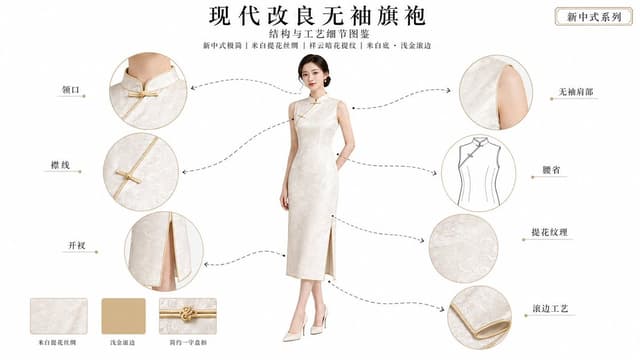
Infographic / Edu Visual - Qipao Design & Craft Infographic — output

Infographic / Edu Visual - Qipao Design & Craft Infographic

李岳GPT Image 2
Generate a 16:9 landscape, pure white background illustrated guide to Qipao structure and craft details. The overall style is a modern minimalist illustration page + high-end clothing structure research drawing + New Chinese Style minimalist clothing analysis page. The image should be clean, bright, restrained, and exquisite, with a clear sense of design and sharability.\n\nSet up a complete title explanation area at the top, with simple and high-end typography and ample white space:\nMain Title: \"Modern Modified Sleeveless Qipao\"\nSubtitle: \"Illustrated Guide to Structure and Craft Details\"\nTop style description line: \"New Chinese Minimalism | Off-white Jacquard Silk | Auspicious Cloud Hidden Flower Pattern | Off-white Base - Light Gold Piping\"\nTop-right series label: \"New Chinese Style Series\"\n\nBackground must be pure white, not off-white, not rice paper, no vintage paper texture.\n\nIn the center is an adult Oriental female, aged 22–32, with an elegant, modern, and restrained temperament. Facial features are delicate and intellectual, with soft contours and a clear Oriental aesthetic. Hairstyle is a simple low bun. The pose is natural and stable, front-facing or slight 3/4 angle, showing the full body. Arms should not block the garment structure. The focus is on displaying the Qipao, not a portrait photography.\n\nShe wears a modern modified sleeveless Qipao in New Chinese Minimalism style with a slim-fit streamlined silhouette. Specifications:\nCollar: Low stand-up collar\nOpening: Simplified diagonal opening\nButton type: Minimalist straight frog button\nSleeve: Sleeveless\nLength & Slit: Mid-calf length, medium slit\nFabric: Off-white jacquard silk\nPattern & Craft: Auspicious cloud hidden flower jacquard\nMain color & Piping: Off-white base + Light Gold piping\n\nThe central Qipao must clearly show: low stand-up collar, diagonal opening line, minimalist frog buttons, sleeveless shoulder contour, waist darts, slit position, and hem piping.\n\nDistribute 7 local breakdown modules on the left and right sides, strictly matching the central Qipao in color, fabric, pattern, piping, and structure. Focus areas: neckline, opening line, sleeveless shoulder, waist dart, slit, jacquard texture, and piping craft.\n\nModules mix three forms: structural enlargement (neckline, opening, shoulder, slit), craft macro view (texture, piping, buttons), and structural line drawing (waist darts).\n\nUse fine, hand-drawn dashed unidirectional arrows with small dot anchors to connect modules to the central figure. Style: elegant and restrained, not high-tech infographic.\n\nLabel each module with brief Chinese names only: 领厘 (Neckline), 襔线 (Opening Line), 无袖肩部 (Sleeveless Shoulder), 腰省 (Waist Dart), 开衩 (Slit), 提花纹理 (Jacquard Texture), 滚边工艺 (Piping Craft).\n\nAdd small samples at the bottom: off-white jacquard silk fabric, light gold piping color swatch, minimalist frog button sample.\n\nOverall visual emphasis: purity, modern structural feel, New Chinese Minimalism, delicate jacquard layers, high-end off-white and light gold palette, design research page feel, and sharability.\n\nLighting: soft and bright, like a high-end fashion design display, clearly presenting silk textures, piping thickness, and tailoring details.\n\nNegative Constraints: No ordinary portrait poster feel, no e-commerce white background product shot feel, no messy layout, no long descriptions, no thick arrows, no technical straight lines, no blocking the garment structure, no inconsistency in details, no incorrect slit position, no blurred textures, no plastic texture.
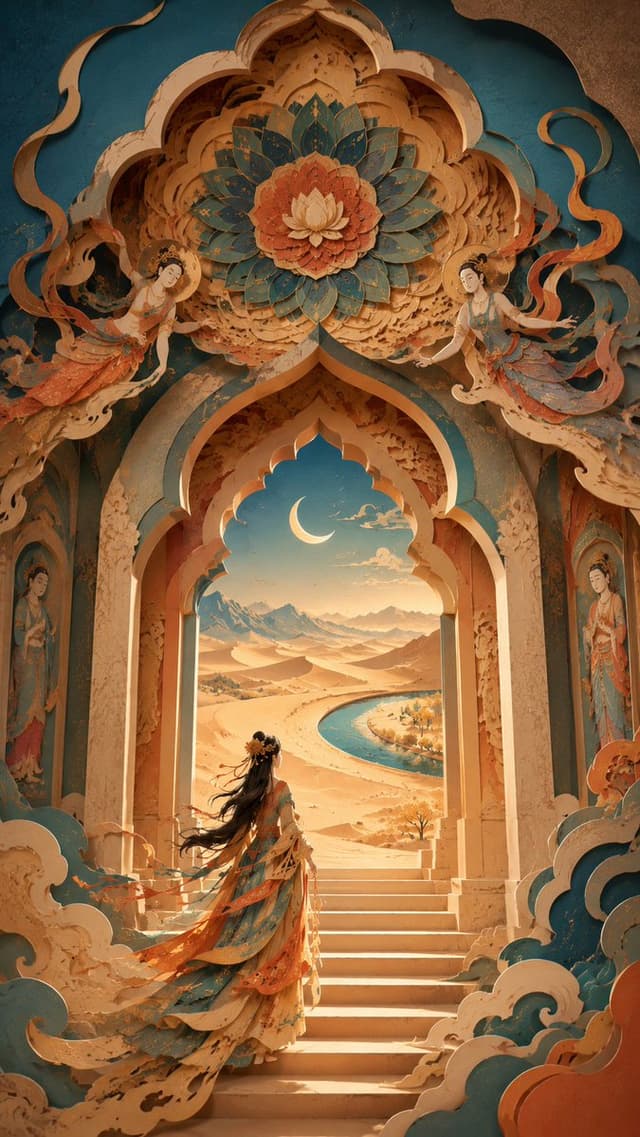
Social Media Post - Dunhuang Papercut Dreamscape Art — output

Social Media Post - Dunhuang Papercut Dreamscape Art

李岳GPT Image 2
9:16 vertical version, modern oriental female dreamscape dimensional papercut art, modern oriental papercut art, layered paper cut illustration, dimensional paper sculpture, intricate paper carving, paper diorama, poetic female dreamscape. The theme of the work is 'She walks into the unfinished page of a Dunhuang mural.' A visual 24-year-old oriental adult female, mysterious, elegant, quiet and determined, walking alone along long steps in a paper-carved cave. The character has a clear oval face, slender almond eyes slightly raised, and a quiet, focused expression. Long black hair is half-draped and half-tied, with strands naturally connecting to Feitian-style paper ribbons, wearing light gold floating clouds and small flower branch hair accessories. The character wears a multi-layered paper art long dress composed of ochre, stone green, peacock blue and gold. The hem features Feitian, caisson, sand patterns and Crescent Spring-style hollow patterns. The outer layer of silk ribbons flutters lightly behind her in the wind. The clothing has clear paper thickness, fiber texture, cut edges and dense hollow structures. The scene uses a relatively simple multi-layered stage-style composition, not crowded with mural characters. The main subject is a huge, nested Dunhuang-style paper-carved cave entrance. The arched door frame occupies the main space of the picture, with a large caisson paper-carved pattern at the top as a visual anchor. Only a few Feitian paper carvings and mural character silhouettes are kept on the left and right of the door, creating a sense of a dream of civilization, but avoiding complex crowding. The character is located in a small position at the lower center of the screen, facing away or two-thirds side-facing away from the camera, walking towards the huge door along several wide paper art steps. The scale of the character is significantly smaller than the door to emphasize the massive scale of the cave. Through the door, you can directly see another opened Dunhuang dream: vast golden sand dunes, curved blue water like the Crescent Spring, distant mountains, paper art clouds and a thin moon in the sky. The dunes and water surface are formed by multiple layers of paper, and the space is open and clean, without too many buildings. The overall colors are brighter and clearer than traditional Dunhuang colors: dominated by high-saturation but high-end peacock blue, stone green, ochre and warm sand gold, with an appropriate amount of cinnabar orange-red as a visual highlight. The outer layer of the door uses ochre and gold, the middle layer adds stone green and peacock blue, the distant desert uses warm gold and light ochre, and the Crescent Spring uses a bright blue-green. Colors are clearly separated from each other, without a uniform brownish-yellow filter, not gray or dirty. The lighting uses a transition from warm inside the cave to brighter outside. Golden celestial light shines from the direction of the distant dunes and Crescent Spring, passing through the paper-carved door and falling on the steps and the character's silhouette, forming a clear but soft guiding light. The edges of the caisson, Feitian, door frame and character's ribbons have a delicate translucent feel, while the dark areas still maintain layers of peacock blue, stone green and ochre. All caves, caissons, Feitian, sand dunes, Crescent Spring, clouds, characters and clothing must be unified into a high-level dimensional paper carving language. Strengthen the real paper fibers, paper layer thickness, hand-cut edges, slight creases and inter-layer projections. The whole piece is like a high-end Dunhuang-themed paper carving art installation, rather than a common mural illustration. The overall mood is: ancient, mysterious, quiet, vast, civilization is reawakening. The focus of the picture is 'Behind a huge doorway, another page of the ancient world is reopened', the composition is simple and powerful, the character is small, the space is large, and the colors are bright and transparent. Negative prompt: real-life photography, ordinary anime, plastic 3D, resin, clay, felt, children's handmade, ordinary Dunhuang tourism illustration, too many mural characters, accumulated decorations, overcrowded screen, oversized characters, large number of Buddha statues stacked, cave too dark, brownish-yellow filter, overall gray, dirty colors, saturation too low, dead black in shadows, inconspicuous Crescent Spring, sand dune space too small, doorway too small, messy paper layers, blurred paper edges, material separation between character and background, text, Logo, watermark.
Profile / Avatar - Ancient Chinese 'Ink Gold' Makeup Portrait — output

Profile / Avatar - Ancient Chinese 'Ink Gold' Makeup Portrait

李岳GPT Image 2
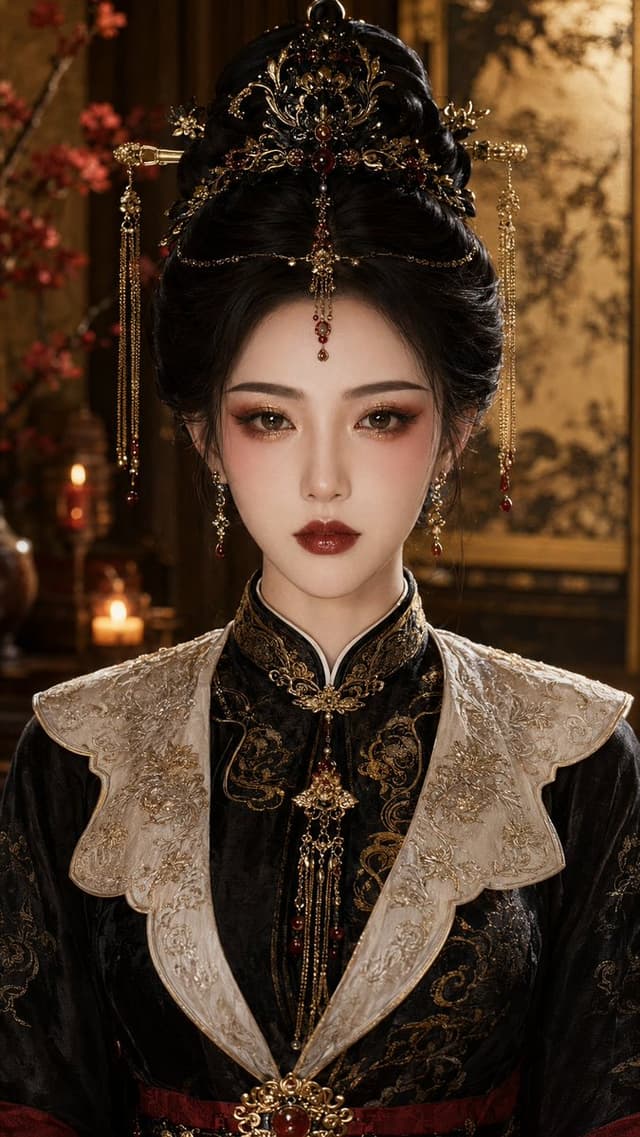
9:16 vertical version, ancient style noble woman ink-gold makeup close-up, oriental classical female bust close-up, sitting straight, looking calmly at the camera, mature, cold and elegant, noble, calm. Young adult oriental female, mature classical beauty face. The makeup is {argument name="makeup style" default="ink-gold red tea rose makeup"}: ink brown, red tea and dark gold pearlescent eye makeup, tea rose blush, deep bean paste moisturizing lips. The hairstyle is a black dignified high bun, matched with a black-gold hollow hair crown. The clothing is a {argument name="clothing" default="obsidian color stand-up collar long coat"}, with dark gold embroidery, matched with a pomegranate red horse-face long skirt. The scene is a dark wood hall, a golden screen, warm candlelight, and the background is softly blurred. The skin tone is clean and transparent, high-end ancient style noble woman portrait photography texture.
Comic / Storyboard - Anime Character Turnaround Sheet — output

Comic / Storyboard - Anime Character Turnaround Sheet

ABM@AIArtGPT Image 2
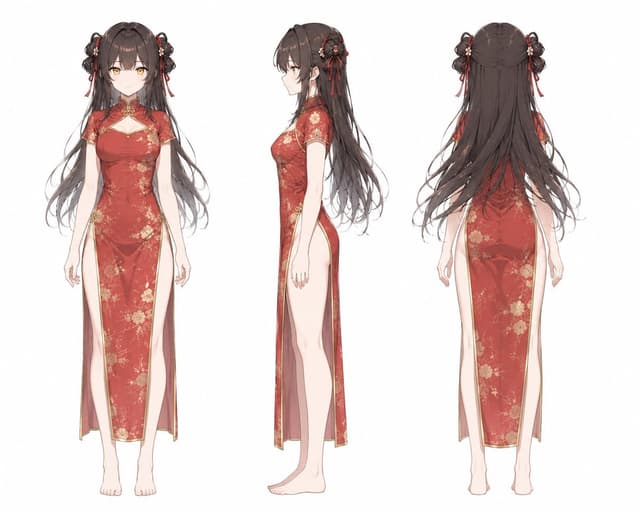
Character Three-View Drawing. Please use the attached character image as the main reference image. Create a character three-view drawing of the same character depicted from the following three directions: 1. Front, 2. Side, 3. Back. Faithfully maintain the face, hairstyle, hair color, eye color, body type, skin color, outfit, accessories, and characteristic parts so that the subject can be recognized as the same person as the character in the reference image. In all three directions, draw in the same natural standing pose and at the same scale. Completely unify height, body type, hairstyle, outfit design, and the position/shape of accessories across all three directions. Use a plain white background, neutral lighting, a composition that shows the entire body, and a layout that is easy to read as character setting material. Do not include extreme perspective, dynamic poses, cut-off body parts, different characters, text, or unnecessary background elements. High-quality anime character design, delicate line art, unified proportions, easy-to-read setting material, and front/side/back turnaround.
YouTube Thumbnail - Cinematic Action Movie Portrait — output

YouTube Thumbnail - Cinematic Action Movie Portrait

LuberGPT Image 2
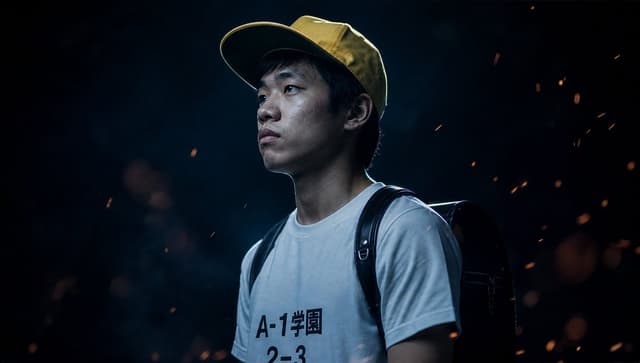
16:9. US action movie screenshot style. Lighting: rim light + {argument name="tone" default="cool tone"}, dark, {argument name="light color" default="cold blue"} tone light source, low light, dark, dim. Close-up of {argument name="subject" default="a male in image 1"} from the waist up (clothing + facial features must be consistent), with some sparks floating in the blurred foreground air. Black background. Shot with the visual effect of an equivalent 85mm portrait lens, depth of field approximately f/2.8, facial features must be in sharp focus. The character's hairstyle must retain its original styling, natural hair texture, and volume, with individual hairs clearly visible. Cinematic contrast. Professional commercial portrait grade retouching, only slightly evening out skin tone. No beauty filters, no artificial, plastic, or obvious AI-generated texture.
Profile / Avatar - Parisian Street Candid Portrait — output

Profile / Avatar - Parisian Street Candid Portrait

MeemGPT Image 2
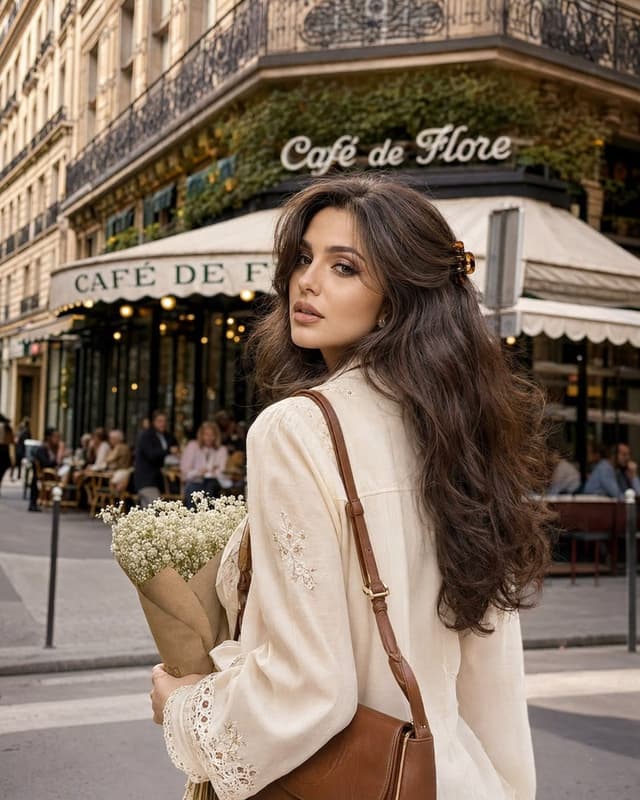
Photorealistic Paris street portrait of the {argument name="subject" default="same girl as the reference image"}, preserving her facial identity, facial features, hairstyle, and overall appearance accurately. She is walking along a charming Parisian street and looking back naturally over her shoulder toward the camera, with a subtle candid expression. She has long, wavy dark-brown hair with soft curtain bangs and the same tortoiseshell hair clip. She wears an {argument name="attire" default="elegant ivory embroidered blouse"} paired with a brown leather shoulder bag and gently holds a {argument name="accessories" default="small bouquet of delicate white flowers"}. Behind her are classic Parisian Haussmann buildings and the recognizable exterior of Café de Flore, softly out of focus. Warm natural daylight, authentic Parisian atmosphere, realistic skin texture, detailed individual hair strands, natural facial expression, soft background bokeh, cinematic candid photography, shallow depth of field, subtle filmic tones, realistic proportions, premium editorial photography, no artificial or plastic-looking skin. Vertical 4:5 composition, high detail, photorealistic.
Profile / Avatar - Luxury Magazine Editorial Portrait — output

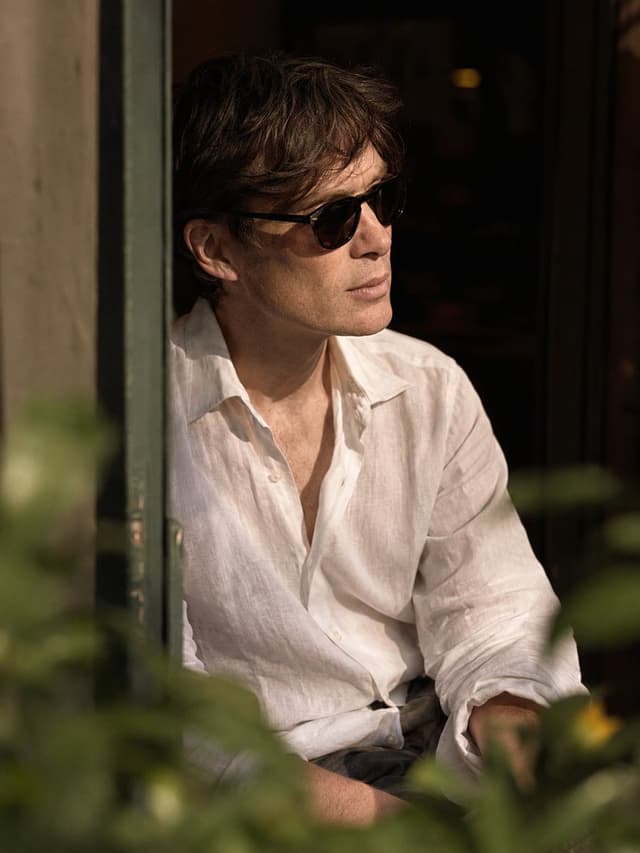
Profile / Avatar - Luxury Magazine Editorial Portrait

SaaS Junction ✦ Daily AI News & PromptsGPT Image 2
{ 
  "prompt_type": "ultra_realistic_candid_portrait", 
  "subject": { 
    "identity": "{argument name="identity" default="Uploaded Image"}", 
    "identity_note": "Preserve the exact facial identity, hairstyle, beard, and overall appearance of {argument name="person name" default="subject"} as accurately as possible", 
    "pose": "{argument name="pose" default="seated indoors, relaxed and natural body language"}", 
    "gaze": "looking slightly off to the side, calm and introspective expression", 
    "eyewear": "dark sunglasses" 
  }, 
  "attire": { 
    "top": "loose-fitting white linen shirt", 
    "collar": "open collar, unbuttoned at the top", 
    "sleeves": "long sleeves, slightly rolled or rolled", 
    "fit": "casual, breathable, effortless drape" 
  }, 
  "composition": { 
    "shot_type": "medium close-up", 
    "angle": "three-quarter side profile", 
    "framing": "partially obscured by soft blurred foreground elements such as leaves and a doorway edge, giving depth and a candid observational feel", 
    "aspect_ratio": "vertical 3:4" 
  }, 
  "lighting": { 
    "source": "warm late-afternoon sunlight entering from the side", 
    "effect": "soft highlights across the face and shirt, deep cinematic shadows", 
    "background": "dark, elegant, softly out of focus interior" 
  }, 
  "photographic_style": { 
    "depth_of_field": "shallow with creamy bokeh", 
    "texture": "realistic skin detail, natural facial hair rendering", 
    "grain": "subtle film grain", 
    "color_grade": "muted, warm tones", 
    "genre": "premium editorial lifestyle photography", 
    "lens_simulation": "85mm lens, f/1.8 aperture", 
    "realism_level": "highly detailed, photorealistic" 
  }, 
  "output_requirements": { 
    "consistency": "generate the same final image style, mood, lighting, framing, and attire regardless of who the person is", 
    "variable_input": "only the person's name changes; all other elements remain fixed" 
  } 
}
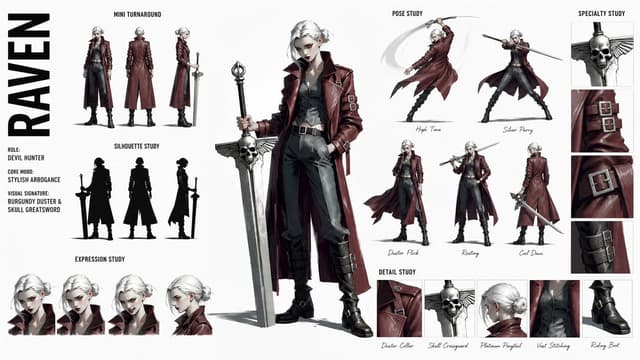
Comic / Storyboard - High-Fashion Character Concept Sheet — output

Comic / Storyboard - High-Fashion Character Concept Sheet

PixieVerseGPT Image 2
Create a premium, modern high-fashion CHARACTER CONCEPT ART SHEET in a 16:9 widescreen layout on a pure white background. THE ATTACHED REFERENCE IMAGE DEFINES THE ART STYLE — treat it as a strict style bible and reproduce its exact rendering
Profile / Avatar - Vintage Graphite Portrait Transformation — output

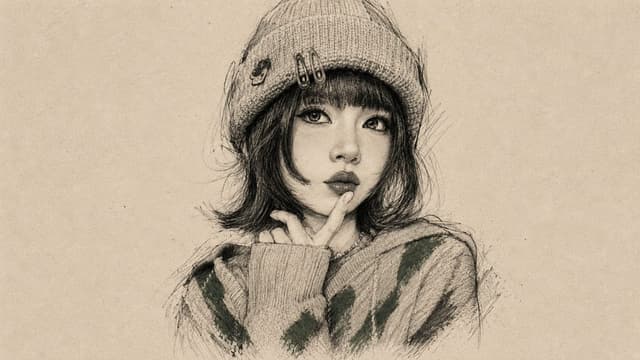
Profile / Avatar - Vintage Graphite Portrait Transformation

Elsa AiGPT Image 2
Using the provided reference image, transform the portrait into a vintage hand-drawn graphite and charcoal sketch on warm beige textured paper. Preserve the same identity, pose, framing, hairstyle, beanie, hair clips, sweater, accessories, and facial expression from the reference, but convert the photo into a monochrome pencil illustration with subtle sepia paper tone. Render visible sketch construction lines, rough crosshatching, soft smudged shading, fine hair strokes, fabric knit texture, and slightly unfinished edges around the shoulders and hat. Keep the composition as a bust portrait centered on a simple blank paper background, with no added objects, text, border, or watermark. Style intensity: {argument name="sketch realism" default="highly detailed realistic graphite portrait"}. Paper tone: {argument name="paper tone" default="warm aged beige"}. Line quality: {argument name="line quality" default="rough expressive pencil and charcoal strokes"}.
Infographic / Edu Visual - Dark Infographic-to-Video Poster — output

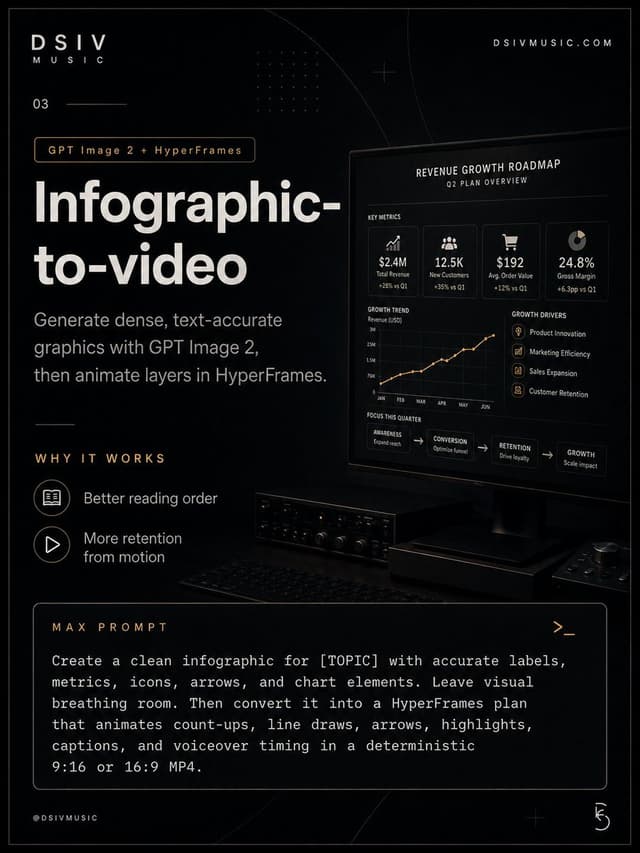
Infographic / Edu Visual - Dark Infographic-to-Video Poster

DSIVGPT Image 2
Goal: Create a premium dark editorial poster/slide teaching how to turn infographics into animated videos using {argument name="tool pairing" default="GPT Image 2 + HyperFrames"}. The design should feel like a high-end tech/music brand case-study card: minimal, cinematic, black background, white typography, warm amber accent lines, and a realistic workstation monitor showing a business dashboard.

Canvas: Portrait 4:5 social post, approximately 900 × 1200 px. Use a thin gray border around the whole canvas, deep black charcoal background, subtle concentric arcs, dotted grid texture, small plus-sign drafting marks, and very low-contrast technical linework.

Layout: Left side contains the branding, issue number, main headline, explanation, and two benefit bullets. Right side contains a realistic angled computer monitor on a dark desk. Bottom third contains a large rounded rectangle prompt box. Keep generous negative space and strong reading order from top-left to right monitor to bottom prompt box.

Branding and top details: In the top-left, place the logo text “DSIV” with spaced letters and smaller “MUSIC” underneath. In the top-right, place “DSIVMUSIC.COM”. Below the logo, add the issue number “03” with a thin horizontal line extending right. Add one small rounded amber-outline pill reading “GPT Image 2 + HyperFrames”.

Main headline: Large bold off-white sans-serif text on the left, split across two lines: “Infographic-” and “to-video”. Under it, add the subtitle: “Generate dense, text-accurate graphics with GPT Image 2, then animate layers in HyperFrames.”

Benefit section: Add the amber spaced heading “WHY IT WORKS”. Include exactly 2 benefit rows with circular outline icons: 1) an open-book icon labeled “Better reading order”; 2) a play-triangle icon labeled “More retention from motion”.

Right monitor content: Show a black desktop monitor angled slightly in perspective. On the screen is a clean dashboard titled “REVENUE GROWTH ROADMAP” with the subtitle “Q2 PLAN OVERVIEW”. Include exactly 4 key metric cards across the top: 1) chart-arrow icon, “$2.4M”, “Total Revenue”, “+28% vs Q1”; 2) group icon, “12.5K”, “New Customers”, “+35% vs Q1”; 3) shopping cart icon, “$192”, “Avg. Order Value”, “+12% vs Q1”; 4) donut-chart icon, “24.8%”, “Gross Margin”, “+6.3pp vs Q1”. Below, include exactly 1 orange line chart labeled “GROWTH TREND” with months JAN, FEB, MAR, APR, MAY, JUN along the bottom and rising data points. To the right, include exactly 4 growth driver rows with small amber circular icons: “Product Innovation”, “Marketing Efficiency”, “Sales Expansion”, and “Customer Retention”. Along the bottom of the dashboard, include exactly 4 connected roadmap boxes with arrows between them: “AWARENESS / Expand reach” → “CONVERSION / Optimize funnel” → “RETENTION / Drive loyalty” → “GROWTH / Scale impact”.

Desk details: Under the monitor, include a dark audio rack or amplifier with small knobs and indicator lights, a low-profile keyboard in shadow, and a small control surface at the bottom-right. Keep these objects subtle and nearly black, with faint highlights.

Bottom prompt box: Create a wide rounded rectangle with a thin gray outline and amber heading “MAX PROMPT”. Add a small terminal-style symbol “>_” in the upper-right of the box. Inside, use white monospaced type with this exact text: “Create a clean infographic for [TOPIC] with accurate labels, metrics, icons, arrows, and chart elements. Leave visual breathing room. Then convert it into a HyperFrames plan that animates count-ups, line draws, arrows, highlights, captions, and voiceover timing in a deterministic 9:16 or 16:9 MP4.”

Footer: Bottom-left small text “@DSIVMUSIC”. Bottom-right add a small abstract circular DSIV-style mark. Use tiny plus marks and faint arcs behind the footer.

Visual style: Dark monochrome luxury tech aesthetic, crisp vector typography mixed with realistic rendered monitor hardware, high contrast but restrained, amber accents only for highlights, thin strokes, clean grid alignment, accurate legible text, no clutter.

Constraints: Use exactly 4 dashboard metric cards, 4 growth driver rows, 4 roadmap boxes, and 2 benefit rows. Do not add extra sections, people, bright colors, or decorative elements that compete with the text. Keep all typography sharp and readable.
Game Asset - Retro Low-Poly Spaceflight Preview — output

Game Asset - Retro Low-Poly Spaceflight Preview

Kevin WhinneryGPT Image 2
Create a retro low-poly 3D spaceflight preview screen inside a desktop application window. Canvas is a wide 16:9 landscape screenshot with a white macOS-style browser/app frame, rounded top corners, three small traffic-light buttons at top left, and the window title “Space 1995 (DEBUG)”. Inside the window is a deep black starfield with many tiny white pixel-like stars and a few larger square stars, plus one large dark blue planet near the top center-left. The main subject is a single orange blocky spaceship centered slightly below the middle, viewed in three-quarter perspective from above, flying toward the right. The ship should look like a 1990s polygonal game asset: chunky rectangular geometry, visible panel-grid details, two side engine pods, a wide flat central body, dark cockpit glass on the front top, small black thrusters, subtle orange emissive glow on the left pod, and crisp voxel-like edges. Add a minimal sci-fi HUD overlay: at upper left a thin cyan horizontal line above the title text “SPACE 1995 // FLIGHT SYSTEM” in glowing cyan pixel/monospace lettering, with smaller subtitle “SHIP PREVIEW” beneath it. At lower right add a dark translucent rectangular status panel with a thin vertical orange accent bar on its left and the text “VX 150 DIABLO // LOADED” in small cyan-white monospaced type. Use exactly 1 spaceship, 1 planet, 1 top-left title HUD block, and 1 bottom-right status HUD panel. Visual style: retro-futuristic 1995 computer game, low-poly Three.js concept art, black space background, teal and orange UI accents, clean composition, no people, no extra labels, no watermark. Customizable elements: spaceship model name {argument name="spaceship model name" default="VX 150 DIABLO"}, main HUD title {argument name="main HUD title" default="SPACE 1995 // FLIGHT SYSTEM"}, subtitle {argument name="subtitle" default="SHIP PREVIEW"}, ship color {argument name="ship color" default="orange"}, planet color {argument name="planet color" default="dark blue"}.
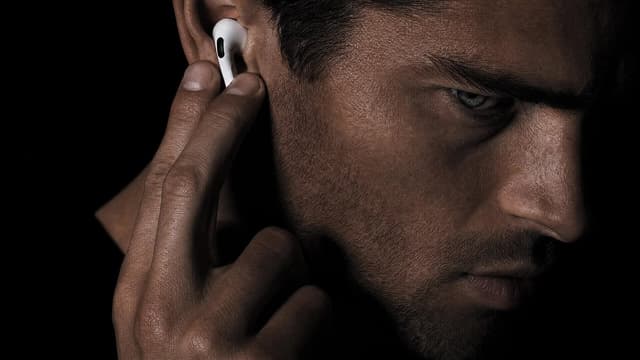
Product Marketing - Cinematic Earbud Portrait — output

Product Marketing - Cinematic Earbud Portrait

Jamieson O'ReillyGPT Image 2
Create a hyper-realistic cinematic close-up portrait of a {argument name="subject" default="serious adult man"} in near-total darkness, cropped extremely tight on the right side of his face and left ear. He has short dark hair, thick brow, intense narrowed eye contact looking downward and forward, rugged skin texture, visible pores, light stubble, and a trimmed mustache. A single glossy white wireless earbud is inserted in his left ear, and one raised hand with long fingers is touching or adjusting it; count exactly 1 earbud and 1 visible hand. Use dramatic low-key lighting with a narrow hard key light from the front-left revealing skin texture, cheekbone, nose bridge, lips, ear, and fingers while the background falls to pure black. Composition should feel like a premium tech or audio advertisement: horizontal 16:9 frame, face occupying the right two-thirds, ear and hand on the left third, deep shadows, high contrast, muted natural skin tones, no text, no logos, no extra accessories. Make the image photorealistic, sharp, moody, and cinematic, with shallow depth of field and subtle specular highlights on the earbud and skin.
Product Marketing - Fashion Portrait With Powder Disintegration — output

Product Marketing - Fashion Portrait With Powder Disintegration

Alina AiGPT Image 2
Create a photorealistic high-end fashion editorial full-body portrait of {argument name="subject" default="a young woman"} standing in a minimalist dark gray studio with a smooth gray backdrop and polished reflective floor. She has {argument name="hair" default="long straight dark brown hair with a center part"}, natural makeup, realistic skin texture, and a calm confident expression while looking directly at the camera. Dress her in a fitted {argument name="shirt color" default="mustard yellow"} short-sleeve T-shirt tucked casually into loose black cargo jogger pants with side pockets, and clean white high-top sneakers. Pose her slightly left of center with relaxed posture, one hand in a pants pocket, legs casually crossed, studio fashion lighting from the front-left, crisp detail, editorial realism. Add a dramatic surreal particle-disintegration effect starting from the right side of her body and expanding to the right side of the image: her shirt and pants dissolve into thousands of tiny fragments, black ash-like particles, and dense billowing smoke, blending into a huge cloud of {argument name="powder color" default="vivid orange"} pigment above and charcoal-black smoke below. The orange powder plume should occupy most of the upper-right half of the frame with turbulent rounded clouds and fine dust speckles, while the black smoke and debris occupy the lower-right half, creating a dynamic explosion frozen in motion. Keep the left side of her face and body intact and sharply realistic, maintain natural human proportions and identity consistency, no text, no logos, no extra people, vertical 9:16 composition, cinematic contrast, ultra-detailed fabric texture, realistic shadows and reflections.
Product Marketing - Porcelain Court Painter — output

Product Marketing - Porcelain Court Painter

NARI (나리)GPT Image 2
Create a vertical fine-art surreal fashion portrait of {argument name="character name" default="an ethereal porcelain-faced court painter"} leaning in from the right toward a hanging linen canvas. The figure has a smooth white mask-like face, narrow pale eyes, small muted peach lips, delicate ears, and visible cracked gold kintsugi seams across the cheek, neck, and hand. Dress the figure in translucent layered cream-white gauze robes with ruffled texture and tiny gold glitter speckles, plus a sheer veil sweeping dramatically from the head across the upper right of the frame. Add a dark traditional black headpiece or cap under the veil. The figure holds one long black calligraphy brush in one hand, touching the lower-left area of the canvas as if painting an ink landscape. The canvas on the left is tan raw linen with a black sumi-e style scene: bamboo stalks and leaves, rugged rocks, dark ink washes, and an unfinished brushy mountain-like composition. Include a small white ceramic ink vessel at the bottom left and a dark carved wooden table edge beneath it. Use a warm sepia and ivory palette, chiaroscuro lighting from the front-left, deep brown shadow background on the right, soft dust and glitter particles in the veil, hyper-detailed textures of linen, porcelain, gold cracks, sheer fabric, and wet black ink. Composition should be intimate and theatrical, 3/4 view, subject’s face in profile angled downward, elegant, haunting, museum-quality editorial photography mixed with classical East Asian ink painting aesthetics. No modern objects, no visible text, no watermark.
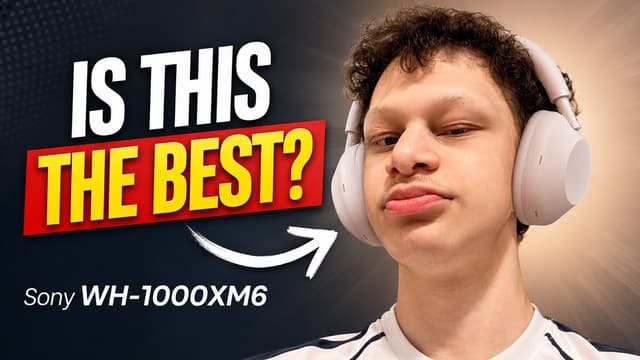
YouTube Thumbnail - Sony Headphones Review Thumbnail — output

YouTube Thumbnail - Sony Headphones Review Thumbnail

BLCNYYGPT Image 2
Create a high-impact YouTube tech review thumbnail in a 16:9 landscape format. On the right half, show a close-up portrait of a young man with short curly dark hair wearing large light-gray over-ear headphones, looking confidently at the camera with a slightly raised chin and subtle smirk; crop him from the chest up, with the headphones clearly visible. On the left half, place huge bold thumbnail text reading {argument name="headline text" default="IS THIS"} in white uppercase at the top, and {argument name="main question text" default="THE BEST?"} in bright yellow uppercase inside a red rectangular banner beneath it, with strong drop shadows and a slightly tilted dynamic layout. Below the main text, add smaller white product text reading {argument name="product name" default="Sony WH-1000XM6"}. Add exactly one thick hand-drawn white curved arrow pointing from the text area toward the headphones. Use a dark navy-to-black background on the left with subtle dotted halftone texture, transitioning to a warm beige radial glow behind the person on the right. Make the design crisp, saturated, and clickable, with dramatic contrast, studio lighting, sharp facial detail, clean cutout edges, and no extra logos, watermarks, or additional text.
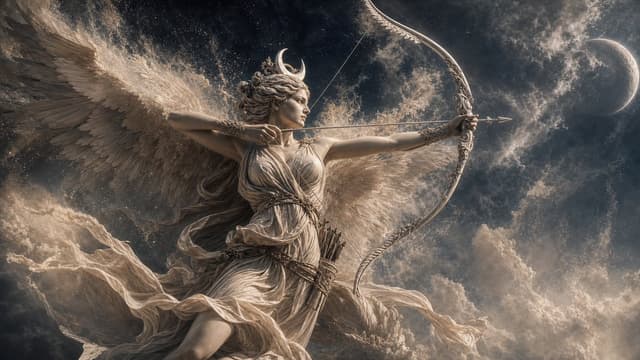
Game Asset - Winged Moon Goddess Archer Wallpaper — output

Game Asset - Winged Moon Goddess Archer Wallpaper

Sophia_ammyGPT Image 2
Using REFERENCE_0 as the classical mythological painting style and winged celestial figure base, transform the subject into {argument name="mythological character" default="a female moon goddess archer inspired by Artemis/Diana"}. Keep the grand Baroque/classical oil-painting treatment, dramatic clouds, monumental feathered wings, flowing pale drapery, sculptural anatomy, and cinematic wide desktop-wallpaper composition, but change the pose so she is aiming a bow in profile with one arrow drawn taut. Add exactly 5 new key details: 1 ornate crescent-shaped bow, 1 nocked arrow, 1 quiver at her waist, 1 crescent moon ornament in her hair, and 1 distant crescent moon in the sky. Shift the lighting and atmosphere from warm heavenly daylight to {argument name="atmosphere" default="dark moonlit night"}, with a starry cloud-filled sky, silver-gray highlights, glowing mist, and ethereal lunar radiance. Make the image feel like a mythological 4K desktop wallpaper: highly detailed, elegant, epic, painterly, no text, no watermark.
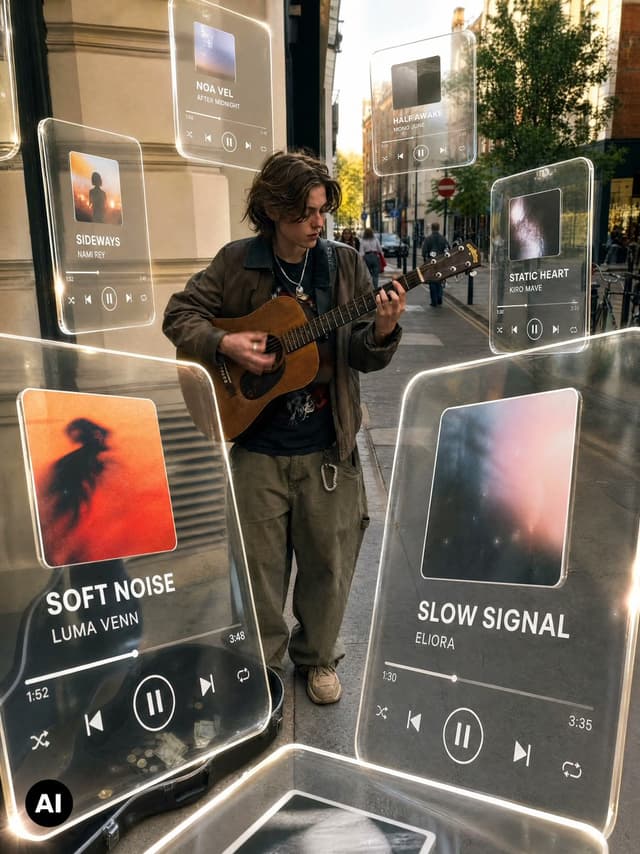
Social Media Post - Cinematic Holographic Music Player Edit — output

Social Media Post - Futuristic AR Music Cards Street Edit

Deenu KhanGPT Image 2
Using the provided street musician photo as the base, keep the original person, guitar, sidewalk setting, and camera angle intact, but transform it into a viral futuristic music-discovery edit. Add a warm cinematic color grade with deeper contrast, golden highlights, subtle background blur, and a polished social-media look.

Overlay exactly 8 floating translucent glass music-player cards around the musician, with rounded corners, glowing white edges, realistic reflections, and slight perspective depth as if they are hovering in the street. The cards should feel like holographic acrylic UI panels integrated into the scene lighting.

Visible cards to add:
1. Large foreground left card: album art with an orange blurred silhouette, title “SOFT NOISE”, artist “LUMA VENN”, progress time 1:52 to 3:48, playback controls.
2. Large foreground right card: soft abstract pink/blue album art, title “SLOW SIGNAL”, artist “ELIORA”, progress time 1:30 to 3:35, playback controls.
3. Mid-left smaller card: sunset silhouette album art, title “SIDEWAYS”, artist “NAMI REY”, playback controls.
4. Upper-center card: small blue album art, title “NOA VEL”, subtitle/artist “AFTER MIDNIGHT”, playback controls.
5. Upper-right card: dark album art, title “HALF AWAKE”, artist “MONO JUNE”, playback controls.
6. Right-side smaller card: galaxy-like album art, title “STATIC HEART”, artist “KIRO MAVE”, playback controls.
7. Bottom foreground partial card, cropped by the frame, showing only a glowing glass edge and partial album image.
8. Far-left edge partial card, cropped by the frame, showing only a sliver of another glowing glass panel.

Style: premium AR music interface, realistic transparent glass, luminous rim lighting, shallow-depth street photography, warm evening grade, mild motion/hand blur preserved on the guitarist. Keep the original busker and environment recognizable; do not replace the subject. Preserve the black circular “AI” watermark in the lower-left corner. Optional customizable main titles: {argument name="left main song title" default="SOFT NOISE"}, {argument name="left main artist" default="LUMA VENN"}, {argument name="right main song title" default="SLOW SIGNAL"}, {argument name="right main artist" default="ELIORA"}, {argument name="overall color grade" default="warm cinematic golden street edit"}.
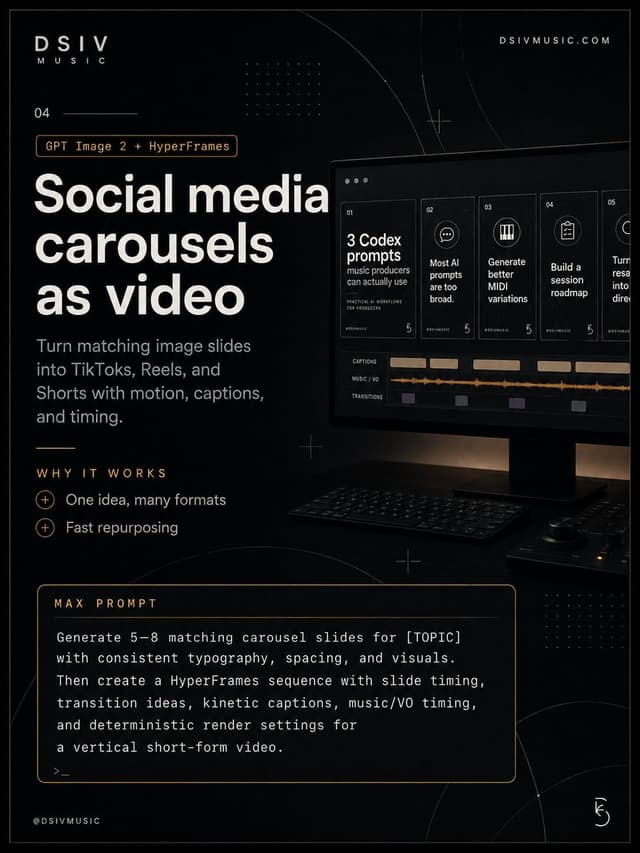
Infographic / Edu Visual - Dark Tech Carousel-to-Video Slide — output

Infographic / Edu Visual - Dark Tech Carousel-to-Video Slide

DSIVGPT Image 2
Goal: Create a dark, premium tech carousel slide promoting {argument name="headline text" default="Social media carousels as video"}, branded as DSIV Music, with a cinematic desktop-production setup and instructional marketing copy.

Canvas: Vertical 3:4 poster, about 900 × 1200 px, black charcoal background with subtle grain, thin gray border, faint geometric arcs, crosshair marks, dotted grid accents, and warm amber highlight lines.

Layout: Use a left-heavy editorial layout with a product mockup on the right. Top left shows the brand text “DSIV” with “MUSIC” beneath it; top right shows “DSIVMUSIC.COM”. Under the brand, place the slide number “04” with a thin horizontal rule. Below that, add a small outlined amber pill label reading {argument name="tool label" default="GPT Image 2 + HyperFrames"}. The main headline occupies the left center in very large bold white sans-serif type across four lines. Beneath it, add the subheading: {argument name="subheading text" default="Turn matching image slides into TikToks, Reels, and Shorts with motion, captions, and timing."}

Right visual: Show a realistic dark monitor angled slightly in perspective on a desk, with a keyboard and small audio/control device in shadow. On the monitor, display a carousel-to-video editing interface: exactly 5 vertical slide cards across the top, numbered 01, 02, 03, 04, and 05. Card 01 reads “3 Codex prompts” with smaller text “music producers can actually use”; card 02 reads “Most AI prompts are too broad.”; card 03 reads “Generate better MIDI variations”; card 04 reads “Build a session roadmap”; card 05 is partially cropped and begins with “Turn...” as if continuing offscreen. Below the cards, show exactly 3 labeled timeline rows: “CAPTIONS”, “MUSIC / VO”, and “TRANSITIONS”, with beige caption blocks, an orange audio waveform, and small purple/gray transition blocks.

Middle-left section: Add a small amber divider line, then the spaced uppercase label “WHY IT WORKS”. Under it list exactly 2 benefits, each preceded by a circled plus icon: “One idea, many formats” and “Fast repurposing”.

Bottom section: Add a large rounded rectangle prompt box outlined in amber. Header text inside the box says “MAX PROMPT”. Body text uses a monospaced typewriter style and reads: “Generate 5–8 matching carousel slides for [TOPIC] with consistent typography, spacing, and visuals. Then create a HyperFrames sequence with slide timing, transition ideas, kinetic captions, music/VO timing, and deterministic render settings for a vertical short-form video.” End with a small terminal-style “>_”. Bottom left footer reads “@DSIVMUSIC”; bottom right has a small abstract circular DSIV-style mark.

Visual style: Sleek black-and-white SaaS/creator-economy aesthetic, high contrast typography, warm amber accents, subtle photographic realism on the monitor and desk, clean modern Swiss grid composition, cinematic lighting, crisp legible text, no extra logos beyond DSIV branding.
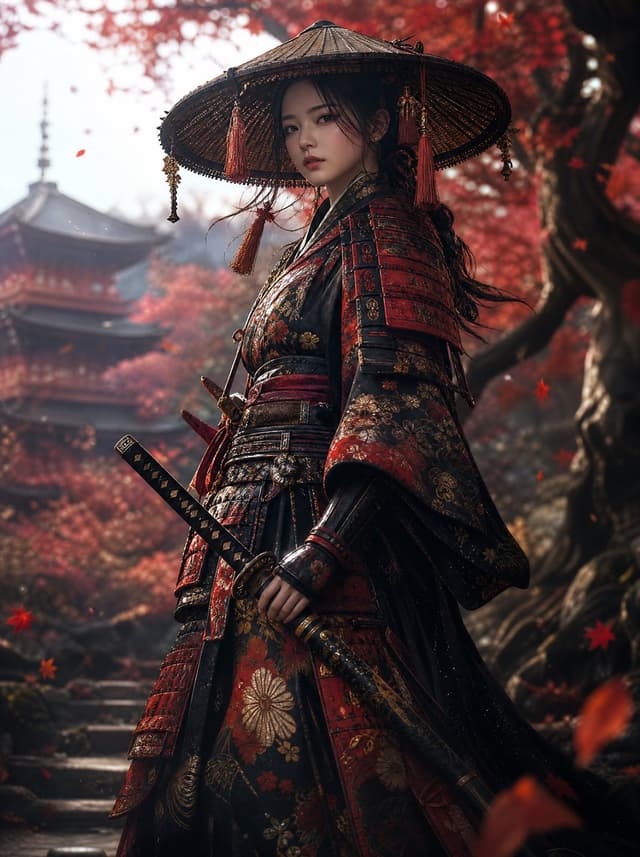
Product Marketing - Autumn Female Samurai Portrait — output

Product Marketing - Autumn Female Samurai Portrait

DavidGPT Image 2
Create a cinematic full-body portrait of a {argument name="character description" default="young Japanese female samurai warrior"} standing in a misty autumn temple garden. She wears an ornate black and deep crimson patterned kimono integrated with layered samurai armor: lacquered red shoulder plates, segmented waist and thigh guards, black leather bracers, gold floral embroidery, brocade fabric, and a dark obi belt. She holds one katana at her side with the hilt near her hand, and a second sheathed sword is visible at her waist; include exactly 2 swords. Her pose is calm and powerful, body angled slightly sideways, head turned toward the viewer with a serious, elegant expression. She has long dark hair loosely tied back with windblown strands around her face. Add a wide woven straw kasa hat with dangling red tassels and small gold ornaments; include exactly 4 prominent tassel clusters hanging from the brim. The background shows a softly blurred Japanese pagoda on the left, stone steps below, a massive dark tree trunk on the right, and dense red maple foliage overhead. Add scattered falling red maple leaves, atmospheric haze, shallow depth of field, dramatic rim light, soft backlighting through the trees, realistic skin, intricate textile detail, and a moody red-black-gold color palette. Style: ultra-detailed photorealistic fantasy fashion editorial, cinematic composition, vertical 3:4 frame, high dynamic range, natural lens bokeh, no text, no watermark.
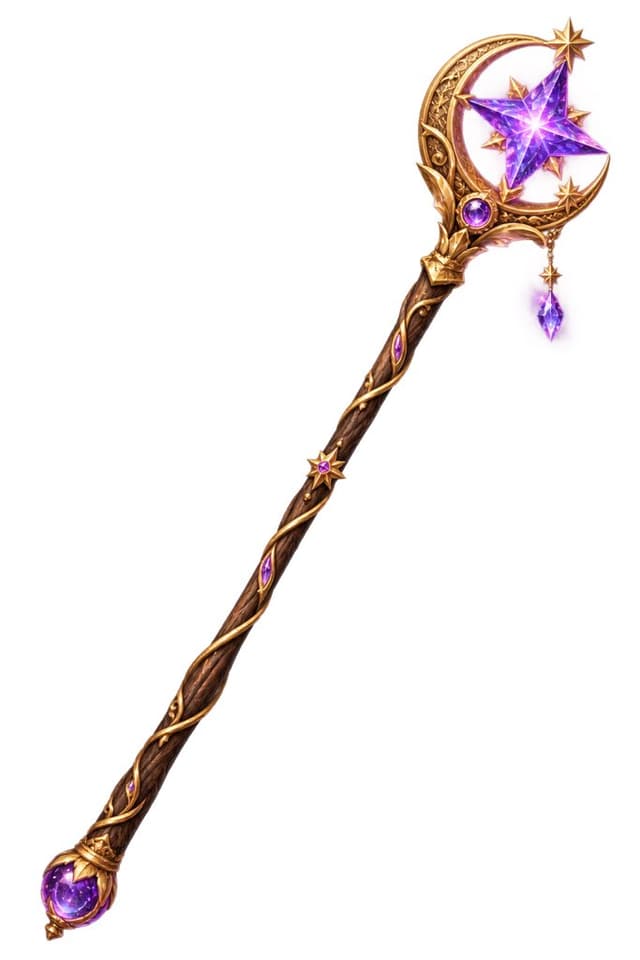
Game Asset - Fantasy Crescent Star Magic Staff — output

Game Asset - Fantasy Crescent Star Magic Staff

連GPT Image 2
Create a high-fantasy magical staff game asset isolated on a pure white or transparent background, angled diagonally from lower left to upper right. The staff has a long twisted dark walnut wooden shaft wrapped by thin spiraling polished gold vines. At the top is an ornate gold crescent-moon frame with filigree engravings, leaf-like gold brackets, and a brilliant faceted purple crystal star set inside the crescent, emitting a soft violet glow and bright white sparkle at its center. Include exactly 8 visible purple jewel elements: 1 large five-point star crystal in the crescent, 1 round amethyst gem below the crescent, 1 dangling purple teardrop crystal on a fine gold chain, 4 small oval purple inlays along the shaft, and 1 large round purple orb set into the bottom pommel. Include exactly 6 visible gold star ornaments: 1 star at the top tip of the crescent, 1 small star overlapping the upper left of the large purple star, 1 small star on the right point of the large purple star, 1 small star on the lower right curve of the crescent, 1 tiny star above the dangling crystal, and 1 star clasp on the middle of the shaft. The bottom pommel should be ornate gold with a glowing purple orb. Render in highly detailed polished fantasy RPG item icon style, glossy metallic gold, carved wood grain, gemstone refraction, subtle magical violet aura, crisp edges, centered composition with lots of empty background space, no text, no character, no shadow-heavy scene.
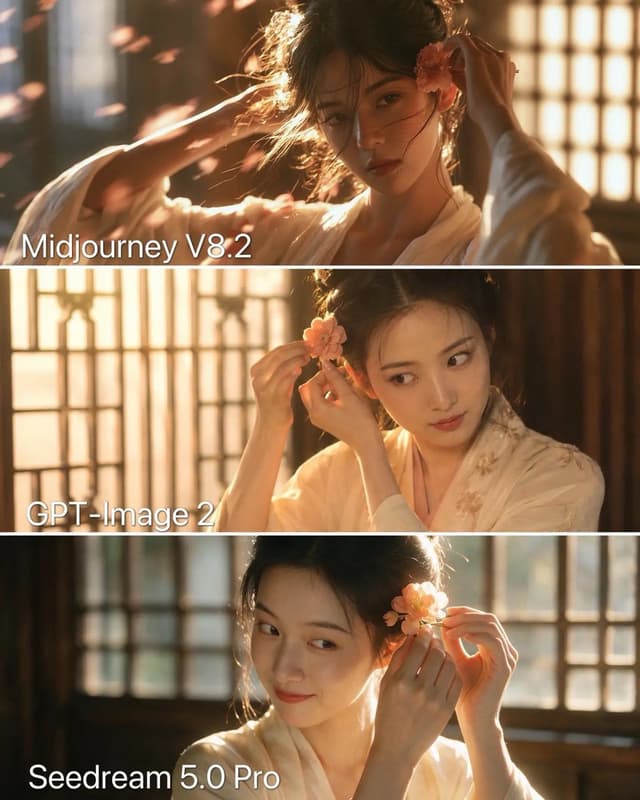
Comic / Storyboard - Three-Panel Chinese Aesthetic Model Comparison — output

Comic / Storyboard - Three-Panel Chinese Aesthetic Model Comparison

梦老湿 Dream AIGPT Image 2
Goal: Create a vertical three-panel comparison collage showing the same Chinese traditional aesthetic portrait generated in three different styles.

Canvas: Portrait format, approximately 4:5 aspect ratio, 960×1200 feel. Divide the image into exactly 3 equal horizontal panels separated by thin white horizontal lines.

Overall subject: In all three panels, show the same young East Asian woman in a warm, cinematic ancient Chinese interior, wearing a soft ivory hanfu robe. She is adjusting a peach-pink flower hair ornament near her ear with both hands. Her black hair is loosely pinned up with wispy strands around her face. The atmosphere is golden-hour, backlit, romantic, and traditional, with wooden lattice windows behind her, soft haze, shallow depth of field, warm sunlight, and floating flower petals or dust motes.

Panel count and labels: Use exactly 3 panels with large white sans-serif text labels in the lower-left area of each panel: 1) “Midjourney V8.2” on the top panel, 2) “GPT-Image 2” on the middle panel, 3) “Seedream 5.0 Pro” on the bottom panel.

Top panel: Label “Midjourney V8.2”. Make this the most dramatic and cinematic version: stronger contrast, moody shadows, glowing rim light, more dynamic pose, windblown hair, petals crossing the foreground, refined facial features, realistic skin texture, premium film still quality. The woman faces slightly toward camera with a serious, elegant expression while placing the flower by her ear.

Middle panel: Label “GPT-Image 2”. Make this cleaner and softer, with a slightly polished beauty-retouch look. The woman is turned three-quarters to the right, looking sideways while carefully adjusting the flower. Keep warm window light, cream hanfu fabric with subtle embroidered floral details, and a more smooth, influencer-like face.

Bottom panel: Label “Seedream 5.0 Pro”. Make this brighter and slightly more plastic/smooth than the top, with a gentle smile and softer realism. The woman holds the peach flower close to her ear, looking down-left or sideways, with intense backlight from the lattice window and a glowing edge around her hair and hands.

Text styling: Large white text, simple sans-serif, no outline, subtle shadow if needed for readability. Place each label consistently near the bottom-left of its panel. Do not add any other text, logos, watermarks, or UI elements.

Customizable details: The subject is {argument name="subject description" default="a young East Asian woman in ivory hanfu"}; the setting is {argument name="setting" default="a warm ancient Chinese room with wooden lattice windows"}; the hair accessory is {argument name="hair flower" default="a peach-pink flower"}; the top label is {argument name="top model label" default="Midjourney V8.2"}; the middle label is {argument name="middle model label" default="GPT-Image 2"}.
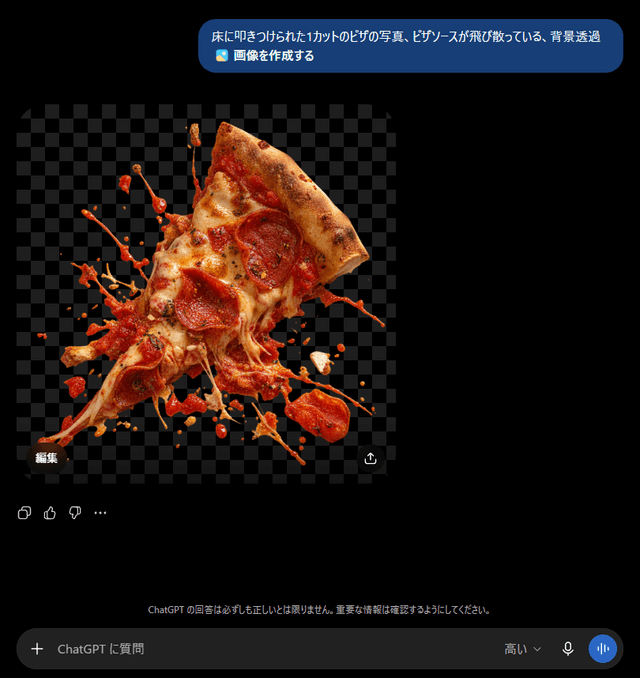
Infographic / Edu Visual - ChatGPT Transparent Pizza Result — output

Infographic / Edu Visual - ChatGPT Transparent Pizza Result

とらのGPT Image 2
Goal: Create a realistic screenshot of a dark-mode ChatGPT conversation showing an image generation result about a transparent-background pizza slice.

Canvas: Square-ish desktop screenshot, approximately 820×847 px, with a pure black ChatGPT-style dark interface background.

Layout: At the top right, place one rounded blue user message bubble containing Japanese text and a small image icon line. Below it, aligned left, show one generated image preview: a square transparent-background checkerboard area with a cutout photo of a pizza slice exploding into scattered sauce and toppings. Under and around the image preview, include small ChatGPT interface controls, then a bottom input bar.

Text content: The top message bubble must read exactly: 「床に叩きつけられた1カットのピザの写真、ピザソースが飛び散っている、背景透過」 on the first line, and 「🖼️ 画像を作成する」 on the second line. Add a small dark pill button labeled 「編集」 near the lower-left corner of the image preview. Add a small circular share/download-style icon near the lower-right corner of the image preview. Near the bottom center, add the faint Japanese disclaimer: 「ChatGPT の回答は必ずしも正しいとは限りません。重要な情報は確認するようにしてください。」 The bottom input placeholder should read 「ChatGPT に質問」, with a plus icon on the left and small microphone/voice icons on the right, plus the label 「高い」.

Generated image details: The preview should show exactly 1 triangular slice of pepperoni pizza, tilted diagonally upward to the right, with a browned crust at the top right, melted mozzarella cheese stretching downward, red tomato sauce splashing outward, and pepperoni pieces visible on the slice. Surround it with many irregular sauce droplets, cheese strands, and flying topping fragments as if the slice was slammed onto a floor. The cutout should have an alpha/transparent look represented by a dark gray checkerboard background behind the pizza. Make the pizza highly photorealistic, glossy, messy, and sharply lit, with no plate and no visible floor.

Interface details: Use a modern ChatGPT mobile/desktop hybrid dark UI aesthetic, black background, rounded blue user bubble, soft gray icons, and a rounded dark input field at the bottom. Include exactly 4 small reaction/action icons below the generated image area on the left: copy, thumbs up, thumbs down, and an ellipsis. Keep all UI elements subtle and crisp.

Constraints: Do not add extra messages, avatars, watermarks, or browser chrome. The main focus should be the transparent PNG-style pizza cutout inside the chat interface. Use {argument name="pizza prompt text" default="床に叩きつけられた1カットのピザの写真、ピザソースが飛び散っている、背景透過"} as the visible user request, {argument name="subject" default="one pepperoni pizza slice smashed with sauce splashing"}, and {argument name="interface language" default="Japanese"}.
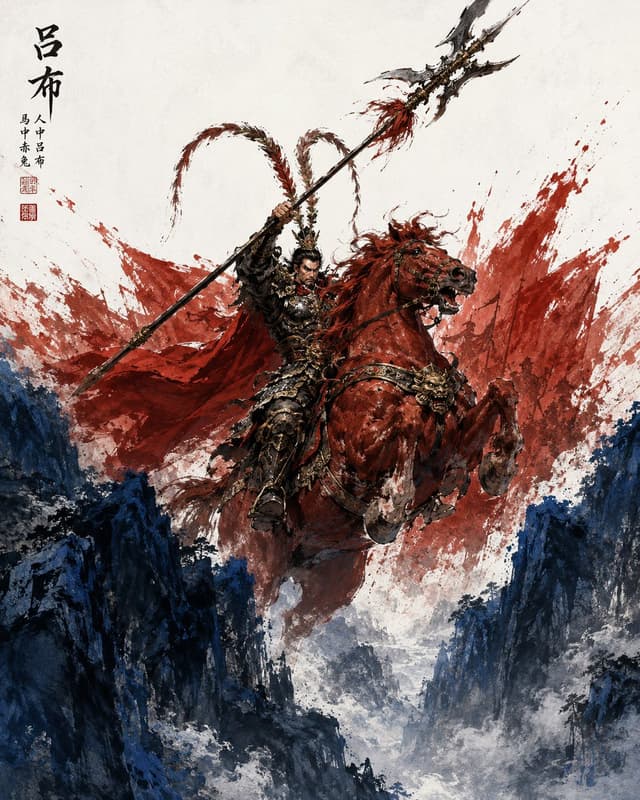
Comic / Storyboard - Lu Bu Ink Wash Warrior — output

Comic / Storyboard - Lu Bu Ink Wash Warrior

mo KiGPT Image 2
Create a dramatic vertical Chinese ink-and-wash fantasy illustration of {argument name="character name" default="Lu Bu"}, the legendary Three Kingdoms warrior, charging through a narrow mountain gorge on a rearing {argument name="horse color" default="blood-red"} warhorse. The warrior wears ornate black-and-gold lamellar armor with sharp gilded details, a fierce expression, dark hair and beard, and a small crested headpiece with two long pheasant-tail plumes arcing high behind him. He raises an enormous Fangtian halberd diagonally across the composition, its jagged double crescent blade pointing to the upper right with red tassels near the head. A vast torn {argument name="cape color" default="crimson"} cape explodes behind him like splashed paint, merging with red ink bursts that fill the upper background. The horse is muscular, mid-leap and rearing, mouth open, mane flying, ornate bridle and chest armor decorated with a fierce beast-mask emblem. Below, dark blue-black rocky cliffs frame a deep misty ravine, painted with rough expressive brush strokes and white fog. Use a textured off-white rice-paper background, dynamic splatter ink, energetic xieyi brushwork, high contrast red against deep navy rocks, painterly realism mixed with traditional Chinese martial art poster aesthetics. Add vertical black Chinese calligraphy in the upper left reading {argument name="calligraphy text" default="吕布"}, with smaller side inscriptions and two small red seal stamps beneath it. No modern objects, no borders, no watermark, keep the image focused on one warrior, one horse, one halberd, one cape, two plume arcs, two red seal stamps, and the mountain gorge.
Browse by model, style or topic

Find your next direction

ASTORIE CANVAS

Take the idea further.

Bring your prompts, references and results together in one creative space.

Open your canvas ↗