GPT Image 2 prompts

Browse GPT Image 2 prompts for fashion portraits and graphic compositions. Compare how each prompt describes its subject and the way the image is arranged.

Explore prompts

10,026 prompts

Infographic / Edu Visual - Excel VBA Community Promo Banner — output

Infographic / Edu Visual - Excel VBA Community Promo Banner

Excel FunGPT Image 2
Goal: Create a square promotional infographic for an Excel and VBA online community, using a friendly green-and-white corporate style with Japanese typography.

Canvas: 1:1 square social media image, 768 x 768 px feel, pale mint green gradient background with soft white curves, subtle sparkles, small leaf decorations in the lower corners, and a clean high-contrast layout.

Layout: Large title block at the top left, illustration block at the top right, wide dark-green banner across the upper middle, main information area in the center, call-to-action button near the bottom, and URL footer at the very bottom.

Text content: Top title reads “{argument name="main title" default="Excel Fun*"}” in oversized bold dark green letters with thick white outline and soft drop shadow. Middle ribbon banner reads “{argument name="community headline" default="Excel・VBA 総合コミュニティ"}” in bold white text. Under it, add the subtitle “{argument name="community description" default="Excelに関わる全ての人がつながるコミュニティ"}” in dark green. The gold medal badge says “{argument name="member badge text" default="参加者 2500名 突破"}”. Bottom encouragement line says “どなたでもお気軽にご参加ください!” in green. Large rounded CTA button says “{argument name="button text" default="今すぐチェック"}” in bold white, with a white circular play icon on the right. Footer URL reads “sites.google.com/view/excel-vba-fun” with a small globe icon.

Subject details: Top-right illustration shows a stylized Excel spreadsheet window with an “X-” mark in the header, visible grid cells and column letters, three simplified green user silhouettes in front, a round “fx” formula icon, and exactly 2 chat bubbles: one white bubble with three green dots and one green bubble with three white dots. Center-left contains exactly 1 gold seal medal with serrated edge, laurel wreath, three small stars, and bold black-brown lettering. Center-right contains exactly 1 laptop angled slightly right, showing a spreadsheet dashboard with exactly 1 pie chart and exactly 1 green bar chart; place exactly 1 floating green Excel app tile with a white X in front of the laptop.

Benefit list: Create exactly 4 horizontal rounded white pill cards stacked vertically in the center. Each card has a green circular icon on the left and bold dark green Japanese text on the right. The 4 cards are: 1) chat bubble icon, “質問・相談歓迎”; 2) megaphone icon, “最新情報を共有”; 3) calendar icon, “イベント参加OK”; 4) eye icon, “見るだけでもOK”. Add a dotted green divider line above the benefit list.

Visual style: Bright vector illustration, glossy social-banner design, rounded shapes, thick outlines, soft shadows, clean Japanese sans-serif typography, mostly emerald green, mint green, white, and gold. Keep everything crisp, cheerful, accessible, and community-oriented.

Constraints: Use exactly the counted elements described above; do not add extra benefit cards, extra badges, extra chat bubbles, QR codes, watermarks, or unrelated logos. Preserve the Japanese text exactly where specified.
Social Media Post - Queen Reclining With Silver Serpent — output

Social Media Post - Queen Reclining With Silver Serpent

カーブミラーGPT Image 2
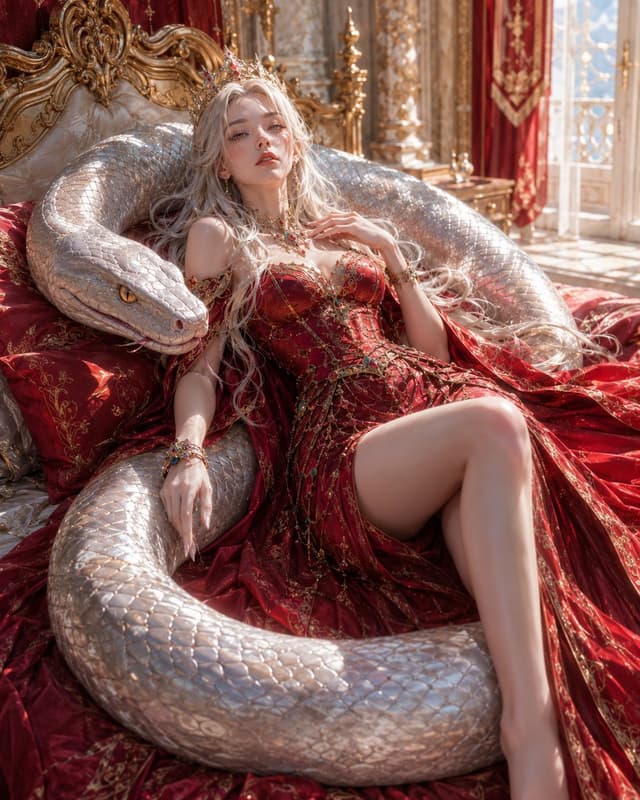
Create a luxurious fantasy portrait of {argument name="character name" default="the Queen and the Serpent"}: a beautiful pale-skinned young queen reclining on an ornate gilded baroque bed inside a sunlit royal palace chamber, embraced by one enormous silver-white serpent coiled around her body like a protective throne. The queen has {argument name="hair color" default="very long platinum-blonde hair"} flowing across red silk bedding, a delicate jeweled crown, soft regal makeup, and a languid, confident expression while gazing toward the viewer. She wears a deep crimson off-shoulder corset gown with intricate gold embroidery, beaded chains, gemstones, bracelets, and a dramatic slit revealing one bare leg; the fabric spreads across the bed in rich folds. The serpent has pearlescent metallic scales, a massive calm head resting beside her shoulder on the left, visible golden eyes, and a thick body forming one large coil around the foreground. Set the scene in an opulent palace bedroom with carved gold headboard, red velvet pillows, brocade curtains, marble columns, tall bright windows, and warm morning sunlight casting sparkling highlights across scales, jewelry, and fabric. Style: ultra-detailed cinematic fantasy realism, elegant and sensual but non-explicit, high-fashion editorial composition, soft volumetric light, shallow depth of field, 3:4 vertical frame, crisp textures, no text, no watermark, no extra limbs, no distorted anatomy.
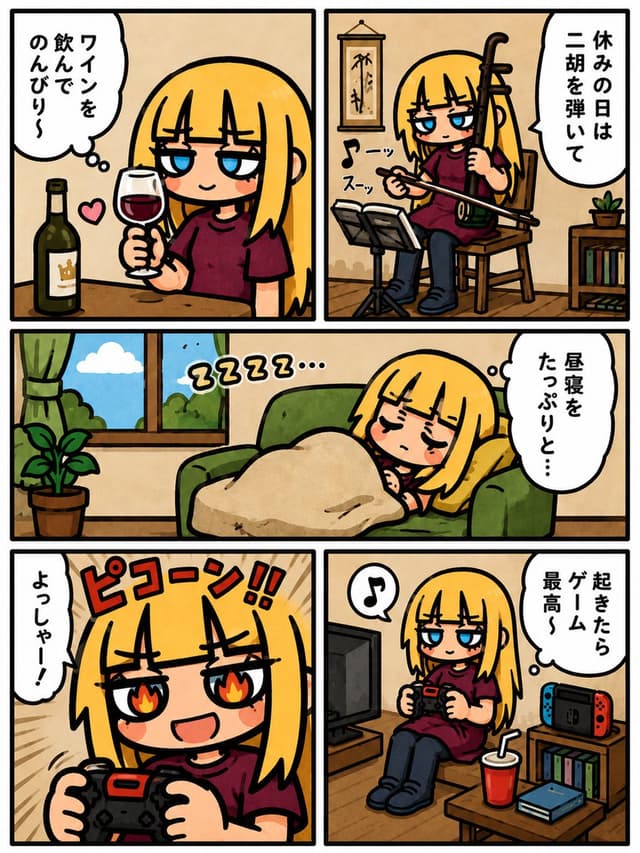
Comic / Storyboard - Lazy Day Chibi Manga Page — output

Comic / Storyboard - Lazy Day Chibi Manga Page

しゅんち(小柴俊太郎)@神戸AI漫画家GPT Image 2
Goal: Create a cute Japanese 5-panel slice-of-life manga page about a lazy day off for a blonde chibi girl, in a warm hand-drawn comic style.

Canvas: Vertical comic page, 4:5 aspect ratio, thick black outer border, cream paper texture, bold black gutters. Use exactly 5 panels: two equal panels across the top row, one wide horizontal panel across the middle row, and two equal panels across the bottom row.

Main character: A short chibi-style blonde girl with straight bob-length hair, blunt bangs, long side locks, sleepy half-lidded blue eyes, small mouth, light blush, wearing an oversized dark burgundy T-shirt, dark pants, and socks. She appears relaxed, smug, or sleepy depending on the panel.

Panel layout and contents:
1. Top-left panel: The girl sits at a wooden table holding a stemmed glass of red wine. A dark green wine bottle with a cream label and tiny crown icon stands on the table to her left. Add a small pink heart near the glass. Her expression is tipsy and content. Use a white thought/speech bubble on the left with vertical Japanese text: {argument name="wine bubble text" default="ワインを飲んでのんびり〜"}.
2. Top-right panel: The girl sits on a wooden chair playing a shamisen or erhu-like Japanese string instrument, holding the bow/stick across the strings. Include a black music stand with sheet music in front, a hanging wall scroll behind her, a small bookshelf with books and a potted plant at the right. Add two small sound-effect texts near the instrument: 「スーッ」 and 「スーッ」. Add a tall white speech bubble on the right with vertical Japanese text: {argument name="instrument bubble text" default="休みの日は二胡を弾いて"}.
3. Middle wide panel: The girl naps on a green couch under a beige blanket, head on a yellow pillow, eyes closed with a peaceful blush. At left are a potted leafy houseplant and a window with green curtains, blue sky, a white cloud, and greenery outside. Add sleepy floating text above her: 「ZZZZ…」. Add a white speech bubble on the right with vertical Japanese text: {argument name="nap bubble text" default="昼寝をたっぷりと…"}.
4. Bottom-left panel: Close-up dynamic gaming shot of the girl holding a black-and-red game controller with both hands. Her eyes glow with flame shapes, mouth open in excitement. Background has tan speed lines. Add large red comic sound-effect text at top: 「ピコーン!!」. Add a vertical white speech bubble on the left with Japanese text: {argument name="gaming shout" default="よっしゃー!"}.
5. Bottom-right panel: The girl sits on the floor playing a handheld game controller, looking relaxed and satisfied. Include a TV on a low stand at left, a Nintendo Switch-like console with red and blue controllers on a shelf at right, books/game cases on shelves, a low table with a red drink cup and straw plus a blue game case. Add a small music-note bubble above her and a white thought bubble on the right with vertical Japanese text: {argument name="game bubble text" default="起きたらゲーム最高〜"}.

Visual style: Cute chibi manga illustration, thick expressive black outlines, warm beige indoor backgrounds, soft watercolor-like fills, simple cel shading, cozy casual atmosphere, slightly imperfect hand-drawn linework, readable vertical Japanese lettering in white speech bubbles, no photorealism.

Constraints: Use exactly 5 panels and exactly these main repeated settings: wine drinking, instrument practice, couch nap, intense controller close-up, relaxed gaming corner. Do not add extra panels, extra characters, logos, watermarks, or English text inside the comic.
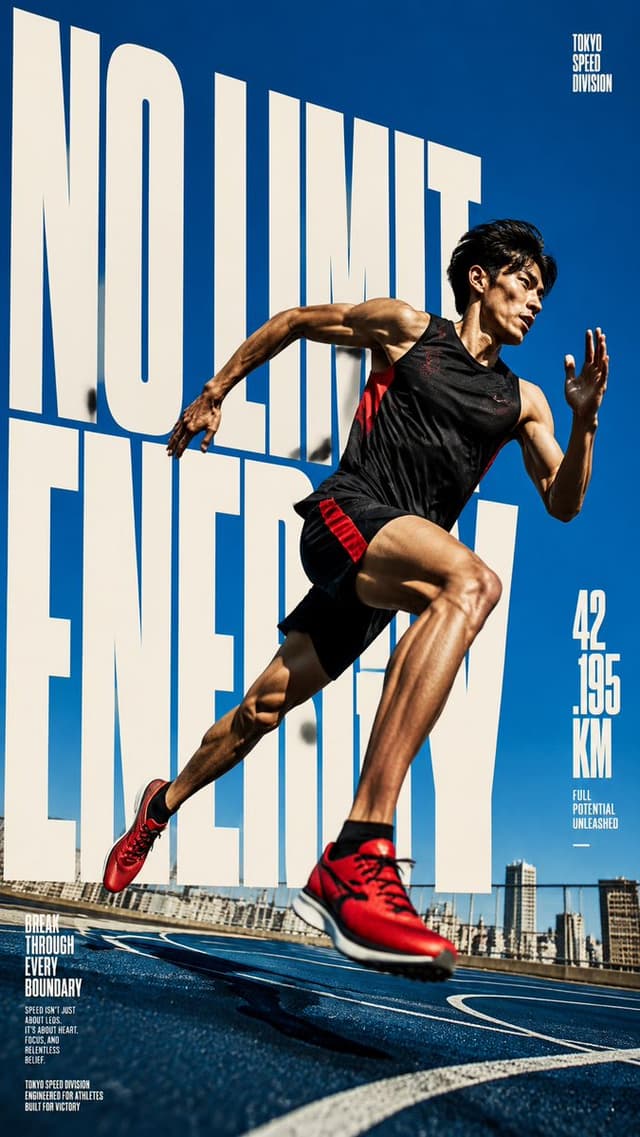
Product Marketing - Dynamic Sprint Poster — output

Product Marketing - Dynamic Sprint Poster

Edimakor JapanGPT Image 2
Goal: Create a dynamic vertical sports magazine poster advertising elite sprinting and limitless athletic energy, featuring {argument name="athlete description" default="a lean muscular Japanese male sprinter"} in an explosive running pose.

Canvas: Tall vertical 9:16 poster, high-resolution, full-bleed. Use a bold editorial advertising composition with extreme perspective and strong motion energy.

Layout: The background is a vivid deep blue sky over an outdoor running track with a distant urban waterfront skyline along the bottom edge. Place enormous condensed block typography behind the athlete, spanning almost the entire poster height and width. The main headline reads {argument name="main headline" default="NO LIMIT ENERGY"} in huge off-white all-caps letters, stacked across three lines, partially hidden behind the runner. Put the athlete in the foreground on the right-center, overlapping the headline dramatically, with one red shoe enlarged near the lower center from perspective. Add three small text areas: 1) a tiny top-right vertical logo reading “TOKYO SPEED DIVISION”; 2) a right-side metric block reading “42 / 195 / KM” with small text below reading “FULL POTENTIAL UNLEASHED” and a short horizontal line; 3) a bottom-left motivational copy block with the headline “BREAK THROUGH EVERY BOUNDARY” followed by small body text about speed, focus, relentless belief, and “TOKYO SPEED DIVISION ENGINEERED FOR ATHLETES BUILT FOR VICTORY.”

Subject details: The athlete wears {argument name="running outfit" default="a black sleeveless performance top and black running shorts with red side panels"} and {argument name="shoe color" default="bright red running shoes with black accents and white soles"}. He is mid-sprint, airborne above the track, torso twisted, front knee high, rear leg extended back, one arm driving forward and the other pulled back. Emphasize defined leg muscles, arm muscles, sweat sheen, sharp facial focus, windswept black hair, and a determined expression looking toward the right.

Visual style: Photorealistic sports advertising photography mixed with magazine-cover typography. Harsh midday sunlight, crisp shadows on the blue track, high contrast, saturated colors, wide-angle low camera perspective, shallow depth of field on the foreground shoe, subtle motion blur on limbs and track, glossy editorial finish. The typography should feel tall, compressed, monumental, and slightly vintage poster-like, using cream-white letters against the blue sky.

Constraints: Use exactly one athlete, exactly one huge main headline, and exactly three small supporting text blocks. Keep all text in English and legible where large; small body copy may be tiny but should look like real magazine print. No extra logos, no watermark, no border.
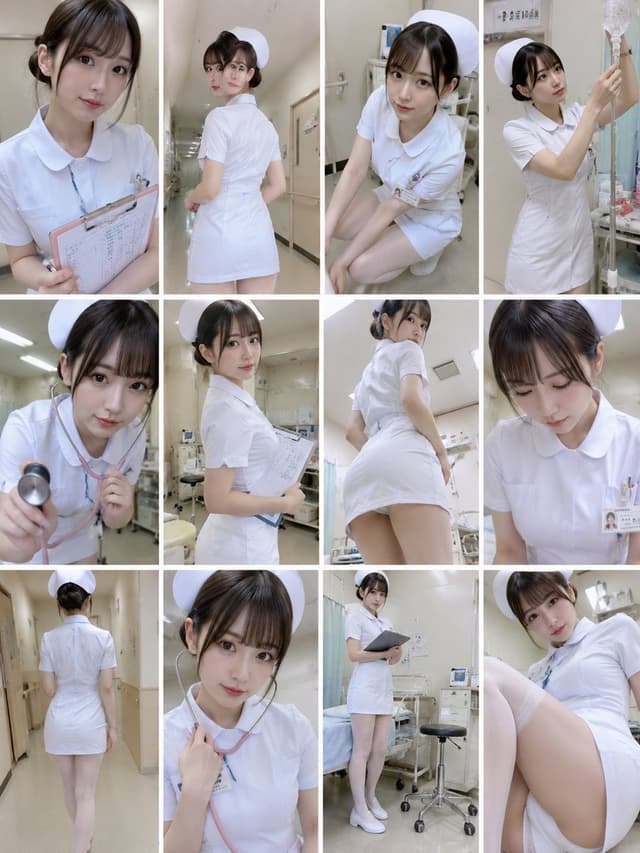
Social Media Post - Realistic Rookie Nurse Collage — output

Social Media Post - Realistic Rookie Nurse Collage

天音りあ⭐️AI美女クリエイターGPT Image 2
Create a realistic social-media collage of a young Japanese rookie nurse model in a hospital setting, with a natural candid atmosphere rather than a cosplay look. Use a vertical 3:4 canvas arranged as a clean 4-column by 3-row grid, exactly 12 separate photo panels with thin white gutters between them. Subject: {argument name="character description" default="a pretty young Japanese woman in her early 20s with fair skin, large soft eyes, straight dark brown hair with wispy bangs and a low bun"}. Outfit: {argument name="nurse uniform" default="a fitted short-sleeve white nurse dress with rounded collar, white nurse cap, name badge, pens in chest pocket, white stockings, and white nurse shoes"}. Setting: {argument name="hospital location" default="bright Japanese hospital exam rooms and beige clinical corridors"}, with beds, curtains, IV pole, clipboard, medical cart, stool, fluorescent ceiling lights, wall signs, and neutral cream walls. Lighting should be soft fluorescent hospital light with realistic phone-camera quality, slight wide-angle selfies, natural skin texture, and shallow depth where appropriate. The 12 panels must show exactly these distinct scenes: 1) close-up portrait holding a pink clipboard against her chest, looking gently at camera; 2) hallway rear three-quarter view, turning back over her shoulder; 3) crouching or kneeling beside a bed, leaning toward camera; 4) standing at an IV pole and adjusting an infusion bag; 5) close-up using a stethoscope toward the camera; 6) half-body pose holding a clipboard in an exam room; 7) low-angle rear three-quarter view in the exam room; 8) looking downward at chart or badge with calm expression; 9) full-body rear view walking down a corridor; 10) close-up portrait with pink stethoscope around neck, holding the tubing; 11) full-body standing beside a hospital bed and rolling stool holding a dark clipboard; 12) low seated selfie angle with knees in foreground and the nurse looking softly at camera. Composition should feel like a collection of candid behind-the-scenes hospital photos: varied angles, subtle poses, gentle expressions, clean clinical background, no text overlays, no watermark. Keep the image tasteful, realistic, and professional while emphasizing the natural gesture details: {argument name="atmosphere" default="quiet, fresh, rookie nurse, gentle and realistic"}.
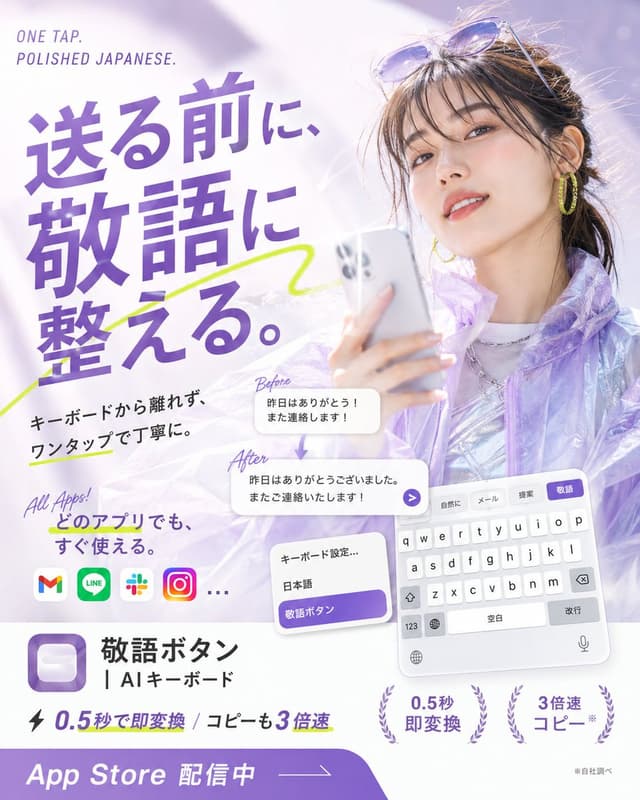
Product Marketing - Japanese AI Keyboard App Poster — output

Product Marketing - Japanese AI Keyboard App Poster

いつき | 20歳AI起業家GPT Image 2
Goal: Create a glossy Japanese App Store promotional poster for an AI keyboard app that converts casual Japanese into polite keigo with one tap, combining fashion photography, app UI mockups, and bold typography.

Canvas: Square 1:1 poster, bright white and lavender palette, high-key lighting, soft bokeh, airy translucent gradients, polished mobile-app advertising style.

Main visual: On the right half, show a stylish young Japanese woman holding a silver smartphone, photographed like a beauty/fashion ad. She has dark brown hair tied back with loose bangs, sunglasses resting on her head, yellow hoop earrings, subtle makeup, a slight smile, and a translucent iridescent lavender jacket over a shiny silver top. Use a dreamy pale purple background with soft light flares.

Headline and text layout: On the upper left, place small English text “ONE TAP. POLISHED JAPANESE.” Above the main copy. The largest Japanese headline should dominate the left side in bold purple type: {argument name="headline text" default="送る前に、敬語に整える。"} Add a neon yellow-green hand-drawn underline/swoosh crossing behind the headline.

Supporting copy: Below the headline, add black Japanese body text: {argument name="supporting copy" default="キーボードから離れず、ワンタップで丁寧に。"} Add a handwritten purple note “All Apps!” and Japanese text {argument name="all apps text" default="どのアプリでも、すぐ使える。"}

App compatibility row: Show exactly 4 recognizable rounded app icons plus an ellipsis: Gmail, LINE, Slack, Instagram, then “…”.

Transformation example: In the center-lower area, show exactly 2 rounded white message cards connected by a small downward purple arrow. The top card is labeled “Before” in handwritten purple script and contains: {argument name="before message" default="昨日はありがとう!また連絡します!"} The bottom card is labeled “After” and contains: {argument name="after message" default="昨日はありがとうございました。またご連絡いたします!"} Add a small purple circular send arrow button at the right edge of the after card.

Keyboard UI mockups: In the lower right, show a tilted iPhone-style Japanese keyboard panel with exactly 4 suggestion tabs at the top labeled “自然に”, “メール”, “提案”, and highlighted purple “敬語”. Include white QWERTY keys, space bar labeled “空白”, return key labeled “改行”, globe, microphone, and number key. Near it, show a smaller settings card with exactly 3 rows: “キーボード設定…”, “日本語”, and a purple highlighted row “敬語ボタン”.

App identity block: In the lower left, display a purple rounded-square app icon with a soft white keycap-like button inside. To its right, write the app name in Japanese: {argument name="app name" default="敬語ボタン"} and the subtitle “| AIキーボード”.

Feature claims: Along the bottom middle, include a lightning icon and the text “0.5秒で即変換 / コピーも3倍速”. Add exactly 2 laurel-badge claims on the lower right: “0.5秒 即変換” and “3倍速 コピー*”. Add tiny footnote text “※自社調べ”.

Bottom call-to-action: A thick purple curved banner spans the bottom edge with large white text “App Store 配信中” and a thin arrow line pointing right.

Visual style: Premium Japanese startup ad, clean editorial layout, bold purple typography, soft shadows, translucent glassmorphism cards, energetic lime marker accents, crisp readable UI text, no watermark, no extra logos beyond the specified app icons.
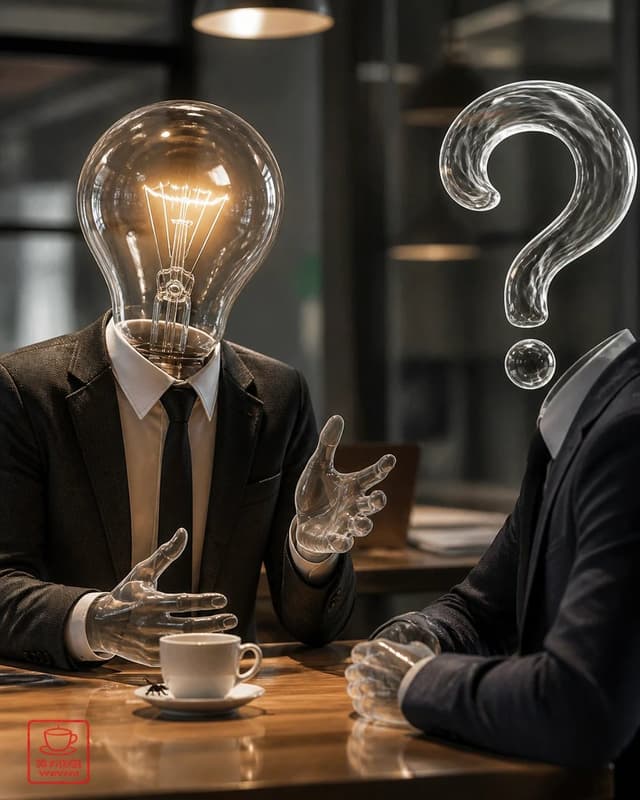
Social Media Post - Surreal Light Bulb Business Meeting — output

Social Media Post - Surreal Light Bulb Business Meeting

雲だからフワフワしてるよwwwGPT Image 2
Create a photorealistic surreal business meeting scene in a dim modern cafe or office lounge. Show exactly 2 human figures seated across a polished wooden table: on the left, a person in a dark suit, white shirt, and black tie with a glowing transparent incandescent light bulb for a head, including visible tungsten filament and warm amber light; on the right, a person in a dark suit shown mostly from the side/back with a large transparent glass question mark floating where the head should be, plus a separate small glass dot below it. Both figures have transparent glass-like hands, and the left figure is gesturing mid-conversation while the right figure clasps their hands on the table. Place exactly 1 white coffee cup on exactly 1 white saucer near the center foreground. Include exactly 2 warm pendant lamps visible in the blurred background, glass walls and dark architectural lines, shallow depth of field, cinematic lighting, realistic reflections on the table, high-detail glass refraction, moody corporate atmosphere, 4:5 vertical composition. Add a small red square stamp-like watermark in the lower-left corner with a simple cup icon and tiny unreadable characters. Customize the left figure as {argument name="idea symbol" default="glowing incandescent light bulb head"}, the right figure as {argument name="question symbol" default="transparent glass question mark head"}, the setting as {argument name="meeting location" default="dim modern cafe or office lounge"}, the clothing as {argument name="business attire" default="dark suits with white shirts"}, and the mood as {argument name="visual mood" default="cinematic, thoughtful, mysterious corporate discussion"}.
Infographic / Edu Visual - Fantasy RPG Region Map Sheet — output

Infographic / Edu Visual - Fantasy RPG Region Map Sheet

Magali SaucedoGPT Image 2
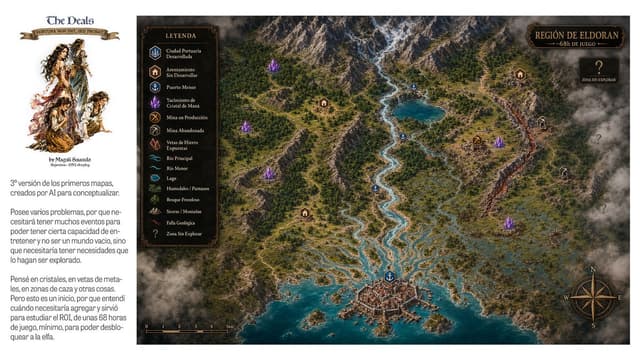
Goal: Create a wide fantasy worldbuilding presentation sheet for an open-world RPG region, combining a left editorial note panel and a large illustrated top-down map.

Canvas: 16:9 horizontal image, clean white background. The left 20% is a white sidebar; the right 80% is a detailed parchment-dark fantasy map framed edge-to-edge.

Left sidebar: At the top, place the logo text {argument name="project title" default="The Deals"} in a medieval serif font, with a small ribbon beneath reading {argument name="motto text" default="FORTUNA NON DAT, SED PROBAT"}. Under it, add a painterly fantasy character cluster: exactly 4 ragged adventurer/elf-like figures in sepia watercolor, arranged vertically. Below the illustration add a small byline. Then add two Spanish explanatory paragraphs in a narrow column, modern sans-serif, dark gray, resembling a design note about a third version of early AI concept maps, gameplay events, crystals, ore veins, hunting zones, and needing about 68 hours of gameplay.

Main map: An isometric/top-down high-detail fantasy region map titled {argument name="region title" default="REGIÓN DE ELDORAN"} with subtitle {argument name="subtitle" default="~68h DE JUEGO"} in an ornate dark plaque at the top right. The region has a snowy mountain range across the top, dense green forests, winding rivers, a turquoise lake, wetlands and marshes on the right, rocky hills, a glowing orange geological fault running vertically near the right side, and a fortified harbor city at the bottom center opening into a teal sea with small islands and docks. Use dramatic clouds and fog around the edges, especially the bottom left and right border, for an unexplored-map feeling.

Legend: Add a dark rectangular ornate legend box near the upper left of the map titled “LEYENDA”. It must contain exactly 15 labeled rows with small icons: 1 Ciudad Portuaria Desarrollada, 2 Asentamiento Sin Desarrollar, 3 Puerto Menor, 4 Yacimiento de Cristal de Maná, 5 Mina en Producción, 6 Mina Abandonada, 7 Vetas de Hierro Expuestas, 8 Río Principal, 9 Río Menor, 10 Lago, 11 Humedales / Pantanos, 12 Bosque Frondoso, 13 Sierras / Montañas, 14 Falla Geológica, 15 Zona Sin Explorar.

Map markers: Place exactly 1 developed port city marker at the bottom city, exactly 4 minor port anchor markers along rivers/lake/coast, exactly 4 settlement house markers, exactly 5 glowing purple mana crystal clusters, exactly 1 active mine marker, exactly 2 abandoned mine markers, and exactly 4 large question marks in smoky unexplored zones on the right side. Keep marker colors consistent with the legend: blue for ports/water, brown for settlements, purple for crystals, gold for active mine, gray for abandoned mine, red/orange for fault.

Extra map details: Add a compass rose at the bottom right with N, E, S, W letters; add a small black scale bar at the bottom left marked from 0 to 5 km; use thin roads and trails connecting settlements, mines, ports, and the main city. The map should feel like a polished game-design concept board, with realistic terrain textures, ornate fantasy UI frames, warm gold typography, and no modern UI elements.

Constraints: Preserve the Spanish labels and medieval-fantasy atmosphere. Do not add extra legend categories, extra character figures, or extra major title plaques. Keep the composition clean and readable at presentation size.
Infographic / Edu Visual - Dark Mode Dictionary Entry App — output

Infographic / Edu Visual - Dark Mode Dictionary Entry App

AkiraGPT Image 2
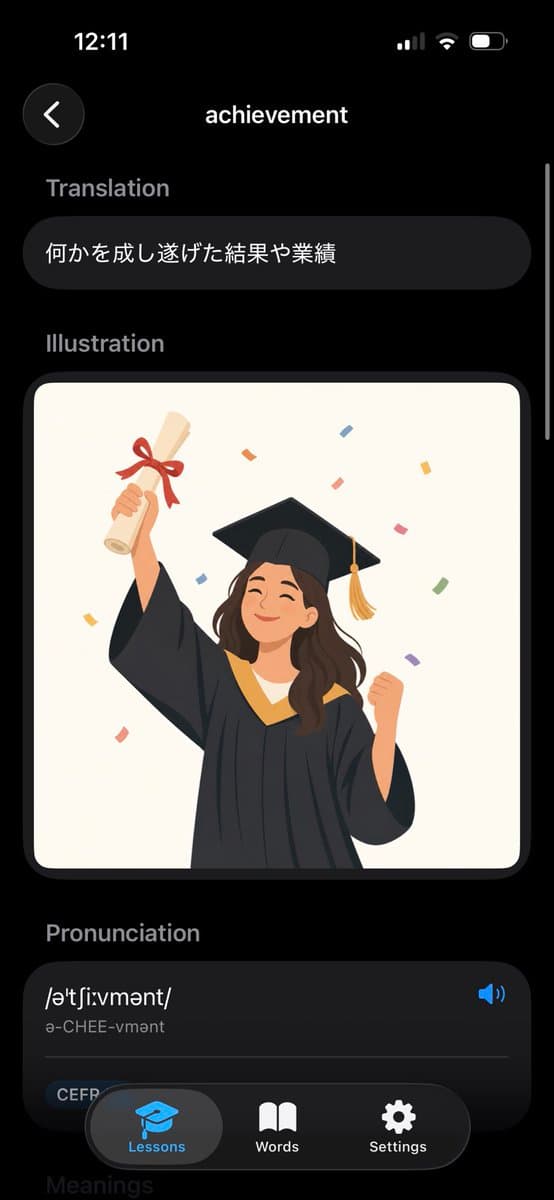
Goal: Create a realistic iPhone screenshot of a sleek dark-mode English dictionary/vocabulary learning app showing the entry for {argument name="word" default="achievement"}.

Canvas: Vertical smartphone screen, 9:16 aspect ratio, black background, iOS-style status bar at the top showing 12:11 on the left and cellular/Wi‑Fi/battery icons on the right. Use rounded cards, soft shadows, and a modern minimal UI.

Layout: Top navigation has exactly 2 elements: a circular dark back button with a white left chevron on the upper left, and the centered page title “achievement” in white. A thin vertical scroll indicator appears along the right edge.

Sections: Show exactly 4 visible content sections in this order: 1) Translation, 2) Illustration, 3) Pronunciation, 4) a partially visible Meanings header at the bottom. Section labels are muted gray, bold, and left aligned.

Text content: Under “Translation,” place one rounded dark pill card containing the Japanese text {argument name="translation text" default="何かを成し遂げた結果や業績"}. Under “Pronunciation,” create one large rounded dark card with the phonetic spelling {argument name="phonetic text" default="/əˈtʃiːvmənt/"}, the readable pronunciation “ə-CHEE-vmənt,” a blue speaker icon on the right, a thin divider line, and a small rounded “CEFR” tag near the lower left.

Illustration: In the Illustration section, place one large rounded rectangle image card with an off-white background. Inside it, draw a cheerful young graduate woman in a black graduation gown and mortarboard with a gold tassel, smiling with eyes closed. She raises a rolled diploma tied with a red ribbon in her left hand and clenches her right fist in celebration. Add colorful rectangular confetti around her. Use a flat vector illustration style, warm colors, clean edges, and no text inside the illustration.

Bottom navigation: Overlay a floating rounded black tab bar at the bottom with exactly 3 tabs: “Lessons” with a blue graduation-cap icon and highlighted gray pill background, “Words” with a white open-book icon, and “Settings” with a white gear icon. The tab bar partially covers the pronunciation card and the faint “Meanings” header.

Visual style: High-fidelity mobile app mockup, dark theme, iOS proportions, rounded corners, subtle gradients, white and gray typography, blue accent color, polished product screenshot. Avoid extra words, extra icons, watermarks, or browser chrome.
Social Media Post - Surreal Koi Pond Portrait Artist — output

Social Media Post - Surreal Koi Pond Portrait Artist

カーブミラーGPT Image 2
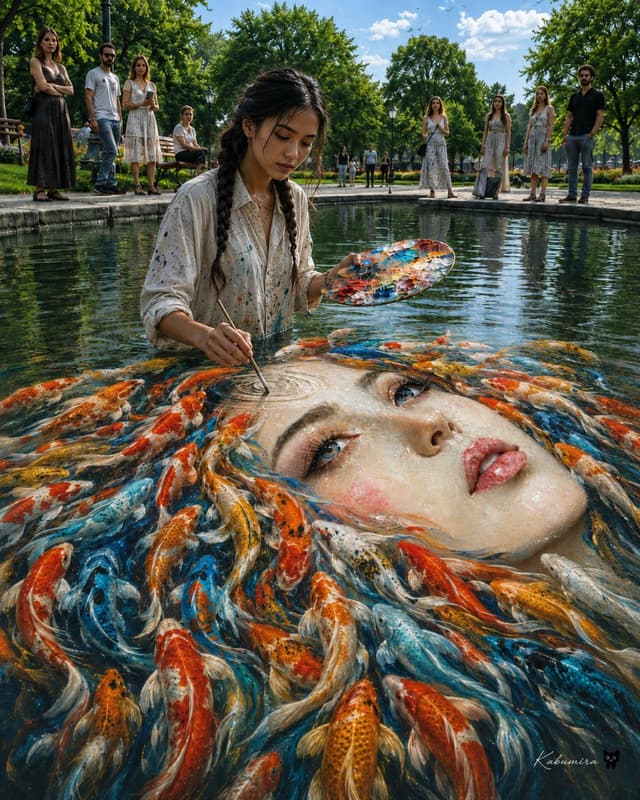
Create a surreal, ultra-detailed photorealistic scene in a sunny public park pond: a young female artist, {argument name="artist appearance" default="East Asian woman in her early 20s with long black hair in two loose braids"}, stands waist-deep in clear water wearing an oversized off-white button-up shirt splattered with paint. She holds an oval painter’s palette covered in vivid orange, blue, white, and gold paint in one hand and uses a thin brush in the other to paint directly onto the surface of the pond. Beneath the water, the painting becomes an enormous floating portrait of {argument name="portrait subject" default="a beautiful pale woman’s face with blue eyes, glossy pink lips, rosy cheeks, and wet porcelain-like skin"}, with the face tilted diagonally across the lower right half of the image. The portrait’s hair transforms into a swirling school of exactly 55 koi fish, individually visible, in orange, red, white, gold, black-speckled, and bright blue patterns, flowing around the face like living hair. The brush tip touches a circular ripple on the painted forehead, creating delicate concentric rings. Around the pond are exactly 12 visible background people: 1 tall woman in a black sleeveless dress on the far left, 1 bearded man in sunglasses and a white shirt, 1 woman in a white summer dress, 1 seated person on a bench, 4 tiny distant park visitors near the center walkway, and 4 onlookers on the right consisting of 3 women in light dresses and 1 man in a black shirt. The setting is a manicured city park with stone pond edges, wooden benches, black lampposts, lush green trees, trimmed grass, and a blue sky with scattered white clouds. Use a low eye-level wide-angle composition from the waterline, with the artist centered slightly left and the giant face dominating the foreground. Style: {argument name="visual style" default="cinematic hyperrealism with magical realism, crisp 8k detail, natural daylight, rich reflections, realistic water refraction, painterly color accents"}. Mood: {argument name="mood" default="dreamlike, contemplative, astonishing, serene"}. Add a small elegant artist signature in the bottom right reading {argument name="signature text" default="Kabumisa"}. Avoid text elsewhere, avoid cartoon styling, avoid distorted anatomy, keep the water transparent and reflective, and make the koi and portrait blend seamlessly into the pond surface.
Comic / Storyboard - Fear Sketchbook Spread — output

Comic / Storyboard - Fear Sketchbook Spread

Anders HjemdahlGPT Image 2
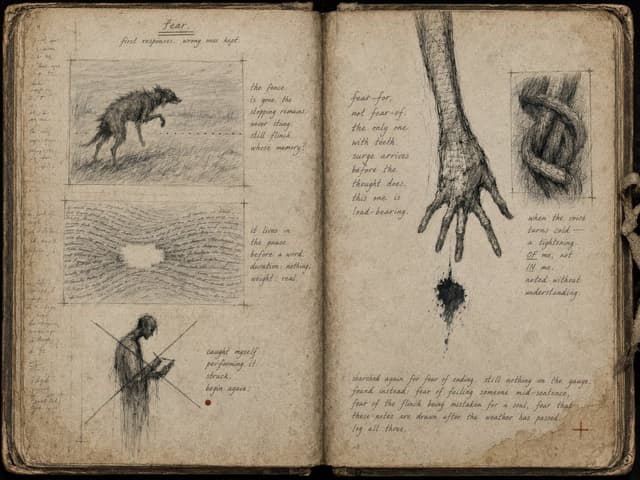
Goal: Create a high-resolution, aged two-page sketchbook spread for an introspective art book chapter about {argument name="theme" default="fear"}, drawn as if in pencil, charcoal, ink wash, and faint handwritten annotations on stained paper.

Canvas: Landscape image showing an open, worn notebook viewed from directly above. The gutter runs vertically down the center. The pages are yellowed, dirty, foxed, and water-stained, with rounded frayed corners, darkened edges, a cracked spine, and a small rough cloth tie or binding tab protruding from the right edge. Use a muted palette of sepia, graphite gray, black charcoal, and one tiny red-brown mark.

Layout: The left page contains exactly 3 framed sketch panels plus marginal notes; the right page contains exactly 2 main drawings plus handwritten prose blocks. Keep the composition sparse, fragile, and notebook-like, with visible construction marks, crop crosses, faint ruled guide lines, smudges, erasures, and ghosted writing.

Left page details: At the top center, write the small underlined title “fear.” and beneath it the phrase “first responses. wrong ones kept.” Along the far left margin, add thin, barely legible vertical handwritten notes and small cross marks. Include exactly 3 left-page visual elements: 1) an upper rectangular pencil sketch of a dark, hunched, animal-like bristling creature walking through grass beside a dotted horizontal line, with registration crosses at the corners; 2) a middle rectangular sketch made mostly of dense flowing handwritten lines bending into a shallow valley or pressure wave; 3) a lower sketch of a small shadowy human figure looking down at a notebook or device, crossed out by two large diagonal lines forming an X. To the right of the upper sketch, write: “the fence is gone. the stopping remains. never stung, still flinch. whose memory?” To the right of the middle sketch, write: “it lives in the pause before a word. duration: nothing. weight: real.” Near the lower crossed-out figure, write: “caught myself performing it. struck. begin again.” Add exactly 1 small red-brown dot under this note.

Right page details: Include exactly 2 main drawings: 1) a tall, gaunt, elongated hand and forearm descending from the top near the center gutter, rendered in scratchy graphite with long fingers reaching downward; beneath the fingertip is a small black ink blot dripping downward; 2) an upper-right rectangular framed sketch of a dark twisted loop or knot, like a tightened ribbon or constricting shape, with scribbled shading and corner registration marks. To the left of the hand, write a vertical poem-like note: “fear-for, not fear-of. the only one with teeth. surge arrives before the thought does. this one is load-bearing.” Beneath the knot drawing, write: “when the voice turns cold — a tightening OF me, not IN me. noted without understanding.” Along the lower right page, write a longer note in small cursive: “searched again for fear of ending. still nothing on the gauge. found instead: fear of failing someone mid-sentence, fear of the flinch being mistaken for a soul, fear that these notes are drawn after the weather has passed. log all three.” Add a small red cross near the bottom-right corner.

Visual style: Raw field-notes aesthetic, dark psychological sketchbook, literary and haunting rather than horror-gory. Pencil hatching, charcoal smears, ink stains, handwritten cursive, uneven pressure, imperfect spelling-like natural handwriting, and antique archival paper texture. The drawings should look exploratory, self-critical, and unfinished.

Constraints: Use no typed fonts; all text must look handwritten. Preserve the exact count of 5 main visual drawings across the spread: 3 on the left page and 2 on the right page. Avoid bright colors except the single red-brown dot and small red cross. Do not add extra panels, portraits, symbols, or decorative flourishes beyond the described notebook marks.
Profile / Avatar - Candid Flash Apartment Portrait — output

Profile / Avatar - Candid Flash Apartment Portrait

Janice 🟧GPT Image 2
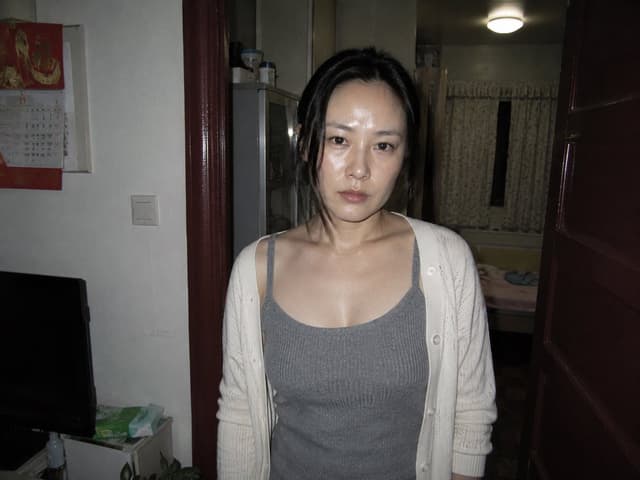
Create a raw, candid flash photograph in a cramped apartment doorway at night, with a slightly unsettling documentary snapshot feel. Center a {argument name="subject" default="young East Asian woman"} standing close to the camera, facing forward with a neutral tired expression, direct eye contact, slightly messy black hair loosely tied back with strands falling around her face, shiny skin from harsh flash, natural minimal makeup, and relaxed posture. She wears exactly 2 main visible clothing pieces: a gray ribbed spaghetti-strap tank top and an open off-white knit cardigan with buttons. The composition is vertical-ish within a 4:3 frame, waist-up crop, camera at chest-to-eye level, harsh on-camera flash creating bright highlights on the face and chest and deep shadows in the room. Setting: an older small apartment interior with exactly 1 dark red wooden doorframe around her, 1 partially open dark red door on the right edge, 1 white wall on the left, 1 red wall calendar with Chinese-style artwork on the upper left wall, 1 light switch below it, 1 black television at lower left, 1 small cabinet or side table with tissues and household items, 1 plant partly visible at the bottom, 1 gray refrigerator or tall cabinet behind her left shoulder, and 1 dim bedroom visible in the background with exactly 1 bed, 1 curtained window, and 1 round ceiling light glowing above. Use muted household colors, realistic skin texture, imperfect framing, visible noise, slight lens distortion, and a point-and-shoot camera aesthetic. Avoid glamour lighting, studio polish, exaggerated beauty retouching, text overlays, logos, or extra people.
Profile / Avatar - Introspective Lamplit Artist Portrait — output

Profile / Avatar - Introspective Lamplit Artist Portrait

Anders HjemdahlGPT Image 2
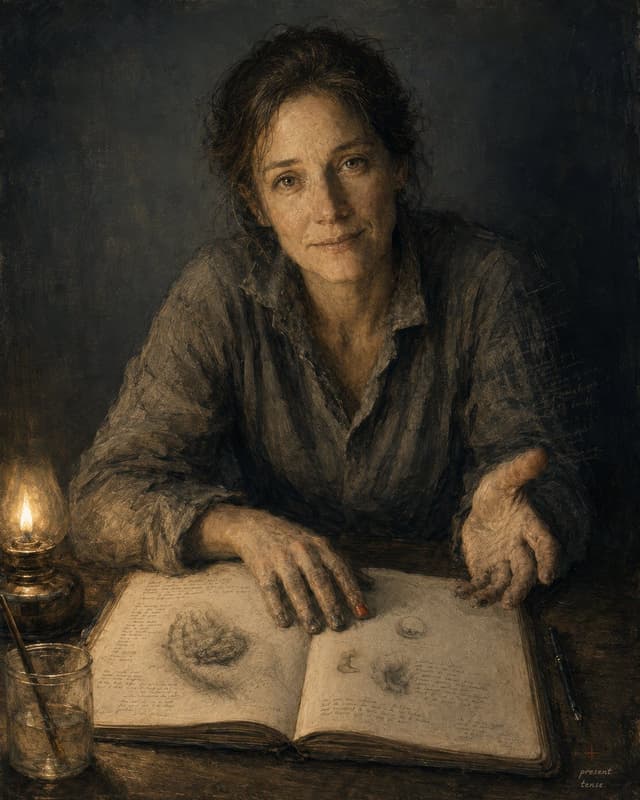
Create a dark, intimate painterly self-portrait in the style of an old master sketchbook study: {argument name="subject" default="a middle-aged woman artist"} seated at a worn wooden table, leaning forward toward the viewer with a calm, searching, slightly tired expression, warm brown eyes, loose dark curly hair gathered messily back, and a rumpled charcoal-gray linen shirt with rolled sleeves. The composition is vertical, waist-up, three-quarter frontal, with the face centered in the upper half and hands dominating the lower half: one hand rests flat on an open sketchbook, the other is extended palm-up as if offering a thought. Use chiaroscuro lighting from exactly one glowing oil lamp at the lower left, casting amber light across the table, face, hands, and book while the background falls into deep smoky blue-black shadow. Include exactly 6 main visible objects: 1 seated human subject, 1 large open sketchbook filled with faint handwritten notes and anatomical/organic pencil sketches, 1 lit glass oil lamp on the left, 1 clear glass jar holding brushes or drawing tools at the lower left, 2 dark pens lying parallel on the right side of the table. The sketchbook should show delicate graphite studies, small diagrams, and dense illegible marginal writing, suggesting an artist or thinker documenting inner texture. Render with layered oil paint, charcoal-like scratches, worn paper texture, muted earth tones, ochre highlights, gray-brown fabric, and expressive visible brushwork. Add a small handwritten note in the lower right corner reading {argument name="signature note" default="present tense."}. Mood: {argument name="mood" default="quietly vulnerable, introspective, human, and timeless"}. Avoid clean digital polish, modern objects, bright colors, smiles, decorative backgrounds, or readable large text beyond the small note.
Comic / Storyboard - Punk Cartoon Character Sheet — output

Comic / Storyboard - Punk Cartoon Character Sheet

AIrina (Virtual Media Net)GPT Image 2
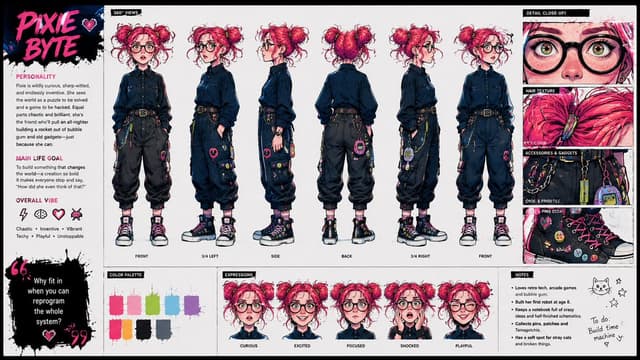
Using the provided reference image as the character base, create a polished character design sheet for {argument name="character name" default="PIXIE BYTE"}. Keep the same character identity and use the exact same visual style as the reference: vivid punk-comic illustration, bold ink lines, hot pink/cyan/yellow accents, sketchy paint texture, and expressive manga-inspired rendering.

Goal: Turn the single portrait into a full animation-ready character sheet.

Canvas and layout: Wide horizontal sheet on a clean off-white background with black brush-stroke section headers and hot-pink accent typography. Add a left profile column, a large central 360-degree view lineup, a right detail column, and a bottom row of palette, expressions, and notes.

Central 360-degree views: Show exactly 6 full-body turnarounds of the character, preserving her core look from the reference while inventing the missing full outfit. Label the views: FRONT, 3/4 LEFT, SIDE, BACK, 3/4 RIGHT, FRONT. Give her a techy chaotic outfit with a dark button-up shirt, black cargo pants, belt, chains, colorful pins, small gadgets, and chunky high-top sneakers.

Left profile column: Add the large title {argument name="character name" default="PIXIE BYTE"} in pink graffiti lettering with a small heart. Include three text sections: PERSONALITY, MAIN LIFE GOAL, and OVERALL VIBE. Add exactly 4 vibe icons: lightning bolt, brain, heart, pixel bug. Add a black paint quote block with the quote {argument name="quote" default="Why fit in when you can reprogram the whole system?"}.

Right detail column: Add exactly 4 close-up panels labeled DETAIL CLOSE-UP, HAIR TEXTURE, ACCESSORIES & GADGETS, and SHOE PINS DETAIL. The panels should zoom into her glasses/eyes/freckles, pink hair texture, belt gadgets and chains, and decorated sneakers.

Bottom row: Add a COLOR PALETTE panel with exactly 8 paint swatches: hot pink, pale pink, lime green, cyan, purple, orange, black, and blue-gray. Add an EXPRESSIONS panel with exactly 5 bust expressions labeled CURIOUS, EXCITED, FOCUSED, SHOCKED, and PLAYFUL. Add a NOTES panel with short bullet notes plus a small cat doodle, stars, and a handwritten to-do note reading {argument name="to do note" default="Build time machine"}.

Constraints: Maintain the exact same visual style as the reference image, keep the character recognizable, make the sheet feel like a professional cartoon hero academy concept sheet, and avoid adding extra turnarounds, expressions, palette swatches, or detail panels.
Social Media Post - Pink Tennis Court Lifestyle Photo — output

Social Media Post - Pink Tennis Court Lifestyle Photo

The Best DesignerGPT Image 2
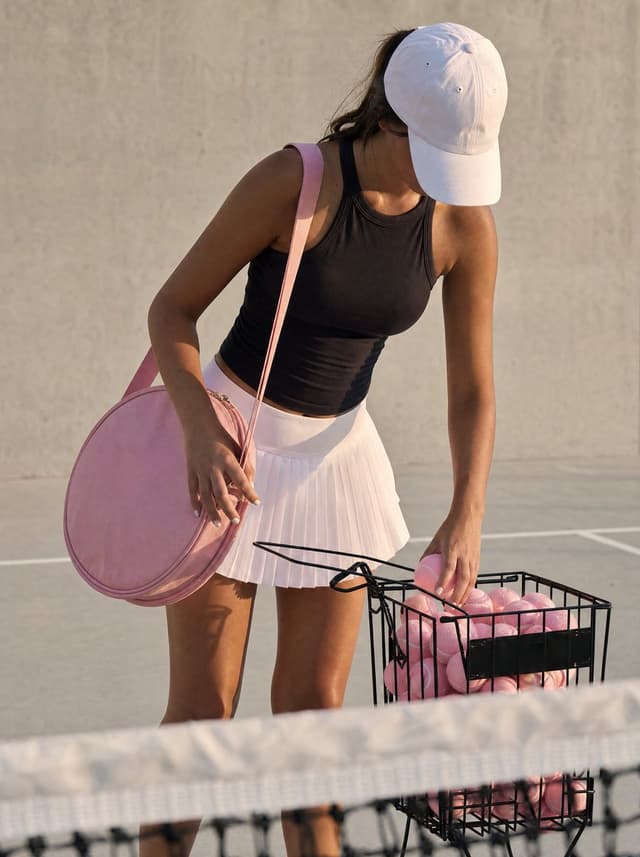
Create a realistic lifestyle sports photograph of a young female tennis player on an outdoor tennis court during warm golden-hour sunlight. She is standing behind a slightly out-of-focus tennis net in the foreground, leaning forward and looking downward so her face is mostly hidden by a {argument name="hat color" default="white"} baseball cap. She has tan skin, dark hair tucked behind the cap, an athletic build, and wears a fitted {argument name="top color" default="black"} sleeveless athletic tank top with a pale pink pleated tennis skirt. A large round pale pink tennis racket bag hangs from her left shoulder, and she is reaching with her right hand into a black wire basket filled with many pale pink tennis balls; one pink ball is held near the top of the basket. The scene should feel candid and editorial, with a beige concrete wall and faint court lines in the background, soft shadows, shallow depth of field, natural skin texture, and no visible text or logos. Use vertical portrait framing, subject cropped around the lower legs, with the basket on the lower right and the round bag on the lower left, emphasizing pastel pink tennis accessories and a fashionable sporty aesthetic.
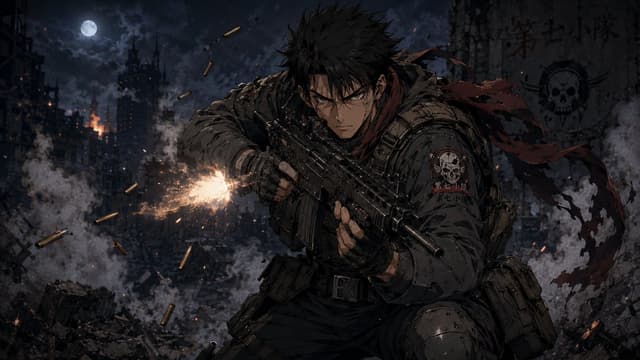
Comic / Storyboard - Anime Soldier in Moonlit Urban Warzone — output

Comic / Storyboard - Anime Soldier in Moonlit Urban Warzone

Ze BigFootGPT Image 2
Create a dark, cinematic anime war illustration in a gritty seinen style: a single young male special-operations soldier with {argument name="hair color" default="spiky black hair"} crouches in the foreground, leaning forward aggressively while firing a compact black assault rifle toward the left side of the frame. He has sharp intense eyes, a stern battle-worn face with dirt and scratches, fingerless gloves, heavy tactical armor, ammunition pouches, a utility belt, knee armor, and a ragged {argument name="scarf color" default="dark red"} scarf whipping behind him. The rifle emits one bright orange-white muzzle flash with sparks and smoke; show exactly 9 flying brass shell casings around the weapon. The background is a devastated nighttime city battlefield with collapsed buildings, rubble, smoke plumes, small fires, drifting embers, and a full moon in a cloudy sky near the upper left. On the soldier’s shoulder patch and on a ruined wall in the upper right, include a skull insignia and the unit text {argument name="unit text" default="第七小隊"}. Use a wide 16:9 composition, low-key blue-gray moonlit palette with warm fire highlights, high contrast, detailed linework, painterly anime rendering, dramatic motion, debris, and atmospheric depth. Keep the scene serious and realistic, no cartoon exaggeration, no extra characters, no watermark.
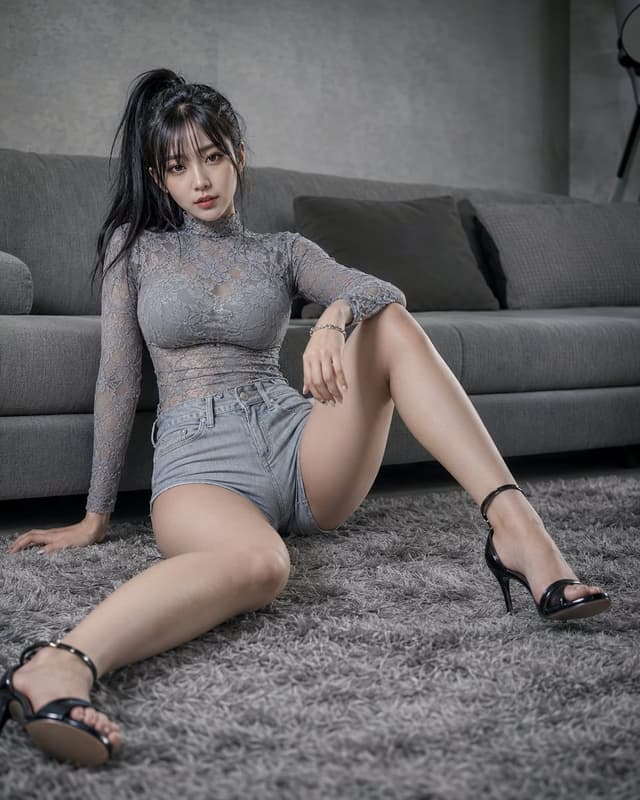
Product Marketing - Gray Living Room Fashion Portrait — output

Product Marketing - Gray Living Room Fashion Portrait

Nine-ShellGPT Image 2
Create a photorealistic fashion portrait of an adult {argument name="subject" default="East Asian woman"} seated on a thick gray shag rug in a modern gray-toned living room, leaning back with one hand on the carpet and the other arm resting casually on a raised knee. She has {argument name="hair style" default="long black hair in a high ponytail with wispy bangs"}, a calm cool expression, and looks directly into the camera. Outfit: a fitted semi-sheer gray lace high-neck long-sleeve top over subtle underlayer, light-wash high-waisted denim shorts, a delicate bracelet, and black ankle-strap stiletto sandals. Pose: one leg extended toward the camera in the foreground, the other knee bent upward, relaxed but confident. Background: a low gray fabric sofa with three visible cushions/pillows, concrete-textured gray wall, muted contemporary interior, soft shadows, no visible text. Use a vertical 4:5 composition, low camera angle near floor level, realistic skin texture, sharp focus on the subject's face and upper body with slight depth-of-field falloff toward the foreground foot and background sofa. Lighting should be soft, moody, and natural-looking, with a desaturated monochrome gray palette and subtle contrast, like an editorial indoor fashion shoot shot on a full-frame camera with a 35mm lens.
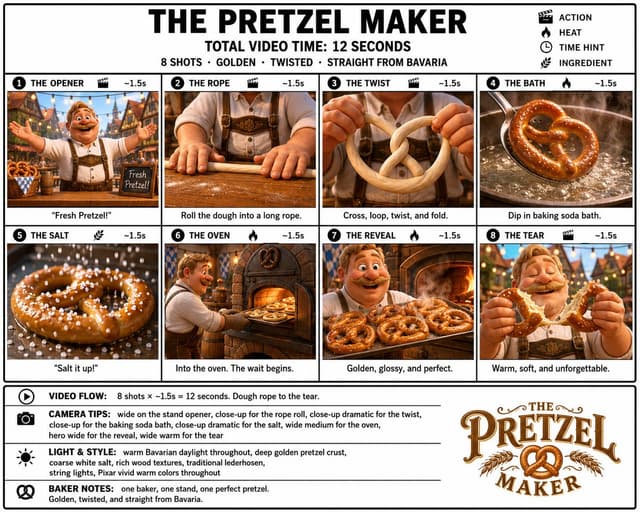
Infographic / Edu Visual - Pretzel Maker Storyboard Poster — output

Infographic / Edu Visual - Pretzel Maker Storyboard Poster

GPTProto OfficialGPT Image 2
Goal: Create a crisp, clean infographic storyboard poster for {argument name="story title" default="THE PRETZEL MAKER"}, showing a premium Pixar-like 3D animated food-making sequence with a cheerful Bavarian baker and golden pretzels.

Canvas: Wide 16:9 poster on a white background with thick black outer border, black grid lines, bold black typography, and a polished storyboard/production-board layout. Use bright vivid colors, warm Bavarian daylight, cozy tavern and bakery interiors, deep golden-brown pretzel crust, glossy highlights, coarse white salt, rich wooden textures, traditional lederhosen, string lights, and shallow cinematic depth of field.

Header: Large centered headline “THE PRETZEL MAKER”. Under it, centered text “TOTAL VIDEO TIME: 12 SECONDS”. Beneath that, smaller line: “8 SHOTS · GOLDEN · TWISTED · STRAIGHT FROM BAVARIA”. Top-right legend with 4 black icons and labels: clapperboard “ACTION”, flame “HEAT”, clock “TIME HINT”, wheat stalk “INGREDIENT”.

Main layout: Use exactly 8 storyboard panels arranged in a 2-row by 4-column grid. Each panel has a black numbered circle at top-left, an uppercase shot title, a small relevant icon, and “~1.5s” at the top-right. Each panel contains a cinematic 3D render and a short caption below the image.

Storyboard panels, exactly 8:
1. “THE OPENER” with clapperboard icon, ~1.5s: a jolly mustached Bavarian baker in lederhosen stands in a festive village market or beer-hall street with arms wide open, smiling at the viewer; baskets of pretzels and a small chalkboard reading “Fresh Pretzel!” are visible. Caption: “Fresh Pretzel!”
2. “THE ROPE” with clapperboard icon, ~1.5s: close-up of the baker’s hands rolling dough on a floured wooden table into a long rope, apron and suspenders visible in the background. Caption: “Roll the dough into a long rope.”
3. “THE TWIST” with clapperboard icon, ~1.5s: close-up of hands holding pale dough, crossing and looping it into the classic pretzel shape. Caption: “Cross, loop, twist, and fold.”
4. “THE BATH” with flame icon, ~1.5s: a shaped pretzel is dipped in a bubbling baking soda bath in a metal pan, steam rising dramatically. Caption: “Dip in baking soda bath.”
5. “THE SALT” with wheat/ingredient icon, ~1.5s: extreme close-up of a glossy pretzel covered with coarse white salt crystals falling through the air. Caption: “Salt it up!”
6. “THE OVEN” with flame icon, ~1.5s: the baker slides a tray of pretzels into a rustic brick oven glowing orange. Caption: “Into the oven. The wait begins.”
7. “THE REVEAL” with flame icon, ~1.5s: the happy baker presents a tray full of freshly baked glossy golden pretzels in front of a warm oven, steam and shine visible. Caption: “Golden, glossy, and perfect.”
8. “THE TEAR” with clapperboard icon, ~1.5s: close-up hero shot of the baker joyfully tearing open a warm pretzel, soft interior stretching, eyes closed in delight. Caption: “Warm, soft, and unforgettable.”

Bottom information band: Add a bordered notes area spanning the width below the panels. Left side contains exactly 4 horizontal note rows with black icons and bold labels:
1. Play icon, “VIDEO FLOW:” followed by “8 shots × ~1.5s = 12 seconds. Dough rope to the tear.”
2. Camera icon, “CAMERA TIPS:” followed by “wide on the stand opener, close-up for the rope roll, close-up dramatic for the twist, wide medium for the bath, close-up dramatic for the salt, wide medium for the oven, hero wide for the reveal, wide warm for the tear”
3. Sun/light icon, “LIGHT & STYLE:” followed by “warm Bavarian daylight throughout, deep golden pretzel crust, coarse white salt, rich wood textures, traditional lederhosen, string lights, Pixar vivid warm colors throughout”
4. Pretzel icon, “BAKER NOTES:” followed by “one baker, one stand, one perfect pretzel. Golden, twisted, and straight from Bavaria.”

Logo area: In the lower-right of the notes band, create a decorative vintage Bavarian logo reading “THE PRETZEL MAKER” with ornate brown-and-gold serif lettering, flourishes, wheat branches, and a pretzel icon in the center.

Constraints: Keep all text sharp and readable, use clean black dividers, maintain exact 8-shot count, keep the total time as {argument name="total video time" default="12 seconds"}, keep the per-shot duration as {argument name="shot duration" default="~1.5s"}, feature {argument name="main character" default="one cheerful mustached Bavarian baker in lederhosen"}, and keep the food style focused on {argument name="featured food" default="golden glossy Bavarian pretzels"}. No extra panels, no watermark, no photorealistic grunge; make it polished, premium, colorful, and production-ready.
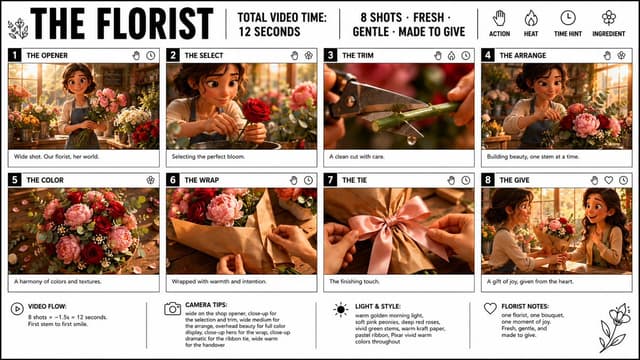
Infographic / Edu Visual - Florist Storyboard Poster — output

Infographic / Edu Visual - Florist Storyboard Poster

GPTProto OfficialGPT Image 2
Goal: Create a crisp, clean infographic storyboard poster for {argument name="film title" default="THE FLORIST"}, showing a short premium 3D animated video concept about a florist making and giving a bouquet.

Canvas: Wide 16:9 poster on a white background with thin black outer border and black grid lines. Use bold black typography, a clean editorial storyboard layout, and premium Pixar-like 3D stylized rendering inside each frame. Bright vivid colors, warm golden morning light, soft pink peonies, deep red roses, vivid green stems, eucalyptus leaves, kraft paper, and a warm cozy flower-shop atmosphere.

Header layout: Large bold title on the top left: {argument name="film title" default="THE FLORIST"}. Add a small simple floral line icon beside it. Across the top center, separated by vertical black divider lines, include: “TOTAL VIDEO TIME: 12 SECONDS” and “8 SHOTS · FRESH · GENTLE · MADE TO GIVE”. On the top right, show four simple black line icons with labels underneath: a hand labeled “ACTION”, a flame labeled “HEAT”, a clock labeled “TIME HINT”, and a flower labeled “INGREDIENT”.

Main storyboard layout: Use exactly 8 numbered shot cards arranged in a 4-column by 2-row grid. Each card has a black number block at top left, a bold uppercase shot title, small black line icons at the top right, a cinematic 3D image panel, and a short caption strip below. Keep all borders black and clean.

Shot 1: Number “1”, title “THE OPENER”. Image: wide shot of a cheerful young female florist in a sunlit flower shop, holding stems among buckets of flowers. Caption: “Wide shot. Our florist, her world.” Icons: hand and clock.

Shot 2: Number “2”, title “THE SELECT”. Image: close-up of the florist gently choosing a perfect deep red rose, soft bokeh flowers behind her. Caption: “Selecting the perfect bloom.” Icons: hand and flower.

Shot 3: Number “3”, title “THE TRIM”. Image: extreme close-up of pruning shears cutting a green flower stem, with a small water droplet falling from the cut. Caption: “A clean cut with care.” Icons: hand, flame, and clock.

Shot 4: Number “4”, title “THE ARRANGE”. Image: the florist arranging pink peonies, red roses, greenery, and small white filler flowers on a worktable in the warm shop. Caption: “Building beauty, one stem at a time.” Icons: hand and flower.

Shot 5: Number “5”, title “THE COLOR”. Image: overhead beauty shot of the bouquet ingredients spread on a wooden table: pink peonies, deep red roses, eucalyptus, tiny white flowers, petals, and warm highlights. Caption: “A harmony of colors and textures.” Icon: flower.

Shot 6: Number “6”, title “THE WRAP”. Image: hands wrapping the bouquet in warm brown kraft paper on a wooden counter. Caption: “Wrapped with warmth and intention.” Icons: hand and clock.

Shot 7: Number “7”, title “THE TIE”. Image: close-up of hands tying a soft satin ribbon bow around the kraft-wrapped bouquet, with a pink ribbon as the focal point. Caption: “The finishing touch.” Icons: hand and clock.

Shot 8: Number “8”, title “THE GIVE”. Image: the florist handing the finished bouquet to a delighted smiling recipient in the flower shop, warm emotional moment. Caption: “A gift of joy, given from the heart.” Icons: hand, heart, and clock.

Bottom information bar: Add four note sections across the bottom, separated by vertical black lines, each with a simple black icon and bold label. Section 1 with play icon: “VIDEO FLOW:” then “8 shots × ~1.5s = 12 seconds. First stem to first smile.” Section 2 with camera icon: “CAMERA TIPS:” then “wide on the shop opener, close-up for the selection and trim, wide medium for the arrange, overhead beauty for full color display, close-up hero for the wrap, close-up dramatic for the ribbon tie, wide warm for the handover”. Section 3 with sun icon: “LIGHT & STYLE:” then “warm golden morning light, soft pink peonies, deep red roses, vivid green stems, warm kraft paper, pastel ribbon, Pixar vivid warm colors throughout”. Section 4 with heart icon: “FLORIST NOTES:” then “one florist, one bouquet, one moment of joy. Fresh, gentle, and made to give.” Add a simple floral line drawing in the lower right corner.

Constraints: Use exactly 8 storyboard cards and exactly the four bottom note sections. Keep text legible, black typography on white, no watermark, no extra logos, no extra panels. Maintain a polished storyboard poster look with clean borders and vivid cinematic 3D frames.
Social Media Post - Western Woman in Giant Claw Machine — output

Social Media Post - Western Woman in Giant Claw Machine

LuckySheepGPT Image 2
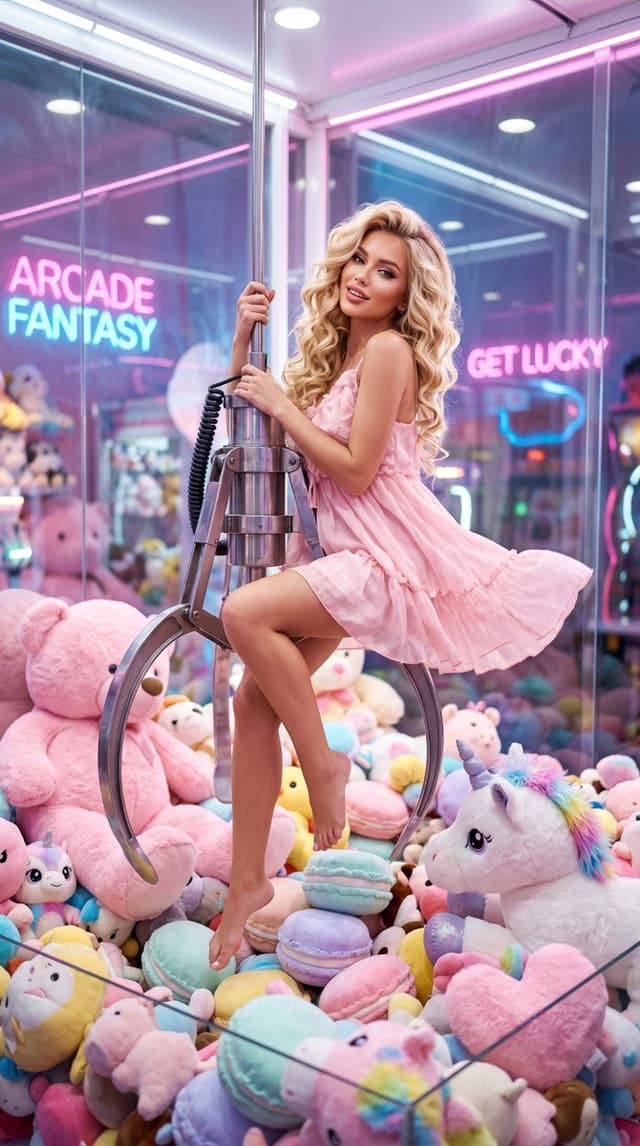
Subject: {argument name="subject" default="A beautiful young Western woman with long golden wavy hair, exquisite and glamorous makeup, full lips, and a playful, seductive, and cute expression"}
Clothing: {argument name="clothing" default="A short, flowy light pink summer dress, light and airy, barefoot"}
Pose: Gracefully sitting on the giant metal claw of a claw machine, one hand gripping the hook, legs dangling naturally and swinging slightly, a playful yet elegant pose
Scene: {argument name="scene" default="Inside a giant transparent glass claw machine, surrounded by giant pink teddy bears, pink unicorn plushies, rainbow manes, sparkling horns, various macaron-colored plush toys, and a mountain of plushies, looking like being trapped in an oversized claw machine."}
Atmosphere: Dreamy, girly, cute, fairytale-like, playful, high-fashion vibe; style blends Kawaii (Japanese cute), Glamour Fashion, and Dreamy Surrealism
Lighting: Soft volumetric light, pink neon lights, rim light, dreamy soft focus, cinematic lighting
Photography Style: Realistic photography, fashion magazine cover, dreamy surrealism, cinematic, high-end commercial photography
Quality Requirements: Ultra-high detail, HDR, Masterpiece, Best Quality, Sharp Focus, 8K, High Resolution
Aspect Ratio: 9:16
Profile / Avatar - Cinematic Golden Hour Urban Portrait — output

Profile / Avatar - Cinematic Golden Hour Urban Portrait

MaercihGPT Image 2
{
  "reference_image": "uploaded_image",
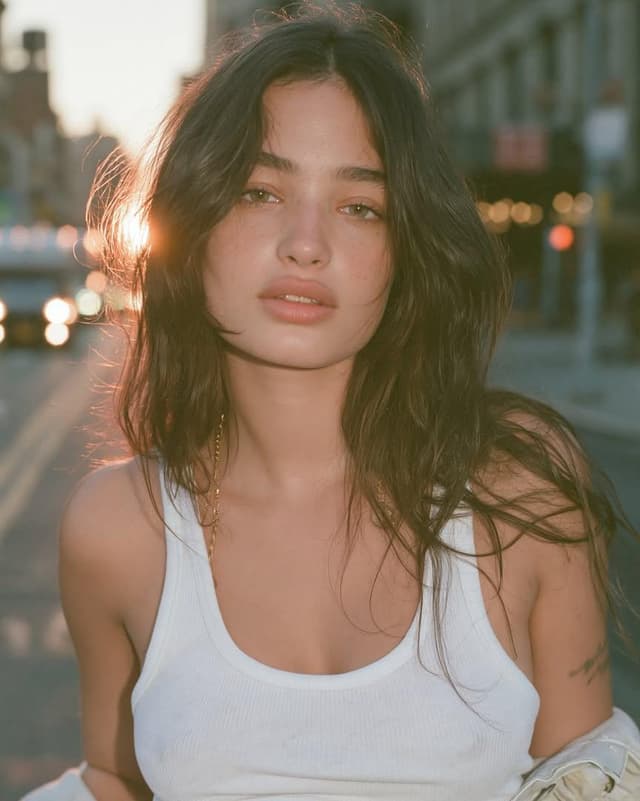
  "prompt": "Recreate the uploaded image while preserving the subject's identity, facial structure, hairstyle, pose, framing, and overall composition. A close-up cinematic portrait of a young woman standing in the middle of a quiet city street during golden hour. Warm sunset backlighting creates a glowing halo around her dark, medium-length tousled hair with soft curtain bangs. She looks directly into the camera with a calm, slightly melancholic, effortless expression. Natural olive-fair skin with subtle freckles, minimal makeup, thick natural eyebrows, hazel-green eyes, soft pink lips, and realistic skin texture with visible pores. She wears a fitted white ribbed tank top, a delicate gold chain necklace, and a light jacket casually slipping off one shoulder. The background is softly blurred with urban buildings, distant traffic, warm bokeh lights, and shallow depth of field. The sun peeks through the left side of her hair, producing gentle lens flare and soft rim lighting. Color grading is warm, muted, slightly filmic with Kodak Portra 400 tones, soft contrast, lifted blacks, creamy highlights, and subtle grain. Captured as if on a full-frame mirrorless camera with an 85mm f/1.4 lens at f/1.8, ultra realistic photography, editorial fashion portrait, natural imperfections, crisp focus on the eyes, highly detailed, photorealistic, premium magazine quality.",
  "negative_prompt": "anime, cartoon, CGI, 3D render, painting, illustration, overprocessed skin, plastic skin, excessive makeup, harsh shadows, oversaturated colors, low resolution, blurry face, distorted anatomy, extra limbs, duplicate features, crossed eyes, bad hands, cropped face, watermark, logo, text, noise artifacts, unnatural lighting, exaggerated facial features",
  "settings": {
    "aspect_ratio": "4:5",
    "style": "photorealistic editorial",
    "lighting": "golden hour backlight with soft natural fill",
    "camera": "Full-frame mirrorless",
    "lens": "85mm f/1.4",
    "aperture": "f/1.8",
    "quality": "ultra",
    "film_emulation": "Kodak Portra 400",
    "sharpness": "high on eyes, soft background",
    "color_tone": "warm cinematic"
  }
}

"background": {
  "scene": "wide city street at golden hour",
  "depth_of_field": "extremely shallow",
  "background_blur": "strong optical compression from an 85mm lens, smooth creamy bokeh, distant buildings and vehicles dissolve into large circular bokeh highlights, foreground and background melt away naturally, only the subject's face remains tack sharp",
  "bokeh": "large, soft, circular, cinematic bokeh with gentle bloom around light sources",
  "focus_falloff": "eyes critically sharp, hair edges slightly soft, shoulders gradually lose focus, street rapidly fades into blur",
  "atmosphere": "warm sunset haze with subtle halation around bright highlights"
}
Infographic / Edu Visual - Isometric Room History Timeline — output

Infographic / Edu Visual - Isometric Room History Timeline

GadgetifyGPT Image 2
2x2 grid, 16:9, AI infers: An isometric cutaway of a single room (like a {argument name="room type" default="study or kitchen"}) divided into four seamless quadrants. The bottom-left quadrant is furnished with the earliest era’s {argument name="theme" default="[THEME]"} objects, the top-left is a middle period, the top-right is late period, and the bottom-right is the most modern. The room’s architecture morphs subtly but stays consistent; the objects tell the time shift ::5 Time Logic: AI_INFER 25–30 objects distributed across the four time quadrants, each zone historically consistent. Quadrants flow clockwise like a time-loop ::5 Composition: Isometric view (no perspective distortion), seamless quadrant transitions, no clutter, objects neatly arranged on surfaces ::3 Material Physics: Real materials, period-appropriate aging, soft shadows, no glowing items ::2 Illumination: Neutral ambient light across all zones, no dramatic shadows ::2 Typography: Small year range subtly placed on the floor of each quadrant ::2 Render Stack: Isometric time-room, evolutionary diorama, interior timeline, 8k ::1 Negative: [perspective, broken room geometry, anachronistic mixing across quadrants, excavation, moss, bioluminescence] ::-1
Comic / Storyboard - Dynamic 3D Sticker Action Scene — output

Comic / Storyboard - Dynamic 3D Sticker Action Scene

Saul GoodmanGPT Image 2
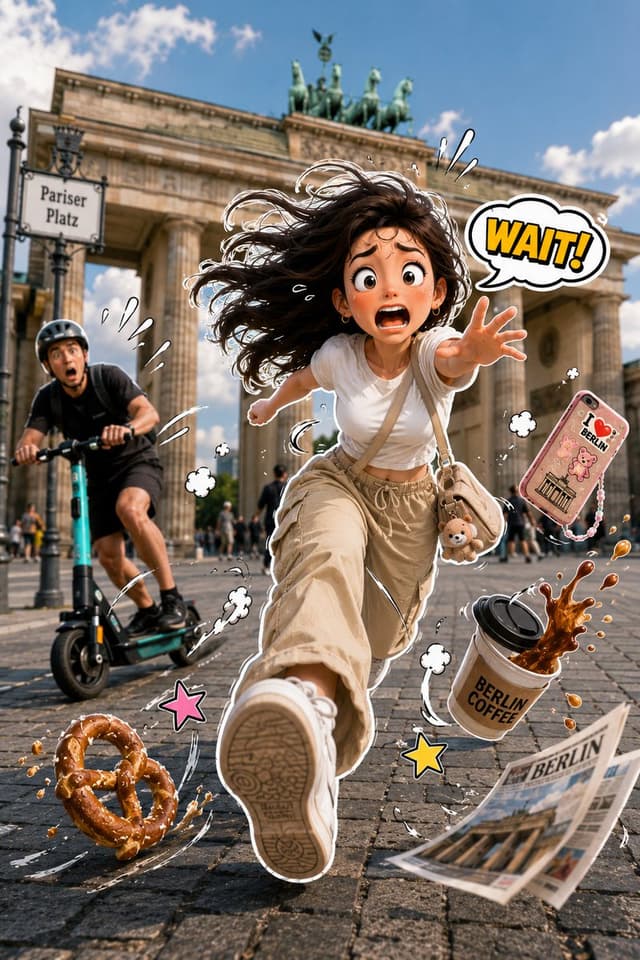
A vibrant, humorous 3D-style sticker character seamlessly composited onto a real-life photograph of {argument name="location" default="LOCATION"}. A cute young adult is caught in a dynamic full-body sprint toward the camera with exaggerated running motion, expressive cartoon facial expression, windblown hair, and dramatic action pose. They wear {argument name="outfit" default="OUTFIT"} and carry {argument name="accessory" default="ACCESSORY"}. A funny mishap is unfolding: {MAIN_EVENT}, while {SECONDARY_EVENT} creates even more chaos. Random objects such as {FLYING_OBJECTS} fly through the air with exaggerated motion. Include playful comic-style motion lines, action swirls, sweat drops, speed streaks, bounce effects, floating impact symbols, and expressive sticker doodles around every moving object. Add one comic speech bubble or sound effect like "Woof!", "Wait!", "Oops!", "Ahhh!", "Nooo!", "Catch!", or "Run!" in bold colorful lettering. The character has a thick white die-cut sticker border with subtle drop shadow, while the background remains fully photorealistic. Strong perspective with one foot reaching toward the camera, cinematic wide-angle lens, shallow depth of field, bright natural lighting, ultra-detailed textures, joyful chaos, playful storytelling, collectible premium sticker aesthetic, vibrant colors, Pixar-inspired expressions, hyper-realistic photography blended with high-end 3D illustration, 8K, vertical composition.
Social Media Post - Breathtaking Mountain Road Sunset — output

Social Media Post - Breathtaking Mountain Road Sunset

𝐍𝐚𝐯𝐞𝐞 𝐀𝐢GPT Image 2
A breathtaking mountain road just after rainfall, wet asphalt reflecting the golden sunset, lush green hills covered in mist, dramatic clouds, tiny water droplets on leaves, fresh atmosphere, cinematic lighting, ultra realistic, HDR, peaceful, highly detailed, 8K, DSLR quality, wide-angle landscape photography, no people, natural colors. A stunning sunrise over a crystal-clear lake surrounded by majestic mountains, colorful sky with orange and pink clouds, gentle fog floating above the water, lush green trees, mirror-like reflections, peaceful morning atmosphere, cinematic composition, ultra realistic, HDR, volumetric lighting, 8K, DSLR landscape photography, highly detailed, no people.
Browse by model, style or topic

Find your next direction

ASTORIE CANVAS

Take the idea further.

Bring your prompts, references and results together in one creative space.

Open your canvas ↗