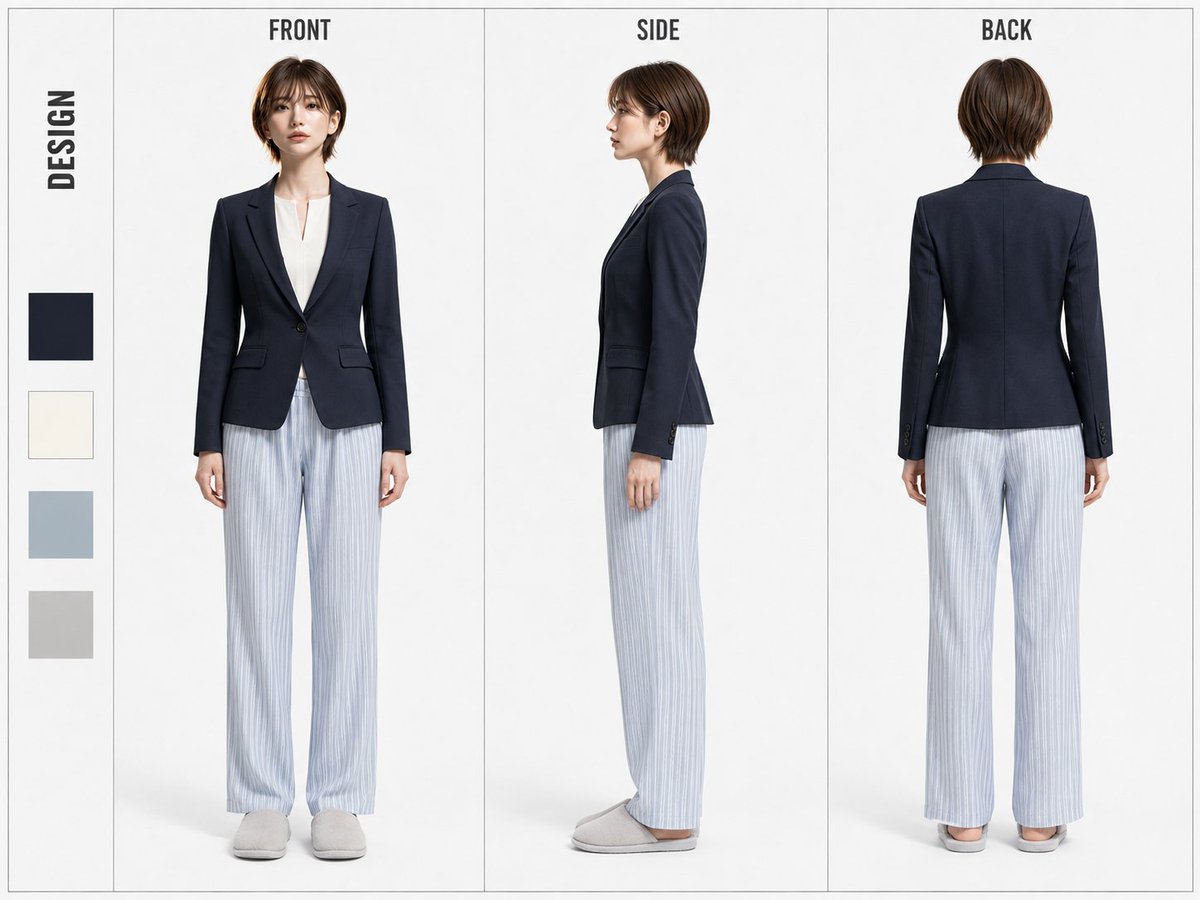
A detailed layout for a character design sheet featuring a female executive in a suit jacket and pajamas, showing front, side, and back views.
[Input Items] Jacket Color: [NAVY / BORDEAUX / FOREST GREEN / CAMEL] (Mandatory selection) [Purpose] Using only the single full-body portrait attached to this instruction manual as the sole character reference, create one design-focused simple character three-view sheet for both sharing and video reference. Inherit only the face, body type, and hairstyle from the reference image. Do not inherit the costume, footwear, accessories, bags, small items, or costume color scheme. Replace them with the specific costume for this occasion. [Aspect Ratio] Fixed at 4:3. Do not change to other ratios. [Character Reference] Maintain the facial features, eyes, nose, mouth, outline, age, and skin tone of the reference image. For the body type, maintain the proportions of the reference image, such as height, head-to-body ratio, shoulder width, torso length, waist position, hip position, leg length, and body slenderness/thickness. For the hairstyle, maintain the length, bangs, parting, hair volume, overall silhouette, and the shape of the sides and back from the reference image. Do not change the face, body type, or hairstyle due to clothing changes, and naturally develop as the same person in FRONT/SIDE/BACK views. [Costume Concept] Combine a neat and sophisticated tailored style for the upper body with a relaxed pajama style for the lower body. The upper body should give a sharp and high-quality impression, convincing as a sophisticated professional woman. Clarify the difference in texture and silhouette between the upper and lower halves to establish it as a single character design. [Jacket] A sophisticated tailored jacket. The design is fixed: a single-breasted jacket that naturally follows the body in a slightly slim fit, with one button, standard notched lapels, a moderately short length reaching near the hip bone, a naturally cinched waistline, and clean long sleeves. The shoulders should have a moderately structured and natural silhouette. Use only one of the colors selected in the [Input Items] (NAVY/BORDEAUX/FOREST GREEN/CAMEL) for the jacket body, maintaining the design even if the color is changed. [Inner] A high-quality minimal no-collar blouse fixed in OFF WHITE. The neckline should be a shallow and neat split neck, with a short vertical slit in the center of the neck. Do not open the chest widely like a general V-neck; keep the opening modest and sharp up to near the collarbone. Do not include lapels, shirt collars, collar tips, or stand-up collars. Do not create a collar like a general dress shirt. Do not use visible buttons on the front or a normal shirt placket. The material should be high-quality, smooth, matte blouse fabric, neither too thin nor transparent, and should not sag loosely on the body. It should not be excessively tight, but have a neat and sophisticated silhouette that naturally follows the body. Ensure the shape of the split neck is clearly and beautifully visible from the V-zone of the jacket, preventing collars or excess fabric from sticking out. Keep the neckline clean and organized to give a professional, intelligent, and urban impression. Maintain the same neckline, texture, and silhouette in FRONT/SIDE/BACK views. [Pajamas] Fixed PALE BLUE-GRAY long pajama pants for the lower body. Made of soft, light cotton-based material with a naturally relaxed straight silhouette from the waist to the hem. The waist should have a simple elastic specification. The fabric should have thin WHITE vertical stripes evenly placed, creating a clear loungewear design recognizable as pajamas. The color, pattern, silhouette, and length are fixed. [Footwear] Simple indoor slippers fixed in LIGHT GRAY. Maintain the same shape and color in FRONT/SIDE/BACK views. [Accessories] Do not use accessories. [Three-View Drawing] Left = FRONT / Center = SIDE / Right = BACK. FRONT is directly facing forward. Face, chest, waist, knees, and toes should point forward in a natural upright posture with both arms down naturally at the sides. SIDE is a complete profile, fixed facing left. Face, tip of the nose, chin, gaze, chest, abdomen, knees, and toes should point toward the left of the screen without twisting the body. BACK is a complete rear view. A natural upright posture where the back of the head, shoulders, back, waist, legs, and heels can be confirmed from behind. All three views must show the figure completely from the top of the head to the bottom of the slippers, unifying character size, height, head-to-body ratio, shoulder width, waist position, and leg length. The jacket, split-neck no-collar blouse, pajamas, and indoor slippers must also be established as the same design in all three views. [Fixed Layout] The 4:3 canvas is fixed into four areas from the left: "DESIGN STRIP | FRONT | SIDE | BACK". The leftmost 8% = DESIGN STRIP, and the remaining 92% = the three character regions for FRONT/SIDE/BACK, with all three character regions having the exact same width. The character regions are the main focus, while the DESIGN STRIP serves only as a visual accent for the sharing sheet. Characters are placed independently within each region at the same display magnification. [DESIGN STRIP] In the thin vertical area on the left edge, place only the rotated English heading "DESIGN" and four color swatches. "DESIGN" should be a normal horizontal English word rotated 90 degrees clockwise and placed vertically. The letters themselves should not be deformed; use a bold to medium-bold condensed sans-serif in all caps. Place it in the center of the DESIGN STRIP horizontally, starting at about 5-6% from the top edge. [Color Swatches] The four swatches are fixed from top to bottom in the order: NAVY / OFF WHITE / PALE BLUE / LIGHT GRAY. All should be squares of the same size, arranged in a single vertical column at the bottom of the DESIGN STRIP. Each side of a swatch should be about 50% of the DESIGN STRIP width, horizontally centered. The starting position of the swatch block is about 58% from the top edge of the canvas, with even spacing of about 2% of the canvas height between each swatch. Even if the jacket color is changed in the [Input Items], maintain the swatches as a fixed graphic element for the sheet design. [Character Headings] Display FRONT / SIDE / BACK exactly once at the top of each character region. The three headings must have the same font, weight, size, height, and top margin, using a condensed sans-serif from the same family as "DESIGN". FRONT / SIDE / BACK should be written horizontally. [Background / Separators] The background is white to a very light neutral gray. Use only thin outer border lines and thin vertical lines separating DESIGN STRIP / FRONT / SIDE / BACK. [Completion Conditions] 4:3 aspect ratio. A thin DESIGN STRIP on the left, and FRONT/SIDE/BACK in equal widths on the right. The face, body type, and hairstyle inherited from the reference image must be consistent as the same person in all three views. FRONT must be directly forward-facing, SIDE must be a complete profile facing left, and BACK must be a complete rear view. Unify character size, proportions, height, shoulder width, waist position, and leg length across the three views. The upper body must consist of the fixed tailored jacket + fixed split-neck no-collar blouse, the lower body must be the fixed pajamas, and the footwear must be the fixed slippers. Do not create a general shirt collar at the neck of the inner garment. The shallow split neck should look neat from the V-zone of the jacket. The neckline should not be messy with collars, fabric, or plackets, and the upper body should establish the character as a sophisticated professional woman. Use the color selected in the [Input Items] for the jacket, and maintain the position, structure, and order of the DESIGN STRIP and the four swatches. [Prohibitions] Aspect ratios other than 4:3, turning into a different person, changing the face/body type/hairstyle of the reference image, inheriting costume elements from the reference image, making the SIDE view face right or 3/4, cutting off parts of the body, overlapping characters, inconsistent character magnification between the three views, and changing the fixed layout or the four swatches. Do not add general shirt collars, fold-over collars, collar tips, stand-up collars, conspicuous plackets, or visible front buttons to the inner garment. Do not change the split neck to a deep V-neck. Do not add decorations such as frills, ribbons, bow ties, necklaces, or pendants to the neck.