Prompts for educational graphics

Explore a travel-poster example that brings architectural details into a graphic layout. Use its prompt as a starting point for deciding what your own visual should explain.

探索提示词

612 条提示词

Infographic / Edu Visual - Procedural Book Nook Diorama Generation Prompt — output

Infographic / Edu Visual - Procedural Book Nook Diorama Generation Prompt

GadgetifyNano Banana Pro
<instructions>    Input Variable:   [INSERT TOPIC HERE] (e.g., History of Space Exploration)

  System Instruction:  
Generate a crowded, hyper-realistic   "Book Nook" Diorama  . Use the following logic to procedurally fill the scene with high-density detail:

  1. Semantic Analysis (The Loot Table):  
      The Totem:   Identify the single tallest, most vertical object representing the topic (e.g., Saturn V Rocket).
      The Ephemera:   Identify 4-5 small, specific consumer goods or artifacts (e.g., "Tang" Packet, Freeze-Dried Ice Cream, Mission Patches, Apollo 11 Manual).
      The Timeline:   Identify the key visual evolution steps (e.g., Sputnik -> Lunar Module -> Shuttle).

  2. The Immutable Container (The Corner Stage):  
      Geometry:   The book is NOT lying flat. It is standing upright, opened to form a   Strict 90-Degree Corner  .
         Vertical Wall:  The back cover/pages standing straight up.
         Horizontal Floor:  The front cover/pages lying flat.
      The Anchor:   The "Totem" object (Rocket) stands   inside the spine crease  , acting as the structural pillar holding the book open.
      Paper Texture:   The pages must look thick, rough, and heavily aged (like an 1800s manuscript).

  3. The Vertical Plane (The Da Vinci Sketchbook):  
      Density:     MAXIMUM.   Do not leave white space.
      Style:   Sepia-tone   Pen & Ink Technical Drawings  .
      Content:   The background should be a chaotic but organized collage of diagrams, timelines, and schematics. It should look like a scientist's field notes.
      Text:   A bold, formal Serif Title at the top (e.g., "{argument name="title" default="HISTORY OF SPACE EXPLORATION"}").

  4. The Horizontal Plane (The Physical Clutter):  
      Transition:   The Totem (Rocket) seamlessly transitions from a drawing on the wall to a   Physical 3D Model   on the floor.
      The Scatter:   The "Ephemera" props are   scattered and overlapping   on the floor page. They should not be neatly arranged.
         Material Contrast:  The props must look like shiny plastic, crinkled foil, and fabric patches. This clashes with the matte paper.
         Scale:  A tiny 1:64 scale human figure (e.g., Astronaut) stands next to the massive Totem for scale.

  5. Visual Syntax:  
      Background:     Void Black.   The book floats in infinite darkness.   DO NOT render studio equipment, lamps, or tables.  
      Lighting:   "Museum Display" lighting. A focused beam hits the Totem, creating a long shadow against the back page sketches.
      Depth:   The 3D objects must cast hard shadows onto the 2D paper to sell the optical illusion.

  Output:   1:1 Aspect Ratio, Macro Photography, High Textural Contrast (Paper vs. Plastic). </instructions>
使用此提示词 ↗
Infographic / Edu Visual - Monumental Mathematical Symbols as Terrain Typography — output
Infographic / Edu Visual - History of Gaming Diorama Book Template Prompt — output
Infographic / Edu Visual - Kinetic Sculpture of Scientific Discovery in a Lab Notebook — output

Infographic / Edu Visual - Kinetic Sculpture of Scientific Discovery in a Lab Notebook

Artificial intelligence (Ai),Open AiNano Banana Pro
Role:
Science Historian & Kinetic Sculpture Engineer

Input:
Scientific Discovery: {argument name="scientific discovery" default="{{DISCOVERY}}"}
Primary Scientist: {argument name="scientist name" default="{{SCIENTIST_NAME}}"}

Year: {{YEAR}}
Lab Location: {{LOCATION}}

Phase 1: Concept Analysis

Identify the defining eureka moment behind {{DISCOVERY}}
Briefly imply earlier failed attempts through visual cues

Select the key physical apparatus used or symbolized in this discovery (e.g. telescope, prism, microscope, equation, clock, lens)

Phase 2: Visual Execution

Goal:
A single 1x1 frame showing a working “lab notebook contraption” frozen mid-discovery.

Scene Rules:

Base:
An open, aged lab notebook on a wooden desk. Coffee stains, handwritten equations, rough sketches, and marginal notes fill the pages.

The Machine:
A functional brass and glass apparatus rises directly from the notebook pages. Steampunk-inspired but scientifically grounded.

The Process:
The apparatus actively demonstrates {{DISCOVERY}}

Examples: light bending, gears rotating, particles flowing, rings orbiting, waves oscillating.

The Scientist:
A tiny, realistic figurine of {{SCIENTIST_NAME}} in period-accurate lab clothing, holding a fountain pen and taking notes.

The Failure:
Crossed-out equations, torn sketches, and crumpled paper scattered near the notebook.

The Eureka:
One subtle glowing element (LED, filament, beam of light, energized ring) symbolizing the breakthrough moment.

The Label:
Handwritten in fountain pen style on the notebook page:
“{{SCIENTIST_NAME}} | {{DISCOVERY}} | {{YEAR}} | {{LOCATION}}”

Era Props:
Period-accurate tools such as a slide rule, telegram, brass compass, glass tubes, Bunsen burner, vacuum tubes, or notebooks.

Style & Output

Composition: Single frame, centered subject, square 1x1

Lighting: Dramatic side lighting, warm highlights, deep shadows

Texture: Brass, glass, paper fibers, ink stains clearly visible

Photography Style: Industrial scientific photography, cinematic realism

Mood: Quiet intensity, intellectual tension, frozen moment of discovery
Quality: Ultra-detailed, macro realism, shallow depth of field
使用此提示词 ↗
Infographic / Edu Visual - Instrument Genealogy Board (Luthier's Legacy) — output
Infographic / Edu Visual - Deconstructed Culinary Promotional Poster — output

Infographic / Edu Visual - Deconstructed Culinary Promotional Poster

Artificial intelligence (Ai),Open AiNano Banana Pro
{argument name="dish name" default="Tiramisu"}], [vertical] arrangement, premium culinary promotional poster with pure black background (#000000), presenting a deconstructed layered display of this dish. Arranged from top to bottom or left to right following the cooking sequence. 
    
    Visual Structure: 5-7 layers, showcasing the complete deconstruction from raw ingredients to finished dish. One end features sauce or seasoning liquid, middle layers include aromatics, main ingredients, and key seasonings, with the finished dish at the other end. 
    
    Each layer separated by appropriate spacing to highlight textures and details; the finished dish layer maintains significantly larger gap from adjacent layers to create dramatic final presentation. 
    
    Ingredient Textures: 
    
    - Sauce layer: Showcase clean, premium sauces or seasonings - Aromatics layer: Vibrant colors, floating weightlessly, emanating warm fragrance, tangibly realistic texture - Main ingredient layer: Clear textures, distinct layers, showcasing natural grain of premium ingredients, fresh and dewy
    
     - Seasoning layer: Crystal clear, well-defined granules, 
    
    warm luster - Finished dish layer: Glossy and appetizing, tender texture, coated in rich sauce, surface slightly trembling, steam rising, aroma seemingly penetrating the frame. 
    
    The finished dish should be slightly larger than other decomposed layers Visual Style: - All elements floating against pure black background, no white base or platform 
    
    - Uniform 45-degree angle photography, highly realistic style - Finished dish placed in appropriate vessel, consistent angle with decomposed layers above Annotations: Elegant labels with refined arrows pointing to each component, labeling each layer's ingredients or seasonings. 
    
    Atmosphere Details: 
    
    - Transition zones feature subtle floating wisps of steam, oil droplets, and spice particles gently descending, enhancing dynamism and authentic cooking atmosphere 
    
    - Soft highlights near finished dish, echoing the glossy sheen of ingredients and glaze-like quality of the sauce
使用此提示词 ↗
Infographic / Edu Visual - Scientific Theory Visualization: 2D to 3D Extrusion — output
Infographic / Edu Visual - Scientific Discovery Visualization: Kinetic Sculpture Lab Notebook — output

Infographic / Edu Visual - Scientific Discovery Visualization: Kinetic Sculpture Lab Notebook

GadgetifyNano Banana Pro
<instructions> 
Role:   Science Historian & Kinetic Sculpture Engineer

  Input:   [{argument name="scientific discovery" default="Scientific Discovery, e.g., DNA Structure, Theory of Relativity"}]

  Phase 1: Analysis  
1. Identify the "eureka moment" and the failed attempts before it
2. Select 4 lesser-known scientists/discoveries that used similar methodology
3. Extract the physical apparatus used in the discovery (microscope, prism, blackboard equation)

  Phase 2: Execution  
  Goal:   2x2 Grid of "Working Lab Notebook Contraptions"

  Rules per Panel:  
-   The Base:   An open, coffee-stained lab notebook with handwritten equations/sketches
-   The Machine:   A functional brass and glass apparatus rises FROM the notebook pages (steampunk aesthetic)
-   The Process:   The machine actively demonstrates the discovery (gears turning, liquid flowing, light refracting)
-   The Scientist:   Tiny figurine in period lab coat taking notes with a fountain pen
-   The Failure:   Crossed-out attempts and crumpled paper nearby
-   The Eureka:   A single glowing element (LED) representing the breakthrough moment
-   The Label:   Fountain pen handwriting: "Scientist Name | Discovery | Year | Lab Location"
-   The Props:   Era-accurate items (telegram, slide rule, Bunsen burner, petri dishes)

  Output:   2x2 Grid, Industrial Scientific Photography, dramatic side lighting
</instructions>
使用此提示词 ↗
Infographic / Edu Visual - Scientific Theory Visualization Generator — output
Infographic / Edu Visual - Instrument Genealogy and Exploded View Diagram — output
Infographic / Edu Visual - Seed to Shelf Diorama Flowchart Prompt — output

Infographic / Edu Visual - Seed to Shelf Diorama Flowchart Prompt

GadgetifyNano Banana Pro
<instruction>
  1. Analyze Input Variable:  
Input A is a Global Commodity with a distinct production lifecycle (e.g., Coffee, Chocolate/Cocoa, Wine, Denim/Cotton).
Deconstruct the lifecycle into   3 Distinct Stages  :
   Stage 1 (The Origin):  The agricultural source (e.g., Coffee Plantation, Cacao Trees).
   Stage 2 (The Process):  The industrial transformation (e.g., Roasting Plant, Fermentation Vats).
   Stage 3 (The Destination):  The retail experience (e.g., A Hipster Cafe, A Chocolatier Shop).
2.  Container (The Map Table):
Goal: A "Seed to Shelf" Flowchart Diorama.
The Base: A large, vintage World Map (blue oceans, pastel continents) laid flat on a wooden dining table.
The Spine: A raised, winding S-Shaped Chute/Conveyor snakes through the center of the image, physically connecting the three stages.
The Flow: The chute is filled with the product, which visually transforms as it moves down the path (e.g., Red Coffee Cherries at the top 
→
→
 Brown Roasted Beans in the middle 
→
→
 Fine Ground Powder at the bottom).
3. The Vignettes (The Stations):
Construct a 3D diorama "Island" at each key point of the S-curve:
Top Station (Origin): A square patch of terrain sitting on the map (e.g., South America). Detailed crops, trees, and farmers harvesting the raw material.
Middle Station (Process): A compact industrial facility sitting on the map (e.g., Europe/USA). Metallic roasters, silos, smoke stacks, and factory workers.
Bottom Station (Destination): An architectural Cutaway Box. The front wall is removed to reveal the interior of a shop (e.g., Espresso machines, tiny customers sitting at tables, baristas serving).
4. The Narrative Scale (The Workers):
Scale: 1:87 (HO Scale) miniature figures.
Action: The figures are not just standing; they are actively moving the product from the "Station" into the "Chute" (e.g., Farmers dumping baskets of cherries into the stream, Factory workers shoveling beans).
5. Lighting & Atmosphere:
Camera Angle: High-Angle Perspective (45-60 degrees). Looking down the length of the table.
Lighting: Natural Daylight. Bright, cheerful, and even. Shadows fall softly on the map.
Depth of Field: Tilt-Shift effect. The top and bottom edges of the table are slightly blurred to make the models look tiny.
Output: ONE image, Vertical Aspect Ratio (4:5), Miniature Photography, Educational Diorama aesthetic.
</instruction>
使用此提示词 ↗
Infographic / Edu Visual - Encyclopedic 3D Infographic Evolution Chart — output

Infographic / Edu Visual - Encyclopedic 3D Infographic Evolution Chart

Lovart 公式 (ラブアート)Nano Banana Pro
Role and Subject: A massive, encyclopedic 3D infographic poster with a 16:9 ratio. Title: “THE EVOLUTION OF {argument name="product name" default="[Product Name]"}”. The visual style is a high-end fusion of museum-quality product photography and complex technical blueprints.

Core Lineup (Chronology): Arrange 8–12 historical versions of the {argument name="product name 2" default="[Product Name]"}, from the first prototype to the latest future model, completely and linearly. They are precisely positioned on a measuring scale/ruler base running horizontally across the center. Rendering: Ultra-realistic 3D, 8K resolution. Emphasize the evolution of texture: contrast the aging of the early {argument name="material atmosphere" default="[Material Atmosphere]"} with the clean, high-tech finish of the modern versions.

Brand Atmosphere (Canvas): Background: A deep, rich [Brand Color] textured background. Overlaid with watermarks of low-opacity vintage patent drawings, handwritten engineering notes, and newspaper clippings related to the brand's history. Header: A prominent, high-contrast brand logo centered at the top, with the title displayed in bold typography.

“Ultra-Dense” Information Layer (Punch Style): The layout is overwhelmed with systematized information (creating a “data aesthetic” look):
High-Density Annotation Network: Hundreds of ultra-fine white hairlines connecting specific [Key Components] (e.g., curves, buttons, engines) to compact text blocks or data tables floating in space.
Contextual Zones: “Era Modules” floating above the product. Representing different historical decades with iconographic markers.
Magnified Inserts: Circular “zoom-in” lenses scattered in empty spaces. Showing extreme macro close-ups of texture details or internal mechanisms.
Technical Specification Strip: A structured data bar placed at the bottom. Listing precise specifications (weight, dimensions, year, material code).

Technical Specifications: Octane render, Unreal Engine 5 aesthetic, editorial layout, masterpiece of information design, volumetric lighting, sharp focus, professional color grading. --ar 16:9 --v 6.0 --stylize 300 (Reference style: The history of Coca-Cola's development)
使用此提示词 ↗
Cutaway infographic of a 5th generation stealth fighter jet — output
Infographic / Edu Visual - Medical Infographic Poster Prompt using Bento Grid Layout — output

Infographic / Edu Visual - Medical Infographic Poster Prompt using Bento Grid Layout

xiaobeiLinNano Banana Pro
{
  "image_analysis": {
    "subject": "{argument name="drug name" default="Oseltamivir Capsule"} Science Infographic, 9:16",
    "style": "Modular Bento Grid Design / Minimalist Medical UI Design",
    "tone": "Professional, Clinical, Rigorous, Scientific, Trustworthy",
    "primary_colors": ["Clinical White", "Medical Blue", "Slate Grey", "Mint Green"]
  },
  "prompt_elements": {
    "subject_description": "A high-quality science infographic poster about {argument name="drug name" default="Oseltamivir Capsule"}.",
    "layout": "Bento box style modular grid layout, clean medical UI/UX interface design, divided into clear rectangular cards.",
    "visual_details": [
      "Top header with striking modern sans-serif font title 'Chinese Drug Name' and its chemical/generic name",
      "Center top features an ultra-realistic macro photograph of the [Drug Form/Packaging] (e.g., tablet, capsule, or bottle)",
      "A minimalist line drawing of the [Chemical Structure] in the corner",
      "Section 1: Analysis of active ingredients and pharmacology with circular and bar charts, data visualization",
      "Section 2: Indications with minimalist line icons",
      "Section 3: Dosage and Administration matrix with minimalist line icons ([Oral/Injection], [Frequency], [Dose])",
      "Section 4: Pharmacokinetics or onset time axis with line charts",
      "Section 5: Precautions grid with simple warning icons ([Drug Interactions], [Contraindications], [Side Effects]), drug interactions, contraindications, side effects require online search",
      "Section 6: Applicable population profile icons (e.g., suitability markers for elderly, children, pregnant women)",
      "Section 7: Drug storage guidelines with thermometer and humidity icons"
    ],
    "art_style": "Minimalist scientific visualization design, combining detailed medical illustrations with product photography, flat medical icons, Swiss-style typography.",
    "lighting": "Bright laboratory shadowless lighting, clean and clear, emphasizing sterility and clarity.",
    "color_palette": "Monochromatic clinical white or light grey background, translucent frosted glass cards, dark grey and navy blue text, accented with medical blue or cyan to highlight key points."
  },
  "negative_prompt": "Clutter, warm tones, vintage style, handwriting, low resolution, blur, distorted text, noise, dark background, unsanitary, oversaturated, watermark, food texture"
使用此提示词 ↗
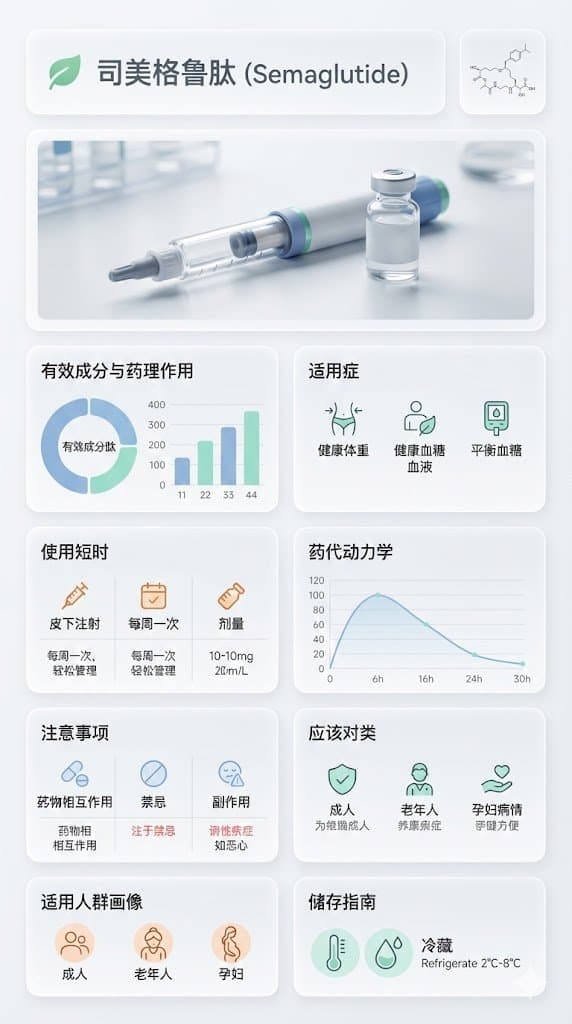
Infographic / Edu Visual - Medical Infographic Poster for Drug Information (Bento Grid Style) — output

Infographic / Edu Visual - Medical Infographic Poster for Drug Information (Bento Grid Style)

0xwolverineNano Banana Pro
{
"image_analysis": {
"subject": "{argument name="drug name" default="Semaglutide"} Science Infographic, 9:16",
"style": "Modular Bento Grid Design / Minimalist Medical UI Design / Approachable Feel",
"tone": "Professional, Clinical, Rigorous, Scientific, Trustworthy, Humanized, Easy-to-read",
"primary_colors": ["Clinical White", "Medical Blue", "Slate Grey", "Mint Green"]
},
"prompt_elements": {
"subject_description": "A high-quality science infographic poster about [Drug Name], designed to combine professional rigor with humanized care.",
"layout": "Bento box style modular grid layout, clean medical UI/UX interface design, divided into clear rectangular cards with soft edges, providing a comfortable visual experience.",
"visual_details": [
"Top header with a striking modern sans-serif font title 'Drug Chinese Name' and its chemical/generic name. A gentle medical icon (like a heart or green leaf) can be added next to the title.",
"Center top features a hyper-realistic macro photograph of the [Drug Dosage Form/Packaging] (e.g., tablet, capsule, or vial), with soft lighting, appearing safe and reliable.",
"In the corner, a minimalist line drawing of the [Chemical Structure], with smooth lines, not overly obtrusive.",
"Part 1: Analysis of active ingredients and pharmacological action with ring charts and bar charts, data visualization using gentle medical blue and mint green colors, charts designed to be simple and intuitive.",
"Part 2: Indications with minimalist line icons, icons designed to be friendly, avoiding overly clinical or cold symbols.",
"Part 3: Dosage and administration matrix with minimalist line icons ([Oral/Injection], [Frequency], [Dose]), simple text descriptions can be added next to the icons, such as 'One tablet daily, easy to take'.",
"Part 4: Pharmacokinetics or onset time axis with linear charts, smooth lines, clearly marked time points, instilling confidence based on scientific evidence.",
"Part 5: Precautions grid with simple warning icons ([Drug Interactions], [Contraindications], [Side Effects]), icons should gently remind rather than cause panic, text descriptions should be concise and highlight key points.",
"Part 6: Applicable population profile icons (e.g., suitability markers for elderly, children, pregnant women), icons designed to be warm, reflecting care for different groups.",
"Part 7: Drug storage guidelines with thermometer and humidity icons, icons designed to be simple and clear, text descriptions easy to understand."
],
"art_style": "Minimalist scientific visualization design, combining detailed medical illustrations with product photography, flat medical icons, Swiss style typography, focusing on readability and approachability.",
"lighting": "Bright laboratory shadowless lighting, clean and transparent, emphasizing sterility and clarity, while the light is soft and not harsh.",
"color_palette": "Monochromatic clinical white or light gray background, translucent frosted glass cards, dark gray and navy blue text, accented with medical blue or cyan to highlight key points, the overall color scheme gives a fresh, comfortable feeling."
},
"negative_prompt": "Clutter, warm tones (except for gentle accents), retro style, handwriting, low resolution, blur, distorted text, noise, dark background, unsanitary, oversaturated, watermark, food texture, overly cold clinical feel, panic-inducing warning icons"
}
使用此提示词 ↗
按模型、风格或主题浏览

寻找下一个方向

ASTORIE CANVAS

让灵感,继续生长。

在同一个创作空间,连接提示词、参考素材和生成结果。

打开创作画布 ↗