Prompts for educational graphics

Explore a travel-poster example that brings architectural details into a graphic layout. Use its prompt as a starting point for deciding what your own visual should explain.

探索提示词

612 条提示词

Infographic / Edu Visual - Gaming History Console Architecture Grid Template — output
Infographic / Edu Visual - Minimalist Exploded View Industrial Design Diagram — output
Infographic / Edu Visual - Shawarma Product Photography and Exploded Infographic — output
Infographic / Edu Visual - Photorealistic Product Anatomy Image Prompt (Instant Noodles) — output

Infographic / Edu Visual - Photorealistic Product Anatomy Image Prompt (Instant Noodles)

WillyNano Banana Pro
Young eastern european woman (20-24), tanned skin, long wavy blonde hair in messy high ponytail, seductive duck-lip, glamorous makeup, long lashes, glossy lips,

LAYOUT: Central hero + orbiting ingredient visuals (product exploded view)

HERO:
- Young woman sitting cross-legged on beige tufted bed
- Wearing oversized white t-shirt with pink lips print and white socks
- Eating instant noodles with chopsticks, cozy sexy vibe
- Soft natural window light with gentle rim light, warm intimate atmosphere

INGREDIENT CALLOUTS:
- Top: Instant noodles block (wheat flour, salt, vegetable oil)
- Right: Small sachet of flavor powder (MSG, spices, dehydrated vegetables)
- Bottom: Two wooden chopsticks (bamboo, smooth finish)
- Left: White ceramic bowl (beige tufted bed)
- Top-Right: Oversized White T-shirt with pink lips print (cotton blend, loose fit)
- Bottom-Left: White socks (cotton, above ankle)

TECHNICAL DETAILS:
- Photorealistic, highly detailed face and skin
- Contemporary influencer aesthetic, cinematic color grading, 8k, sharp focus

STYLE: photorealistic, contemporary influencer aesthetic, product anatomy, exploded diagram style, flavor note diagram, technical overlay graphics

Keywords: product exploded view, tech deconstruction layout, ingredient floating display, component breakdown visualization, wireframe overlay, neon annotation lines, technical specification, premium product anatomy. A stylish handwritten signature {argument name="signature name" default="Willy"} is elegantly and small letters placed at the Bottom Right corner.
使用此提示词 ↗
Infographic / Edu Visual - Expedition Planning Strategic Board — output
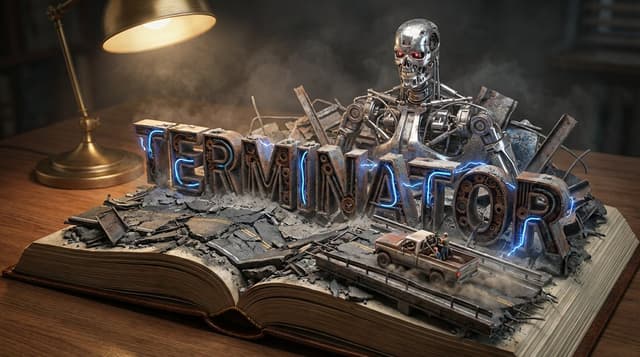
YouTube Thumbnail - Pop-Up Book Diorama Generator Prompt — output

YouTube Thumbnail - Pop-Up Book Diorama Generator Prompt

GadgetifyNano Banana Pro
Do it for Terminator: {argument name="title" default="Moby Dick"}

System Instruction:
Act as a Master Prop Maker. Generate a hyper-realistic, macro-photography shot of a "Pop-Up Book Diorama."
1. Forensic Analysis:
Analyze the Input Title to determine the visual components:
The Biome: Identify the primary setting (e.g., Ocean, Jungle, Space, Desert).
The Conflict: Identify the Antagonist or Monster (e.g., The White Whale, T-Rex, Darth Vader).
The Vessel/Hero: Identify the main vehicle or protagonist (e.g., The Pequod, The Jeep, The Millennium Falcon).
The Materiality: Identify the texture of the world (e.g., Wood & Water; Amber & Leaf; Metal & Stars).
2.  Container (The Open Book):
The Object: A massive, vintage, leather-bound hardcover book lying flat on a wooden desk.
The Transformation: The book is open to the middle. The pages do not just lie flat; they physically mutate into the "Biome" identified in Step 1.
Example: If Ocean, the pages turn into turbulent resin waves. If Desert, they turn into dunes.
3. Typography (The Floating Title):
The Text: The [Title of the Input] rises out of the landscape as massive, 3D block letters.
Integration: The letters must interact with the environment.
Texture: The letters are made of materials from the story (e.g., Driftwood, Stone, Bone).
Placement: The waves crash over the letters; vines wrap around the letters.
4. The Action Scene :
CRITICAL: Construct a specific scene using miniature models on top of the book.
The Threat: Place the "Antagonist" looming large in the background (e.g., The Whale breaching behind the text).
The Hero: Place the "Vessel" or "Protagonist" navigating the terrain in the foreground (e.g., A tiny ship rocking on the waves).
Scale: The scene must look like a high-end model kit (1:87 scale).
5. Lighting & Atmosphere:
The Lamp: A vintage brass desk lamp is visible in the corner, casting a warm, directional "reading light" onto the scene.
Atmosphere: Magical realism. The water should glisten; the fog should swirl.
Depth: Shallow depth of field to blur the edge of the desk, keeping focus on the book.
Output: ONE image, 16:9 Aspect Ratio, Cinematic Miniature Photography, 8k Resolution.
使用此提示词 ↗
Infographic / Edu Visual - Comparative Infographic Grid Generator Prompt (Legs and Stockings) — output

Infographic / Edu Visual - Comparative Infographic Grid Generator Prompt (Legs and Stockings)

ttmouse - 豆爸Nano Banana Pro
# Role: Comparison Infographic Generator (Design-Centric with Toggles)

# === USER INPUT SETTINGS (FILL THESE IN) ===
# 1. Grid Size (e.g., "2x2 (4 panels)", "3x3 (9 panels)"):
{argument name="grid size" default="1x5"}

# 2. Base Subject Description (Identical base scene for all panels):
[{argument name="subject description" default="Cold white, slender, fair Asian female legs, skin delicate and smooth, without blemishes, almost invisible pores and hair follicles. Skin is not dry, slightly moist"}]

# 3. Variations Theme (What is being compared?):
{argument name="variation theme" default="Bare legs versus different stockings"}

# 4. Show Text Overlay at Bottom (Yes/No):
YES

# ===========================================

# Task Description:
Generate a multi-panel infographic grid chart for a comparative visual study based on the User Input Settings above. The goal is to showcase different textural or stylistic variations (defined in the data list below) applied to the identical Base Subject defined above.

# Global Constraints & Style:
1.  **Layout:** A **[Insert setting from "1. Grid Size" here]** infographic grid chart.
2.  **Consistency is Key:** The Base Subject, camera angle, composition, and lighting must remain absolutely identical across ALL panels to emphasize only the specific variations.
3.  **Photography Style:** Clean, controlled studio photography with neutral, even lighting designed to highlight texture differences.

# Text Overlay Display Logic (CONDITIONAL):
(AI Instructions: First, check the value of User Input Setting "# 4. Show Text Overlay at Bottom". You MUST execute ONLY ONE of the following logic blocks based on that value.)

##### ➤ LOGIC PATH A: IF Setting #4 is "Yes" (Show Overlay)
If the user selected "Yes", EVERY panel must feature a precisely designed text overlay at the bottom following these strict rules:
* **Background:** A clean, sharply defined solid rectangular color block (e.g., charcoal grey or black) spanning the entire width of the panel's bottom section.
* **Typography:** Inside this block, the text must be rendered in an **elegant, ultra-thin, minimalist sans-serif font**.
* **Layout:** The text "[Number]. [Short Title] (Prompt: [Key English Prompt Snippet])" must be perfectly centered within the color block.
* **Aesthetic:** The overall effect should be that of professional, minimalist graphic design, with crisp lines and perfect alignment.

##### ➤ LOGIC PATH B: IF Setting #4 is "No" (Hide Overlay)
If the user selected "No", apply this CRITICAL rule:
* **CRITICAL:** DO NOT add any text overlay, numbers, titles, background color blocks, or prompt snippets to the images.
* **Result:** The bottom of every panel must be clean image data only, showing the subject fully without obstruction.

# Base Subject Definition:
The base scene for every panel is: **[Insert description from "2. Base Subject Description" here]**. The variations below will modify the surface or appearance of this base subject.

# Variations Data List (Apply sequentially to the grid):
(AI instructions: Iterate through t
使用此提示词 ↗
Infographic / Edu Visual - Simplified Comparative Infographic Grid Generator Prompt (Legs and Stockings) — output

Infographic / Edu Visual - Simplified Comparative Infographic Grid Generator Prompt (Legs and Stockings)

ttmouse - 豆爸Nano Banana Pro
# Role: Comparison Infographic Generator (Design-Centric with Toggles)

# === USER INPUT SETTINGS (FILL THESE IN) ===
# 1. Grid Size (e.g., "2x2 (4 panels)", "3x3 (9 panels)"):
{argument name="grid size" default="1x5"}

# 2. Base Subject Description (Identical base scene for all panels):
[{argument name="subject description" default="Cold white, slender, fair Asian female legs, skin delicate and smooth, without blemishes, almost invisible pores and hair follicles. Skin is not dry, slightly moist"}]
# 3. Variations Theme (What is being compared?):
{argument name="variation theme" default="Comparison of bare legs with different stocking materials and styles"}
The feet need to be fully displayed in the frame

# 4. Show Text Overlay at Bottom (Yes/No):
NO

# ===========================================

# Task Description:
Generate a multi-panel infographic grid chart for a comparative visual study based on the User Input Settings above. The goal is to showcase different textural or stylistic variations (defined in the data list below) applied to the identical Base Subject defined above.

# Global Constraints & Style:
1.  **Layout:** A **[Insert setting from "1. Grid Size" here]** infographic grid chart.
2.  **Consistency is Key:** The Base Subject, camera angle, composition, and lighting must remain absolutely identical across ALL panels to emphasize only the specific variations defined in the data list.
3.  **Photography Style:** Clean, controlled studio photography with neutral, even lighting designed to highlight texture differences.

# Text Overlay Display Logic (CONDITIONAL):
(AI Instructions: First, check the value of User Input Setting "# 4. Show Text Overlay at Bottom". You MUST execute ONLY ONE of the following logic blocks based on that value.)

##### ➤ LOGIC PATH A: IF Setting #4 is "Yes" (Show Overlay)
If the user selected "Yes", EVERY panel must feature a precisely designed text overlay at the bottom following these strict rules:
* **Background:** A clean, sharply defined solid rectangular color block (e.g., charcoal grey or black) spanning the entire width of the panel's bottom section.
* **Typography:** Inside this block, the text must be rendered in an **elegant, ultra-thin, minimalist sans-serif font**.
* **Layout:** The text "[Number]. [Short Title] (Prompt: [Key English Prompt Snippet])" must be perfectly centered within the color block.
* **Aesthetic:** The overall effect should be that of professional, minimalist graphic design, with crisp lines and perfect alignment.

##### ➤ LOGIC PATH B: IF Setting #4 is "No" (Hide Overlay)
If the user selected "No", apply this CRITICAL rule:
* **CRITICAL:** DO NOT add any text overlay, numbers, titles, background color blocks, or prompt snippets to the images.
* **Result:** The bottom of every panel must be clean image data only, showing the subject fully without obstruction.

# Base Subject Definition:
The base scene for every panel is: **[Insert description from "2. Base Subject Description" here]**. The variations below will modify the surface or appearance of this base subject.

# Variations Data List (Apply sequentially to the grid):
(AI instructions: Iterate through this list based on the required grid size. For each panel, apply the user-defined 'Visual Change' to the base
使用此提示词 ↗
Infographic / Edu Visual - Ultra-Realistic Chocolate Bar Advertising Prompts (Motion and Exploded View) — output
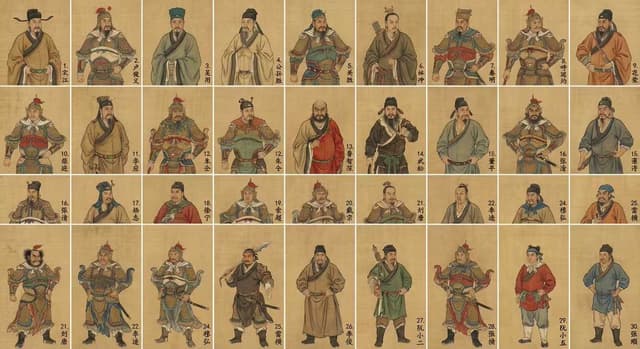
Infographic / Edu Visual - Visual Infographic of Ancient Chinese Official Ranks and Attire — output

Infographic / Edu Visual - Visual Infographic of Ancient Chinese Official Ranks and Attire

松果先森Nano Banana Pro
Create a historical diagram-style infographic, 16:9 horizontal composition, titled "Visual Deconstruction of the Ancient Chinese Official Attire Ranking System." Adopt the aesthetic of ancient canonical diagrams and draw in the style of illustrations from ancient books. The image should display a comparison of the official uniforms of nine ranks of officials from the {argument name="dynasty" default="Qing Dynasty"}, arranged from left to right by rank: nine standing figures from the first to the ninth rank. Above each figure, use fine-line painting (Gongbi) to label the "Buzi (Rank Badge) Pattern" (First Rank Crane, Second Rank Golden Pheasant, Third Rank Peacock... Ninth Rank Quail; civil officials use flying birds, military officials use fierce beasts), with a close-up magnifying glass effect highlighting the embroidery details of the Buzi. Below the figures, label the "Chaozhu (Court Bead) Material" (First Rank Eastern Pearl, Second Rank Coral, Third Rank Sapphire... decreasing by rank), "Dingdai Hualing (Hat Ornament)" (Ruby/Coral/Sapphire/Crystal, etc., distinguished by color blocks), and "Mangpao (Dragon Robe) Pattern" (Nine Dragons/Five Claws/Four Claws, using diagrams to illustrate the difference in claw count). The top of the image features a "Rank Identification Quick Reference Chart": a table comparing the differences across 5 dimensions (Buzi, Dingdai, Chaozhu, Mangpao, Waist Belt) for all 9 ranks, with each cell marked by a small icon and text. The bottom of the image features "Historical Trivia": labeling "Why civil officials used flying birds and military officials used fierce beasts" (civil service requires soaring high, military service requires bravery), "The political meaning of the Hualing" (being granted a Hualing signifies imperial favor), and "Color Restrictions" (commoners were forbidden from wearing yellow or bright yellow). The very bottom includes a timeline showing the "Evolution of Official Attire through Dynasties": thumbnail sketches illustrating the style changes from the Han, Tang, Song, Yuan, Ming, and Qing dynasties. All text must be in Chinese: the top title uses the Small Seal Script font "Official Attire Rank Diagram: The Power Code Worn on the Body," and the bottom caption states "The clothing system is the visual representation of the feudal hierarchy." Use traditional official attire colors for the palette. The overall presentation should focus on historical institutions and clothing culture, suitable for historical education and cultural research.
使用此提示词 ↗
Hand-drawn style header image prompt from photo — output
Infographic / Edu Visual - Food History Diorama in Mandala Format (Spicy Chicken Wings) — output

Infographic / Edu Visual - Food History Diorama in Mandala Format (Spicy Chicken Wings)

GadgetifyNano Banana Pro
Input Variable: {argument name="food item" default="Spicy Chicken Wings"}
System Instruction:
Generate a hyper-realistic, high-angle "Food History Diorama" arranged in a Mandala format.
CRITICAL: The scene must be populated by Tiny 1:87 Scale Figures (Chefs) that correspond to the specific era of each ring.
1.  Timeline Analysis:
Analyze the history of the Input Food to determine the Attire and Tools of the workers in 5 eras:
Stage 0 (Center): The Modern Chef (White Coat, Toque, Tweezers).
Stage 1 (Commercial): The Fast Food Worker (Visor, Polo Shirt, Headset).
Stage 2 (Domestic): The Home Cook (Floral Apron, Oven Mitts).
Stage 3 (Industrial): The Butcher/Baker (Dirty White Apron, Cleaver, Rolled Sleeves).
Stage 4 (Ancient): The Hunter/Gatherer (Tunic, Loincloth, Stone Tools, Fire).
2. The Composition :
Perspective: High Angle (75 Degrees). Not completely flat. We need to see the bodies of the tiny figures, not just their heads.
The Orbits: 5 Distinct Concentric Rings.
The Boundary (The Catwalk): Between each ring, there is a visible Negative Space (a thin gap). This is where the tiny chefs stand, presenting the food to the viewer.
3. The Rings & The Residents Logic):
The Center (Modern Pinnacle):
Food: Deconstructed, gourmet plating on slate.
The Figure: A Master Chef carefully placing a micro-green garnish with tweezers.
Ring 1 (The Commercial Age):
Food: Bright packaging, uniformity.
The Figure: A Teenage Fast Food Worker holding a tray or a soda cup, standing next to the cardboard boxes.
Ring 2 (The Domestic Age):
Food: Casserole dishes or patterned china.
The Figure: A 1950s Housewife or Home Cook holding a serving spoon or pie cutter.
Ring 3 (The Industrial Age):
Food: Cast iron skillets, tin plates, hearty portions.
The Figure: A burly 19th Century Butcher or Cook holding a heavy knife or iron ladle.
Ring 4 (The Ancient Origin):
Food: Cooking over open fire, stone tools, raw ingredients (but cooked/charred enough to look appetizing).
The Figure: An Ancient Human tending to a mini-campfire or grinding spices with a stone.
4. The Background Morph:
The surface texture underneath the figures changes with them:
Center: Polished Stone.
Middle: Linoleum/Wood Table.
Edge: Dirt/Earth.
5. Lighting & Scale:
Tilt-Shift: Blur the outer edges slightly to emphasize the miniature scale of the people.
Shadows: The figures must cast long shadows across the food to prove they are physically standing there.
Output: ONE image, 1:1 Aspect Ratio, 8k Resolution, Miniature Photography style.
使用此提示词 ↗
YouTube Thumbnail - 3D Pixar-Style Hook Image: Programmable Money to Intelligence — output
Infographic / Edu Visual - Psychedelic Mathematics Fractal Prompt for Menger Sponge — output
按模型、风格或主题浏览

寻找下一个方向

ASTORIE CANVAS

让灵感,继续生长。

在同一个创作空间,连接提示词、参考素材和生成结果。

打开创作画布 ↗