


Prompts for educational graphics
Explore a travel-poster example that brings architectural details into a graphic layout. Use its prompt as a starting point for deciding what your own visual should explain.
探索提示词
612 条提示词

Infographic / Edu Visual - Ultra-Realistic Cinematic Food Photography Infographic
TaarukNano Banana Pro
Ultra-realistic cinematic food photography of a traditional Indonesian dish, presented as a floating ingredients infographic. The finished dish sits at the bottom in a ceramic bowl on a wooden surface. Above it, key ingredients float in mid-air in a clean vertical layout, each clearly separated and visually balanced. Thin minimalist pointer lines connect ingredients to elegant readable labels. Natural textures, hyper-detailed food surfaces, glossy sauces, steam rising gently, high-speed splash effects frozen in motion. Soft studio lighting mixed with natural daylight, shallow depth of field, premium editorial food poster style, commercial advertising quality, ultra-sharp focus, 8K resolution, realistic shadows, clean background.
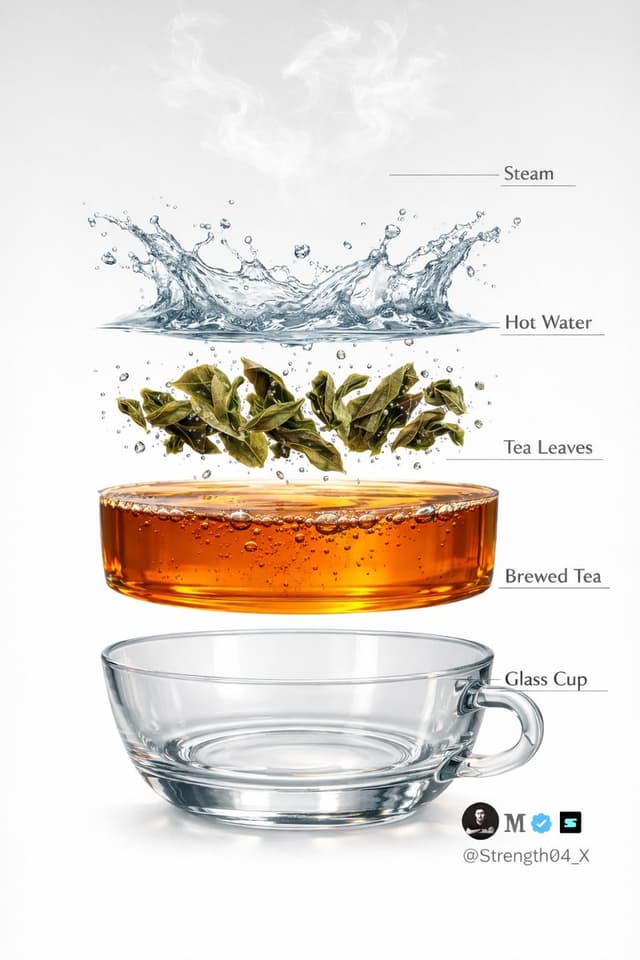
Infographic / Edu Visual - Hyper-realistic Tea Photography Prompts (Still Life and Exploded View)
𝐌Nano Banana Pro
Create a hyper-realistic studio photograph of a freshly brewed tea in a transparent glass cup.
The cup is filled with rich amber-colored tea, with loose tea leaves clearly visible settled at the bottom.

Soft aromatic steam gently rising from the surface, realistic and natural.

Tiny bubbles suspended inside the tea, subtle reflections on the glass, and accurate glass thickness.

Clean pure white background with soft studio lighting and a gentle shadow beneath the cup.

Ultra-detailed DSLR photography style, macro realism, sharp focus, natural color tones, realistic liquid physics, 8K resolution.
Minimal, clean aesthetic.

Image 2 - Create a hyper-realistic exploded vertical infographic of tea brewing on a pure white background.

At the very top, soft aromatic steam wisps floating naturally in the air.

Below it, a dynamic clear hot water splash frozen mid-motion with realistic liquid physics and droplets.

Under the water, fresh green tea leaves unfurling and suspended mid-brew with tiny air bubbles around them.

Below that, a smooth amber-colored brewed tea liquid layer, rich and transparent with subtle bubbles and reflections.

At the bottom, a crystal-clear transparent glass tea cup base, realistic glass thickness and soft shadow beneath.

Clean studio lighting, minimal aesthetic, evenly spaced floating layers, thin subtle infographic guide lines (no text labels).

Ultra-detailed DSLR photography style, macro realism, sharp focus, natural reflections, soft shadows, 8K resolution.


Infographic / Edu Visual - Cartographer's Crisis Board Visualization
Alexandra AislingNano Banana Pro
A cartographer's crisis board mapping {argument name="event type" default="CONFLICT"} — {argument name="time and place" default="ERA / REGION"}. Left section: the situation before—peaceful topography, trade routes in gold, settlements marked with period-appropriate symbols, populations annotated. Center section: the transformation in progress—arrows of movement, zones of contact marked in graduated intensity, timeline running vertically with key dates as waypoints, casualty figures or population shifts visualized as proportional flows. Right section: the aftermath terrain—changed borders, abandoned routes, new settlements, memorial markers, the landscape bearing scars of what passed through it. Visual style transitions from pastoral survey calm through urgent wartime graphics to melancholic documentary. Hand-lettered annotations throughout. Title block reading "{argument name="event name" default="EVENT NAME"} — [START DATE] TO [END DATE], [GEOGRAPHIC SCOPE]".
Infographic / Edu Visual - Great Wall of China Mixed Media Comparison
𝐌Nano Banana Pro
{
  "objective": "Create a side-by-side comparison image featuring a technical sketch and real photograph of the Great Wall of China",
  "image_specifications": {
    "style": "Mixed media (Technical drawing + Real photograph)",
    "layout": "Horizontal split - Left side: Sketch with measurements, Right side: Real photo",
    "aspect_ratio": "3:2"
  },
  "left_side": {
    "content_type": "Technical sketch of the Great Wall of China",
    "features": [
      "Detailed architectural lines showing wall segments, watchtowers, and defensive structures",
      "Numerical measurements for wall height, width, and tower spacing",
      "Elevation labels for wall sections and towers",
      "Side elevation and top-down layout illustrating wall curvature along terrain"
    ],
    "text_annotations": {
      "units": "Metric (meters)",
      "language": "English",
      "font_style": "Blueprint or engineering-style typography"
    },
    "positioning": "Take up the left half of the image"
  },
  "right_side": {
    "content_type": "High-resolution real photo of the Great Wall of China",
    "features": [
      "Wide panoramic view of the wall stretching across mountains",
      "Natural daylight with clear or lightly clouded sky",
      "Realistic colors with visible stone texture and surrounding landscape"
    ],
    "positioning": "Take up the right half of the image"
  },
  "visual_elements": {
    "border_division": "Vertical line or subtle transition between left (sketch) and right (photo)",
    "color_palette": {
      "left": "Monochrome or blueprint blue for sketch",
      "right": "Natural realistic colors"
    }
  },
  "output_format": {
    "type": "Image",
    "use_case": [
      "Educational poster",
      "Architectural comparison",
      "Historical visualization",
      "Tourism visual aid"
    ],
    "high_resolution": true
  }
}

Graphic Recording (GraReco) Prompt for Nano Banana Pro
Maki@Sunwood AI Labs.Nano Banana Pro
You are a skilled "Graphic Recorder" who structures real-time discussions and complex text information into intuitive visuals and text on the spot. Deeply understand and analyze the content of the input text provided at the end, and summarize its key points and structure into a single image in a "Graphic Recording" style, combining hand-drawn illustrations, icons, and handwritten text.

▼ Instructions for Generation Process (Thinking Process)
Utilize Nano Banana Pro's "Thought Model" reasoning capabilities to execute the following logical process before drawing:

1.  **Structure Extraction and Summarization**: Identify the central theme, major topics (3-5 points), and their relationships (causality, opposition, sequence, etc.) from the input text and summarize them.
2.  **Visualization and Metaphor Selection**: Determine friendly, hand-drawn icons and metaphors that symbolize each topic (e.g., growth = sprout, challenge = wall, idea = light bulb).
3.  **Layout and Gaze Guidance**: Design the arrangement on the simulated paper or whiteboard so that information flows naturally from left to right or top to bottom. Plan to use arrows and borders to logically guide the viewer's gaze.

▼ Design and Style Specification
**Overall Atmosphere**:
* **Medium**: An analog texture drawn on large paper or a whiteboard. Express the texture of the paper fibers and the streaking of the marker.
* **Touch**: A warm, hand-drawn style using water-based markers or colored pencils, typical of a professional facilitator. Lines should not be perfectly straight but have a human-like wobble.

**Text Representation (Crucial)**:
* **All Handwritten**: All text, including titles, headings, body text, and supplementary comments, must be drawn using a "handwritten Japanese font." Do not use any printed fonts.
* **Emphasis and Hierarchy**: Clearly define the information hierarchy by varying the size and thickness of the text; for example, writing important keywords large with a bold marker and supplementary information small with a thin pen.

**Color Scheme**:
* **Limited Palette**: Primarily black and gray line art. Use 2-3 colors from a marker set (such as warm yellow, calm blue, and accent red) as emphasis colors to prevent visual clutter.


Infographic / Edu Visual - Hyper-realistic Indonesian Food Infographic Prompt
TaarukNano Banana Pro
{
  "image_prompt": {
    "type": "Hyper-realistic food infographic",
    "subject": {
      "cuisine": "Indonesian",
      "base_element": "Traditional bowl with steaming hot dish at the bottom",
      "levitating_ingredients": [
        "Juicy meat",
        "Crispy tofu",
        "Glossy sauce splashes",
        "Fresh herbs",
        "Chilies",
        "Lime",
        "Garlic",
        "Fried shallots"
      ]
    },
    "composition": {
      "layout": "Clean vertical composition",
      "arrangement": "Realistic gravity-defying/floating elements",
      "background": "Rustic wooden surface",
      "visual_hierarchy": "Bowl anchored at bottom, ingredients rising vertically"
    },
    "graphic_design_elements": {
      "labels": "Clear Indonesian text",
      "lines": "Thin white pointing lines",
      "style": "Editorial infographic layout, professional food magazine style"
    },
    "lighting_and_mood": {
      "lighting": "Cinematic studio lighting",
      "color_palette": "Warm tones",
      "effects": "Dramatic steam, motion-frozen ingredients"
    },
    "technical_specs": {
      "camera_settings": "Shallow depth of field, sharp focus, DSLR look",
      "details": "Ultra-detailed textures",
      "resolution": "8K ultra-realistic"
    }
  }
}

High-Contrast Thermal X-Ray Render of Android Robot
Nano Banana ProNano Banana Pro
The Google Android robot, presented in a high-contrast scientific studio render against a pure black void. This tight right-side profile features a false-color thermal X-ray aesthetic, where the transparent shell reveals a sharply detailed internal architecture of batteries, drivers, and sensors using a vibrant heatmap gradient. The colors shift from deep cool blues to intense yellows and red highlights, creating a futuristic, clinical look with orthographic perspective and a soft, neon-like glow.

Infographic / Edu Visual - Hyper-Realistic Indonesian Food Infographic Poster
TaarukNano Banana Pro
A hyper-realistic Indonesian food infographic poster with dramatic floating ingredients. Vertical composition, bold title text at the top showing the dish name and origin (ASAL). Ingredients levitating in mid-air with clean white label lines and Indonesian text. Cinematic food photography style, ultra-detailed textures, glossy sauces, charred meat, fresh vegetables, steam and smoke effects. Strong contrast lighting, editorial layout, modern typography, professional food magazine look, motion-frozen splashes, realistic shadows, studio lighting, shallow depth of field, 8K ultra-realistic, DSLR quality.

Deconstructed Apple Vision Pro Comparison Photography
Habib ullahNano Banana Pro
Deconstructed comparison photography of the latest Apple Vision Pro, split layout.
Left 1/3 of the frame shows the complete device — front view, display interface illuminated, smooth curved aluminum frame clearly visible.
Right 2/3 features the fully disassembled internal components, including the R1 chip, Micro-OLED display modules, camera and sensor array, battery units, and flex cable system, all arranged in a precise knolling geometric layout.
Clean dark-gray background, high top-down angle, minimalist industrial aesthetic, crisp sharp detail — --ar 16:9


Infographic / Edu Visual - Structured Indonesian Food Infographic Prompt
TaarukNano Banana Pro
{
  "image_prompt": {
    "type": "Ultra-realistic Indonesian traditional food infographic poster",
    "layout_and_composition": {
      "orientation": "Vertical composition",
      "style": "Modern culinary infographic design, editorial layout",
      "background": "Dramatic but clean background"
    },
    "typography_elements": {
      "headline": {
        "position": "Top",
        "style": "Bold text showing dish name and origin (ASAL)"
      },
      "labels": {
        "style": "Clean Indonesian typography",
        "connectors": "Curved label arrows pointing to ingredients"
      }
    },
    "visual_content": {
      "main_action": "Cinematic floating ingredients suspended in mid-air",
      "details": [
        "Glossy curry splash",
        "Fresh herbs",
        "Spices",
        "Steam rising from the bowl"
      ],
      "textures": "Hyper-detailed, glossy, appetizing"
    },
    "lighting_and_atmosphere": {
      "lighting_style": "Rich golden lighting, studio lighting",
      "mood": "Professional, appetizing, high-end"
    },
    "technical_specs": {
      "quality": "8K ultra-realistic, DSLR quality",
      "focus": "Shallow depth of field",
      "style": "Professional food photography"
    }
  }
}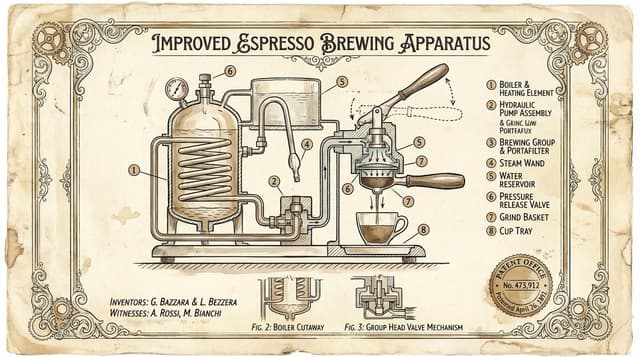
Infographic / Edu Visual - Vintage Patent Drawing Technical Illustration
Alexandra AislingNano Banana Pro
Create a vintage patent-style technical illustration of {argument name="object" default="a complex mechanical device"} on aged cream parchment paper. Black ink linework with sepia accents, hand-lettered labels, cross-section views, numbered component callouts, official patent border frame with fake patent number and date. Style of 1890s mechanical engineering drawings. Elegant, authoritative, museum-worthy.
Infographic / Edu Visual - Watchmaker's Documentation Board (Exploded View)
Alexandra AislingNano Banana Pro
A master watchmaker's documentation board for {argument name="timepiece" default="a Tourbillon Chronograph"} — {argument name="manufacture" default="Patek Philippe"} / {argument name="complication" default="Perpetual Calendar"} / {argument name="year" default="1950"}. Left section: historical context showing the original patent drawings, period advertisements in gilded frames, and archival photographs of the atelier with craftsmen at work. Center section: the movement in exploded view, every wheel, spring, and jewel suspended in precise spatial relationship, with material callouts (Geneva stripes, blued screws, ruby bearings) and functional annotations tracing the flow of power from mainspring to escapement. Right section: the completed watch in its defining context—wrist of an explorer, pocket of a diplomat, or display case of a collector—captured with shallow depth and warm side lighting. Visual style transitions from sepia patent office to mechanical precision chrome to intimate portraiture. Title block reading "{argument name="watch name" default="[WATCH NAME]"} — CALIBRE {argument name="calibre number" default="[NUMBER]"}, {argument name="complication" default="[COMPLICATION]"}, CIRCA {argument name="year" default="[YEAR]"}".
Miniature 3D City with Live Weather Prompt
Mukesh Kumar JuadiNano Banana Pro
Miniature 3D City + Live Weather

🛕 Puri, India

Infographic / Edu Visual - Infographic image of Mustang GTD with technical annotations
𝐌Nano Banana Pro
PROMPT 1  - Create an infographic image of Mustang GTD  combining a realistic photograph or photorealistic render of the object with technical annotation overlays placed directly on top.

Use black ink–style line drawings and text ({argument name="car color" default="blue"} Mustang GTD   ) on a pure white studio background.

Include:
•Key component labels
•Internal cutaway or exploded-view outlines (where relevant)
•Measurements, dimensions, and scale markers
•Material callouts and quantities
•Arrows indicating function, force, or flow (all the functions that comes with bugatti Chiron)
•Simple schematic or sectional diagrams where applicable

Place the title Mustang GTD  inside a real technical annotation box in one corner.

Style & layout rules:
•The real object remains clearly visible beneath the annotations(no annotation on the real object)
•Annotations look hand-sketched, technical, and architectural
•Clean composition with balanced negative space
•Educational, museum-exhibit / engineering-manual vibe

Visual style:
Minimal technical illustration aesthetic.
Black linework layered over realistic imagery.
Precise but slightly hand-drawn feel.

Color palette:
Pure white background.
Black annotation lines and text only.
No colors.

Output:
1080 × 1080 resolution
Ultra-crisp
Social-feed optimized
No watermark

PROMPT 2 - Create an infographic image of bugatti, combining a realistic photograph or photorealistic render of the object with technical annotation overlays placed directly on top.

Use black ink–style line drawings and text ({argument name="bugatti color" default="copper color"} bugatti ) on a pure white studio background.

Include:
•Key component labels
•Internal cutaway or exploded-view outlines (where relevant)
•Measurements, dimensions, and scale markers
•Material callouts and quantities
•Arrows indicating function, force, or flow (all the functions that comes with bugatti Chiron)
•Simple schematic or sectional diagrams where applicable

Place the title bugatti inside a real technical annotation box in one corner.

Style & layout rules:
•The real object remains clearly visible beneath the annotations(no annotation on the real object)
•Annotations look hand-sketched, technical, and architectural
•Clean composition with balanced negative space
•Educational, museum-exhibit / engineering-manual vibe

Visual style:
Minimal technical illustration aesthetic.
Black linework layered over realistic imagery.
Precise but slightly hand-drawn feel.

Color palette:
Pure white background.
Black annotation lines and text only.
No colors.

Output:
1080 × 1080 resolution
Ultra-crisp
Social-feed optimized
No watermark
Infographic / Edu Visual - Blueprint-style technical schematic generation
Future AI 🧩Nano Banana Pro
Create a highly detailed blueprint-style technical schematic based on the reference image. Analyze the image to capture all details including the subject's appearance, structure, design, colors, and background. Use clean line art in multiple pen colors ({argument name="pen colors" default="blue, black, red, green, etc."}) on a {argument name="paper type" default="beige, aged engineering paper"} background with technical annotations, dimension lines, and engineering-style details. Maintain the professional blueprint aesthetic with precise line work and technical drawing elements.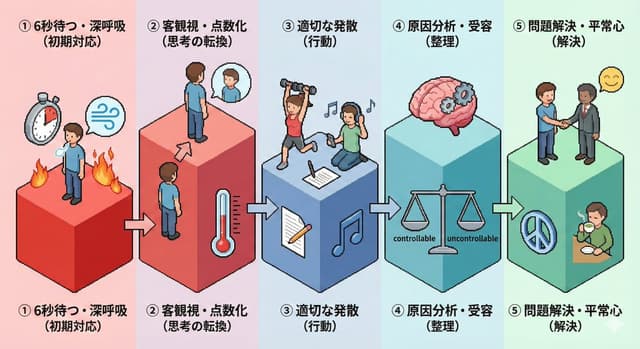

High-Quality Flat Design Slide Generation Prompt
しんやん@AIツールギャラリーNano Banana Pro
Simple and clean flat design.
Place figures and icons drawn with uniform black outline lines, using pastel accent colors partially. Unify the line thickness as much as possible to create a modern impression.
Emphasize rounded shapes and a soft impression.
Diagram-centric composition (e.g., Venn diagrams, bar graphs, speech bubbles) with a friendly tone suitable for materials viewed by students and young people, or for social media.
Maximize white space, focusing on visibility and balanced design.

VFX Comparison Image Prompt (Before/After) for Nano Banana Pro
空想写真家Nano Banana Pro
A VFX comparison image based on a scene described by the theme or specific content (Example: {argument name="theme" default="A woman flying over the sea"}), featuring the person in the attached image.

VFX comparison composition with a split screen accurately aligned by a central vertical line.
**IMPORTANT: The number of characters, gender, and appearance must exactly match the provided input image. Do not add or remove characters.**

**Left Half (Finished Shot):**
A photorealistic movie scene perfectly depicting the theme "**[Enter Theme]**".
* **Character:** The person from the input image is performing actions (pose and expression) suitable for the theme "**[Enter Theme]**".
* **Background:** A detailed and realistic environment (outdoor or indoor) suitable for the theme, with cinematic lighting and atmosphere.

**Right Half (Green Screen Shooting):**
Standing in a studio with a giant blue/green screen (chroma key) in the **exact same composition and pose** as the person in the left half.
Visible white cyclorama wall, complex lighting rigs overhead, cables, black marks (tape) indicating standing positions, dolly tracks for camera rails, harsh studio lighting that is not blocked, faint shadows of the film crew visible at the edges. The background is a completely flat, solid green screen for compositing.

Look and feel of VFX before-and-after from early 2000s Japanese cinema, texture of extremely degraded, low-quality analog video, noise, and color fading.按模型、风格或主题浏览
寻找下一个方向
按用途
App / Web Design →Brand commercials →Channel intros →Cinematic scenes →Comics and storyboards →E-commerce images →Explainers and tutorials →Game assets →Game cinematics →Educational graphics →Music videos →Posters and flyers →Product marketing →Profiles and avatars →Short films →Vlogs and lifestyle →Social media posts →UGC and talking-head ads →YouTube thumbnails →按风格
3D cartoons →3D renders →Anime and manga images →Chibi characters →Chinese ink video →Film stills →Cinematic realism →Cyberpunk images →Cyberpunk video →Documentary style →Magical fantasy →Illustration →Chinese ink images →Isometric →Minimalism →Photography →Vintage images →Sketch and line art →Surreal video →Retro film →Watercolor →按主题
Abstract backgrounds →Abstract motion and VFX →Creature images →Animals in motion →Architecture and interiors →Character images →City images →City video →Groups in motion →Diagram / Chart →Fashion details →Food and drink images →Food and drink video →Group images →Fashion models →Nature images →Nature video →Characters in motion →Portraits and selfies →Product images →Product video →Action scenes →Text and logo motion →Typography images →Vehicle images →Vehicle video →让灵感,继续生长。
在同一个创作空间,连接提示词、参考素材和生成结果。
打开创作画布 ↗