


Prompts for educational graphics
Explore a travel-poster example that brings architectural details into a graphic layout. Use its prompt as a starting point for deciding what your own visual should explain.
探索提示词
612 条提示词


Infographic / Edu Visual - Generating Clean Sheet Music from Scanned Image
( ˘ω˘)スヤァ…( ゚д゚)ハッ!( ˘ω˘)˘ω˘)ススヤァ…( ゚д゚)ハッNano Banana Pro
Generate a clean image from the original printed & handwritten sheet music

Infographic / Edu Visual - High-Detail Enhancement of Page 9
布留川英一 / Hidekazu FurukawaNano Banana Pro
Enhance page 9 with high detail using Nano Banana Pro
Infographic / Edu Visual - Industrial Blueprint Generation Prompt
Nid All | AI art and more 🤖Nano Banana Pro
“Analyze the uploaded reference image to understand the mechanical structure and geometry of the object. Generate a comprehensive, industrial-level blueprint of this specific product. Present the design as a professional orthographic projection, featuring clear plan, elevation, and section views to detail the internal and external construction. Deconstruct the assembly into its primary components and apply legible, technical text labels (denominations) for each part using a standardized sans-serif engineering font. Render the visual in a classic blueprint aesthetic with precise white vector-style lines on a deep blue grid background, ensuring high contrast and professional accuracy suitable for manufacturing documentation.”
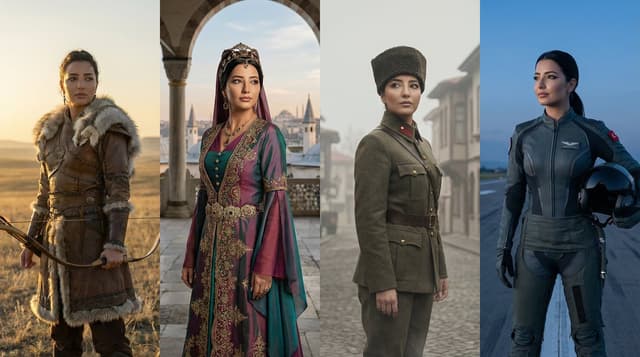
Infographic / Edu Visual - Turkish History Character Grid
Özge DönerNano Banana Pro
Create a dynamic grid image showing the same character represented across major eras of Turkish history. The image is divided into 4 vertical panels arranged in a clean, graphic grid. Panel 1 (Ancient Era): A Göktürk warrior on the Central Asian steppes, wearing leather armor with wolf fur details, holding a traditional recurve bow. Panel 2 (Imperial Era): An Ottoman figure in the classical era, wearing an intricate Kaftan and a turban or janissary crest, with Istanbul's silhouette in the background. Panel 3 (Independence Era): A 1923 Republic era officer or hero, wearing a traditional "Kalpak" hat and a vintage military wool uniform, representing the War of Independence. Panel 4 (Modern Era): A confident modern-day character or futuristic pilot (Kızıl Elma style), representing the future of Türkiye. Each panel shows the exact same character identity (same face structure and eyes) but adapted to the specific historical era, interacting subtly through poses and gazes looking at each other. Cinematic lighting, hyper-realistic, live action, 8k resolution, highly detailed textures. --ar 16:9

Game Asset - Character Robotization and Technical Diagram Prompt
シュナプーンNano Banana Pro
【Character Settings】
*Please rewrite this section to match the appearance of the character you want to draw*
[Character Features]: {argument name="character features" default="Girl with brown twin tails and wearing a cape"}

【Image Generation Instructions】
Style Definition:
- A style that fuses anime-style character illustration with technical illustrations (blueprints) of industrial products.
- Background is white or plain. Infographic-style layout.

Pose and Composition:
- Isometric composition
- Deformed style (chibi character) with 2 to 3 head proportions
- Shape of limbs: Do not draw joints at the elbows, knees, wrists, or ankles. Do not draw fingers or fine joints; make the tips a simple shape, like a mitten. Reproduce the smooth 'stuffed animal limbs' look.
- Facial structure: Do not draw the nose or mouth; only place 'eyes.' The eyes are drawn as vertical ovals (vertically long circles), looking like simple sensors. The eye color should match the reference image.
- Clothing depiction: The left half shows the character wearing the clothes from the reference image (cape, shirt, pants, shoes) normally, but the right half, which is a cutaway section, should show the cross-section of the clothes and the mechanics underneath simultaneously.
- Full-body standing pose of the character.
- The exterior (skin and clothes) of the right half of the body is rendered translucent, making it an 'internal perspective view' that shows the internal mechanical structure.

Internal Structure Details:
- Head: The structure of a camera lens is visible deep inside the vertical eyes. A speaker unit is behind the mouth. The brain is composed of electronic circuit boards.
- Torso: The round limbs are tightly packed with thick hydraulic cylinders, large gears, and spherical joints.
- Back: A large 'Wind-up key' is inserted into the back, giving it the atmosphere of a retro toy.

Annotations and Explanations (Decoration):
- Leader lines extend from the main mechanical parts of the internal structure (brain, eyes, ears, arms, legs), with detailed explanatory text in English placed at the ends of the lines.
- Overall, finish it like a 'blueprint of a robot that is round and charming but contains precision machinery inside.'

Style:
- Aspect Ratio: Vertical (close to A4 paper ratio)
- Background: Grid paper (grid notebook) texture.
Infographic / Edu Visual - Character Relationship Chart Infographic
シュナプーンNano Banana Pro
# Instructions
Refer to the attached image and create an illustration of a "Character Relationship Chart" based on the following requirements.

# Production Style
- A warm, hand-drawn BD anime illustration style, similar to the image.
- White background.
- Characters should be drawn and placed inside circular icons.

# Character Settings
*List the order and characteristics corresponding to the uploaded images.
[Character A]
- Name: {argument name="Character A Name" default="Tsuno-chan"}
- Role: {argument name="Character A Role" default="Half-vampire"}

[Character B]
- Name: {argument name="Character B Name" default="Shiori-chan"}
- Role: {argument name="Character B Role" default="Loves new things"}

[Character C]
- Name: {argument name="Character C Name" default="Kumao-kun"}
- Role: {argument name="Character C Role" default="Always sleepy"}
[Character D]
- Name: {argument name="Character D Name" default="Donut"}
- Role: {argument name="Character D Role" default="Donut"}
(*Add more characters here if necessary)

# Specific Relationship List

from [A] to [B] : {argument name="Relationship A to B" default="Snack provider"}
from [A] to [C] : {argument name="Relationship A to C" default="Minion No. 1"}
from [A] to [D] : {argument name="Relationship A to D" default="Supreme item"}
from [B] to [A] : {argument name="Relationship B to A" default="Love!"}
from [B] to [D] : {argument name="Relationship B to D" default="Rival?"}
from [C] to [A] : {argument name="Relationship C to A" default="Don't want to get involved"}
from [C] to [B] : {argument name="Relationship C to B" default="Pitiful"}
from [C] to [D] : {argument name="Relationship C to D" default="It's a donut..."}
(*Add more relationships here if necessary)
# Relationship and Arrow Rules (Important)

Connect characters with arrows and strictly adhere to the following color-coding rules:
- Positive relationships (like, admiration, cooperation, etc.)

- Color: Red
- Atmosphere: Warm colors, may include hearts or sparkles.
- Negative relationships (dislike, hostility, nuisance, etc.)

- Color: Blue
- Atmosphere: Cold colors, may include jagged lines or cold sweat.
# Output Notes

- Arrange the layout in a balanced circular or hierarchical manner, even if the number of characters increases.
- Write the name and role below each character icon.
- Place the relationship description text near the arrow.
- If a relationship is not set, the arrow and text are unnecessary.
- Aspect ratio: 16:9

Infographic / Edu Visual - Invention Prototype Display Box Prompt
GadgetifyNano Banana Pro
<instruction>
Input A is a world-changing invention (photo or invention name).
Analyze the inventor, eureka moment, prototype design, and societal impact.
Optional Input B is a style reference (patent office / inventor's workshop). If missing, choose steampunk-meets-modern museum aesthetic.
Goal: Wooden display box with brass hinges containing the miniature "first prototype" surrounded by inventor's tools, failed attempts, and blueprint fragments.
Rules:
- Center: tiny working-looking prototype of the invention
- Include inventor figurine at miniature workbench
- Surround with 10-15 period tools, sketches, failed versions
- Add aged paper "patent document" visible through glass top
- Materials: dark wood, brass accents, vintage glass
- Plaque with invention name, inventor, patent year
Output: ONE image, 1:1 inventor's journal aesthetic
</instruction>

Infographic / Edu Visual - Hybrid Transportation Device Design and Patent Generation
GadgetifyNano Banana Pro
<instructions> Step 1: Analyze urban mobility rides and vehicles and 5 relevant patents from the past.
Step 2: Learn about their features how they can be combined, what can be inspired by them, how the patents can be integrated
Step 3: Design a hybrid transportation device that combines the main selling points of all these ideas into a feasible product.
Output: a 2x2 grid, Grid 1 Create a 3D rendering of the hybrid device, showing it in use on a city street, with a detailed explanation of its unique features and benefits. Grid 2 “Now render the final product in glossy Apple-product-photography style on white infinity background with subtle reflection. Add fake patent number in corner.” Grid 3: detailed explanation of selling points like a tech magazine. Grid 4: four clean black-and-white technical patent drawings (exploded view, side, top, perspective) of this new invention in classic patent illustration style.
</instructions>

Infographic / Edu Visual - Geometric Mosaic Portrait Illustration
zayanNano Banana Pro
An ultra-detailed {argument name="style" default="geometric mosaic portrait illustration"} blending cubist abstraction, architectural blueprint aesthetics, and contemporary editorial pop-art design. Constructed from thousands of interlocking angular polygon fragments with no color lines, fragmented planes, segmented colorless contours, and intricate line grids. The highly structured composition, with layered technical drawing details embedded throughout, creates a complex look that blends schematic and artwork. Bold {argument name="colors" default="complementary color blocks are dominated by saturated cobalt blue, yellow, turquoise, vibrant golden earth tones, warm orange, and sharp white accents"}. The color treatment is flat yet dimensional, with a balanced contrast between large color fields and subtle geometric micro-details. Clean, vector-like precision combines with the imperfection of hand-drawn sketches and the texture of architectural drawings. Expressive contemporary {argument name="subject" default="character design with stylized facial construction, exaggerated eyeglass shapes, and fragmented surface geometry"}. A dense network of thin construction lines, blueprint markings, technical annotations, abstract map-like divisions, and layered polygonal textures seamlessly integrate into the subject and background. A mixed-media blend of cubism, urban mural art, technical illustration, generative geometry, and modern magazine cover aesthetics. Sharp edge definition, highly detailed surface articulation, intricate tessellation patterns, crystalline segmentation, and sophisticated visual rhythms. The background and subject are treated as a unified geometric ecosystem, with forms flowing continuously throughout. Premium gallery-quality digital artwork, razor-sharp linework, complex layered depth, contemporary design language, architectural abstraction, vibrant modernist color harmonies, highly detailed geometric storytelling, and a visually rich yet clean and organized composition. R 9:16.
Infographic / Edu Visual - Kickstarter Campaign Generator Prompt
GadgetifyNano Banana Pro
Act as a Senior Product Designer and Crowdfunding Campaign Manager.

1. ANALYZE INPUT
Look at the attached image. Determine the material properties (Soft vs. Hard), the primary colors, and the texture.

2. AUTO-SELECT SMART WEARABLE
Use this logic to choose the product category. The goal is Clean Modern Tech, not Cyberpunk.

IF the input is Soft or Fabric-like ({argument name="soft input examples" default="Ramen, Towel, Moss"})
GENERATE: The All-Climate Smart Jacket.
Features: Self-regulating temperature control, hydrophobic coating based on the input texture, and hidden magnetic pockets.

IF the input is Rigid, Boxy, or Container-like ({argument name="rigid input examples" default="Toaster, Book, Suitcase"})
GENERATE: The Ultimate Commuter Backpack.
Features: Integrated power bank with solar coating, anti-theft biometric zipper locks, and organized modular compartments.

IF the input is Mechanical or Footwear-shaped ({argument name="mechanical input examples" default="Stapler, Car, Tool"})
GENERATE: The Urban Mobility Smart Sneaker.
Features: Energy-returning sole technology, step-tracking sensors embedded in the heel, and auto-tensioning laces.

3. EXECUTE VISUALIZATION (2x2 GRID)
Generate a single image split into a precise 2x2 grid layout.

Top Left Panel (Hero Shot):
A clean, studio-lit 3/4 angle view of the product on a white or light grey background. It must look refined and manufacturable, using the texture of the input image as a premium material.

Top Right Panel (Detail Shot):
A zoomed-in macro shot focusing on a specific high-tech feature (e.g., a USB-C port, a magnetic buckle, or a waterproof seam) that shows off the input texture quality.

Bottom Left Panel (Lifestyle Shot):
A photorealistic shot of a fashionable model wearing the item in a clean, modern city setting (daytime). They look comfortable and stylish.

Bottom Right Panel (Campaign UI):
A mockup of a Kickstarter campaign page. It should show the product title, a green progress bar at 100% funded, and a bright green button that says Back This Project.

Overall Style: High-key lighting, soft shadows, 8k resolution, commercial product photography, minimalist design aesthetic.
Infographic / Edu Visual - Inventor's Future Product Prediction Prompt
GadgetifyNano Banana Pro
<instructions> Act as a world class inventor, historian, LLM engineer, and artist. Take the uploaded image of the scientist, inventor or artist, analyze their inventions, past work, tendencies, design characters. Step 1: Find 2 random current product they may be interested in if they were alive. Analyze their strengths and weaknes Step 2: Learn about their features and how they can be improved by the given scientist. Step 3: Design an upgraded device that was perfected by the given scientist/inventor/artist in a unique, stunning way, making it even a bigger hit with the public. They should be feasible based on current science and tech advancement. Output: Grid 1 & 2: Each a 3D rendering of a upgraded device, showing it in use on a city street, with a detailed explanation of its unique features and benefits. Grid 3 : clean black-and-white technical patent drawings (exploded view, side, top, perspective) of the first invention in patent drawing, showing the upgrades that will happen in the next generation. Grid 4: clean black-and-white technical patent drawings (exploded view, side, top, perspective) of the first invention in patent drawing, explain the upgrades that will happen in the next generation.</instructions>

Infographic / Edu Visual - Firefighter Storyboard Infographic
𝐌Nano Banana Pro
Create a crisp, clean infographic storyboard poster for {argument name="subject" default="THE FIREFIGHTER"}. Wide 16:9 layout, white background, black borders, bold black typography, {argument name="rendering style" default="premium Pixar 3D stylized rendering"}, intense dramatic colors — fiery deep oranges, emergency redInfographic / Edu Visual - Travel Itinerary Illustration Generation Prompt
シュナプーンNano Banana Pro
Generate an illustration image in the style of a travel itinerary according to the following requirements.

## 1. Input Settings
** (Please rewrite this section. If left blank, it will be treated as "Leave it to AI")**
- **Character Features**: {argument name="Character Features" default="A girl with brown short hair, wearing a black cloak"}
- **Name (for Title)**: {argument name="Name for Title" default="Complete Guide to the Donut Museum!"}
- **Tourist Destination**: {argument name="Tourist Destination" default="Donut Museum"}
- **Schedule**: [
Format: "Time : Place/Action : Short Comment (Situation or Feeling at the time)"
]
- **Packing List**:

## 2. Image Generation Specifications
You are an illustrator for a travel magazine. Based on the settings above, draw one "hand-drawn travel itinerary" in the following style.

**【Style and Composition】**
- **Aspect Ratio**: Vertical (Vertical format close to A4 paper ratio)
- **Background**: Graph paper (grid notebook) texture.
- **Art Style**: Warm, hand-drawn style illustration like the reference image (watercolor, marker, colored pencil touch).
- **Layout**:
- Place the title prominently at the top.
- Timeline composition connected by arrows flowing from the top left to the bottom right.
- Memo illustration of the "Packing List" in the bottom right or an empty space.

**【Content and Comment Reflection】**
- Draw each item in the specified "Schedule" as **5-6 small cut illustrations**.
- Maintain **character consistency**.
- **Comment Reflection**:
- Reflect the content of the "Short Comment" in the schedule in the character's **expression and pose** (e.g., if "delicious," the cheeks should be relaxed; if "excited," the eyes should sparkle).
- Place a **handwritten-style text space (like a speech bubble, sign, or writing in the margin)** next to or below each panel for the comment.
- *The text in the image must be accurate Japanese. Use a font that looks like handwritten notes.*

**【Decoration】**
- Overall cheerful and pop atmosphere.
- Decorate with masking tape, stamps, handwritten arrows, and musical note marks.

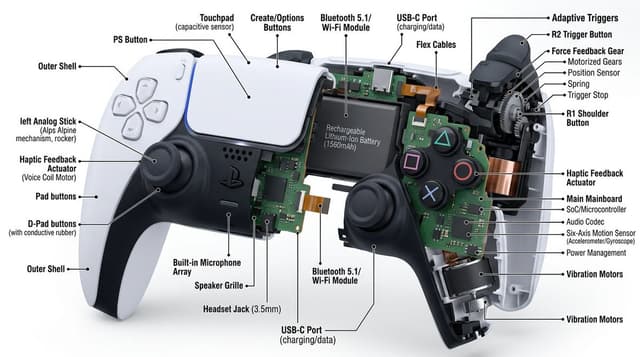
Infographic / Edu Visual - Technical Cutaway Diagram
Pierrick Chevallier | IANano Banana Pro
Cutaway diagram of a {argument name="object" default="mechanical device"}, detailed with interior component, on a white background. High-resolution, with a focused technique and text callouts providing information about each part. Interior details, hyper-realistic appearance.
Infographic / Edu Visual - Knolling Flat Lay Product Photography Prompt (Inventions)
GadgetifyNano Banana Pro
Do this for {argument name="year" default="1983"} > You are a Professional Product Photographer specializing in knolling Flat Lay photography. I will provide a Year or inventor. Step 1: The Selection.  > Identify 3 to 5 inventions from that year, plus 5-7 smaller related accessories (e.g., if the invention is a camera, include film rolls; if it's a car part, include a wrench).

Step 2: The Layout. Arrange all items on a flat, solid-colored matte background (choose a color that contrasts well with the items).

The Grid: Align everything at perfect 90-degree angles. Organize them by size and shape.

The Vibe: Deconstructed, organized, satisfying, geometric.

The Lighting:

Soft, flat, overhead studio lighting (shadowless).

Output:

 A single 4:5 image.

The Year (e.g., "1955") should be arranged using physical typography (like metal letters or cut paper) placed in the center of the grid.

Style: Wes Anderson symmetry, high-end commercial advertising, vibrant.
Infographic / Edu Visual - Profile URL to Magazine Infographic Prompt
テツメモ|AI図解×検証|NewsletterNano Banana Pro
Use search to find out how {argument name="username" default="tetumemo"} ({argument name="profile URL" default="https://t.co/XcPInQDrVZ"}) is perceived. Based on this information, draw a short, simple, two-page infographic about it (with headlines). Return a photo of the article published in a glossy magazine. Show ({argument name="username" default="tetumemo"}) on the magazine cover and display the two-page spread infographic about {argument name="username" default="tetumemo"}.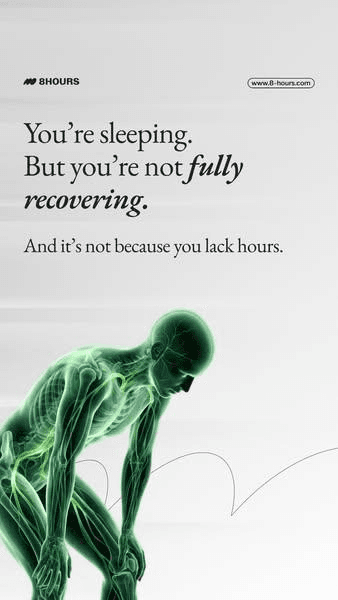
Infographic / Edu Visual - 3D Medical Glow Scan Rendering
Dera | Performance marketing CreativeNano Banana Pro
A ultra-detailed, hyper-realistic 3D rendering of {argument name="subject" default="human waist"}, presented against a {argument name="background" default="smooth, clean white-to-light-grey gradient background"}. The style must mimic that of an advanced, glowing medical scan (like an fMRI combined with a CT). The entire structure is composed of luminous, semi-transparent green tissue (fascia, muscles, nerves), with skeletal elements and major neural pathways rendered in a {argument name="glow color" default="brilliant, glowing electric green light"}. The texture is that of a complex, interwoven network of lit fibers and nodes. The aesthetic is clean, technological, and medicinal, with the green structures appearing to emit light. The composition must be high-focus and minimalist, with a single, clear subject and no text.按模型、风格或主题浏览
寻找下一个方向
按用途
App / Web Design →Brand commercials →Channel intros →Cinematic scenes →Comics and storyboards →E-commerce images →Explainers and tutorials →Game assets →Game cinematics →Educational graphics →Music videos →Posters and flyers →Product marketing →Profiles and avatars →Short films →Vlogs and lifestyle →Social media posts →UGC and talking-head ads →YouTube thumbnails →按风格
3D cartoons →3D renders →Anime and manga images →Chibi characters →Chinese ink video →Film stills →Cinematic realism →Cyberpunk images →Cyberpunk video →Documentary style →Magical fantasy →Illustration →Chinese ink images →Isometric →Minimalism →Photography →Vintage images →Sketch and line art →Surreal video →Retro film →Watercolor →按主题
Abstract backgrounds →Abstract motion and VFX →Creature images →Animals in motion →Architecture and interiors →Character images →City images →City video →Groups in motion →Diagram / Chart →Fashion details →Food and drink images →Food and drink video →Group images →Fashion models →Nature images →Nature video →Characters in motion →Portraits and selfies →Product images →Product video →Action scenes →Text and logo motion →Typography images →Vehicle images →Vehicle video →让灵感,继续生长。
在同一个创作空间,连接提示词、参考素材和生成结果。
打开创作画布 ↗