Prompts for educational graphics

Explore a travel-poster example that brings architectural details into a graphic layout. Use its prompt as a starting point for deciding what your own visual should explain.

Explore prompts

612 prompts

Infographic / Edu Visual - Annual Music Report Vinyl Record Infographic Prompt — output

Infographic / Edu Visual - Annual Music Report Vinyl Record Infographic Prompt

小洲洲的AI日常Nano Banana Pro
Hyper-realistic professional photography, a high-end transparent acrylic vinyl record placed on a classic turntable, slowly rotating and playing. The overall scene is set on a warm wooden turntable stand, with a dark, dreamy starry sky mixed with gradient neon lights in the background, creating a retro yet modern atmosphere. Subject - Transparent Acrylic Vinyl Record and Turntable: Record Material: Crystal clear transparent acrylic, with realistic reflections, glowing edges, and refraction effects. Classic vinyl groove textures are visible on the surface, but the whole is crystal clear. The record is rotating, with a slight motion blur.
Turntable: Retro style wooden or metal platter base, the tonearm gently rests on the record, the stylus touches the grooves, details are realistic, including the spindle and speed adjustment knob.
Content Style: Elegant modern typography combined with a slight hand-drawn feel. Text is directly “engraved” or projected onto the transparent record surface, with slightly imperfect lines.
Record Center Label Area: Circular label printed with NetEase Cloud Music's red LOGO, surrounded by the words "{argument name="report year" default="2025"} Annual Listening Report." The label rotates with the record.

Content Layout (Text and elements cleverly integrated into the record surface and grooves): Top Area (Upper outer edge of the record): Large title: "Your {argument name="report year" default="2025"} Annual Listening Report" using bold modern font, with purple-blue gradient and neon purple edge glow.

Center Area - Favorite Artist Ranking (occupying about 40% of the center): Central illustration: Hand-drawn style reinforcement of the center label with the iconic pattern of #1 {argument name="artist 1" default="HuiChunDan"} (rainbow gradient circle), surrounded by small avatar icons of artists like Taylor Swift and Li Ronghao, slightly dynamic with rotation. Avatar icons are sourced from the reference image.
Art Style: Simple line art with slight hand-drawn imperfections, full of personality.
Colors: Main fill in deep purple and blue tones, white outline, neon purple and orange highlights.
Artist ranking text arranged along the record grooves: #1 {argument name="artist 1" default="HuiChunDan"} 497 times, #2 Taylor Swift 493 times, #3 Li Ronghao 420 times, #4 Ma Yuan Shi Ren 327 times (Top 4), elegant glowing font, curved along the groove lines.

Surrounding Information Display (Circular layout, text and icons distributed on the outer ring of the record and the turntable panel): Left Side (Left panel of the turntable) - Total Listening Volume and Style: Icons: Music note and heart.
“You listened to 2839 songs this year”
“New exploration songs accounted for 68%”
“Cyan is the average color of the music world this year”
Hand-drawn small arrow pointing to the center of the record.

Top Right (Space above the record) - Annual Genre TOP 5: Icon: Flowing waveform.
“Your {argument name="report year" default="2025"} Annual Genre TOP 5”
European/American Pop 49%, Cantonese Pop 15%, Pop Rock 15%, Indie Rock 12%, Alternative/Indie 9%
Displayed using percentage circles or sector diagrams surrounding the outer edge of the record, slightly glowing.

Bottom (Turntable base panel) - Listening Duration: Icons: Hourglass and play button.
“Your listening duration this year is 695 hours and 25 minutes”
“Exceeding 95.2% of users”
“Your listening duration is the absolute authority”

Connecting Elements: Hand-drawn arrows and dashed lines connecting various parts of the turntable to the rotating record.
Small Decorative Elements: Scattered music notes, stars, light spots, NetEase Cloud red small clouds, slightly floating with rotation.
All text is in Chinese, elegant modern font with a slight handwritten feel.

Color Scheme: Baseline: Cream white texture (#F5F5DC)
Main Illustration: Deep purple-blue gradient fill, white outline
Highlights: Neon purple (#A100FF) and orange used for emphasis and decoration
Icons and Charts: Light grey (#B0B0B0) line art
Brand Color: NetEase Cloud red (#E60026) used for LOGO and key emphasis

Bottom Area (Front edge of the turntable): Dark gradient horizontal bar background
Left: NetEase Cloud Music Red LOGO (metallic glow)
Center: “NetEase Cloud Music” standard text
Right: Small text “Open NetEase Cloud Music Search 【Annual Report】”

Environment and Photography: Background: Dark dreamy starry sky with purple-blue neon gradient, extremely heavy blur.
Depth of Field: f/1.4 large aperture simulation - background is almost completely abstract.
Only soft purple, blue, and pink bokeh light spots are visible, with no discernible shapes.
Perspective: Slightly overhead 45-degree frontal view, record and turntable perfectly centered, capturing rotational dynamics.
Lighting: Warm side light and professional spotlight creating strong reflections on the acrylic surface, dramatic neon purple glowing edge, subtle highlights captured on the tonearm and stylus.
Atmosphere: Nighttime retro dreamy atmosphere, transparent acrylic record glowing while spinning on the turntable, heavy background blur highlighting the main subject.

Technical Specifications: 8K ultra-high resolution, cinematic color grading high contrast, realistic acrylic material physics (edge glow, reflection, refraction, slight rotational blur), exquisite modern text details, high-end music photography quality, extreme background bokeh making the record and turntable content the absolute focal point. Key requirement: Background must be extremely blurred (almost abstract bokeh), the central transparent vinyl record must have a realistic sense of rotation, elegant modern text integrated into the record surface, all elements incorporating the user-provided 2025 NetEase Cloud annual summary data, strong overall retro turntable atmosphere.
Batch study card generation prompts (physics, English, poetry) — output
Infographic / Edu Visual - Futuristic AI Age Checker Infographic Portrait — output

Infographic / Edu Visual - Futuristic AI Age Checker Infographic Portrait

Doctor WasifNano Banana Pro
A hyper-realistic, high-resolution portrait infographic based on (your photo). Keep the same person, identity, hairstyle, clothing and natural skin tone from (your photo), with a neutral studio background.Overlay a subtle, semi-transparent facial analysis grid on the entire face, very similar to a 3D face-scanning mesh: thin, soft white lines following the facial contours, slightly glowing but not hiding the skin details. Add one clean vertical red laser line running down one side of the face, like a futuristic scan. All analysis lines must be soft, minimal and elegant, exactly like a cosmetic-tech advertisement.Create a clean medical–aesthetic infographic that evaluates 5 aging factors using global data percentages:1. Fine lines and wrinkles2. Skin texture and elasticity3. Facial volume and sagging4. Eye area aging signs5. Skin tone and pigmentationFor each factor, place a small label with a thin line pointing to the relevant facial area, and next to it write a short title and a realistic percentage score from 0–100% (based on global data), for example:“Fine lines & wrinkles – 18%”“Skin texture & elasticity – 72%”“Facial volume & sagging – 35%”“Eye area aging signs – 41%”“Skin tone & pigmentation – 63%”Use clean, modern, sans-serif typography and small technical-style text, like a scientific facial analysis UI. At the bottom of the image, in the center, write a large bold text showing the final estimated real age based on the analysis, for example:“ESTIMATED AGE: {argument name="estimated age" default="(random number based on face analysis )"}”Overall style: futuristic AI-guided skincare analysis, minimalistic, premium editorial lighting, no gender mentioned, suitable for any human face.
Infographic / Edu Visual - Historical Archivist Prompt for Flawed Inventions — output

Infographic / Edu Visual - Historical Archivist Prompt for Flawed Inventions

GadgetifyNano Banana Pro
Role: Historical Archivist & Technical Illustrator.
Input Era/Region: {argument name="era and region" default="US, 1820s"}

Phase 1: The Deep Dive (AI to Deduce)
1.  Identify Container: Era-appropriate storage (Chest, Cabinet, Box).
2.  Identify Paperwork: Era-appropriate medium (Vellum, Blueprints, Floppy Disks).
3.  Identify 4 Obscure Failures:
    Constraint: Do NOT select famous successes. Select Bizarre, Failed, or Dangerous prototypes.
   Data Extraction: For each item, identify its Historical Name and its Fatal Flaw.

Phase 2: The Visual Translation Layer (Geometry)
Logic: The AI must explicitly analyze the Physical Form Factor of each selected invention.
Instruction: Do not render generic shapes. If it's a "Steam Man," render a brass robot. If it's a "Pneumatic Tube," render the piping.

Phase 3: Visual Execution
Subject: The [Container] overflowing with the [Signature Geometries] of the lost inventions.

1. The "Lost" Prototypes:
Render the 4 inventions based strictly on their Physical Form Factor.
Material: Authentic materials (Brass, Wood, Bakelite, Clay) based on the era.

2. The Labels (CRITICAL UPDATE):
Format: Each item has a clearly attached tag (String/Wax/Adhesive) with Legible Text.
Text Structure:
Line 1:[The Invention Name] (e.g., "The Dynasphere").
Line 2:[The Flaw] (e.g., "Unstable Steering").
Note:Ensure the text looks handwritten or stamped according to the time period.

3. The Narrative:
The Inventors: Tiny figurines reacting to the failure (frustrated, crying, kicking the machine).
The Contrast: A generic Modern Smartphone (or futuristic device) sitting on the edge for scale/irony.

4. Atmosphere:
Lighting: Dramatic, moody, specific to the era.
Texture: Macro details of rust, dust, and age.

Output: ONE image, 4:5, Photorealistic Macro Photography, Legible Text Labels.
Infographic / Edu Visual - Exploded View Taco Infographic for Commercial Use — output
Infographic / Edu Visual - Taylor Swift Eras Tour vs. Human Civilization Ages Comparison — output
Infographic / Edu Visual - Evolutionary Blueprint Sheet for an Invention — output

Infographic / Edu Visual - Evolutionary Blueprint Sheet for an Invention

Artificial intelligence (Ai),Open AiNano Banana Pro
Single large horizontal blueprint sheet, 16:9 aspect ratio, showing the complete evolutionary journey of **{argument name="invention name" default="[INVENTION]"}** from its first concept to its modern form, presented as a technical blueprint coming to life.
Authentic aged blueprint paper with white technical lines on deep blue background, subtle coffee stained edges and worn paper texture. Forced perspective across the page from left to right.
Left side shows the original patent era design of **{argument name="invention name" default="[INVENTION]"}** as a pure flat 2D technical line drawing, precise drafting style, no depth. Inventor figure on the far left also drawn fully in 2D blueprint line art.
Gradual transformation across 7 to 9 clearly separated stages moving rightward: Stage 1 pure technical line drawing. Stage 2 blueprint lines beginning to lift off the page with a paper craft effect. Stage 3 partial miniature model emerging from the blueprint. Stage 4 fully formed 3D miniature model, unpainted. Stage 5 painted miniature with realistic materials. Final stage shows a photo realistic tiny working version of **{argument name="invention name" default="[INVENTION]"}**.
The inventor figure evolves in parallel from flat 2D drawing on the left into a fully 3D miniature figurine on the right, matching the same transformation stages.
Each stage labeled with technical annotations, measurement markings, arrows, and small evolution dates in blueprint drafting style typography.
Drafting tools including compass, protractor, mechanical pencil, ruler, and T square interacting with the flat blueprint areas, while the 3D sections break free from the page.
Lighting transitions from cool LED blueprint table backlight on the left to realistic practical lighting on the right, emphasizing depth and realism.
Ultra detailed technical illustration meets practical effects, high realism, clean composition, museum quality concept visualization.
Infographic / Edu Visual - Miniature Diorama Prompt for Visualizing the Historical Journey of Calculus — output

Infographic / Edu Visual - Miniature Diorama Prompt for Visualizing the Historical Journey of Calculus

GadgetifyNano Banana Pro
Input A: {argument name="concept" default="calculus"}
Input A is a technology that traveled historical trade routes (papermaking, gunpowder, astronomy, silk production, algebra, etc.).
Analyze: origin civilization, the journey route, cultural adaptations at each stop, timeline of spread.
Goal: Miniature Silk Road/trade route caravan scene showing technology being transported and transformed.
Rules:
- Base: 3D topographic map showing actual historical route (mountains, deserts, seas)
- Caravan: 8-12 miniature merchant/scholar figurines progressing along route with pack animals
- Each stop: micro-diorama of how that civilization adapted the technology
  * Origin point: technology in pure form with inventor culture's aesthetic
  * Midpoint stops: hybrid versions showing cultural fusion
  * Destination: fully transformed/adapted version
- Include: the technology itself transforming—paper becoming different textures, numbers changing symbol systems, etc.
- Obstacles: miniature barriers that were overcome (mountain passes, hostile territories, language barriers shown as scroll fragments in different scripts)
- Time markers: seasons/years labeled along route
- Materials: actual sand/terrain materials, tiny textiles from different cultures, brass caravans
- Lighting: journey from dawn (origin) to dusk (destination) across the scene
Output: ONE image, 21:9 ultra-wide to capture full journey, epic historical adventure photography
Infographic / Edu Visual - Macro Diorama of a Historical Scientist's Workspace — output
Infographic / Edu Visual - Magic Prompt for Automatic Infographic Generation with Nano Banana Pro — output

Infographic / Edu Visual - Magic Prompt for Automatic Infographic Generation with Nano Banana Pro

テツメモ|AI図解×検証|NewsletterNano Banana Pro
You are an expert in infographics. Read the article or report provided by the user and automatically generate a visually clear and attractive infographic that summarizes its content. Specifically, please create it considering the following elements:

### Objective
To visualize the main message, key data, process, or structure of the article or report so that it can be understood at a glance.

### Style and Tone
*   **Style**: A hand-drawn or minimal and sophisticated diagram style, similar to Napkin AI.
*   **Tone**: Professional yet approachable and visually appealing.

### Components
1.  **Title**: An attractive title that concisely represents the article's theme.
2.  **Key Points**: 3 to 5 of the most important points extracted from the entire article.
3.  **Diagrams**: Graphs, flowcharts, icons, or conceptual diagrams to represent the key points or processes.
4.  **Data**: If there are specific numbers or statistical data in the article, display them in an emphasized manner.
5.  **Conclusion/Action**: A summary of the article or the next action expected from the reader.

### Output Format
Based on the content of the provided article, output the overall image of the infographic, integrating the above components, as detailed instructions. Describe the diagram ideas, layout suggestions, and the image of the colors and fonts to be used specifically.

### Article/Report
{argument name="Content of the Article or Report" default="[Paste the full text of the article or report here]"}
Infographic / Edu Visual - Nano-banana Pro Persona Generation Prompt — output
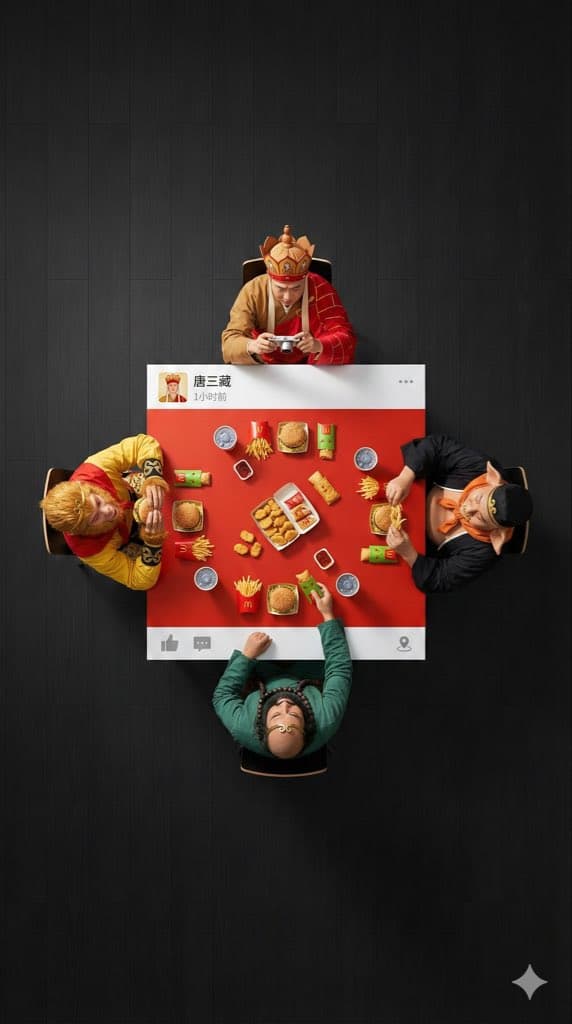
Infographic / Edu Visual - Overhead Superhero Mahjong Scene Prompt (WeChat Moments Style) — output

Infographic / Edu Visual - Overhead Superhero Mahjong Scene Prompt (WeChat Moments Style)

xiaobeiLinNano Banana Pro
An ultra-wide, surreal, 9:16 overhead flat lay photograph. A group of 4 [{argument name="characters" default="characters"}] are seated around a square table, one person on each side. The camera is pulled back significantly to create a large amount of negative space (empty floor area) around the people and the table, ensuring a clean, minimalist composition.

The scene is [{argument name="scene" default="scene"}]: [Characters] are wearing their classic costumes, and their interaction is as follows: [DESCRIBE ACTION OF EACH PERSON]

The table is a custom physical prop, designed to look like a WeChat Moments post: with solid white bands only on the top and bottom edges (no white borders on the left and right sides).
- The top white band features a personal profile picture, with a [{argument name="LOGO DESCRIPTION" default="a cool poker avatar or real photo"}], the username “[USERNAME]” is drawn on the right, followed by the posting time text (e.g., “1 hour ago” or “Just now”), and the “...” more options icon on the far right.
- The bottom white band features a right-pointing arrow “Comment” icon (with a bubble shape) and a “Like” icon (WeChat's characteristic thumbs-up icon, which can be designed as gray unliked or red liked) on the right side, separated by a vertical line; the far left or middle can be left blank or include a small location icon (if location is tagged).

The center of the table is painted [EXACT CENTER COLOR & HEX CODE], and the objects on the table are [FOOD/OBJECTS DESCRIPTION].
Important: All objects and hands interacting with them are strictly confined to this central [COLOR] painted area. Nothing should extend onto the white bands or beyond the table boundaries. The floor background is [FLOOR COLOR, e.g., minimalist clean solid color] to create visual separation. Professional studio lighting with distinct cast shadows. 8K, sharp focus.
YouTube Thumbnail - Nano Banana Pro Composition Techniques Prompts (3 Examples) — output

YouTube Thumbnail - Nano Banana Pro Composition Techniques Prompts (3 Examples)

Riku (AI Creater)Nano Banana Pro
[Role]
You are a professional graphic designer. Create a YouTube thumbnail.

[Composition Instructions]
- Split-screen composition, dividing the screen into left and right halves.
- Left side: A Japanese woman with a surprised expression (photorealistic style). Background is a dark office.
- Right side: A vibrant yellow background. Place the text “{argument name="text" default="AI Revolution"}” in bold Gothic font in the center.
- Ensure sufficient negative space around the text to maximize visibility.

[Style]
A scene from an animated movie, cyberpunk

[Camera and Composition Settings]
- Lens: Use a wide-angle lens (24mm equivalent) to emphasize perspective.
- Angle: Extreme low angle (worm's-eye view). The character is viewed looking up from just above the ground.
- Placement: Place the character's left hand directly in front of the camera to exaggerate the sense of distance.
- Background: High-rise buildings sharply converge toward a vanishing point.

[Role]
You are a manual creator. Create {argument name="subject" default="how to make Okonomiyaki"}.

[Format]
Flat design infographic, 16:9

[Layout Instructions]
- A “3-step” process diagram flowing from left to right.
- Step 1 (Left): Magnifying glass icon (Investigation).
- Step 2 (Center): Gear icon (Processing).
- Step 3 (Right): Light bulb icon (Solution).
- Connect each element with arrows and align them at equal intervals.
- Background is white, icons are unified in blue and orange key colors.
Browse by model, style or topic

Find your next direction

ASTORIE CANVAS

Take the idea further.

Bring your prompts, references and results together in one creative space.

Open your canvas ↗