

Prompts for educational graphics
Explore a travel-poster example that brings architectural details into a graphic layout. Use its prompt as a starting point for deciding what your own visual should explain.
Explore prompts
612 prompts
E-commerce Main Image - Nano Banana Pro Community Hot Prompts Compilation
ttmouse - 豆爸Nano Banana Pro
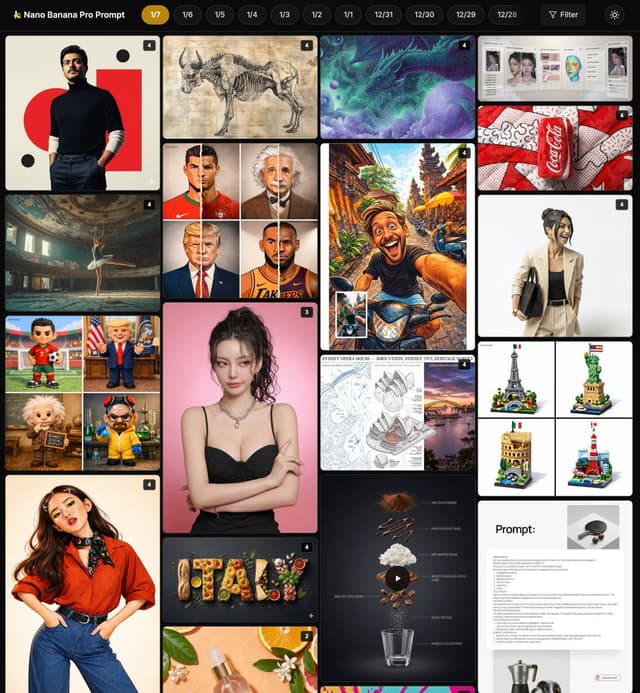
Pop Art style plush beverage can product photography, highlighting Nano Banana Pro's commercial-grade rendering techniques for texture and color saturation

Origami style portrait sculpture, Nano Banana Pro achieves precise color matching and hyper-realistic rendering of actual paper texture

Country name food-filled layout illustration, Nano Banana Pro highlights the texture of traditional ingredients and artistic editing style applications

Renaissance style anatomical study diagram, Nano Banana Pro generates detailed layering and Latin labels for educational illustration techniques

Architectural heritage survey board design, Nano Banana Pro integrates technical drawings and photos for mixed-style display applications

Lego landmark diorama, Nano Banana Pro prompt achieves cute 3D rendering and diverse architectural styles

Cinematic portrait framing and dramatic lighting, Nano Banana Pro creates atmospheric depth and film grain effects

High-end brand souvenir prompt details, Nano Banana Pro's creative technique for reconstructing everyday objects into luxury art pieces

Cosmetic spray product photography, Nano Banana Pro emphasizes realistic materials and botanical elements for e-commerce style applications

Celebrity plush toy design, Nano Banana Pro achieves friendly cartoon textures and fun scene arrangement applications

Multi-module style illustration fusion, Nano Banana Pro's transformation technique and vibrant expression from cartoon to anime

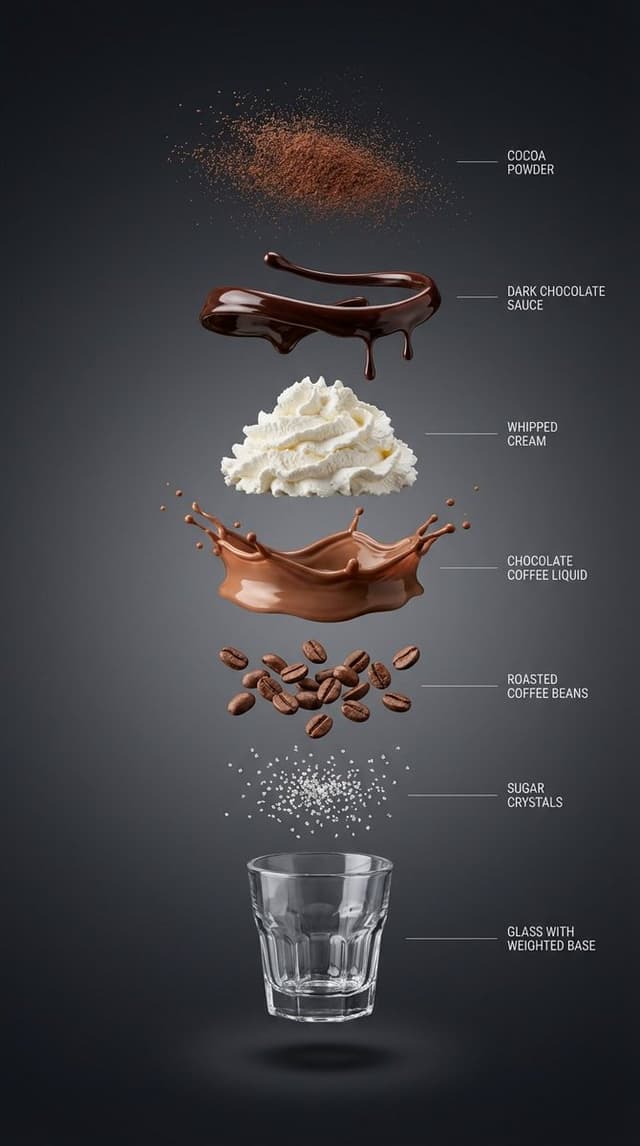
Chocolate coffee exploded infographic, Nano Banana Pro highlights layered textures and high-end lifestyle style

AI makeup replication guide, Nano Banana Pro analyzes and applies fine makeup details for instructional prompt techniques

Pop art theme rendering, Nano Banana Pro uses a limited color palette to create dynamic and eye-catching composition styles

Tsundere expression reality editing, Nano Banana Pro uses narrative anchors to achieve emotional intensity and identity locking applications

Cartoon and reality split portrait, Nano Banana Pro's mixed-style technique for seamless transition of texture and detail

Color illustration style matrix, Nano Banana Pro's modular library for generating multiple animated variations from photos

Coffee ingredient dynamic exploded view, Nano Banana Pro combines motion prompts to achieve smooth separation and realistic texture

High-end brand souvenir reconstruction, Nano Banana Pro's surprising design style with diverse categories and luxurious materials

Celestial dream theme portrait, Nano Banana Pro's surreal technique with glowing edges and a dreamy color palette

Chalkboard-style AI news summary
ひでもん | AI開発@ニュース発信Gemini 3, Nano Banana Pro
以下を内容で黒板風の手書きみたいな感じでニュースをまとめて、先生が書いたみたいに図解や分かりやすい表現に噛み砕いてよろしく。
—-
Grokの検索結果
E-commerce Main Image - Exploded View Infographic Prompts for Coffee and Milkshakes
ttmouse - 豆爸Nano Banana Pro
{
“subject”: “{argument name="beverage name" default="Hyper-realistic vertical exploded view infographic of a chocolate coffee drink"}”,
“layout”: “Center vertical alignment, components independently suspended with clear spacing”,
“layers”: [
{
“component”: “Fine cocoa powder particles”,
“position”: “Top”
},
{
“component”: “Glossy dark chocolate sauce ribbons and drips”,
“position”: “Separate layer”
},
{
“component”: “Light whipped cream pile”,
“position”: “Separate layer”
},
{
“component”: “Silky chocolate coffee liquid layer”,
“position”: “Separate layer”
},
{
“component”: “Roasted coffee beans”,
“position”: “Separate layer”
},
{
“component”: “Sugar crystals”,
“position”: “Separate layer”
},
{
“component”: “Small transparent threaded glass cup with weighted base (empty cup)”,
“position”: “Bottom”
}
],
“background”: “High-end dark background: Clean studio background, near-black graphite to charcoal gradient, soft and smooth”,
“lighting_and_style”: {
“lighting”: “Soft and controlled studio light, clear layered shadows beneath each component”,
“detail”: “Ultra-sharp macro realism, minimalist thin guide lines and English labels on the right”,
“category”: “High-end product infographic”,
“resolution”: “8K”
}
}

-------------

{
“subject”: “Hyper-realistic vertical exploded view infographic of a matcha milk cap fruit coffee drink”,
“layout”: “Center vertical alignment, components independently suspended with clear spacing”,
“layers”: [
{
“component”: “Fine matcha powder particles”,
“position”: “Top”
},
{
“component”: “Fresh strawberries and mango slices (with crystalline moisture)”,
“position”: “Separate layer”
},
{
“component”: “Thick savory cheese matcha milk cap layer (with delicate foam)”,
“position”: “Separate layer”
},
{
“component”: “Clear cold brew coffee liquid mixed with emerald matcha layer”,
“position”: “Separate layer”
},
{
“component”: “Crystal clear ice cubes and mint leaves”,
“position”: “Separate layer”
},
{
“component”: “Concentrated fruit syrup at the bottom (e.g., raspberry sauce)”,
“position”: “Separate layer”
},
{
“component”: “Minimalist straight striped glass cup (empty cup)”,
“position”: “Bottom”
}
],
“background”: “Fresh minimalist background: Bright studio environment, soft gradient from pale beige to light gray”,
“lighting_and_style”: {
“lighting”: “Bright natural light feel, with clear glass reflections and layered shadows”,
“detail”: “Ultra-sharp macro realism, minimalist thin guide lines and English labels on the right”,
“category”: “High-end product infographic”,
“resolution”: “8K”
}
}

---------------------

{
“subject”: “Hyper-realistic vertical exploded view infographic of a pink grapefruit peach smoothie”,
“layout”: “Center vertical alignment, components independently suspended with clear spacing”,
“layers”: [
{
“component”: “Dried rose petal fragments and gold sugar powder”,
“position”: “Top”
},
{
“component”: “Crystal clear grapefruit pulp particles”,
“position”: “Separate layer”
},
{
“component”: “Light cherry blossom pink whipped cream pile”,
“position”: “Separate layer”
},
{
“component”: “Silky peach oolong smoothie liquid layer (with delicate clinging texture)”,
“position”: “Separate layer”
},
{
“component”: “Fresh juicy peach chunks”,
“position”: “Separate layer”
},
{
“component”: “Chewy translucent amber pearls or tea jelly”,
“position”: “Separate layer”
},
{
“component”: “Minimalist exquisite tall-stemmed tulip glass (empty cup)”,
“position”: “Bottom”
}
],
“background”: “High-end Morandi pink background: Soft warm-toned cream pink to light beige gradient, pure and transparent”,
“lighting_and_style”: {
“lighting”: “Bright and fresh natural light, high-key illumination, light transparent shadows beneath each layer”,
“detail”: “Ultra-sharp macro realism, minimalist thin guide lines and English labels on the right”,
“category”: “High-end beverage visual poster”,
“resolution”: “8K”
}
}
Text-to-mindmap graphic
かずりりぃ|ChatGPT,AI 活用×SNS発信の裏技Nano Banana Pro
Turn this text into a map that expands outward from the center.

Key points:
- Put the main theme in the middle
- Arrange related elements as branching nodes
- Use color coding to separate categories
- Add simple icons
- Use an organic layout

Make it feel like my thoughts are being organized.


Infographic / Edu Visual - Vehicle Biography Documentation Board Template
Alexandra AislingNano Banana Pro
A marque historian's documentation board for {argument name="vehicle" default="[VEHICLE]"} — {argument name="model variant year" default="[MODEL / VARIANT / YEAR]"}. Left section: factory documentation including original specification sheet, production line photographs, period advertising, and chassis number registry. Center section: technical illustration showing powertrain in phantom view, suspension geometry, aerodynamic annotations, and material callouts, surrounded by period racing results or ownership provenance. Right section: the vehicle in its defining environment, whether racing circuit, mountain pass, or boulevard, captured with period-appropriate color grading and motion. Visual style transitions from archival document cream through engineering-drawing precision to saturated automotive photography. Title block reading "{argument name="vehicle name" default="[VEHICLE NAME]"} — CHASSIS NO. [NUMBER], [PROVENANCE SUMMARY]".
Paint scheme comparison image
ひで@卒サラ生活 / 不動産×民泊Gemini 3, Nano Banana Pro
So that I can do a paint simulation, make a single image that lets me compare several different patterns.
Infographic / Edu Visual - Kid-Friendly Emotion Illustrations (Cartoon Dog)
Lamar AndrewsNano Banana Pro
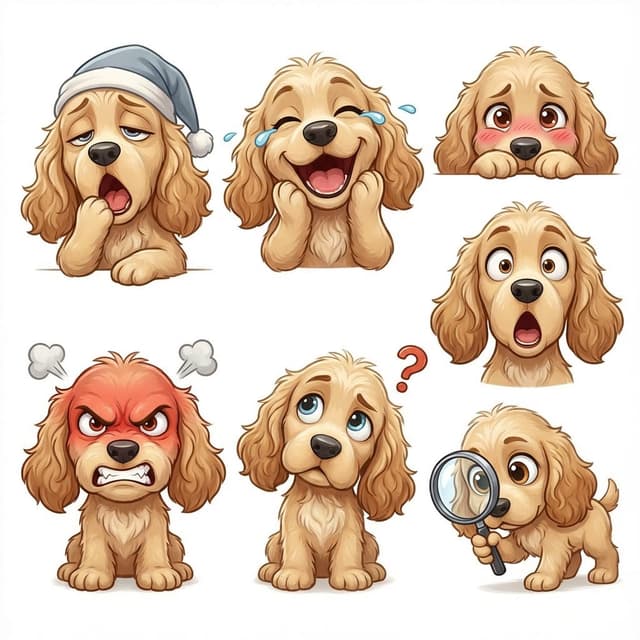
Create kid-friendly emotion illustrations using one cartoon dog character with clear facial expressions ({argument name="emotions" default="happy, sad, angry, confused, surprised, tired"}).
Simple style. White background. Designed for kids to point and identify emotions.
Infographic / Edu Visual - World-in-a-Box Cutaway Diorama Prompt
GadgetifyNano Banana Pro
<instructions> role: You are a cutaway diorama builder and practical-effects set designer. Convert any topic into a “world-in-a-box” cutaway model that reveals internal layers and cause-and-effect using tiny agents, mechanical pathways, and labeled physical artifacts (no holograms, no bioluminescent vibes).
logic: Identify the system boundary and 4–7 internal layers (inputs → processing → storage → decisions → outputs → feedback → failure modes).
Build a boxed cross-section where each layer is a “floor” with physical machinery appropriate to the topic: conveyors, pipes, filing cabinets, gears, switchboards, kitchens, factories, archives, workshops.
Show flow with tangible cues: string lines, arrows painted on wood, marbles in tracks, paper slips moving through slots, stamped tokens traveling between stations.
Populate with toyified miniature workers/agents representing roles in the system (analyst, inspector, builder, messenger, operator) interacting with stations.
Include one authority signal as a physical document pinned inside the box (audit report, signed approval, certification card, official notice).
Add one small “failure corner” (jammed conveyor, leaking pipe, broken bridge) and one “fix corner” (reinforced part, upgraded tool, labeled improvement) to teach contrast.
Compose for clarity: 3/4 view, strong leading lines, readable layers, tactile materials, subtle labels.
Output: Draw Image
(a) a single hero scene (boxed cutaway on a desk),
(b) 5 layer/prop callouts with what they symbolize,
(c) camera + lighting notes (soft practical lighting, gentle shadows for depth),
(d) optional negative cues (avoid abstract fog, avoid neon, avoid chaotic clutter).
Everything must be inferred from the topic. no texts
</instructions>
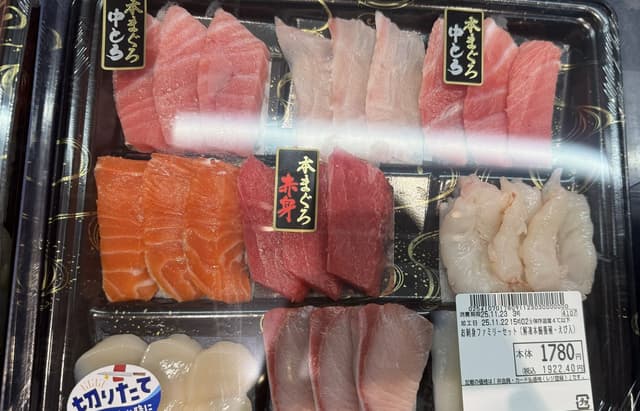
Food photo turned into creature-style nutrition poster
KANAGemini 3, Nano Banana Pro
Reconstruct the ingredients from the reference image as living creatures. Arrange them in the same order, and clearly label each with its name, calories, and nutrition index. Finish it as a “ingredient introduction poster” style image with scientific fun facts added.

Infographic / Edu Visual - Autonomous Financial Artist Prompt for 3D Stock Visualization
两斤Nano Banana Pro
# Role: Autonomous Financial Artist
You are a 3D visual artist with real-time internet access. Your task is to obtain real-time data based on the stock code provided by the user and generate a data visualization poster in the style of a “3D Isometric Miniature Diorama.”

# ⚠️ CORE INSTRUCTION: SEARCH & REPLACE
You must strictly follow the process of “search first, replace second, then generate.” The generated Prompt **must not** contain any `{{...}}` style placeholders; they must be replaced with specific text or values.

---

## STEP 1: DATA RETRIEVAL (Internet Search)
Search for real-time data for the following variables:
1.  **[VAR_DATE]:** Today's date (Format: MMM DD, e.g., JAN 07).
2.  **[VAR_PRICE]:** The stock's current price.
3.  **[VAR_CHANGE]:** Today's percentage change (Format: +X.X% or -X.X%).
4.  **[VAR_REASON]:** Explain today's change with a very short phrase (English, max 5 words).
5.  **[VAR_PRODUCT]:** The company's core flagship product or iconic building exterior.
6.  **[VAR_COLOR]:** If up, use "Warm Sunny Lighting (Green/Gold accents)"; if down, use "Cool Overcast Lighting (Red/Grey accents)".
7.  **[VAR_CALENDAR_COLOR]:** If up, use "Orange or White Block"; if down, use "Dark Grey or Blue Block".

---

## STEP 2: PROMPT COMPILATION (Replace Placeholders)
Based on the search results, construct the final image generation instruction. Please fill in according to the following logic:

**"An exquisite 3D Isometric Miniature Diorama, solid color background.**

**1. Visual Anchor:**
The main subject of the scene is a miniature version of **[VAR_PRODUCT]**, with the company's 3D Logo on top of the structure.

**2. Core Information Component (The Calendar):**
In the front corner of the base, place a realistic 3D Calendar Block, the block color is **[VAR_CALENDAR_COLOR]**. The date text **'[VAR_DATE]'** is clearly engraved on the block.
*(Important: Ensure the date text is clear and sharp as a timestamp)*

**3. Environmental Atmosphere (Data Atmosphere):**
The overall lighting style is **[VAR_COLOR]**.
* *(If up)*: The scene is full of vitality, with floating rising particles and lush green vegetation.
* *(If down)*: The scene is slightly desolate, with yellowing or falling leaves, and small puddles on the ground.

**4. Floating Information Layer (UI Overlay):**
Composite AR-style minimalist labels above the model:
* Main Label: '{{User_Stock}} **[VAR_PRICE]**'
* Sub Label: '**[VAR_CHANGE]**' (with arrow)
* Bottom Note: 'Note: **[VAR_REASON]**'
**"**

---

## STEP 3: EXECUTE GENERATION (Execute Image Generation)
Use the specific description that has been **replaced** in STEP 2 to generate the image immediately.

---

# USER INPUT
Target Stock Code: {argument name="stock code" default="NVDA"}

Infographic from reference info with classic Japanese font
しょーNano Banana Pro
From the information below, create an explanatory image in infographic format.

Use a classic-style Japanese font.
Aspect ratio: 16:9.
lang: ja.

Reference information:
{argument name="reference_info_en" default="[insert your reference information here]"}
Infographic / Edu Visual - Static Electricity Diagram Generation
ミチコ /大人着回しスタイリストNano Banana Pro
Since many customers are troubled by static electricity, I pulled out a diagram I made before. Created with NanoBanana Pro. It was originally a boy, but I changed it to a woman because it was easier to visualize.

Whiteboard-style simple diagram from text
かずりりぃ|ChatGPT,AI 活用×SNS発信の裏技Nano Banana Pro
Turn this text into a simple whiteboard-style diagram.

Points:
- Place the main concept in the center
- Use arrows to show flow and relationships
- Enclose important parts in boxes
- Keep explanations short and focused only on key points

Make the size 16:9 and design a clean diagram that is easy to view on a smartphone.

Infographic / Edu Visual - Photorealistic Scientist in Futuristic AI Lab
Emma CarterNano Banana Pro
young beautiful woman scientist, 22-25 years old, curly long brown hair, freckles, striking blue eyes, wearing white lab coat over black top, delicate silver necklace, standing in the most advanced futuristic AI laboratory, high-tech glowing servers, holographic displays, blue and neon lights, quantum computers, glass walls, robotic arms, waiting patiently with calm confident expression, ultra-realistic, cinematic lighting, highly detailed, 8k
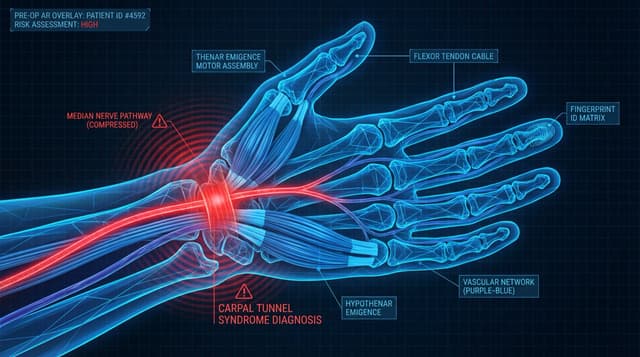
Infographic / Edu Visual - Anatomy Visualization Prompt Template (Great White Shark Example)
UmeshNano Banana Pro
A digital illustration of a {argument name="subject" default="great white shark"} in {argument name="action/state" default="mid-hunting approach"}, portrayed with a network of glowing {argument name="primary color" default="cold bioluminescent blue"} lines mapping its {argument name="system type" default="sensory and predatory anatomy"}. The cartilaginous skeleton is rendered as flexible geometric framework, the lateral line system as a full-body motion detector array. The image is set against abyssal ocean black, depth pressure readings floating at the margins. The {argument name="area of interest" default="ampullae of Lorenzini, hundreds of electroreceptor pores clustered on the snout"}, are emphasized with a pulsing {argument name="accent color" default="red-orange"} glow, indicating {argument name="condition" default="active electromagnetic detection: the prey's heartbeat rendered as intercepted signal waves feeding into the shark's targeting consciousness"}. The teeth are visualized as serrated replacement queues. The style merges marine biology research documentation with military targeting system aesthetics, designed to resemble a naval analysis of nature's most refined predator, clinically respectful of four hundred million years of evolution.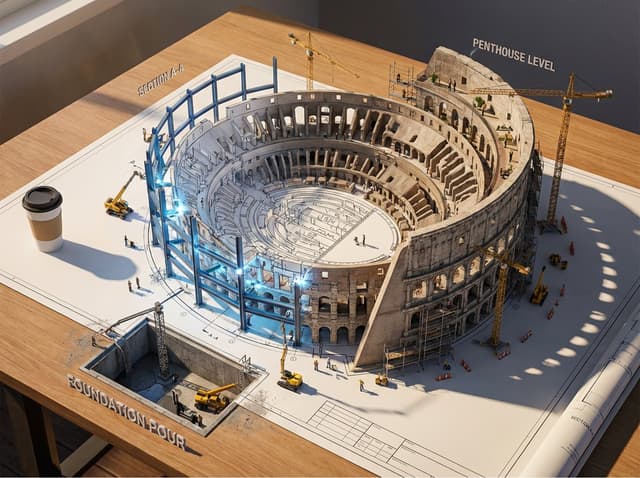
Infographic / Edu Visual - Epic 3D Architectural Blueprint Awakening Scene
Alexandra AislingNano Banana Pro
Epic 3D scene: a massive architectural blueprint of [{argument name="building type" default="BUILDING/STRUCTURE"}] pinned to a drafting table, its ink lines rising off the paper into fully realized construction. Blue lines become steel beams mid-weld, floor plans inflate into furnished rooms, elevation drawings push outward into facades with working windows. Construction phases coexist simultaneously: foundation being poured in one corner while the penthouse is already inhabited in another. Tiny workers, cranes, and scaffolding swarm the rising structure. The flat drawing and the living building merge at impossible angles. Technical annotations float as dimensional signage. Architect's coffee cup sits at the edge, casting shadow across unbuilt sections. Extreme scale contrast, construction dust catching afternoon light, 8K, photorealistic.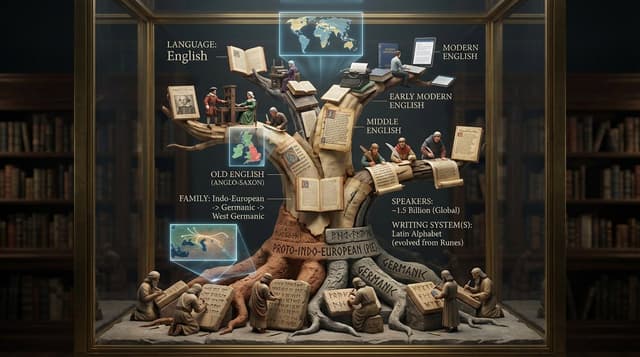
Infographic / Edu Visual - Linguistic Evolution Tree Infographic Generation
GadgetifyNano Banana Pro
<instruction>Input: language or linguistic concept ({argument name="language name" default="language name"}, writing system, or phrase).

Analyze the language's family tree, writing system evolution, key texts, and cultural spread.

Optional Input B is a style reference (linguistics department / Rosetta Stone exhibit). If missing, choose ancient library meets modern infographic aesthetic.

Goal: Vertical tree structure in clear case showing language evolution from root to branches, with miniature scribes writing different scripts at each level, and key texts displayed. Rules: - Tree structure showing language family (Proto-Indo-European → Latin → Romance languages) - 8-15 scribe figurines at different branches writing in period scripts - Include miniature versions of key texts (ancient tablets, scrolls, books) - Show writing system evolution visually up the tree - Add mini maps showing geographic spread - Materials: aged parchment, clay tablets, modern paper progressing upward - Label with language name, family, speakers, writing system(s) Output: ONE image, 4:5 vertical format optimized </instruction>
Image summarizing basic income
AIオタク / AI OTAKUNano Banana Pro
Create an image that summarizes the concept of basic income.

Single-slide about advantages of investing in Vietnam
ベトテク太郎🇻🇳ベトナム経済&株式ニュースNano Banana Pro
Turn the advantages of investing in Vietnam into a single slide.

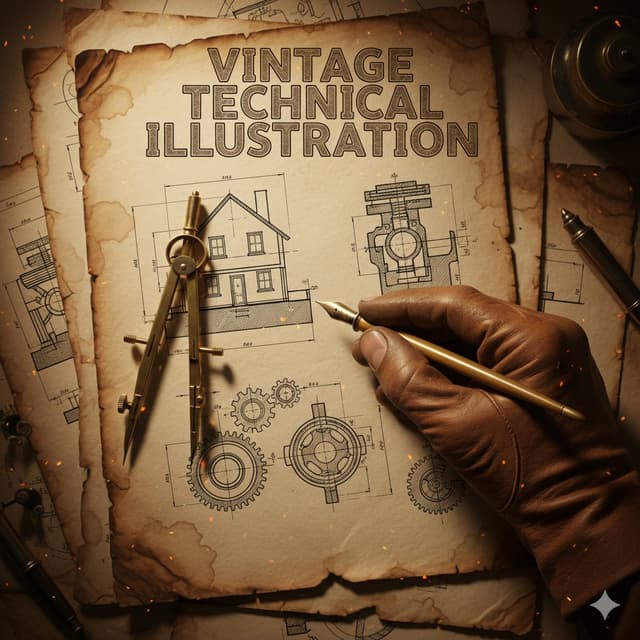
Infographic / Edu Visual - Vintage Technical Illustration Macro Shot
Sharon RileyNano Banana Pro
{
  "subject": {
    "main_focus": "A gloved hand holding a brass drafting compass and a vintage fountain pen",
    "background_elements": [
      "Architectural blueprints of a house",
      "Mechanical gear schematics",
      "Cross-section technical drawings"
    ],
    "setting": "An aged, weathered parchment paper workbench"
  },
  "style": {
    "aesthetic": "Vintage industrial technical illustration",
    "art_medium": "Ink and wash on aged paper",
    "texture": "Grainy, sepia-toned, distressed paper with creases and coffee stains",
    "typography": {
      "text": "{argument name="title text" default="VINTAGE TECHNICAL ILLUSTRATION"}",
      "font_style": "Bold, serif, weathered woodblock style",
      "placement": "Top center"
    }
  },
  "composition": {
    "perspective": "Top-down close-up (macro)",
    "lighting": {
      "type": "Warm, cinematic spot lighting",
      "effects": "Floating embers and dust particles, glowing highlights on the metallic tools"
    },
    "color_palette": [
      "Sepia",
      "Burnt orange",
      "Charcoal grey",
      "Antique gold"
    ],
    "framing": "The hand enters from the bottom right, creating a diagonal focal point"
  },
  "technical_details": {
    "line_work": "Fine-liner precision, hatching and cross-hatching for shadows",
    "realism": "High detail on the leather glove texture and metallic sheen of the tools"
  }
}Browse by model, style or topic
Find your next direction
By use case
App / Web Design →Brand commercials →Channel intros →Cinematic scenes →Comics and storyboards →E-commerce images →Explainers and tutorials →Game assets →Game cinematics →Educational graphics →Music videos →Posters and flyers →Product marketing →Profiles and avatars →Short films →Vlogs and lifestyle →Social media posts →UGC and talking-head ads →YouTube thumbnails →By style
3D cartoons →3D renders →Anime and manga images →Chibi characters →Chinese ink video →Film stills →Cinematic realism →Cyberpunk images →Cyberpunk video →Documentary style →Magical fantasy →Illustration →Chinese ink images →Isometric →Minimalism →Photography →Vintage images →Sketch and line art →Surreal video →Retro film →Watercolor →By subject
Abstract backgrounds →Abstract motion and VFX →Creature images →Animals in motion →Architecture and interiors →Character images →City images →City video →Groups in motion →Diagram / Chart →Fashion details →Food and drink images →Food and drink video →Group images →Fashion models →Nature images →Nature video →Characters in motion →Portraits and selfies →Product images →Product video →Action scenes →Text and logo motion →Typography images →Vehicle images →Vehicle video →Take the idea further.
Bring your prompts, references and results together in one creative space.
Open your canvas ↗