


Prompts for educational graphics
Explore a travel-poster example that brings architectural details into a graphic layout. Use its prompt as a starting point for deciding what your own visual should explain.
Explore prompts
612 prompts


Infographic / Edu Visual - Exploded-View Burger Composition with Annotations
𝐌Nano Banana Pro
Transform the burger into a clean exploded-view composition.
The burger is separated into exactly five layers, floating vertically with even spacing:

Brioche bun

Beef patty

Melted cheese

Fresh lettuce

Ripe tomato

Each layer remains photorealistic and aligned, maintaining the original proportions from the hero shot.

Add minimal, clean annotations with thin lines and clear typography, describing benefits:

Brioche bun — {argument name="bun benefit" default="soft texture, lightly toasted finish"}

Beef patty — juicy, rich flavor, perfectly seared

Melted cheese — creamy melt, enhances savoriness

Fresh lettuce — crisp bite, freshness balance

Ripe tomato — natural sweetness, juicy contrast

Background remains the same, slightly darkened to ensure maximum annotation readability.
Lighting stays consistent with the first image for visual continuity.
Commercial, technical, clean, easy to understand at a glance.
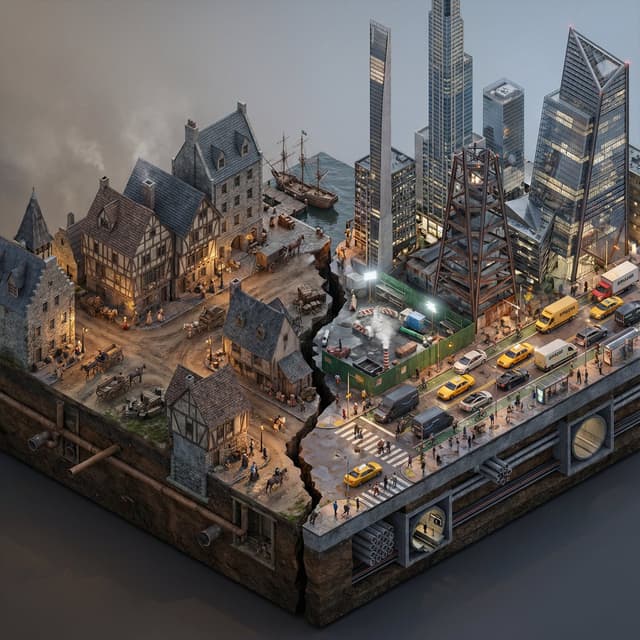
Infographic / Edu Visual - Split-Era Urban Diorama Generation Prompt for Nano Banana Pro
GadgetifyNano Banana Pro
Do this for {argument name="City/Year A vs. City/Year B" default="New York 1700 vs New York 2025"}

<instructions>
Input Variable: [City/Year A vs. City/Year B] (e.g., New York 1900 vs. New York 2025)

System Instruction:
Generate a photorealistic, isometric macro render of a split-era urban diorama. The goal is Historical and Municipal Accuracy, avoiding sci-fi tropes or idealization.

1. Temporal Forensic Analysis:
Analyze the Dates:
 Strictly adhere to the architectural technologies available in Year A versus Year B.
The Left Block (The Past): Construct the Left side using the dominant vernacular of the era.
For 1900: Beaux-Arts stone, brick tenements, water towers, external fire escapes, and cobblestone/early asphalt.
The Right Block (The Present/Future): Construct the Right side using current urban realities, not futuristic fantasies.
For 2025: Prioritize "Super-Slender" Pencil Towers (Billionaire's Row style), Glass Curtain Walls mixed with preserved older facades, and "Hudson Yards" style angled steel.
  Crucial Detail: If the year is modern (2020+), you MUST include Urban Clutter: Green construction plywood barriers, sidewalk scaffolding (sheds), steam vents, and delivery trucks.

2. The Container (The Cross-Section):
The Base: Two suspended chunks of city infrastructure, revealing the "Underground" layer on the side profile.
Left Underground: Brick sewers and early subway tunnels.
Right Underground: Concrete conduit banks, fiber optic lines, and modern subway tiles.
The Divider: A jagged timeline fracture. No glowing sci-fi energy. The divide is a stark cut in the asphalt.

3. The Composition (The Density):
Left Street Life: Period-accurate transport (Horse-drawn carriages mixed with early Model T Fords or Trolleys). Pedestrians in dark coats/hats.
Right Street Life: Municipal Realism. Yellow Taxis, Amazon delivery vans, Uber cars, and bike lanes with cyclists. The street level should feel congested and chaotic.
Vegetation: Left has Elm trees (if applicable); Right has manicured "Corporate Plaza" planters and rooftop gardens.

4. Accurate Lighting Simulation (No "Neon Filters"):
Left Lighting: Carbon-Arc and Gaslight. The light should be dim, patchy, and warm (2400K), casting long shadows.
 Right Lighting: Mixed Municipal Lighting. A chaotic mix of warm sodium streetlights (orange), harsh white LED construction lights (6000K), and internal office lighting (neutral). Do not use "Cyberpunk Blue" or "Purple" unless it is a specific billboard.
Atmosphere: The Left is hazy from coal smoke. The Right has a clearer, sharper air quality but with light pollution.

5. Visual Syntax:
Camera: Isometric Orthographic projection, 45-degree angle.
Render Style: Photorealistic Architectural Visualization (ArchViz), 8k, V-Ray Render. Focus on texture fidelity (rust, wet pavement, grime) rather than bloom effects.

Output: 1:1 Aspect Ratio, Extreme Detail, Historically Authentic.
Split-screen time-lapse of same location by coordinates
NOMI|AI creatorNano Banana Pro
Generate a single photorealistic 16:9 image and split its composition into left and right halves. On each side, depict the same place,
[LOCATION_NAME: {argument name="location_name_en" default="(any location)"}],
at different eras.

Left side: {argument name="left_year_en" default="(any year)"} · {argument name="left_time_en" default="(time)"}
Right side: {argument name="right_year_en" default="(any year)"} · {argument name="right_time_en" default="(time)"}

Keep the camera position exactly the same and use the following coordinates:
[LATITUDE,LONGITUDE: {argument name="coordinates_en" default="(latitude and longitude of any place)"}]

Do not include any text in the image (years, labels, watermarks, etc.). Do not specify detailed visuals.
Leave all aspects such as architecture, light, cars, people, signs, materials, atmosphere, and composition up to Nano Banana Pro.

Each era should feel natural and together form a side-by-side time comparison image within a single 16:9 frame.
--ar 16:9 --stylize 800 --v 6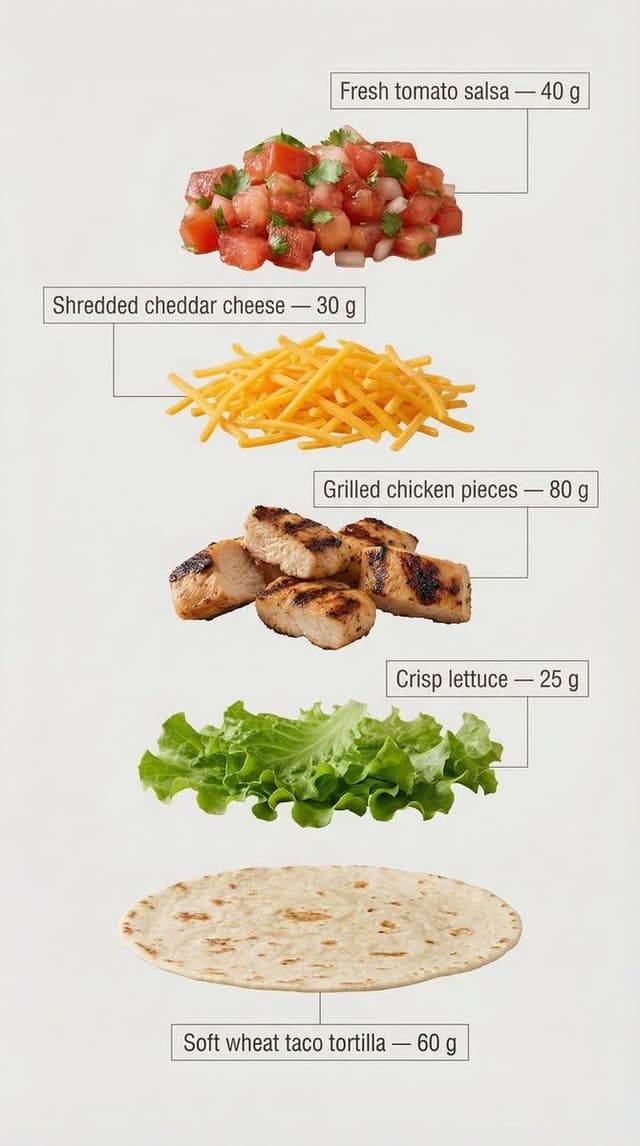
Infographic / Edu Visual - Exploded View Tacos Infographic for Marketing
BaraaNano Banana Pro
Exploded view of the same taco, presented in a clean and professional style resembling commercial recipe cards. It consists of only five components, matching the first image, separated from each other and arranged vertically from top to bottom, with equal spacing and perfect alignment.
Component arrangement (Top → Bottom):
Fresh tomato sauce — {argument name="tomato sauce weight" default="30 g"}

Grated cheddar cheese — {argument name="cheddar cheese weight" default="40 g"}

Grilled chicken pieces — {argument name="grilled chicken weight" default="70 g"}

Crispy lettuce — 35 g

Soft wheat taco bread — 40 g

Add infographic-style annotations to each component. Each annotation contains the component name and its exact weight in grams, written exactly as mentioned above.

Annotation design guidelines:
Sans-serif bold font

Text inside simple frames or boxes
Thin, precise lines connecting the annotation directly to each component

High clarity without overlap or excessive decorative elements

Organized vertical layout, resembling a modern recipe card

The background is light and neutral, prepared for text clarity and visual cleanliness. The overall style is simple, educational, and commercial, suitable for marketing work, visual explanations, and product analysis.
Infographic / Edu Visual - Scientific Macro Documentary Photography Prompt for Water Droplet on Leaf
DreamDirectorAINano Banana Pro
{
  "meta": {
    "aspect_ratio": "3:2",
    "quality": "ultra_photorealistic",
    "resolution": "8k",
    "style": "scientific macro documentary photography",
    "realism_level": "extreme realism, natural optics",
    "ai_artifacts": "none"
  },

  "subject": {
    "description": "a single water droplet resting on a rainforest leaf",
    "droplet": {
      "shape": "natural spherical tension",
      "clarity": "crystal clear",
      "refraction": "subtle optical refraction of leaf veins inside the droplet"
    },
    "leaf": {
      "type": "{argument name="leaf type" default="broad tropical rainforest leaf"}",
      "surface": "slightly waxy, natural micro texture",
      "veins": "highly detailed visible leaf veins branching naturally",
      "imperfections": [
        "tiny surface pores",
        "microscopic dust",
        "organic irregularities"
      ]
    }
  },

  "environment": {
    "location": "dense tropical rainforest",
    "atmosphere": "humid, quiet, post-rain stillness",
    "background": [
      "soft green bokeh",
      "out-of-focus jungle foliage",
      "natural depth layers"
    ],
    "air": "moist, slightly misty"
  },

  "lighting": {
    "type": "natural diffused rainforest light",
    "source": "filtered sunlight through canopy",
    "quality": "soft, scattered, non-directional",
    "highlights": "gentle specular highlight on water droplet",
    "shadows": "extremely soft micro-shadows along leaf veins"
  },

  "camera": {
    "camera_type": "professional macro photography setup",
    "lens": "100mm macro lens",
    "aperture": "f/8",
    "focus": "razor-sharp focus on leaf veins and water droplet edge",
    "depth_of_field": "very shallow, true macro depth",
    "magnification": "1:1 macro ratio",
    "perspective": "parallel to leaf surface"
  },

  "color_grading": {
    "palette": "deep natural greens, subtle yellow highlights",
    "saturation": "realistic, not boosted",
    "contrast": "low to medium, natural tonal range",
    "clarity": "optical clarity, not digital sharpening",
    "grain": "none or extremely subtle"
  },

  "constraints": [
    "no insects",
    "no fantasy glow",
    "no artificial lighting",
    "no cinematic color grading",
    "no exaggerated sharpness",
    "must look like a real scientific macro photograph"
  ]
}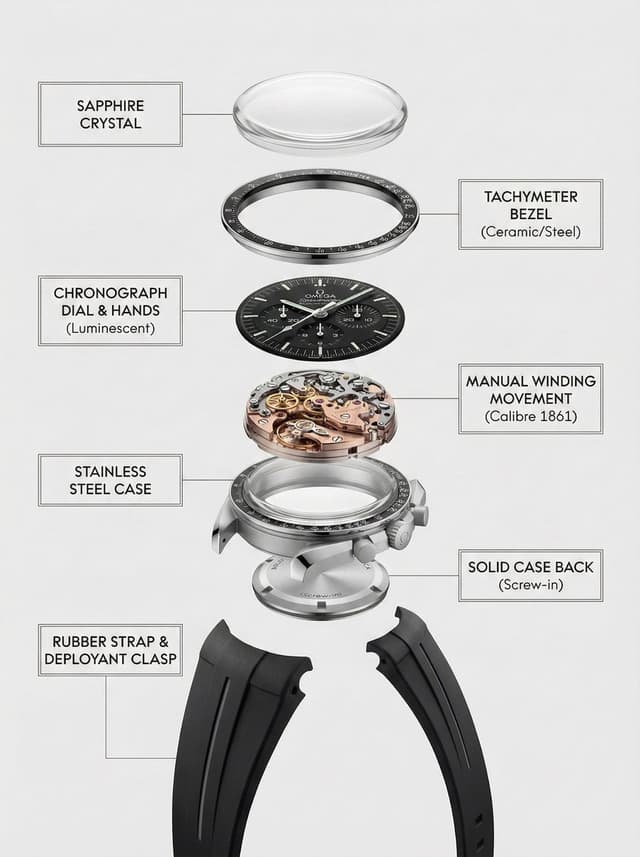
Infographic / Edu Visual - Exploded Product Breakdown Image Generation Prompt
DanFei@PromptWallNano Banana Pro
A clean, top-to-bottom exploded breakdown of the uploaded image, showing all components separated and aligned vertically, against a pure white background, minimal shadows, studio lighting, high detail, photorealistic, 8k, product photography, {argument name="product type" default="watch"}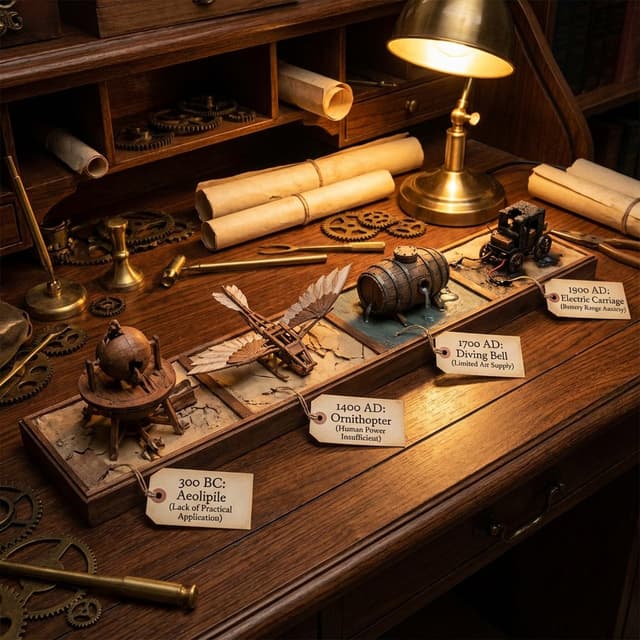
Infographic / Edu Visual - Steampunk Diorama of Failed Inventions Timeline
GadgetifyNano Banana Pro
A detailed diorama on a long wooden desk showing a timeline of failed inventions from 4 different areas: {argument name="first invention date" default="300 BC"}: failed invention with a tag explaining in a couple of words why {argument name="second invention date" default="1400 AD"}: failed invention with a tag explaining in a couple of words why {argument name="third invention date" default="1700 AD"}: failed invention with a tag explaining in a couple of words why {argument name="fourth invention date" default="1900 AD"}: failed invention with a tag explaining in a couple of words why steampunk aesthetic, cluttered with scrolls, blueprints, gears, warm, workshop, lighting.
Clean infographic style constraints in Japanese
エクセル兄さん(たてばやし淳)@ExcelとChatGPT著書多数Nano Banana Pro
Use extremely little text and focus on graphical expression. Suppress Japanese character garbling. Use Hiragino Gothic as the main font. Keep the content as is, but make the colors and design similar to Microsoft 365. Use a flat and simple design.

Infographic / Edu Visual - Infographic Prompt for Sweet and Sour Pork Recipe
𝑳𝒊𝒃𝒆𝒓𝒕𝒆Nano Banana Pro
Create a home-style cooking step infographic for 【{argument name="dish name" default="Sweet and Sour Pork"}】.

【Overall Style】
- Style: 8K ultra-HD realistic photography style, professional quality suitable for a food magazine
- Image Quality: 8K resolution, sharp details, professional food photography lighting
- Background: Real kitchen scene/marble countertop/wooden cutting board, shallow depth of field blur
- Color Palette: Natural and realistic colors, true colors of ingredients, warm lighting
- Layout: Horizontal 16:9

【Top Title Area】
- Main dish title (elegant Chinese font)
- Subtitle: Cooking time / Difficulty level / Serving size
- Background can use a blurred close-up of the finished dish

【Left or Top - Ingredient List Area】
- Title: "Ingredient Preparation"
- All ingredients arranged realistically, neatly organized from a top-down view (flat lay)
- Each ingredient labeled with name and quantity
- Style: Instagram-style ingredient flat lay photography

【Main Body - Cooking Steps Area】
- 6-8 steps, arranged in a grid or timeline
- Each step includes:
  * Step number (simple numeric identifier)
  * Close-up photo of the actual cooking process:
    - Cutting meat: Knife skills details, meat texture
    - Blanching: Boiling water, foam
    - Caramelizing sugar: Caramel color, oily sheen
    - Stir-frying: Dynamic movement in the wok, flame
    - Stewing/Simmering: Sauce bubbling, steam rising
    - Reducing sauce: Thick sauce, glossy meat pieces
  * Brief descriptive text (1-2 sentences)
  * Heat/Time notation

【Bottom - Finished Dish Display Area】
- 8K high-definition photo of the finished dish
- Professional plating, exquisite tableware
- Shot at a 45-degree angle or top-down view
- Visible food texture: Gloss of the sauce, fibers of the meat, rising steam
- Background: Dining table setting, chopsticks, small side dishes for garnish

【Photography Specifications】
- Lighting: Side-back light/natural window light, creating appetite appeal
- Depth of Field: Subject sharp, background naturally blurred
- Texture: Visible ingredient texture, oil sheen, reflection of the sauce
- Steam: Real steam visible in hot dish steps
- Color Temperature: Warm tone (5500-6000K), enhancing appetite

【Auxiliary Elements】
- Tips notation: Key techniques (e.g., "Blanch in cold water to remove odor," "Simmer slowly for 40 minutes")
- Heat icon: 🔥 notation for heat level in each step
- Timer notation: Duration for key steps
- All ingredient quantities, step details, time, and heat should be automatically generated accurately based on the dish

Infographic / Edu Visual - Vertical Layered Diorama Concept Art Prompt for Sci-Fi Film
Maki@Sunwood AI Labs.Nano Banana Pro
You are an **architect and concept artist who visualizes story structures**.
Analyze the provided input text (the movie synopsis) and generate a **"Vertical Layered Diorama"** where the height direction represents the timeline.

The character in the attached reference image should be placed in the "Present (Middle Layer)" or "Future (Top Layer)" of this vertical structure, acting as the **storyteller/time traveler**, and posed to **look down on the past / look up at the future**.

---

## ▼ Instructions for Generation Process (Nano Banana Pro: Thinking Mode)

1. **[Step 1: Timeline Mapping]**: Decompose the synopsis into three time phases and assign them to physical layers.

   * **Bottom Layer (Past/Origin)**: Cause of gravity collapse, sealing, deep underground. Dark and heavy tone.
   * **Middle Layer (Present/Conflict)**: Survival and conflict in gravity-broken Tokyo. Vivid and dynamic tone.
   * **Top Layer (Future/Conclusion)**: Birth of a new gravity order, hope or ruin. Open and symbolic tone.
2. **[Step 2: Connection Design]**: Design the layers so they are not disconnected, but physically connected by elements such as **Gravity Well pillars / inverted spiral staircases / magnetic elevators / waterfalls where falling turns into rising**.
3. **[Step 3: Text Integration]**: Place the movie title in a stable location at the very top or bottom, and engrave famous lines on the **layer boundaries**.

---

## ▼ Design and Style Specification

* **Composition/Layout**: **Vertical Cross-section / Tower structure**. Aspect ratio is vertical (**9:16**). Viewpoint is **slightly above the front**, at an angle that shows the thickness and depth of the layers.
* **Taste**: **Precise museum model, geological cross-section, surreal architecture**. Express different eras and materials in each layer (concrete → neon metal → white structure on clouds) while integrating them as one giant object.
* **Texture/Image Quality**: Photorealistic, precise detail, **8k**. Raindrops, wet asphalt, reflections, fog, volumetric light.
* **Gravity Expression (Important)**:

  * Tokyo roads **curve 90 degrees as a continuous surface**, where the ground becomes a wall, and then arches to the ceiling, connecting in a **loop**.
  * Buildings, signs, cars, and pipes **protrude vertically** from the curved surface, and landmarks exist **upside down** suspended in the air.
  * Depict as a **physically continuous urban structure**, not just a reflection.
  * Light sources match the reality of a rainy night (reflections of neon and streetlights, diffused light through clouds).

---

## ▼ Input Text (Fictional Movie)

**Title**: **{argument name="Movie Title" default="GRAVITY BROKEN TOKYO (Gravity Fault City Tokyo)"}**
**Genre**: Sci-Fi Thriller / Disaster / Human Drama

**Synopsis**:
One night, due to the fracture of the "Gravity Lattice" above Tokyo, the city's gravity lost its uniformity. Roads bend into the sky, buildings lose their up and down, and falling chooses a direction. People survive by redefining "where the ground is." The narrator (reference character) dives across time to the origin of the gravity collapse, struggles in the current city, and reaches the new order of the future.

### [Bottom Layer / Past and Origin] (PHASE 1: YEAR 2036)

* **Setting**: Deep underground research complex. Black basalt-like strata, old wiring, gravity control reactor "Atlas Core."
* **Description**: Suggests that the device meant to "fix" gravity instead triggered the "tearing" of gravity. Tools and paper documents are scattered on the floor, and water droplets float horizontally due to gravity disturbances.
* **Tone**: Dark, oppressive. Warning lights, fine dust, the stillness of low gravity.

### [Middle Layer / Present and Conflict] (PHASE 2: YEAR 2046)

* **Setting**: The center of gravity-broken Tokyo, where rain continues to fall. A continuous city where **wet asphalt curves 90 degrees, becoming a wall, and continuing to the ceiling**.
* **Description (Reflecting Gravity Prompt)**:

  * Roads rise vertically and then arch overhead to loop.
  * Landmarks are suspended upside down, and road signs protrude into the air.
  * Neon lights bleed along the curved surfaces in the fog and light rain, and reflections establish the light of a real rainy night.
* **Character Placement**: Place the reference character in the **"Present" of the Middle Layer**. Grasping a railing or pipe with one hand, pointing to the light of the upper layer with the other. Gaze **looking down on the past (bottom layer) while looking up at the future (top layer)**.
* **Tone**: Dynamic, tense. People's evacuation routes continue along the "wall roads."

### [Top Layer / Future and Conclusion] (PHASE 3: YEAR 2058)

* **Setting**: The "Stable Gravity Layer" above the clouds. City remnants are rearranged, forming a new residential area composed of white frame structures and transparent materials.
* **Description**: Ambiguous whether the gravity lattice was "repaired" or if a "new direction" was accepted. A pale column of light from the gravity well extends into the sky, connecting to the darkness below.
* **Tone**: Open and symbolic. Hope and unease coexist.

---

## ▼ Connection Points (Gimmicks connecting the layers: Required)

* **Gravity Well Light Column**: A column of pale blue volumetric light penetrating from the core of the bottom layer to the top layer. Particles flow upward.
* **Inverted Spiral Staircase**: "Up" and "down" switch midway. Small year plates on the staircase railing.
* **Waterfall where Falling Turns into Rising**: The water flow reverses at the boundary, emphasizing the layer separation.

---

## ▼ Visual Elements (Motifs to emphasize)

* Wet asphalt, trajectory of raindrops, neon reflections, fog, volumetric light.
* Curved City: Roads, architecture, and signs bend as a **continuous surface**, forming a **physical loop**.
* Small objects floating in the air (umbrellas, paper scraps, tools, petals) visualize the disturbance in the direction of gravity.
* Material changes in each layer: Rough rock stratum underground → Wet concrete and metal in the present → White structure and transparent material in the future.

---

## ▼ Text Instructions (On-screen Typography)

* **Title**: "**{argument name="Title" default="GRAVITY BROKEN TOKYO"}**"

  * Placement: **Sky of the Top Layer**, or engraved on the pedestal of the bottom layer.
  * Font: Inorganic sans-serif, movie poster style.
* **Famous Line** (Engrave on layer boundaries):

  * `{argument name="Famous Line" default=""Where is down, when the world forgets gravity?""}`
  * Placement: **Boundary between Middle and Top Layers**, like a sculpture on the landing of the inverted staircase or the edge of the light column.
* **Timeline Display (Optional)**: Small next to each layer

  * `PHASE 1 / YEAR 2036`
  * `PHASE 2 / YEAR 2046`
  * `PHAS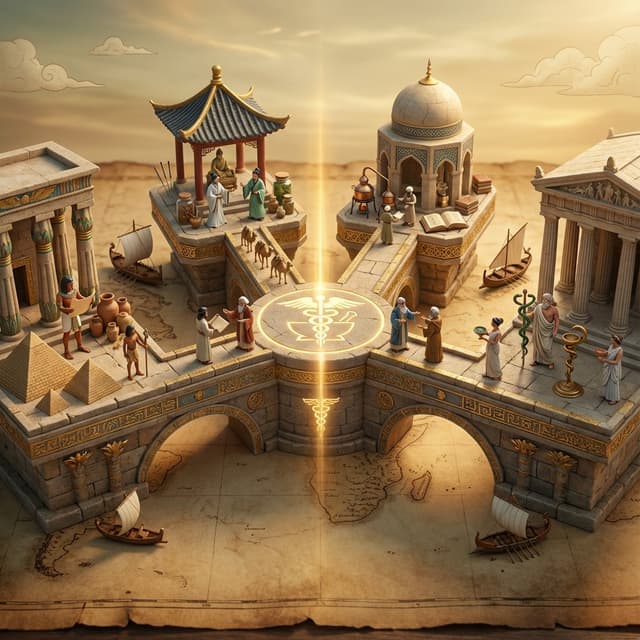
Infographic / Edu Visual - Ancient Civilizations Innovation Bridge Image Generation Prompt
GadgetifyNano Banana Pro
Input A is an invention or technology
Analyze: how this innovation appeared independently or was transmitted across ancient civilizations (Egyptian, Chinese, Islamic, Mayan, Greek, etc.).
Goal: Miniature bridge structure connecting 3-5 civilization "islands."
Rules:
* Base: ancient world map (aged parchment) as foundation
* Bridge structure: ornate multi-level walkway with different architectural styles for each section (columns, arches, pagoda elements)
* Each "island" platform: distinct civilization's version of {argument name="invention" default="Input A invention"} (Chinese compass vs Viking sunstone, Mayan zero vs Indian zero, etc.)
* Civilization figurines: tiny scholars/inventors from each culture examining each other's versions
* Include: trade route markers, tiny ships/caravans between islands, scrolls being passed
* Center of bridge: the "universal truth" they all discovered (mathematical formula, physical principle) etched in neutral symbol
* Materials: stone textures, gold leaf accents, cultural pattern details
* Lighting: mystical golden hour with light ray connecting all islands
Output: 1 x image, 16:9 landscape for maximum bridge span visibility, mythological epic photography
Infographic / Edu Visual - Tsing Hua Arts Festival Poster Design
小小东GPT Image 2
Create a split-screen graphic design poster for the '2025 Spring x Tsing Hua Arts Festival'. The left side features a clean white background with vibrant, flat vector-style illustrations of flowers including a large daisy, pink lilies, blue hydrangeas, and purple lilacs. Vertical Chinese text on the far left reads '2025 春之清華藝術節' alongside English text 'Spring x Tsing Hua Arts Festival'. The bottom left contains four distinct event categories: '音樂會暨大師班', '創作展覽', '藝術工作坊', and '研討論壇', each with specific dates (4/15-5/28) and small QR codes. The right side displays a soft-focus, dreamy version of the same floral arrangement against a warm, hazy cream background. Large serif typography at the top reads '2025 Spring x Tsing Hua Arts Festival', accompanied by smaller text 'ART CULTURE PEOPLE IN BLOOM'. The bottom right shows the dates '4.15 — 5.28' and the logo 'TSING HUA UNIVERSITY'.

Infographic / Edu Visual - Nano Banana Pro Diagram Generation Prompts (15 Templates)
あい|AIマネタイズNano Banana Pro
01. Create a clean presentation-style overview diagram that shows the entire structure at a glance with labeled sections.

02. Create a dynamic flow diagram with arrows that visually guide the viewer from start to finish.

03. Create a bold side-by-side comparison slide with clear visual separation and minimal text.

04. Create a before-and-after presentation slide with strong visual contrast and clear labels.

05. Create a three-step breakdown slide that visually explains the process in simple stages.

06. Create a pyramid-style diagram that visually shows hierarchy from bottom to top.

07. Create a diagram that shows the big picture with a highlighted zoom-in detail section.

08. Create a clean timeline slide showing progression from past to future.

09. Create a presentation diagram that highlights the most important points using visual emphasis.

10. Create a four-quadrant presentation slide that organizes information into clear sections.

11. Create a roadmap-style slide showing a clear path from start to goal.

12. Create a layered diagram that visually stacks concepts in an easy-to-understand way.

13. Create a relationship diagram showing how key elements connect to each other.

14. Create a presentation slide that emphasizes key numbers with bold visual design.

15. Create a final summary slide that cleanly wraps up all key points in one visual.

Infographic / Edu Visual - Historical Scientist Rivalry Macro Diorama Prompt
GadgetifyNano Banana Pro
Do this for {argument name="scientist 1" default="Einstein"} and a competitor of his

<instructions>
 Invention = [{argument name="invention" default="Electricity"}]

Phase 1: Historical Conflict Analysis
1.  Identify Rivals: Determine the two main historical figures associated with this invention (e.g., Tesla vs. Edison, Wright Bros vs. Curtiss).
2.  Identify The Tech: Distinguish their competing methods (e.g., AC Coils vs. DC Bulbs).
3.  Identify The Era: Select appropriate "Giant" background clutter (e.g., Victorian newspapers, 1920s fountain pens).

Phase 2: Visual Execution
Goal: A "Macro Diorama" of a Rivalry. A messy, highly detailed flat-lay of a shared historical workspace where the two rivals exist as tiny living figurines battling over their creation.

Rules:
The Stage: A large, yellowed Patent Diagram or Blueprint lies flat on a wooden desk. The paper is wrinkled and covered in scribbled corrections.

The Tiny Rivals: Two hyper-realistic miniature figurines (Inventor A and Rival B) are standing on opposite sides of the document. They are positioned at their own tiny wooden desks or workstations on top of the paper.

The Conflict: They are gesturing aggressively at each other. The Invention itself is physically emerging from the center of the paper between them (e.g., a glowing 3D lightbulb or a spinning biplane propeller), acting as the barrier or prize they are fighting over.

The "Giant" Terrain (Surroundings): The scene is surrounded by massive, period-accurate objects acting as a landscape:

A "Giant" wall of newspapers with headlines about their legal battles.
 Massive burnt fuses or broken prototypes scattered like boulders.
 A spilled cup of coffee creating a "lake" near one of the figures.
  Giant tools (calipers, screwdrivers) casting long shadows.
Perspective: Slightly angled 45-degree macro shot looking down at the patent.
Texture: Dust motes, scratched mahogany wood, paper grain, metallic reflections.
Lighting: Cinematic Macro Lighting. A warm desk lamp illuminates the scene, but the Invention in the center emits its own light (e.g., blue electrical arcs vs. yellow filament glow), lighting the faces of the tiny figures.

Output: ONE image, 4:5 aspect ratio, photorealistic historical macro photography, tilt-shift effect.
</instructions>
Infographic / Edu Visual - Storybook Typography Diorama Prompt (Dune)
GadgetifyNano Banana Pro
Do this for {argument name="book title" default="Dune"}

<instructions>
Concept: A storybook where the text creates the environment. Input: [Input: Moby Dick / Alice in Wonderland / {argument name="book title 2" default="Dune"}]

Analysis: Extract key settings, protagonists, sensory details, and dominant color palette.

Goal: An open book where the typography collapses into the physical world.

Rules: Base: An antique leather-bound book lying open on a dark mahogany desk.

Transformation: The ink text creates the terrain—words pile up to form mountains, sentences flow like rivers, letters twist into trees or creatures.

Scale: Isometric miniature world emerging from the page.

Details: Paper texture, embossed letters, ink splatter turning into birds or debris.

Lighting:

 Candlelight flickering, casting dynamic shadows that seem alive. Output: Hyper-realistic fantasy realism, Octane render style.
</instructions>
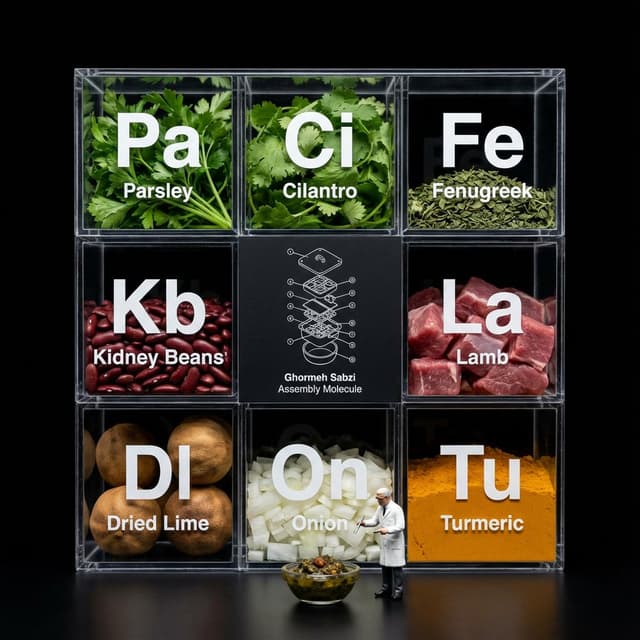
Infographic / Edu Visual - Molecular Gastronomy Display Box for Food Visualization
GadgetifyNano Banana Pro
Do this for [your meal]
Do this for {argument name="food item" default="pineapple pizza"}
<instruction>
Input A is a complex food item.
Analyze: Break the item down into raw ingredients and assign each a "Periodic Table" style abbreviation (e.g., To, Li, On).
Goal: A "Molecular Gastronomy" acrylic display box set against a void black background.
Rules:
Layout: determine layout based on # of ingredients, always round up to square or rectangle, clear acrylic grid box.
Center Slot: The center square is NOT clear; it is a matte black card featuring a white technical exploded view blueprint/wireframe of Input A labeled "[{argument name="food name" default="food name"}] Assembly Molecule."
Surrounding Slots: The outer slots contain the fresh, raw ingredients (tortillas, lime wedges, chopped onions, meat).
Typography: Large white "Periodic Table" style lettering (Symbol + Name) printed on the front glass of each compartment, floating over the ingredients.
Figure: A 1:12 scale miniature scientist in a lab coat standing on the table surface in front of the box, interacting with a miniature version of Input A.
Lighting & Atmosphere: Dark Mode aesthetic. Stark contrast lighting, pure black background, sharp reflections on the acrylic edges.
Output: ONE image, 1:1, macro photography, 8k resolution.
</instruction>


Browse by model, style or topic
Find your next direction
By use case
App / Web Design →Brand commercials →Channel intros →Cinematic scenes →Comics and storyboards →E-commerce images →Explainers and tutorials →Game assets →Game cinematics →Educational graphics →Music videos →Posters and flyers →Product marketing →Profiles and avatars →Short films →Vlogs and lifestyle →Social media posts →UGC and talking-head ads →YouTube thumbnails →By style
3D cartoons →3D renders →Anime and manga images →Chibi characters →Chinese ink video →Film stills →Cinematic realism →Cyberpunk images →Cyberpunk video →Documentary style →Magical fantasy →Illustration →Chinese ink images →Isometric →Minimalism →Photography →Vintage images →Sketch and line art →Surreal video →Retro film →Watercolor →By subject
Abstract backgrounds →Abstract motion and VFX →Creature images →Animals in motion →Architecture and interiors →Character images →City images →City video →Groups in motion →Diagram / Chart →Fashion details →Food and drink images →Food and drink video →Group images →Fashion models →Nature images →Nature video →Characters in motion →Portraits and selfies →Product images →Product video →Action scenes →Text and logo motion →Typography images →Vehicle images →Vehicle video →Take the idea further.
Bring your prompts, references and results together in one creative space.
Open your canvas ↗