
10 Best Midjourney Alternatives in 2026 for AI Images, Text, and Creative Control
The best Midjourney alternatives are Leonardo AI for a broader creator toolkit, Ideogram for text inside images, and Adobe Firefly for Creative Cloud production. ChatGPT Images and Gemini suit conversational revision, while Recraft and ComfyUI are stronger when editable vectors or local control matter more than Midjourney's distinctive exploration loop.

Key takeaways
- Leonardo AI is the most direct alternative for creators who want image generation, editing, motion, upscaling, personal models, and a recurring free tier.
- Ideogram is the strongest specialist alternative when readable text, posters, packaging, and prompt-faithful graphic compositions matter most.
- Adobe Firefly is the better choice when generated images must continue through Photoshop, Illustrator, Express, or an Adobe review workflow.
- ChatGPT Images and Gemini are the better choice when natural-language revision matters more than parameter tuning, Recraft is the pick for editable vectors, and ComfyUI for private local graphs.
- Astorie is a workflow alternative for connecting multiple image, editing, and video models, not a claim that one Astorie model reproduces Midjourney's aesthetic.
The best Midjourney alternatives are Leonardo AI for a broader creator toolkit, Ideogram for text inside images, and Adobe Firefly for Creative Cloud production. ChatGPT Images and Gemini suit conversational revision, while Recraft and ComfyUI are stronger when editable vectors or local control matter more than Midjourney's distinctive exploration loop.
Midjourney now includes web creation, editing, personalization, and video, so this guide compares the current product rather than an outdated Discord-only description. Public pricing and access were rechecked on September 12, 2026; test claims below are limited to the supplied Leonardo and Krea evidence.
Quick answer: the best Midjourney alternatives
Choose Leonardo AI when you want a free entry point plus editing, motion, upscaling, and personal models; give up some of Midjourney's unified aesthetic culture.
Choose Ideogram when exact words inside an image are non-negotiable; expect a narrower end-to-end toolkit.
Choose Adobe Firefly when the image must continue through Photoshop, Illustrator, or Express; expect credit-metered premium actions and less community-led discovery.
Choose ChatGPT Images or Gemini when natural-language revision is more useful than parameter tuning, Recraft for vectors, and ComfyUI for private local graphs.
Use Astorie for a connected multi-model production canvas, not as a claim that one Astorie model reproduces Midjourney's aesthetic.
The best alternatives at a glance
| Alternative | Switch when / scope | Main loss | Pricing or access |
|---|---|---|---|
| Leonardo AI | Full platform: you want generation, editing, motion, upscaling, and personal models in a more conventional creator workspace with a free tier | Less singular aesthetic identity | Free; Essential $12/mo |
| Ideogram | Specialist: typography and prompt-faithful graphic composition matter more than Midjourney's style culture | Smaller end-to-end production toolkit | Free; Plus $20/mo |
| Adobe Firefly | Partial platform: the image must enter an Adobe production, brand, or review workflow immediately after generation | Less focused on artistic community discovery | Free; Standard $9.99/mo |
| ChatGPT Images | Specialist: iterative natural-language edits and dense-text briefs matter more than grid-based visual exploration | Less batch-style visual exploration | Free; Plus $20/mo |
| Krea | Partial platform: real-time experimentation and enhancement are more useful than Midjourney profiles and community discovery | Less Midjourney-specific style culture | Free; Basic $9/mo |
| Recraft | Specialist: editable SVGs, logos, icons, and brand systems are the deliverable | Not aimed at cinematic art exploration | Free; Basic $12/mo |
| OpenArt | Full platform: you want images to continue into reusable characters, video, audio, and story workflows | More complex than a focused generator | Free trial; Starter $14/mo |
| Google Gemini image generation | Specialist: conversational image work inside Google's ecosystem matters more than dedicated art-direction parameters | Fewer dedicated art-direction controls | Free; AI Pro $19.99/mo |
| ComfyUI with Stable Diffusion or FLUX | Technical substitute: privacy, repeatable local graphs, and custom models justify the hardware and maintenance burden | Hardware and maintenance burden | Software is free |
| Astorie | Workflow alternative: the same asset must pass through several image, edit, and video nodes instead of staying in one aesthetic engine | Not a one-model aesthetic replacement | Free; Standard annual offer $12/mo |
Prices above are the public prices or billing descriptions available on the checked date. Regional taxes, annual discounts, promotional pricing, and model-specific credit costs can change the usable cost.
Why people look for Midjourney alternatives
Midjourney remains a strong visual exploration product, but its strengths are not every creator's bottleneck. Searchers commonly want a real free plan, more predictable text rendering, direct editing, private generations at a lower tier, commercial workflow integration, an API, or local control.
Pricing also works differently from most credit-based competitors. Midjourney sells GPU time and includes unlimited Relax image generation on Standard and above, while other platforms meter credits by model or action. Comparing only the entry subscription price hides the number of usable images, revision speed, and finishing work.
How these alternatives were selected
The list separates focused image generators from design suites, conversational tools, local workflow software, and multi-model production platforms. Each candidate must replace the central job—creating a usable visual from a prompt or reference—while making its category and the loss relative to Midjourney explicit.
- Visual quality, prompt adherence, text accuracy, and response to reference images.
- Editing, privacy, commercial use, API access, and export path.
- Free-plan usefulness and the difference between credits, GPU time, and unlimited slow generation.
- Whether the alternative supports aesthetic exploration, production delivery, or a specialist output such as SVG.
- What an experienced Midjourney user loses in personalization, parameters, and style discovery.
Hands-on evidence is included where a repeatable supplied test was available. Results are tied to the stated account, model, prompt, and settings and are not universal model-quality claims.
What do you lose when switching from Midjourney?
A Midjourney switch can break a creative language that has been built around personalization profiles, style and character references, seeds, parameters, saved jobs, and community discovery. Paid-plan benefits such as Relax generation and Stealth Mode also do not have direct equivalents in most credit-based tools.
Export finished assets and prompt metadata before moving. Re-run a representative brief with the same reference set, required text, privacy setting, number of variants, and revision count. The useful comparison is cost per approved asset—not the price of one first render.
1. Leonardo AI – best for a broader creator toolkit
Replacement scope: Full platform. Switch when you want generation, editing, motion, upscaling, and personal models in a more conventional creator workspace with a free tier.
Best for: a creator-first image platform with editing, motion, upscaling, and personal models.
Leonardo is the most direct starting point for people who like Midjourney's visual generation but need more of the production work around it. The platform combines multiple image models with editing, motion, enhancement, presets, collections, and personal model training. It also provides a recurring free entry point, unlike Midjourney's main web service.
Move when Midjourney produces the concept but too much of the refinement happens elsewhere. Leonardo gives up some of Midjourney's focused visual culture and parameter language in exchange for a broader interface and more operational controls.
What you gain: a free tier, image editing, upscaling, motion, and personal AI models in one creator platform.
What you give up: Midjourney's distinctive aesthetic exploration, personalization habits, and unlimited Relax images on higher plans.
What the hands-on check showed

Figure 1. Supplied Leonardo AI interface or plan evidence retained from the original draft.
Leonardo.Ai completed the shared workshop brief in its browser workspace.
A tester completed the shared workshop brief in Leonardo.Ai with the default Lucid Origin model at 1344 × 768 and seed 318048604. Opening the workspace and setting up the task took about three minutes; the image itself appeared in roughly five seconds. Generation speed and the one-click handoff to Canva were the clearest advantages. The result looked polished but more painterly than photographic. Downloading required a paid plan, and generations were public by default unless a paid private option was enabled.

Figure 2. Supplied Leonardo AI interface or plan evidence retained from the original draft.
The test also exposed the output actions and plan limits that affect download and privacy.
Premium is $30 and Ultimate is $60 before tax. Official source
2. Ideogram – best for text inside images
Replacement scope: Specialist. Switch when typography and prompt-faithful graphic composition matter more than Midjourney's style culture.
Best for: typography, posters, packaging, and prompt-faithful graphic compositions.
Ideogram is the clearest specialist alternative when Midjourney's weak point is readable wording. Its current platform is built around image generation and editing, with strong support for lettering, graphic layouts, character consistency, private paid generations, and an API. That combination is useful for posters, title cards, menu art, and product labels.
It does not replace the social ecosystem or every stylistic control that experienced Midjourney users rely on. The gain is a more dependable route from prompt to graphic; the loss is some of Midjourney's breadth of visual exploration and its mature personalization vocabulary.
What you gain: more reliable typography-oriented work, editing, and clear per-image API options.
What you give up: less of Midjourney's community-led style discovery and fewer broader media-production features.
Pricing and access: Ideogram has a free plan. Plus costs $20 monthly or $15 per month billed annually; Pro is $60 per month or $42 on annual billing. Official source
3. Adobe Firefly – best for Adobe integration
Replacement scope: Partial platform. Switch when the image must enter an Adobe production, brand, or review workflow immediately after generation.
Best for: commercial creative production inside Photoshop, Illustrator, and Express.
Firefly makes sense when the generated image is only the beginning. Moodboards, generative fill, vector work, resizing, text treatments, and final retouching can remain inside Adobe's ecosystem. The platform also provides access to Adobe and selected partner models, which gives teams more choice without adopting a node-based technical workflow.
Midjourney may still win the first round of aesthetic exploration for some briefs. Firefly earns the switch when editable delivery, review, licensing posture, and integration with existing Adobe files determine whether the result actually ships.
What you gain: professional editing integration, brand-friendly delivery, and a useful free test path.
What you give up: less of Midjourney's focused style culture and some premium actions consume credits quickly.
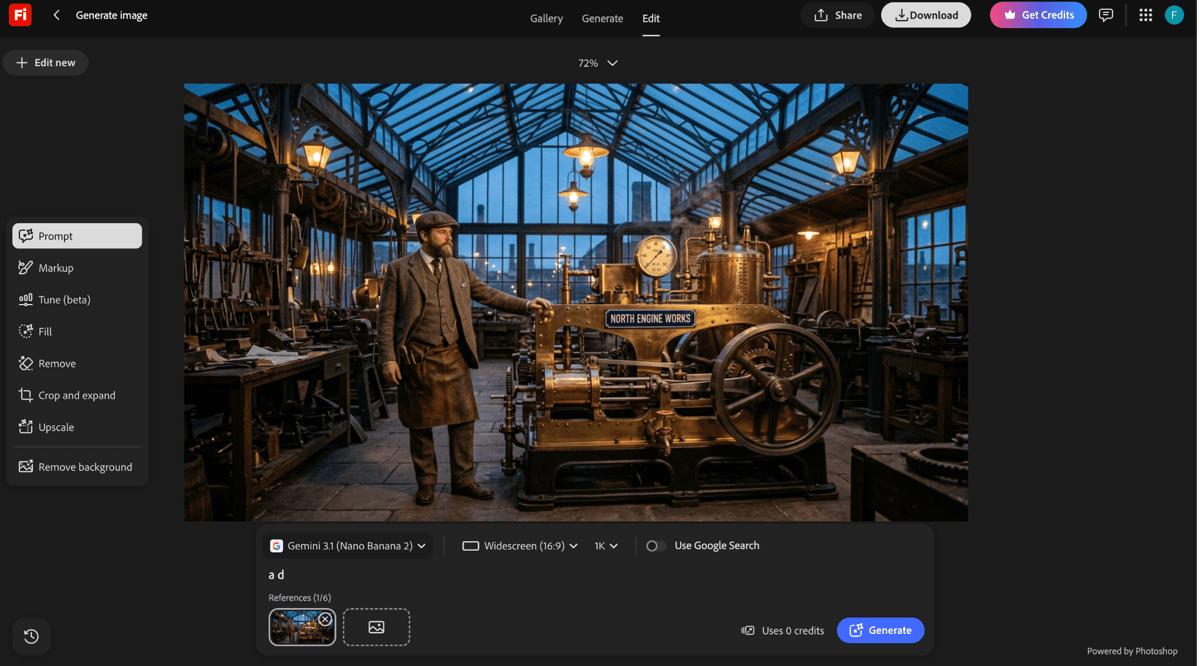
Figure 3. Supplied Adobe Firefly interface or plan evidence retained from the original draft.
Pricing and access: Firefly offers limited free daily generations. Standard is $9.99 per month with 2,000 credits; Pro is $19.99 with 4,000 credits and bundled apps. Official source

Figure 4. Supplied Adobe Firefly interface or plan evidence retained from the original draft.
4. ChatGPT Images – best for conversational editing
Replacement scope: Specialist. Switch when iterative natural-language edits and dense-text briefs matter more than grid-based visual exploration.
Best for: conversational image generation, precise revisions, and text-heavy briefs.
ChatGPT Images 2.5 is a different way to work: the brief, generated image, critique, and revision stay in one conversation. It is useful when a prompt needs reasoning, dense instructions, multilingual text, or a sequence of precise edits rather than dozens of visual variations at once.
Midjourney remains better suited to rapid visual browsing and style exploration. ChatGPT becomes the alternative when explaining the change in normal language is faster than adjusting parameters or moving the image into another editor.
What you gain: strong instruction following, iterative conversational edits, and improved dense-text rendering.
What you give up: less of Midjourney's grid-based exploration, public style discovery, and GPU-plan generation rhythm.
Pricing and access: Limited image generation is available on the free ChatGPT plan. ChatGPT Plus is $20 per month; API image usage is billed separately. Official source
5. Krea – best for a faster iteration loop
Replacement scope: Partial platform. Switch when real-time experimentation and enhancement are more useful than Midjourney profiles and community discovery.
Best for: real-time experimentation, enhancement, and mixed image-video creation.
Krea reduces the gap between an idea and the next adjustment. Its real-time canvas can respond to prompts, painting, camera input, or screen content, while the wider suite covers generation, editing, enhancement, video, 3D, training, and Nodes. This is attractive for art direction sessions where waiting for separate grids interrupts the process.
It is not a direct clone of Midjourney's aesthetic engine. Choose it for responsiveness and workflow range, then judge output style on your own brief rather than assuming the same prompt will behave identically.
What you gain: live feedback, strong enhancement, model choice, and a broader media toolkit.
What you give up: different prompting behavior and less continuity with Midjourney personalization profiles.
Pricing and access: Krea offers 100 daily compute units on its free plan. Basic is $9 monthly, Pro $35, and Max $105; annual plans are discounted. Official source

Figure 5. Supplied Krea interface or plan evidence retained from the original draft.
In our Krea check, one prompt produced four images with Krea 2 Large for two credits. The result was usable for rapid ideation, and the editor exposed an automatic Annotate action for localized revision. This is evidence about the tested workflow and settings, not a universal quality claim.
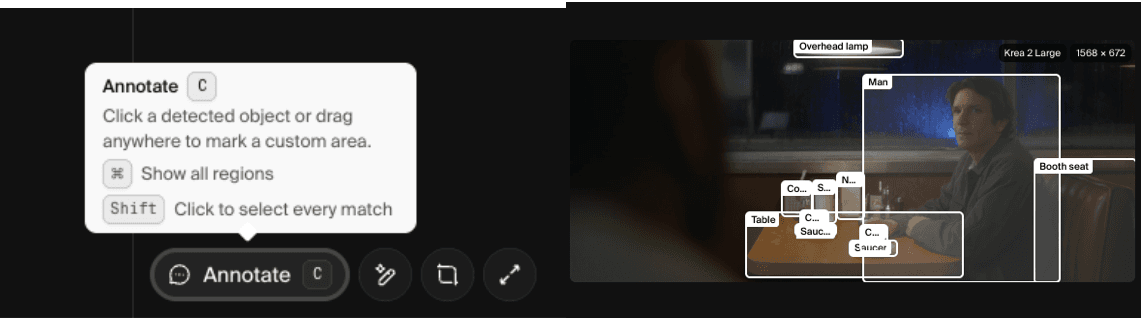
Figure 6. Supplied Krea interface or plan evidence retained from the original draft.
6. Recraft – best for vector-ready design
Replacement scope: Specialist. Switch when editable SVGs, logos, icons, and brand systems are the deliverable.
Best for: logos, vectors, icons, mockups, and consistent branded assets.
Recraft is the better alternative when the required output is a design component, not a finished piece of AI art. It generates raster and vector assets, supports custom styles and mockups, and includes direct vector editing. This avoids the familiar Midjourney handoff where a strong concept must be traced, rebuilt, or cleaned up before professional use.
The trade-off is focus. Recraft is built for design systems and editable assets; Midjourney is stronger for broad aesthetic discovery. Teams producing logos, icon sets, packaging, or campaign components may value Recraft's structure more than raw stylistic surprise.
What you gain: editable SVG output, mockups, custom styles, and commercial ownership on paid plans.
What you give up: less cinematic variation and no equivalent to Midjourney's community style ecosystem.
Pricing and access: Recraft has a free tier. Basic is listed at $12 monthly or $10 per month on annual billing; higher Pro tiers scale the monthly credit pool. Official source

Figure 7. Supplied Recraft interface or plan evidence retained from the original draft.
7. OpenArt – best for a wider creator studio
Replacement scope: Full platform. Switch when you want images to continue into reusable characters, video, audio, and story workflows.
Best for: a multi-model suite that extends images into characters, video, audio, and stories.
OpenArt now reaches far beyond the AI-art gallery implied by its name. Its current suite combines image generation and editing with characters, video, audio, story direction, and 3D world tools. Midjourney users who regularly export stills into several other products may prefer keeping those stages inside one creator platform.
That breadth creates more interface and more credit decisions. Midjourney is easier to understand if the job ends with a striking image; OpenArt makes more sense when that image becomes a reusable character, ad, music video, or story sequence.
What you gain: multiple models and media types, reusable characters, and story-level tools.
What you give up: a busier workflow and less singular focus on image aesthetics.
Pricing and access: OpenArt provides a free trial with daily credits. The public page lists Starter at $14 per seat per month, with discounts depending on billing term. Official source
8. Google Gemini image generation – best for Google-centered image work
Replacement scope: Specialist. Switch when conversational image work inside Google's ecosystem matters more than dedicated art-direction parameters.
Best for: fast image creation and editing with Google models and web-aware context.
Gemini gives users conversational access to Google's current image models, including Nano Banana 2 for fast creation and editing and Nano Banana Pro for more demanding work. It is convenient when the brief depends on real-world context, multilingual text, or a sequence of natural-language revisions.
The Gemini app is less like a specialist art studio. Midjourney users who rely on style references, parameter tuning, and a visual community may find the control surface too general, even if individual edits are easier to explain.
What you gain: conversational edits, Google ecosystem access, strong text handling, and current image models.
What you give up: less dedicated visual exploration and fewer artist-oriented parameter controls.
Pricing and access: Gemini offers limited free access. Google AI Pro is listed at $19.99 per month in the US and increases access to Gemini and related creative tools. Official source
9. ComfyUI with Stable Diffusion or FLUX – best for local technical control
Replacement scope: Technical substitute. Switch when privacy, repeatable local graphs, and custom models justify the hardware and maintenance burden.
Best for: local workflows, custom nodes, privacy, and exact graph control.
ComfyUI replaces Midjourney's managed simplicity with a visible graph. Users can choose checkpoints, conditioning, samplers, reference controls, upscalers, and community nodes, then save the graph as a repeatable workflow. It is a strong fit when privacy, custom model access, or technical reproducibility matters more than immediate convenience.
The subscription disappears, but the work does not. Hardware, installation, model storage, dependencies, and failed updates become part of the cost. For many creators, a hosted service is still cheaper once time is counted honestly.
What you gain: local privacy, reproducible nodes, custom models, and deep technical control.
What you give up: more setup, a steeper learning curve, and no managed aesthetic product by default.
Pricing and access: ComfyUI is free and open source. Local hardware, electricity, storage, and optional cloud compute are separate. Official source
Related reading
Runway Gen4 vs Veo vs Kling: Practical Video Production Comparison
Practical comparison for AI video production choices across Runway Gen4, Google Veo, and Kling.
7 Best Photoroom Alternatives in 2026 (Tested for Ecommerce Photography)
Do you need a Photoroom alternative that goes beyond simple background cutouts and batch image processing? Try these 7 tools and pick the one that best matches your AI product photography use cases.
6 Ideogram Alternatives for Killer AI Image Generation
Here are 6 tried and tested Ideogram alternatives that work best for prompt accuracy, text, image realism, character consistency and are intelligent enough to render real-world scenarios and logic.
Frequently asked questions
- What is the best free Midjourney alternative?
Leonardo AI, Krea, Adobe Firefly, Ideogram, Canva, Gemini, and ChatGPT all provide some level of free access. The useful choice depends on whether credits recur, whether exports are watermarked or public, and whether commercial use is allowed. Midjourney itself currently has no general free trial on its website or Discord.
- Which alternative is best for text in AI images?
Ideogram is the most typography-focused platform in this list. ChatGPT Images 2.5, Gemini's current image models, Adobe Firefly, and Recraft are also relevant, but test the exact phrase and layout you need. Do not judge text accuracy from a promotional example.
- Can Leonardo AI replace Midjourney?
Leonardo can replace the generation step for many users and adds editing, motion, upscaling, personal models, and a free plan. It does not reproduce Midjourney's personalization profile, parameter habits, or community style ecosystem, so the choice depends on workflow rather than a universal quality claim.
- Is Stable Diffusion cheaper than Midjourney?
The software and many model weights can be free, but the full cost includes hardware or cloud compute, electricity, storage, setup, and maintenance. Stable Diffusion through ComfyUI is usually chosen for control and privacy first; cost depends heavily on volume and existing hardware.
- Does Midjourney generate video now?
Yes. Current Midjourney plans can generate video in Fast Mode, and Pro or Mega can use Relax Mode for standard-definition video. Image creation remains the main intent of this article, but calling Midjourney a static-image-only product would now be inaccurate.
Ready to try it on the canvas?
Open Astorie and fan your prompt across every frontier model in one workflow.